Showing posts with label State Bank Of India. Show all posts

Tuesday, October 13, 2020

SBI Xpress Credit Loan Get Up to 10 Lacs Loan Online - State Bank of India Personal Loan Apply Online !


 Hi friends, in this topic you will know that how you can apply SBI Xpress Credit Loan online using the SBI YONO application. Here you can also watch the video regarding SBI Xpress Credit Loan on our YOUTUBE channel link given below, in that video tutorial you will get the process to apply online SBI loan and here is the procedure for SBI Xpress Credit loan how to apply online and also know the SBI Xpress credit loan Eligibility, Features, Documentation, Interest Rates, EMI Calculator, So please watch the complete video to know the details and procedure to apply the SBI Xpress credit loan online.

SBI Xpress Credit Loan Get Up to 10 Lacs Loan Online - State Bank of India Personal Loan Apply Online ! Free Computer Tricks

SBI Xpress credit loan application form

Xpress Credit Personal Loan - SBI

What is Xpress credit loan in SBI?

How can I get emergency loan from SBI?

What is the eligibility for SBI personal loan?

How can I fill SBI Xpress credit application form?


Please Watch the Video Here


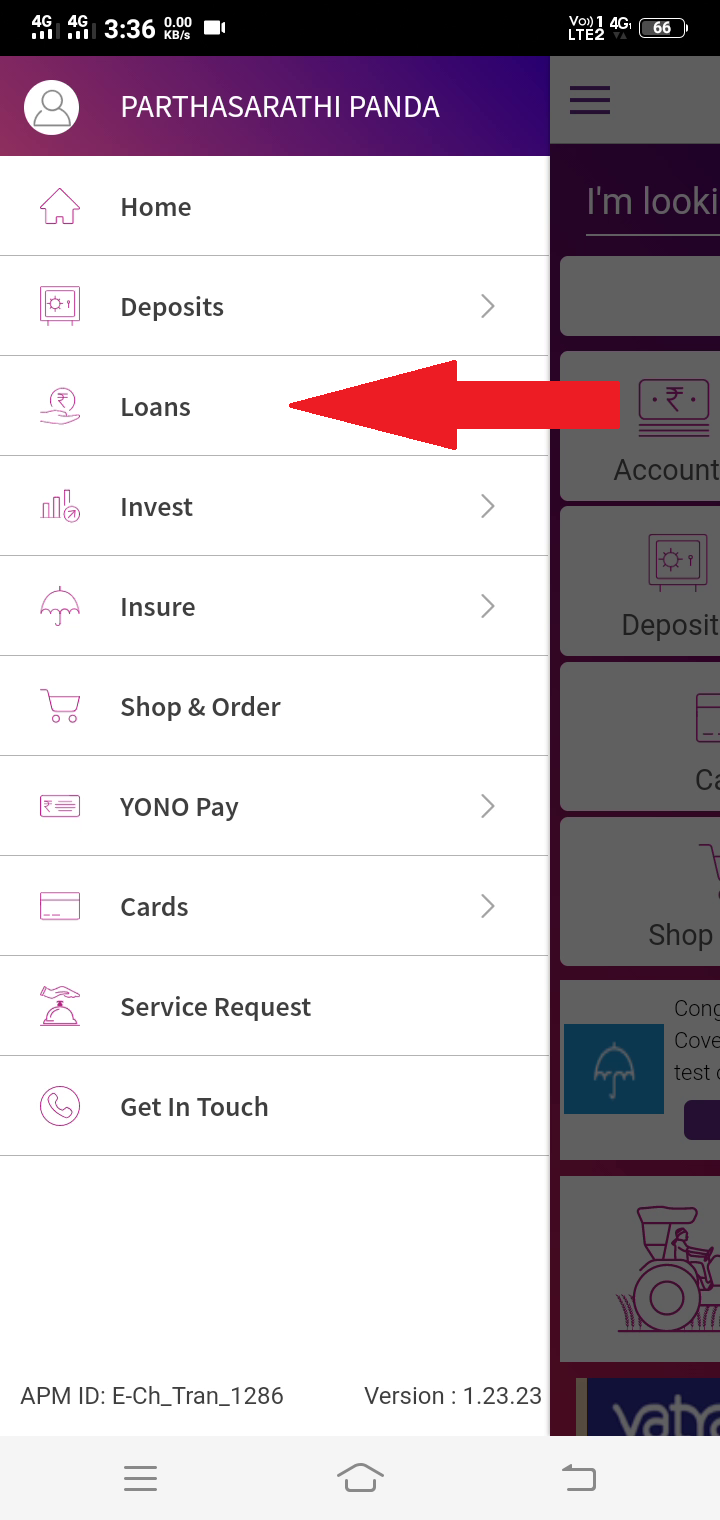
Open SBI YONO app and Select Loans
Then choose Personal Loan

Then Select Xpress Credit Loan
Then Click on Apply Now


Thursday, July 9, 2020

SBI ATM Card - 4 Ways to Generate new PIN || How to Generate New PIN of SBI ATM Card?


How to generate new PIN for SBI debit cum ATM card, if you are wondering to know the procedures to create or generate new PIN of SBI ATM card, then please go through this topic, where we discuss 4 ways to generate new PIN of SBI ATM card. SBI ATM- 4 ways to generate new PIN || SBI ATM ki PIN generate kaise kare?

So Hi friends, in this tutorial I will show you 4 procedure to generate SBI ATM PIN, So if you have SBI ATM and want to change or create new PIN then please follow this procedure and also you can watch the video on our YouTube Channel, Thank you.

SBI ATM- 4 ways to generate new PIN

Please watch the video below!
SBI ATM- 4 ways to generate new PIN || SBI ATM ki PIN generate kaise kare?

SBI ATM PIN Generation Through ATM?
SBI ATM PIN Generation Through SMS?
SBI ATM PIN Generation Through Internet Banking?
SBI ATM PIN Generation Through IVRS?

1- ATM PIN GENERATION THROUGH ATM

This procedure is most popular among the SBI ATM users, in which you can easily generate pin thorough ATM or if you have new SBI ATM card then can active also. But if you do not know how to generate PIN through SBI ATM Machine, then please follow the below steps.

SBI ATM PIN Generation Through ATM

STEPS:
  • Go to the nearest SBI ATM and insert your debit card.
  • Then Select "PIN GENERATION"
  • Now enter the 11 digit Account No. and CONFIRM.
  • Then enter the 10 digit Mobile No. and CONFIRM.
  • Now you will see a notification on the ATM screen, that the PIN shall be received on the registered mobile number. Click on CONFIRM
  • After confirmation ONE TIME PIN (OTP) will be sent to the registered Mobile number, and the validity of the PIN is for 2 days.
  • Now go back to the home screen and Select "BANKING"
  • Then choose "PIN GENERATION"
  • Then enter the old PIN, means the One Time Pin (OTP)
  • Then create you new PIN as your choice click on OK/CONFIRM
  • PIN generation complete through the ATM.

2- SBI ATM PIN Generation Through SMS

SBI ATM PIN Generation Through SMS
  • Use your registered Mobile number for SMS
  • SMS Format example: PIN <space> CCCC <space> AAAA and send to 567676
  • Replace CCCC with your last 4 digits of the Debit Card and replace AAAA with the last 4 digits of the Account number.
  • For example your last 4 digits of Debit card is 1450 and last 4 digits account number is 8759. so finally the SMS format will be PIN 1450 8759 and sent to 567676
  • One Time Pin (OTP) will be sent to  your registered Mobile number, validity 2 days
  • Now use the SBI ATM Machine to change the PIN
  • Go to "Banking" then choose "PIN change"

3- SBI ATM PIN Generation Through Internet Banking

SBI ATM PIN Generation Through Internet Banking
  • Log in to www.onlinesbi.com
  • Select "e-Services" then "ATM Card Services" Then choose "ATM PIN Generation"
  • Use One Time Password or Profile Password for authentication.
  • Select the Account number to which the debit card is linked.
  • Select the Debit card for which you wish to create/change PIN.
  • Enter the first 2 digits of the PIN as per your choice and the last 2 digits of the PIN will be sent to the registered Mobile Number.
  • Now enter the all 4 digits and "CONFIRM"
  • These 4 digits is the new PIN


4- SBI ATM PIN Generation Through IVRS?

SBI ATM PIN Generation Through IVRS
  • Call the Bank Contact Center from your registered Mobile number.
  • Helpline Number: 18004253800/1800112211/080-26599990.
  • Then enter the full card number and Account number.
  • One Time Pin (OTP) will be sent to the registered Mobile number.
  • Then change the PIN using any SBI ATM Machine using the OTP
  • One Time PIN (OTP) validity 2 days.


SBI ATM PIN Generation Through ATM?,SBI ATM PIN Generation Through SMS?,SBI ATM PIN Generation Through Internet Banking?,SBI ATM PIN Generation Through IVRS?,SBI ATM PIN Generation Kiase Kare?,
4 Ways to generate new PIN SBI ATM?

Monday, July 6, 2020

How to do Fixed Deposit Online – State Bank of India?


How to do Fixed Deposit Online – State Bank of India? Hi friends, in this topic, I will show you how you can do a fixed deposit online and here is the procedure for State Bank of India users, who has net banking. So if you have SBI net banking then please follow this to do a fixed deposit online, or you cal also watch the below video tutorial in Hindi, Thank you.

How to do Fixed Deposit Online – State Bank of India

How to do Fixed Deposit Online – State Bank of India? SBI mein fixed deposit online kaise kare? Please watch the video below.

https://youtu.be/-j7DpB4bN_w

STEPS:

  • Go to www.onlinesbi.com
  • Login using your SBI net banking ID.
  • Now go to "Fixed Deposit" and Click on "e-TDR/e-STDR (FD)
  • Select "e-TDR/e-STDR (Fixed Deposite)"
  • Click on Proceed
  • Now enter the amount you want to Fix, for example Rs. 10000/-
  • Then select "STDR" Cumulative Interest Paid at maturity
  • Then select "tenure of Deposit" such as 1 Year
  • Then choose the maturity instruction, let's choose "Repay Principal and Interset"
  • Then select " I accept the terms and conditions"
  • Then click on "SUBMIT"
  • Then verify the details and click on "CONFIRM"
  • Now your FD has been created successfully 


How To Apply For Sbi Fixed Deposit Online?

Can fixed deposit be done online in SBI?

How can I get fixed deposit in SBI?

How can I check my SBI fixed deposit status online?

How to open a fixed deposite e-FD online SBI?


Sbi fixed deposit, sbi fixed deposit online kaise kare,how to fixed deposit online,sbi fixed deposit online,fixed deposit status online,state bank of india,free computer tricks,sbi mein fixed deposit online kaise kare,

How to Open SBI RD (Recurring Deposit) Account Online?


How to Open SBI RD (Recurring Deposit) Account Online?  

Hi and welcome all, in this topic I will show you how you can Open a new SBI RD (Recurring Deposit) account online, so please go through the post to know step by step guide to open SBI RD using SBI net banking, and also you can watch video tutorial on our YouTube Channel, Thank you.

How to Open SBI RD (Recurring Deposit) Account Online

SBI RD Account Online Kaise Kholen? 

https://youtu.be/vrovarL7siU


STEPS:

  • Log in to www.onlinesbi.com
  • Now click on "Fixed Deposit"
  • Then click on "e-RD (RD)"
  • Enter the amount that you can pay monthly.
  • Select the Year, how many years you are going to do RD, for example 2 Years.
  • Then choose the maturity instruction, such as "Payback Principal and Interest"
  • Then select RD creation mode, With Standing Instruction (Set SI Now), Balance must be there to execute the SI on the date of creation to avoid penalty.
  • Select "I accept the term and conditions" and click on "Submit"
  • Then verify the details and Click "Confirm"
  • Now your RD(e-RD) account is opened .


Which bank is best for RD?

What is the meaning of RD?

How is Rd amount calculated?

What is RD and it’s benefits?

e-RD Frequently Asked Questions - SBI.

Application for opening RD account in SBI

How to open online Recurring Deposit account in SBI

Can I open SBI Rd account online?

How can I open a recurring deposit account?

What is RD account in SBI?

How many RD can I open in SBI?


Which bank is best for RD?,What is the meaning of RD?,How is Rd amount calculated?,What is RD and it’s benefits?,e-RD Frequently Asked Questions – SBI,Application for opening RD account in SBI,How to open online Recurring Deposit account in SBI,Can I open SBI Rd account online?,How can I open a recurring deposit account?,What is RD account in SBI?,How many RD can I open in SBI?

Thursday, April 18, 2013

Recruitment State Bank Of India 2013 - SBI Recruitment 2013 for PO Jobs, Recruitment of Probationary Officers in SBI


Recruitment State Bank Of India 2013 - SBI Recruitment 2013 for PO Jobs, Recruitment of Probationary Officers in SBI (State Bank Of India) (Written Examination scheduled on 28.04.2013)


RECRUITMENT OF PROBATIONARY OFFICERS IN STATE BANK OF INDIA


SBI PO EXAM CALL LETTER 2013


ONLINE REGISTRATION OF APPLICATION: 30.01.2013 TO 23.02.2013
PAYMENT OF FEES - ONLINE : 30.01.2013 TO 23.02.2013
PAYMENT OF FEES - OFFLINE : 01.02.2013 TO 28.02.2013
DATE OF WRITTEN EXAMINATION : 28.04.2013

To Download Call Letter for Written Exam SBI POs visit the below link


or you can also visit the official site of SBI State Bank Of India

  • Go to https://www.sbi.co.in/user.htm
  • click on Recruitment from the left side of the web page.
  • Click On Recruitment of Probationary Officers in SBI(Written Examination scheduled on 28.04.2013
  • Then click on Download Call Letter for Written Exam


Recruitment of Probationary Officers in State Bank of India Advertisement No. CRPD/2012-13/04.

To download SBI PO written exam call letter, enter Registration No. and Date of Birth (DD-MM-YY) OR Password and Click on Submit, now you have the call letter of SBI PO just take a print out of that.


Best of luck
For the SBI PO Exam


incoming search terms:

  • SBI call letter for POs 2013
  • State Bank Of India call letter for POs 2013
  • Download call letter for SBI POs 2013
  • SBI PO exam on 28.04.2013
  • CALL LETTER FOR STATE BANK OF INDIA PROBATIONARY OFFICERS
  • STATE BANK OF INDIA SBI 2013 PO CALL LETTER 2013
  • DOWNLOAD SBI PO CALL LETTER 2013 ADVT. NO CRPD/2012-13/04
  • SBI PO EXAM CALL LETTER 2013 FOR ALL OVER INDIA
  • SBI PO EXAM CALL LETTER 2013 DOWNLOAD ONLINE IN INDIA
 

📚 You May Also Like to Read