Showing posts with label Tutorials. Show all posts

Saturday, July 12, 2025

YouTube Showing Adult Content on Home Screen? Here's How to Block It Permanently


Introduction

YouTube is one of the most popular video platforms globally, offering a mix of educational, entertainment, news, and creative content. However, as widely used as it is, many users — especially parents — are increasingly concerned about inappropriate or adult content appearing on the YouTube Home Screen.

Have you ever opened YouTube and been shocked by some inappropriate thumbnails or suggestive video recommendations? Even without searching for such content, these videos often appear, making it unsafe for children and uncomfortable for families. In this blog post, we will explore why adult content shows up, how to block it, and what settings and tools can help you create a safer YouTube experience, especially for children.


YouTube Showing Adult Content on Home Screen? Here's How to Block It Permanently - AI Generated Image


1. Why Is YouTube Showing Adult Content on the Home Screen?

YouTube’s algorithm is designed to recommend videos based on:

  • Your watch history

  • Search history

  • Videos you liked, disliked, or interacted with

  • What’s trending in your region

Unfortunately, even if you don’t intentionally watch adult or inappropriate content, a single click or a misleading title or thumbnail can affect your recommendations. Sometimes, even innocent-looking videos can link to more inappropriate ones due to poor moderation or misleading tags.


2. What Is Considered "Adult" or Inappropriate Content on YouTube?

Adult or inappropriate content can include:

  • Thumbnails showing revealing clothing or suggestive images

  • Titles with double meanings or sexual references

  • Music videos with explicit visuals

  • Videos meant for mature audiences but not marked properly

  • Clickbait videos targeting views

While YouTube does have Community Guidelines, it is impossible to manually filter all content instantly, so some inappropriate content slips through.


YouTube Showing Adult Content on Home Screen? Here's How to Block It Permanently -AI Image


3. How to Block Adult Content on YouTube: Step-by-Step

Let’s dive into how you can block or minimize such content from showing on your home screen.


✅ Enable Restricted Mode

Restricted Mode is a feature designed to help filter out potentially mature content. It’s not 100% accurate, but it’s a strong first step.

📱 On Mobile (YouTube App):

  1. Open YouTube App

  2. Tap your profile picture

  3. Go to Settings > General

  4. Toggle on Restricted Mode

💻 On Desktop:

  1. Go to YouTube.com

  2. Scroll down to the bottom of the page

  3. Click "Restricted Mode: Off"

  4. Enable Restricted Mode

🔒 Tip: If you are a parent, lock Restricted Mode by signing into your child’s account and setting up supervised access via Google Family Link.


YouTube Showing Adult Content on Home Screen? Here's How to Block It Permanently - AI Image


✅ Clear Watch & Search History

If you or someone else using your device has watched inappropriate content, YouTube will keep recommending similar videos.

To reset YouTube's recommendations:

  1. Go to Settings > History & Privacy

  2. Tap on:

    • Clear Watch History

    • Clear Search History

  3. Enable Pause Watch History if you want to prevent YouTube from tracking future activity

This will stop YouTube from pushing unwanted content based on your old viewing habits.


✅ Report or Block Inappropriate Videos/Channels

When you come across an inappropriate video or thumbnail:

  • Tap the three-dot menu (⋮) on the video

  • Select “Don’t recommend channel” OR “Not interested”

  • You can also click Report and select the reason (Nudity, Sexual content, Misleading, etc.)

This teaches YouTube not to show similar videos again.

❗ Reporting consistently helps improve the algorithm for everyone.


✅ Use YouTube Kids App for Children

If you’re worried about your child using YouTube, it’s best to switch to the YouTube Kids app, which is specifically designed for children under 13. It contains curated, child-friendly content.

Features:

  • Set screen time limits

  • Choose content types based on age

  • Disable search option

  • Manually approve videos/channels

📥 Available on Google Play and Apple App Store

YouTube Kids is much safer than regular YouTube, and gives parents more control.


✅ Use Third-Party Tools & Browser Extensions

If you're browsing on desktop, there are several browser extensions that can help:

  • BlockSite – Blocks access to certain websites or categories

  • uBlock Origin – Powerful content blocker that can block certain keywords, thumbnails, or ad-type content

  • Safe YouTube – Allows ad-free and safe YouTube playback for kids

🖥️ Parental Control Apps like Qustodio, Net Nanny, and Google Family Link also allow content monitoring and blocking.


YouTube Showing Adult Content on Home Screen? Here's How to Block It Permanently - AI Image


✅ Supervised YouTube Accounts (for Kids over 13)

YouTube allows Supervised Accounts for teens and pre-teens. These allow parents to:

  • Decide the content level (Explore, Explore More, Most of YouTube)

  • Monitor what their child watches

  • Disable comments, likes, and uploads

Set this up via Google Family Link and connect your child’s Google Account with yours for monitoring.


4. Tips for Parents to Maintain a Safe YouTube Environment

Even with tech solutions, real safety comes from awareness and involvement. Here are practical tips:

👪 Watch With Your Children: Be present while they browse YouTube.

📺 Set Screen Time Limits: Don’t let kids use YouTube unsupervised for long hours.

🧠 Educate Your Kids: Teach them to avoid thumbnails or titles that look suspicious or inappropriate.

👍 Subscribe to Good Channels: Find and subscribe to educational or family-friendly channels so that the home screen is filled with appropriate content.

🚫 Block Suspicious Content Quickly: Don’t wait – the sooner you act, the better the algorithm understands.


5. Real-Life Example: Why It Matters

A father in Odisha once noticed his 9-year-old child opening YouTube only to find suggestive thumbnails on the Home Screen — even though the child hadn’t searched for anything like that. On further inspection, it was found that someone had watched a video using his phone earlier, influencing the algorithm.

After turning on Restricted Mode, clearing Watch History, and installing YouTube Kids, the issue was resolved. The father also taught his child how to avoid clicking on inappropriate-looking thumbnails.

This shows that YouTube is not inherently dangerous, but it does require careful settings and responsible use.


6. Frequently Asked Questions (FAQs)

Q1. Is Restricted Mode 100% accurate?
No. While it helps a lot, some inappropriate content may still slip through. Combining it with other settings is best.

Q2. Can I block a specific video permanently?
You can tell YouTube not to recommend it, or report it — but you cannot completely block a video globally.

Q3. Will clearing history delete all data?
It will only clear your YouTube watch and search history, not other app data or subscriptions.

Q4. Is YouTube Kids safe?
Yes, it’s safer than regular YouTube, but still needs occasional parental supervision.


Conclusion: Take Control of Your YouTube Experience

YouTube is a great platform, but like every tool, it depends on how you use it. With inappropriate or adult content slipping into suggestions, especially on the Home Screen, it’s essential to take control of your settings and usage habits.

By using the steps shared above — enabling Restricted Mode, clearing history, reporting inappropriate content, using YouTube Kids, and educating children — you can create a much safer YouTube environment for yourself and your family.

Remember: Safe content doesn't happen by accident. It happens by intentional actions and smart settings.


If you found this blog helpful, please share it with others. Together, we can build a safer digital space!

Sunday, July 6, 2025

What is Artificial Intelligence? A Complete Guide for Beginners


Introduction

In recent years, Artificial Intelligence (AI) has become one of the most talked-about topics in technology. From smartphones to self-driving cars, from Netflix recommendations to smart assistants like Siri and Alexa, AI is rapidly changing the way we live and work. But what exactly is Artificial Intelligence? How does it work, and why is it so important today?

In this beginner’s guide, we’ll dive deep into the world of AI — its definition, history, types, real-world applications, advantages, disadvantages, and future scope.


What is Artificial Intelligence (AI)?

Artificial Intelligence refers to the simulation of human intelligence in machines that are programmed to think and learn like humans. AI enables machines to perform tasks such as:

  • Problem-solving

  • Decision-making

  • Understanding natural language

  • Recognizing images and speech

  • Learning from experience

In simpler terms, AI is about making computers “smart” — enabling them to do things that usually require human intelligence.


Artificial Intelligence (AI) is a branch of computer science focused on creating machines or software that can perform tasks that typically require human intelligence


A Brief History of Artificial Intelligence

Understanding AI requires knowing where it came from:

  • 1950 – Alan Turing proposed the idea of a machine that could think like a human. His “Turing Test” remains a benchmark for AI.

  • 1956 – The term “Artificial Intelligence” was coined at a conference at Dartmouth College by John McCarthy.

  • 1960s-70s – Early AI programs solved mathematical problems and played basic games.

  • 1980s – Expert systems were developed, which mimicked decision-making by human experts.

  • 2000s–present – With the rise of big data, cloud computing, and machine learning, AI made a massive leap forward.


Types of Artificial Intelligence

AI can be broadly divided into three categories:

1. Narrow AI (Weak AI)

  • Performs a single task extremely well.

  • Examples: Google Assistant, facial recognition systems, spam filters.

2. General AI (Strong AI)

  • Hypothetical AI that can perform any intellectual task that a human can do.

  • It does not exist yet but is a major goal of AI research.

3. Super AI

  • An even more advanced form of AI that surpasses human intelligence.

  • It is still theoretical and could pose ethical risks if not controlled.


How Does AI Work?

AI works through a combination of different technologies and techniques:

1. Machine Learning (ML):

Algorithms that allow computers to learn from data and make decisions.

2. Deep Learning:

A subset of ML using neural networks that mimic the human brain.

3. Natural Language Processing (NLP):

Helps machines understand and respond to human language.

4. Computer Vision:

AI that processes and analyzes images or videos.

5. Robotics:

Machines that perform physical tasks with AI-based control systems.


Popular Applications of Artificial Intelligence

AI is already part of our everyday lives. Here are some common applications:

1. Voice Assistants

  • Google Assistant, Siri, and Alexa use AI to understand your commands and respond.

2. Search Engines

  • Google uses AI to show relevant search results.

3. Social Media

  • Facebook, Instagram, and Twitter use AI to show recommended posts and detect fake content.

4. Online Shopping

  • Amazon uses AI for product recommendations based on your behavior.

5. Healthcare

  • AI helps diagnose diseases, suggest treatments, and even assist in surgery.

6. Finance

  • Fraud detection, stock market prediction, and chatbots for customer service.

7. Transportation

  • Self-driving cars like Tesla use AI for navigation and safety.


Benefits of Artificial Intelligence

  1. Efficiency and Speed:
    Machines can process data faster than humans.

  2. Accuracy:
    AI systems reduce human error.

  3. 24/7 Availability:
    AI-powered systems can work continuously without fatigue.

  4. Data Analysis:
    AI can analyze large volumes of data to uncover hidden patterns.

  5. Cost Reduction:
    Over time, AI can reduce the need for manual labor and lower costs.


Risks and Challenges of Artificial Intelligence

While AI offers many benefits, it also brings concerns:

1. Job Loss

AI could replace humans in many routine or manual jobs.

2. Privacy Issues

AI often relies on large amounts of personal data.

3. Bias in AI

If the training data is biased, AI systems can also become biased.

4. Security Risks

AI can be used maliciously, such as in hacking, surveillance, or misinformation campaigns.

5. Lack of Transparency

It’s often unclear how an AI system makes decisions — a concept known as the “black box problem.”


Ethical Concerns in AI

Ethical questions are growing in importance:

  • Should AI be allowed to make life-and-death decisions (e.g., in autonomous vehicles)?

  • Who is responsible if an AI makes a mistake?

  • How can we ensure AI respects human rights and dignity?

Organizations like OpenAI, UNESCO, and many governments are developing guidelines for ethical AI development.


Future of Artificial Intelligence

The future of AI looks promising but uncertain. Expected developments include:

1. Smarter Virtual Assistants

More personalized and context-aware AI agents.

2. AI in Education

Custom learning plans, intelligent tutoring systems.

3. AI in Agriculture

Precision farming using AI-driven tools to monitor crops and weather.

4. AI in Entertainment

AI-generated music, art, and even movies.

5. Brain-Computer Interfaces

Direct interaction between human brains and AI-powered machines.

But as AI becomes more powerful, it’s crucial that its development is safe, inclusive, and controlled.


Frequently Asked Questions (FAQs)

Q1: Is AI the same as Machine Learning?

No. Machine Learning is a subset of AI focused on systems that learn from data. AI is a broader field.

Q2: Will AI replace humans?

AI will automate some jobs, but it will also create new ones. Humans will still be needed for creativity, strategy, and emotional intelligence.

Q3: Can AI think like humans?

Current AI can simulate certain aspects of human thinking, but true human-like thinking is still far from reality.


Conclusion

Artificial Intelligence is not just a futuristic concept — it’s already here and transforming the world. Understanding AI is important not only for tech professionals but also for students, business leaders, and everyday users.

Whether it’s helping doctors save lives or making your online experience smarter, AI is here to stay. By learning its basics today, you’ll be better prepared for the future it’s shaping.


SEO Tips & Blog Structure Recap:

  • Primary keyword: What is Artificial Intelligence

  • Related keywords: AI types, AI benefits, machine learning, future of AI, AI applications

  • Recommended image ideas:

    • AI brain and circuit concept

    • Timeline of AI development

    • Real-life AI applications

    • AI vs Human intelligence comparison chart

Friday, December 4, 2020

How to get Life Certificate Online? Jeevan Pramaan: Digital Life Certificate for Pensioners.


How to get Digital Life Certificate for Pensioners Online? Hi friends, in this topic you will learn how to get a digital life certificate for pensioners? So if you are a pension holder you can direct get this certificate online using your PC or Mobile phone, but you need to have a biometric device or finger print scanner  or if you are running an Internet business then add this facility for your customers and you can easily do digital life certificate online and it's free, you just need a biometric device (finger print scanner) or also you can do it using your Mobile phone, so please go through this topic and know the complete procedure to get digital Life certificate online (Jeevan Pramaan) or else you can watch the YouTube video tutorial in Hindi on our YOUTUBE channel link given below. Thank you...


How to get Digital Life Certificate Online for Pensioners - Jeevan Pramaan


YouTube Video Tutorial in Hindi

Jeevan Pramaan: How to Get Digital Life Certificate for Pensioners Online?

https://youtu.be/Cl6GwYCRovM


Steps:

Click on PC


Enter you Email id then captcha and click on "I agree to Download"


  1. Then verify the OTP you received in Email
  2. Now a download link of the application will sent to your Email Id
  3. Go to the Email and download the application for PC and Install it.
  4. After installation complete the application will open automatically.

Operator Authentication

  • Now do "Operator Authentication" by providing your Aadhaar No. Email id, Mobile Number.
  • Then enter the Operator Name and click on "Scan Finger"
  • You need to put your finger on the biometric device to authenticate.
  • After Operator Authentication success the application will close automatically and reopen.

Then do Pensioner Authentication by providing Aadhaar, Mobile Number and use biometric for finger print scan. 

Then verify the details and click on "Scan Finger"


Now you have submit the digital life certificate successfully

Print the the certification and submit at Bank or any other office where it's required.


Search Tags: jeevan pramaan app,jeevan pramaan centres,jeevan pramaan enquiry,how to download jeevan pramaan software,jeevan pramaan sbi,fingerprint scanner for jeevan pramaan,how to register in jeevan pramaan,jeevan pramaan from usa.


Saturday, February 29, 2020

How to Enable Wi-Fi Calling on Android Smartphone?


Hi friends, in this tutorial I will describe how you can enable Wi-Fi calling on any Android smartphone, which has this feature to make free calls through Wi-Fi hotspot/Broadband with Wi-Fi router. So please go through the topic to under stand how to enable Wi-Fi calling on any Android smartphone.

As you all know, Airtel and Reliance Jio launched their free Wi-Fi calling facility, so if you are either Airtel 4G user or Reliance Jio 4G user then you can enjoy the free wifi calling to any network, using any Internet connection. To use free wifi calling facility on your Android smartphone you need to enable the wifi calling setting, so here is the complete tutorial how you can enable and make free wifi call on your Android smartphone, step by step procedure.


Enable WiFi calling on Android phone
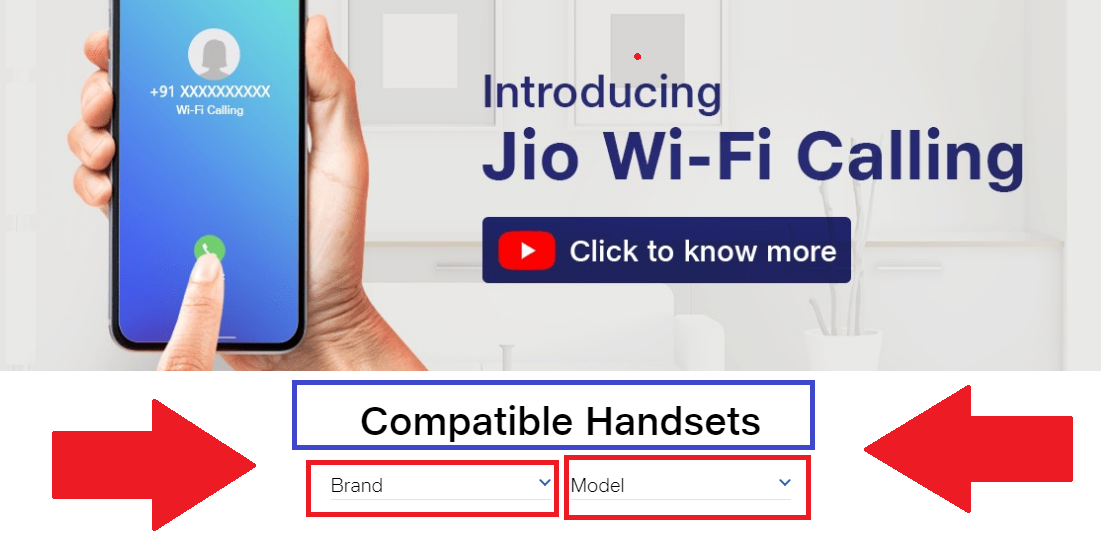
COMPATIBLE HANDSETS:

If you need to know that whether your phone supports this wifi calling feature, then here the way you can easily check the model you are using to know the device is supported or not. To check the compatibility visit the below page and select your handset brand then check the model numbers, if its there then you can use free wifi calling on your Android smartphone in India.


Wi-Fi Calling Compatible Handsets:

https://www.jio.com/en-in/jio-wifi-calling

How to Enable Wi-Fi Calling on Android Smartphone? WiFi calling compatible handsets check here

How to Enable Wi-Fi Calling on Android Smartphone?

Procedure 1:


  • Drag from the top of the screen.
  • Enable Wi-Fi Calling

Android phone Enable WiFi Calling Procedure 4

Procedure 2:


  • Go to Settings.
  • Click on Connections.
  • Click on Wi-Fi Calling
  • Then Switch on For SIM 1 SIM 2


Procedure 3:

  • Go to Settings
  • Click on Phone
  • Click on Wi-Fi Calling
  • Then Enable the switch

Procedure 4:


  • Open Phone Dial Pad
  • Click on More
  • Click on Settings
  • Switch ON Wi-Fi Calling


Android phone Enable WiFi Calling Procedure 4

In this way you can enable WiFi calling on your Android smartphone, so enable Wi-Fi calling and enjoy free wifi calling with HD voice quality on your smartphone. Thank you.

Sunday, July 14, 2019

How To Verify Your Business On Udaan App Using Udyog Aadhaar


Hello friends, as you know Udaan application is a B2B (Business to Business) app, and it's very useful for retailers, which allows to buy items at wholesale price in India Online. So if you are an Udaan app user then must read the topic or tutorial to know how you can verify your business on Udaan application using Udyog Aadhaar, yes if you do not verify your business on Udaan app then you will not able to buy items or goods at wholesale price. There are 5 documents given on the Udaan to verify the business such as GST Certificate, Shop and Establishment License, Udyog Aadhaar, Trade Certificate or License and FSSAI Registration. 

Verify Your Business On Udaan Using Udyog Aadhaar

Here i will tell you the easiest process to verify your business on Udaan and which is using Udyog Aadhaar, yes friends you can verify business using this and the Udyog Aadhaar is free and takes 10 minutes to get it Online, just visit the Udyog Aadhaar website and fill-up the for and get the Udyog Aadhaar Certificate.

HOW TO VERIFY YOUR BUSINESS ON UDAAN - VIDEO TUTORIAL HERE.

HOW TO GET UDYOG AADHAAR ONLINE - VIDEO TUTORIAL HERE.

Verify Your Business On Udaan Procedure Using Udyog Aadhaar:


  • Open Udaan application
  • Then go to your Udaan Account (Click on top left 3 lines and click on your Name)
  • Then click on Business Profile, then click on Verify Your Business.
  • Now select Udyog Aadhaar, it will open Buyer Verification page.
  • Click on Upload then click on Upload Document.
  • Here you can upload the document from library or take photo using the phone camera, I prefer take a photo of your document and click OK.
  • Then enter the name of business as it appear in the proof, then click on Submit.
  • Read the term and conditions, then click on Confirm and Proceed.
  • It will take 2 days to verify your business on Udaan.

So in this way you can verify your business on Udaan to get items at wholesale price in India. You can also watch the tutorial video on our YouTube Channel.

Saturday, July 13, 2019

How to Apply Udyog Aadhaar Online - Get Your Udyog Aadhaar Registration Certificate Online


Hi and Welcome all, today I will show you how you can apply Udyog Aadhaar Online and get instant Udyog Aadhaar Registration Certificate. You can also watch video tutorial on this topic on the Free Computer Tricks YouTube channel. So friends let's begin how to register Udyog Aadhaar Online and get instant Udyog Aadhaar Certification for your business.


How to get Udyog Aadhaar Certificate Online


The Udyog Aadhaar is free of cost and you can apply for it online through the Government of India's Udyog Aadhaar official website for micro, small and medium enterprises. To apply Udyog Aadhaar you must have Aadhaar Card and Pan Card.


Udyog Aadhaar Certificate Online Sample - How Get it Online for Free

How to Get Udyog Aadhaar Registration Certificate?


  • Visit https://udyogaadhaar.gov.in
  • Aadhaar Card and PAN Card is must for this process.
  • Enter your Aadhaar Number and verify with OTP.
  • Then you will see Udyog Aadhaar Registration Form.
  • Then fill-up the Udyog Aadhaar Registration Form Carefully.
  • After complete Click on Submit and again you will ask for OTP
  • Enter the OTP and Click on OK

What to Fill-Up in the Udyog Aadhaar Form?


  • First Enter your Aadhaar Number and Name (as per the Aadhaar Card) and Click on VALIDATE AND GENERATE OTP.
  • Then the OTP will send to your Mobile Number which is linked with your Aadhaar Card, enter the OTP (One Time Password) and click on VALIDATE.
  • After successfully validate the OTP, you will see "Your Aadhaar has been validated successfully, You can continue Udyog Aadhaar registration process" and just below you will see the registration form, fill-up the form carefully.
  • Enter your Social Category details or Cast details, such as General, SC, ST or OBC.
  • Then select the Gender Male/Female.
  • Then select Physical handicapped Yes or No.
  • Then Enter the Name of Enterprise.
  • Then Choose the Type of Organisation.
  • Then enter your PAN Number.
  • Then Enter location of Plant (Means where your business located) and Click on Add Plant.
  • Then enter your Official address with Mobile Number and Email id.
  • Then enter the Date of Commencement (Means when you have started the business)
  • Then enter your Bank Details such as IFSC Code and Bank Account Number.
  • Choose the Major Activity of your Business such as Manufacturing or Services.
  • Then choose the National Industry Classification and click on Add Activity.
  • Enter the number of Persons Employed.
  • Then enter the Investment in Lakhs.
  • Then click on SUBMIT and then click on OK.
  • And again you will receive an OTP, Enter the OTP and Verification Code and click on FINAL SUBMIT and click on OK.
  • Now your Udyog Aadhaar is successfully generated and you can take a print of this.

So friends in this way you can get your Udyog Aadhaar Certificate for your business and it's completely free from Government of India.

You can also watch the video Tutorial
Udyog Aadhaar Registration Online | उद्योग आधार प्रमाण पत्र ऑनलाइन कैसे प्राप्त करें?
On the Free Computer Tricks YouTube Chanel.

Thursday, July 4, 2019

IRCTC Agent Activation Process - If You Have Applied Through IRCTC Authorized Service Providers


Hi friends, today I will tell you how you to activate your IRCTC Agent, if you have applied for the same. As you know you can apply for IRCTC agent through online using IRCTC Authorized Service Providers and you will get detail information about IRCTC Authorized Service Providers on the IRCTC official website. After completing the registration process you will receive an Email regarding IRCTC Agent Activation and here the complete procedure for Agent Activation, so please read the topic carefully.

IRCTC Agent Activation Process - If You Have Applied Through IRCTC Authorized Service Providers

In this topic I will tell you how to activate the IRCTC Agent and verify Email and Verify Mobile Number to use the Agent services of IRCTC, so for that you must applied for IRCTC Agent through IRCTC Authorized Service Providers and when you get the Email that your user id and password has been created and thank your for registering with IRCTC for rail booking, In that Email you get IRCTC User ID, Profile Password and Transaction Password and you can not change the IRCTC user id but after first login you must change the passwords.

How To Complete IRCTC Agent Activation Process?


  • Apply for IRCTC Agent Through IRCTC Authorized Service Providers.
  • You will receive an confirmation Email after successfully registered, which includes YOUR USER ID, PROFILE PASSWORD AND TRANSACTION PASSWORD and in the same time you will receive a SMS on your registered Mobile.
IRCTC Activate Your Account - IRCTC Agent Activation Procedure Step 1

  • In the Email You will find To Activate Your Account Click Here, So click on that link and you will redirect to Agent Interface Application website of IRCTC.
  • Now enter the activation code you have received on your Mobile phone and click on Activate.
  • Then Log in to https://www.operations.irctc.co.in/AgentInterface/loginHome.jsf using your IRCTC user id and profile password.
IRCTC Activate Your Account - IRCTC Agent Activation Procedure Step2

  • After log in click on Aadhaar Based KYC under UPDATE PROFILE OF SUBAGENT, then enter your Aadhaar Number and click on get OTP and you will receive an OTP on the Aadhaar Registered Mobile, Enter the OTP and verify.
  • That's all now the activation process of IRCTC agent complete, now what you need to change the Profile and Transaction Password.
  • Go to PASSWORD MANAGEMENT and change profile password and change txn password, so first click on Change Profile Password, then enter the OLD password you have received in the Email and set the new password for this and do the same for Transaction password. (Note - Password must contain at least One number 0-9 )
Note - There is a time limitation for IRCTC Agent Activation after receiving the Email, if the IRCTC Agent Activation link is expired then ask the IRCTC Authorized Service Providers you have applied through to send another IRCTC Agent Activation link through the Email and you will complete the process.

After complete the IRCTC agent activation process visit IRCTC Agent log in page through the https://www.irctc.co.in/nget/train-search and click on login and then click on AGENT LOGIN https://www.agent.irctc.co.in/nget/train-search, remember you must have the USB Dongle and installed the Client Certificate which you have received through a parcel via Post or courier.

This post is solution for following FAQ.

IRCTC agent login asking verify email id and mobile no again and again solution.
IRCTC email verification get failed IRCTC agent email verification failed IRCTC mobile verification not working IRCTC login idIRCTC account login IRCTC login mobile IRCTC account login registration IRCTC email id change
I have received the IRCTC agent id and password how to activate.
IRCTC agent activation link expired.
I have received the IRCTC USB dongle but unable login as agent.
How to activate IRCTC agent verification?
How to complete IRCTC agent verification process?
IRCTC agent benefitsIRCTC agent commissionIRCTC agent interfaceIRCTC agent registration form download
csc
IRCTC agent registration online
csc
IRCTC agent activationIRCTC agent certificate downloadIRCTC agent registration csc

Sunday, May 6, 2018

How to Customize Blogger Comment Box?


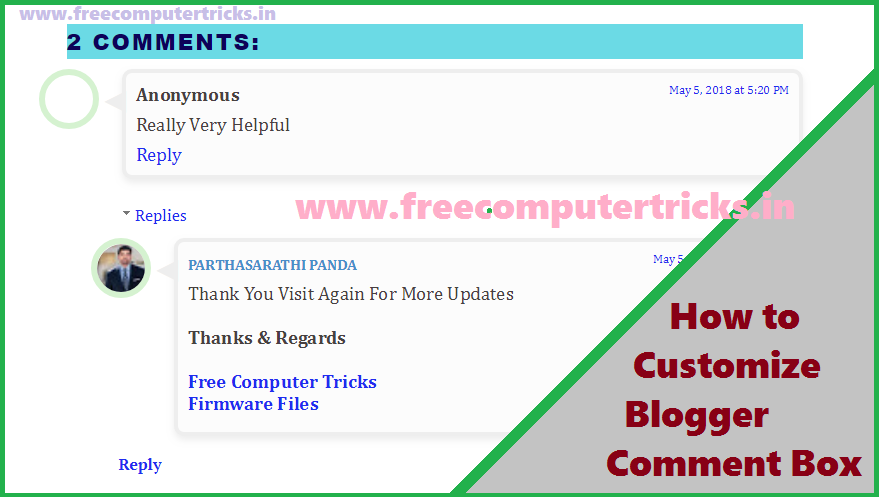
Hi friends, If you are blogging on Blogger and want to know how you can customize the comments box, then you are in right place where you can get the CSS code to design or customise the Blogger comments box. As you know the default comment box of blogger is simple and you may not like it very much, but if you can customize the comment box using CSS codes then it will look very much pretty. So why are you waiting for, please go through the tutorial and customize the comments box.

What to Do For Comment Box Customization?
Do not worry you can easily do this customization and we will briefly describe it. If you are new to Blogger and recently starts your blog, then you can also learn how to customize comment box here. For comment box customization you need to add some bunch of CSS code in your Blogger XML template then save the template and see the magic.
How to Customize Blogger Comments Box
How to Customize Comments Box Blogger?
  • Log in to your Blogger account and choose the blog you want edit.
  • Then select Theme and then click on EDIT HTML.
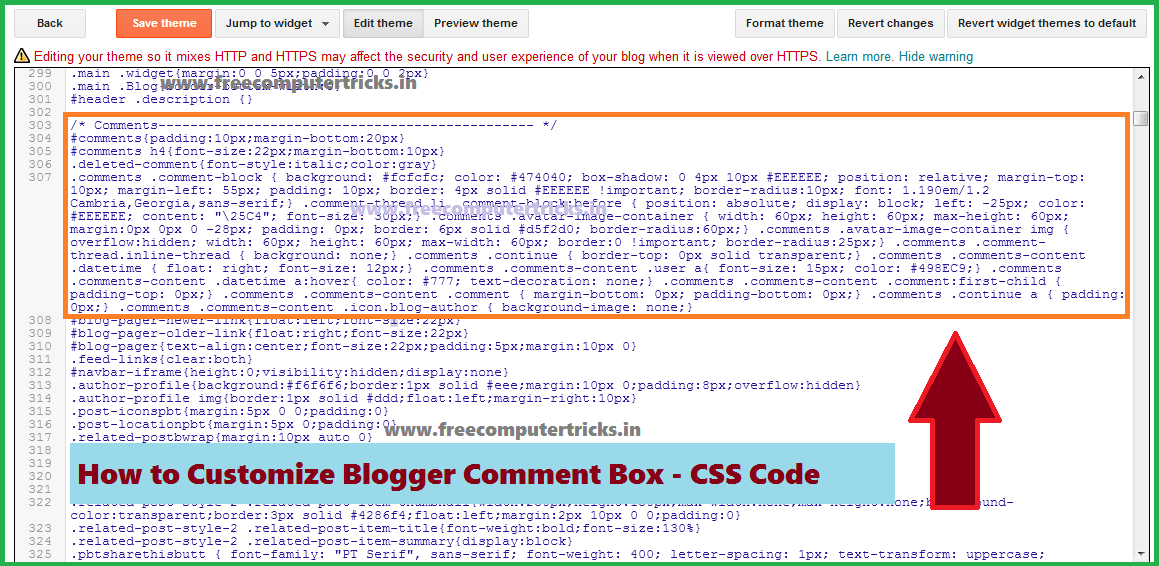
  • Now press CTRL+F and find <b:skin> and paste the below CSS code just below <b:skin>
Comments Box Source Code:

#comments h4{font-size:22px;margin-bottom:10px}
.comments .comment-block { background: #fcfcfc; color: #474040; box-shadow: 0 4px 10px #EEEEEE; position: relative; margin-top: 10px; margin-left: 55px; padding: 10px; border: 4px solid #EEEEEE !important; border-radius:10px; font: 1.190em/1.2 Cambria,Georgia,sans-serif;}
.comment-thread li .comment-block:before { position: absolute; display: block; left: -25px; color: #EEEEEE; content: "\25C4"; font-size: 30px;}
.comments .avatar-image-container { width: 60px; height: 60px; max-height: 60px; margin:0px 0px 0 -28px; padding: 0px; border: 6px solid #d5f2d0; border-radius:60px;}
.comments .avatar-image-container img { overflow:hidden; width: 60px; height: 60px; max-width: 60px; border:0 !important; border-radius:25px;}
.comments .comment-thread.inline-thread { background: none;} .comments .continue { border-top: 0px solid transparent;}
.comments .comments-content .datetime { float: right; font-size: 11px;} .comments .comments-content .user a{ font-size: 15px; color: #498EC9;}
.comments .comments-content .datetime a:hover{ color: #777; text-decoration: none;}
.comments .comments-content .comment:first-child { padding-top: 0px;}
.comments .comments-content .comment { margin-bottom: 0px; padding-bottom: 0px;} .comments .continue a { padding: 0px;}
.comments .comments-content .icon.blog-author { background-image: none;}

Now save the Template and visit a page with comments then see the comments style, it's really cool. So this the simple comments box customization code to help you to design the Blogger comments box to looks better.
How to Customize Blogger Comment Box - CSS Code

📚 You May Also Like to Read