Showing posts with label Mobile Hardware Solution. Show all posts

Thursday, September 13, 2018

Jio Mobile Mic Solution | Jio LYF LF-2403N Mic Ways


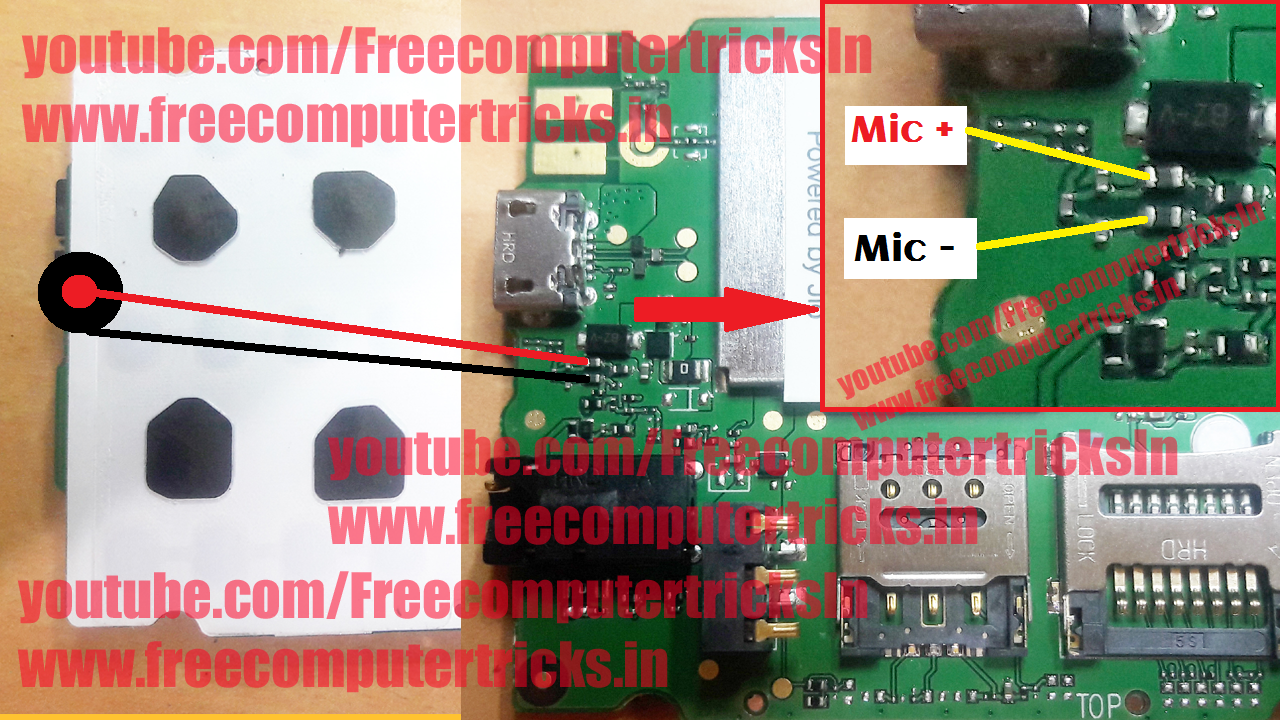
Jio LYF LF-2403N Mic not working and how to repair Jio Mobile phone and here is the Mobile repair solution for Mic not working or Mic track missing or Mic track broken on the JIO LYF LF 2403N. So if the Jio keypad phone Mic is broken and there is no print circuit on the Motherboard and you are searching for Mic track from the component to Mic leg, then here the answer you can easily find the solution for Jio LYF mic ways with HD high quality images with mentioned with missing track.

Please see the below image, you can find your Jio LF 2403N Mic Ways and if the connection to the component is missing then apply jumper and the Mic of the phone will work fine. Check with the multi meter using continuity and find the missing mic track and repair the Mobile hardware with the help of the Mic way diagram on the Jio LYG PCB.
https://www.freecomputertricks.in/
LF-2403N Mic Ways - Jio Keypad Phone Mic Ways - Jio LYF Keypad Phone Mic Solution

So here is the solution for Mic ways, Mic jumper ways, Mic track missing, Mic broken, Mic track on PCB, Mic not working and all the Mic issues on the Jio LYF Keypad phone LF 2403N. Please find the image above and check the mic ways and apply jumper if missing.  

If you are facing to find out the Mic track and do not find the correct Mic connection component on the above image then please click on the below link to open the HD image, through which you can easily find out the track as the PCB diagram is very clear. Thank you visit again.....
 
Click Here To Open Zoomed Image

Friday, October 23, 2015

Samsung S7582 Not Charging and Charging Connector Shot Solution


Samsung S7582 not charging and charging socket short solution here. If the phone is not show charging and when you connect the charger the charger light goes off or dim  then that means the positive (+) point of the charging connector is short with negative (-) point, this may be due to shorting of capacitor or diode, so to solve this problem on Samsung S7582 follow the below image and you will able the solve the charging problem of Samsung S7582 phone.


S7582 Charging Connect Positive point short solution
Charging connector short solution of S7582, Just remove the marked component and you will be done.

Sunday, June 21, 2015

Karbonn K98 Handsfree Symbol Solution - Ear Phone Symbol Solution


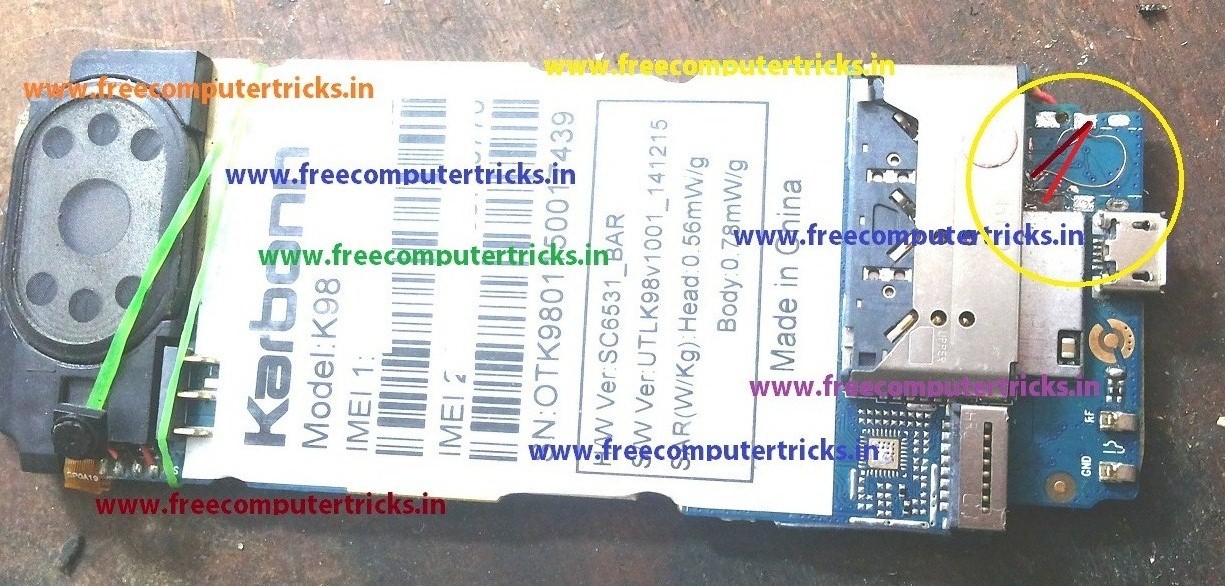
Karbonn K98 how to remove head phone mark? Here is the solution for Head phone symbol or ear phone symbol or hands free symbol problem, if you have face this problem then follow the below process to solve the hands free symbol problem.

Karbonn K98 Hands Free Mark Solution:

Check the below image to apply jumper to remove the heard phone symbol for Karbonn K98. First try the RED line, apply jumper or if you have damaged the point then try to apply jumper BROWN line.


Karbonn K98 Hands-free Symbol Solution

As you see on the above image, one point is damaged so we do the jumper to the next point of the Karbonn K98 Mother board (Brown Color Line).


Karbonn K98 Ear Phone Symbol Problem Solved
See the above Large Image to understand the jumper way to remove head phone symbol for Karbonn K98.

Wednesday, May 20, 2015

Micromax A065 Charging Solution and Complete USB Ways


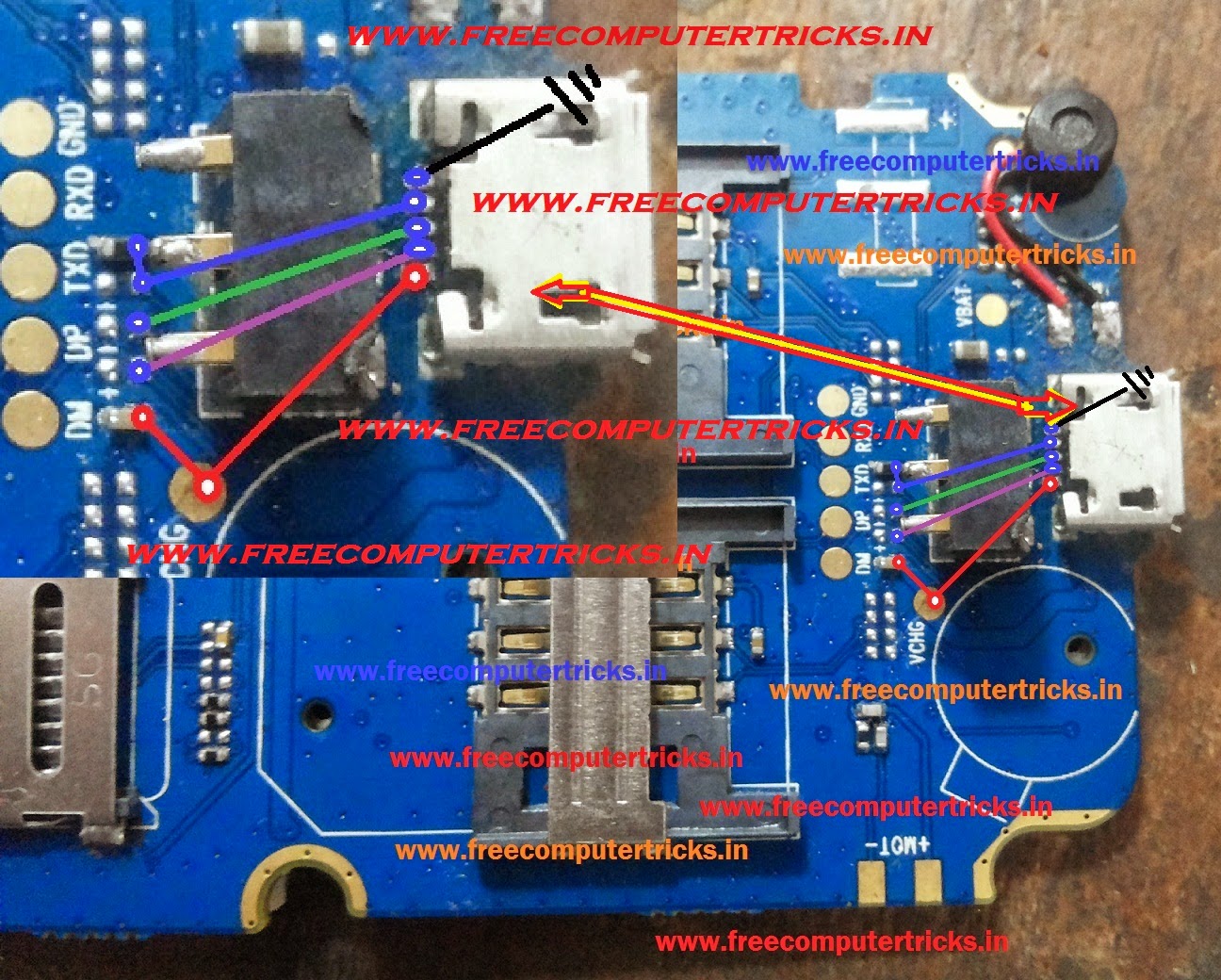
Here is the USB and Charging tracks for Micromax A065. See the below PCB diagram to solve the charging problem of Micromax A065. Micromax A065 Not charging and charging not showing if you face this problem then this topic will help you find out the charging tracks/ways and the complete USB ways of Micromax A065.


Micromax A065 USB Ways and Charging Ways


Check the phone and see the diagram if you miss any connectivity then apply jumper like shown in the picture above.
Search Key words:
Micromax A065 charging ways
Micromax A065 USB charging ways
Micromax A065 not charging
Micromax A065 charging solution
Micromax A065 flashing error
Micromax A065 USB not recognized 
Micromax A065 USB flashing not supported
Micromax A065 USB not recognised 


Friday, May 8, 2015

Nokia LCD Compatibility List 2015 - Nokia C1/C2/X1/100/110/130 LCD Compatible


Here is the details about the C1 LCD compatible with other Nokia Phones, which will help you to use this LCD in any other Nokia phone which has the same LCD version. The below is the compatibility list of Nokia C1 LCD, which is really very useful to the Mobile technicians. 


Nokia C1 LCD Can be used in the below Models 
  • Nokia C1-00, Nokia C1-01, Nokia C1-02, Nokia C1-03
  • Nokia C2-00
  • Nokia X1-01
  • Nokia 100, Nokia 101, Nokia 102, Nokia 106, Nokia 108, Nokia 109
  • Nokia 110, Nokia 111, Nokia 112, Nokia 113, Nokia 114
  • Nokia 130 

Nokia C1 LCD Compatibility List 2015
So we got that Nokia C1-00, C1-01, C1-02, C1-03, C2-00, X1-01, 100, 101, 102, 106, 108, 109, 110, 111, 112, 113, 114 and 130 has the same LCD, if you have any one of these LCD then you can use any one of these Mobile phone.

Tuesday, April 21, 2015

Karbonn K9 (M) Charging Ways and Mic Ways - www.FreeComputerTricks.in


Karbonn K9 M complete charging and mic ways, the below is details about the charging ways and jumpers and for the mic ways. 


If the charging track of Karbonn K9 M is damaged then this will help your to find the tracks and to apply jumper.

Karbonn K9 M Charging Ways


Karbonn K9 M Mic Ways
For charging and mic connectivity check the above Karbonn K9 (M) PCB layout and the charging and mic jumper ways.

Friday, January 23, 2015

Nokia 108 Hardware Solutions - Complete Speaker and SIM Ways


Here is the complete solution for Nokia 108 No SIM and Speaker Ways/Tracks. The below PCB is Nokia 108 and see the details to find out the ways of the Speaker and Insert/NO SIM Solution.


Nokia 108 No SIM Solution, see the below ways and check with multimeter if there is no connectivity then apply jumper.

Nokia 108 Insert NO SIM Complete Solution

Nokia 108 Speaker Ways and Solutions


Check the below image and find the connectivity and apply jumper.

Nokia 108 Speaker Ways


Tuesday, January 20, 2015

Nokia 101 Display Ways and Dead Solution


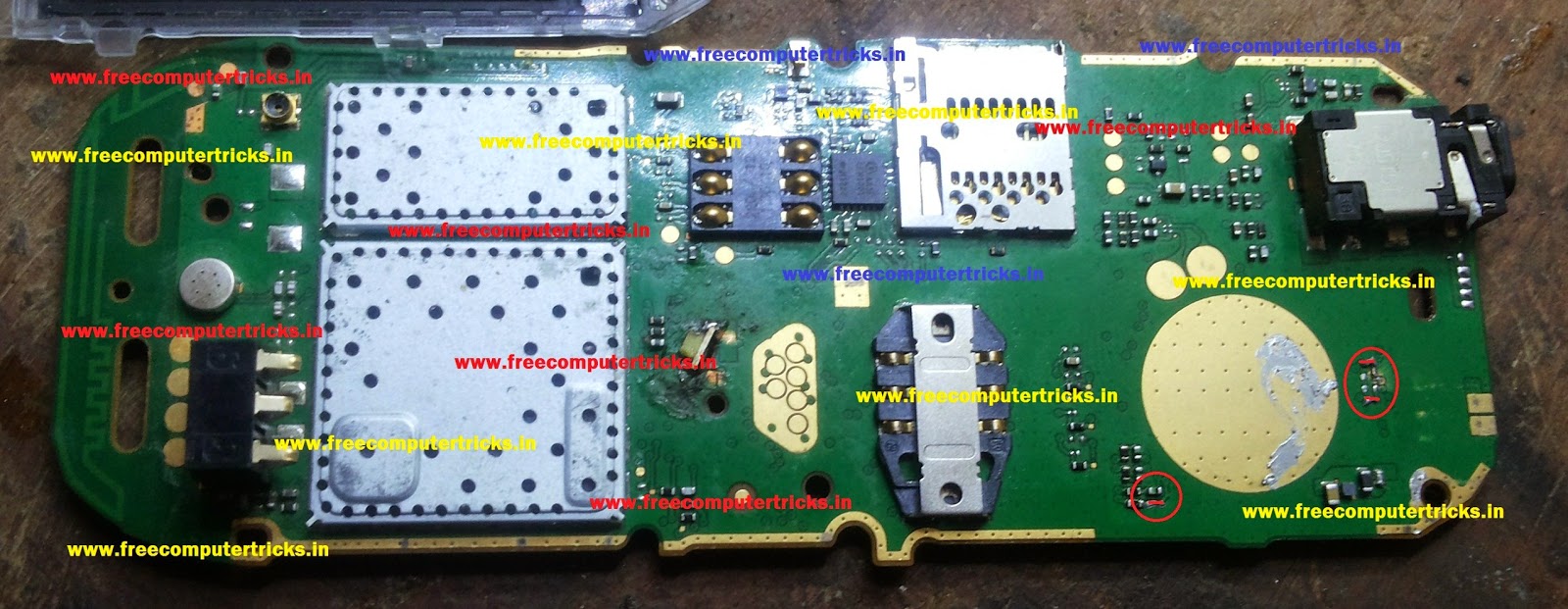
Here is the Nokia 101 Display track and dead solution, if the phone is dead and when you flash the phone is OK, then this topic will help you to find out the fault and tracks for dead condition of Nokia 101. Due to display track or faulty LCD the Nokia 101 not switched ON, see the below image to recover the dead phone.


As per the image remove these parts and make jumper on Nokia 101 and you phone will work fine after that.


101 Display Track or Dead Solution FCT


Check the Red Circled to Make Display Ways and Nokia 101 Dead Solution.

Saturday, January 10, 2015

Lava Arc 22 Complete USB Charging Ways By Free Computer Tricks


Here is the complete charging solution and charging ways/track of Lava Arc22. The below is the PCB or diagram of the charging lines for the phone, if the phone charging connectivity is not good then apply jumper as shown in the image below. If still the phone is not charging then you have to change the Charging IC of the phone.


First check the voltage in charging connector, put charger and check the voltage, it its OK then check the below charging tracks.


Lava Arc 22 USB Charging Ways

Wednesday, December 31, 2014

Micromax A46 Complete Charging Ways and Charging Solutions


Micromax A46 charging problem solved and the complete charging ways given below. If the phone is not charging and also the charging connector C/C track is damaged, then this topic will help you to find out the complete charging ways for Micromax A46, starting from the charging connector and end with the battery connector.


Micromax A46 charging solution and jumper track, see the below image to know the charging way of A46.

Micromax A46 Charging Ways and Charging Solutions


Micromax A46 Charging Ways and Battery Connector Ways.

Monday, December 29, 2014

Micromax X286 Complete Charging Ways - Micromax Charging Solutions


Micromax X286 charging problem and charging track, the solution is given below. Check the tracks as shown in the below image, if there is no connectivity then apply jumper to the charging point. Here is the complete charging ways for Micromax X286.


Micromax X286 Charging Ways

Micromax X286 Complete Charging Ways


As shown in the image, One is ground and another is (+) V+ check the both connectivity and apply jumper, the charging problem will be solved.

Karbonn A99 Charging Ways and Solution - www.FreeComputerTricks.in


Karbonn A99 charging track and charging ways and solution, the below is the complete charging way for Karbonn A99 Mobile phone. If the charging connector of Karbonn A99 is damaged the this will help you regarding the charging problem and find the charging ways for the phone.


Karbonn A99 Charging Way

Karbonn A99 Charging Ways, tracks and solutions


The Plus (+) side is connected to VBUS pin from that point you can check other connectivity of the charging ways.


Saturday, December 20, 2014

Nokia 105 Charging Solution and Charging Ways 100% Working


Nokia 105 charging problem and no charging and no voltage on battery connector see the below solution. Here is the complete charging way  for the 105 Nokia, see the below image for the charging ways.


Nokia 105 Full Charging Way 100% Solved Charging Problem
 

Check the charging track or ways with multimeter, if the connectivity is not good then apply jumper. 

Thursday, July 17, 2014

Karbonn K9 Keypad Not Working Solved - www.FreeComputerTricks.in


Karbonn k9 keypad solution and keypad ways, this topic is about the Karbonn K9 Keypad hardware solution for you. If the phone is ON and not working the keypad, even one key also not working then this topic will help you to find out the solution for it.


Karbonn K9 Only switch ON then No key work, in this case this process is tested and working fine. So if you have same problem, karbonn k9 keypad problem then follow the below steps.


Karbonn K9 Keypad Not Working Solution Solved


Karbonn K9 Keypad Problem Solved


  • Open the mobile and check the charging connector if it's damaged then just change it, your problem will solve.
  • If the Charging Connector C/C is fine then clean the C/C area and just heat the C/C area, your keypad problem will solve for Karbonn K9.

Note: Don't over heat the board and this process will help, if no key is working on the Karbonn K9 (tested), in other case you can try.


Wednesday, July 9, 2014

Camera Failed Errormessagehandler.handlemessage (-1) - Solved


Here you will learn how to solve the Camera error on Samsung Galaxy Y, when you touch the camera icon to open the camera, the error message will come i.e. camera failed errormessagehandler.handlemessage (-1). So it's not a firmware/software issue, it's a hardware problem of the Samsung Galaxy y s5360, that means you have some problem in the camera, to repair that please see the below details.


Samsung Galaxy Y S5360 Camera Error Solved
Samsung S5360 Camera Error Solved.

Open the camera and clean the camera holder and then fix it, your problem will be solved. This is tested and working fine for Me. 


Note: Camera removing is difficult, so do it very carefully and with your own risk, if you are Mobile Technician then you can do.

Search Tags: camera failed errormessagehandler.handlemessage (-1) solution, camera failed errormessagehandler.handlemessage (-1) samsung galaxy y, samsung galaxy camera failed error message handler.handlemessage (-1), Samsung Mobile Camera Error Solved, Samsung Hardware Solutions

Sunday, June 22, 2014

Karbonn K46+ Not Switching On and Keypad Not Working Solution - www.FreeComputerTricks.in


Karbonn K46+ MTK CPU Mobile phone not switching ON or Dead and the keypad is not working, to repair this phone follow the procedure below, it's 100% working and tested.


Karbonn K46+ Hardware Solutions

Karbonn K46+ Dead/Not Switching ON Solution

If the mobile is not switching On then

First Check the phone with DC Power Supply, while press the power button the reading comes to 4/5 and when you release the power button the reading comes to 0.

In that case change the C/C (Charging Connector) the problem will solve.


Karbonn K46+ Dead or Not Switch On and Keypad Solution


Karbonn K46+ Keypad Not Working

If the keypad is not working in Karbonn K46+ then just Clean the Charging Connector or Change it the problem will be solved.


Search Tags: karbonn k46+ keypad ways, karbonn k46+ dead solution and not switched on, karbonn hardware solution, karbonn k46+ all hardware solutions, karbonn k46+ keypad jumper ways or keypad track, karbonn change charging connector, karbonn mobile hardware solution, karbonn k46+ keypad problem solved.

📚 You May Also Like to Read