Showing posts with label Reliance Jio Hard Reset. Show all posts

Sunday, December 12, 2021

F220B Hard Reset


 In this topic you will learn how to hard reset JIO LYF F220B hard reset, so please go through the post to know the step by step procedure to hard reset/factory reset F220B Jio phone using keypad.
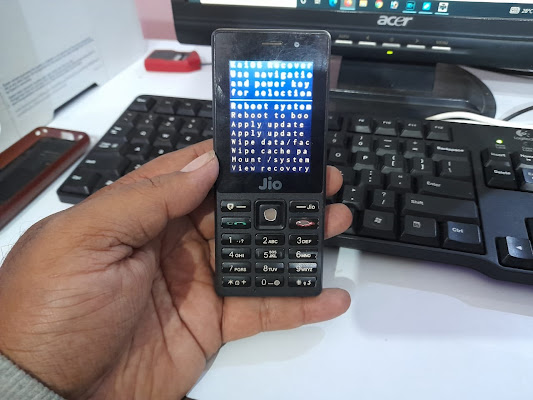
F220B Hard Reset FREE COMPUTER TRICKS


JIO LYF F220B Hard Reset?


  1. Switch off the phone.
  2. Now hold the * key and then power on the phone.
  3. After power on release the power button only, continue holding of * key until see the recovery option.
  4. Now choose the Wipe Data/Factory Reset and Press Power button
  5. Then choose Yes and press Power button to select.
  6. After format it will back to recovery menu
  7. Then choose REBOOT SYSTEM AND press power key for OK.


Now your F220B phone has been hard reset.

Thursday, August 25, 2016

Reliance Jio 4G LYF LS-4005 Hard Reset


How to hard reset Reliance Jio 4G LS 4005? Here is the solution to hard reset Reliance Jio phones, If you need to hard reset the Jio mobile with Keys then this topic will help you regarding that. Reliance Jio 4G hard reset done with keys/buttons.

LYF LS-4005 Hard Reset

  • First Press Power Key (After 2Seconds) then Press Volume Down Key
  • Now Hold the Power Key then Press Volume Key to See Recovery Option
  • Now Wipe data
  • Volume Down to Select and Power Key to OK

Reliance Jio 4G LYF LS4005 Hard Reset OK

After hard reset just reboot the phone using the option and now you have successfully hard reset the Reliance Jio 4G LYF LS-4005 Android Smart Phone.


📚 You May Also Like to Read