Showing posts with label LYF Hard Reset. Show all posts

Sunday, December 12, 2021

F220B Hard Reset


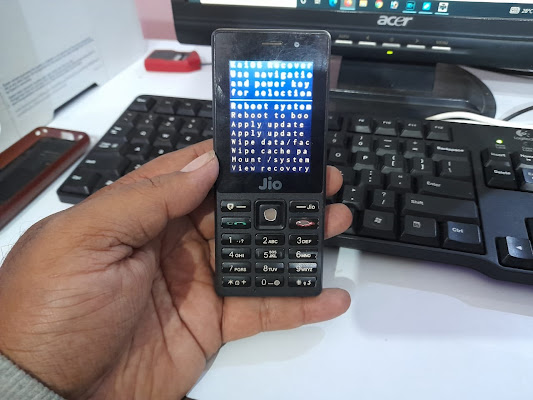
 In this topic you will learn how to hard reset JIO LYF F220B hard reset, so please go through the post to know the step by step procedure to hard reset/factory reset F220B Jio phone using keypad.
F220B Hard Reset FREE COMPUTER TRICKS


JIO LYF F220B Hard Reset?


  1. Switch off the phone.
  2. Now hold the * key and then power on the phone.
  3. After power on release the power button only, continue holding of * key until see the recovery option.
  4. Now choose the Wipe Data/Factory Reset and Press Power button
  5. Then choose Yes and press Power button to select.
  6. After format it will back to recovery menu
  7. Then choose REBOOT SYSTEM AND press power key for OK.


Now your F220B phone has been hard reset.

Thursday, August 2, 2018

Jio LYF F101K Tested Firmware | USB Driver | Flash Tool (Download Link Given)


Here you will get all the necessary files and flash tool required for to flash Jio LYF F101K Keypad smartphone, such as LYF F101K tested firmware, LYF F101K USB driver and LYF F101K flash tool. You can get so many links to download LYF F101K firmware by searching it on the Internet, but you may not get the tested firmware link and for you only we have tested the firmware by flashing the phone using this flash file or firmware or ROM and posting it here to all of you who need the tested and working firmware for LYF F101K Android phone. So here not only you get the working firmware but also you can download USB driver and Flash tool for the phone.

Jio LYF F101K Tested Firmware | F101K USB Driver | F101K Flash Tool Download
Jio LYF F101K Tested Firmware - USB Driver - Flash Tool

Download LYF F101K Firmware (All Version)

LYF-F101K-000-01-26-181117.pac
File Name: LYF_JIO_F101K_181117_SPD.zip
File Size: 264 MB
Download Link: Mediafire Link [Download]

LYF F101K USB Driver Download Link

SPRD NPI USBDriver 1.4
File Name: SPRD_NPI_USBDriver_1.4.rar
File Size: 9 MB
Download Link: Google Drive Link [Download]

LYF Flash Tool:

Download LYF F101K Flash Tool (Direct Link) 

UPGRADE DOWNLOAD TOOL R17.0.0001
File Name: UPGRADEDOWNLOAD_R17.0.0001.rar
File Size: 3 MB
Download Link: Google Drive Link [Download]
Password= fct@f101k

Friday, May 4, 2018

How to Hard Reset LYF F50Y Using Keypad Buttons


Jio phone F50Y, if you are searching for how to hard reset the phone, because the Jio LYF F50Y hang on logo or continuously restarts or stuck on logo only, then you are at the right place where you can learn how to hard reset LYF Jio Phone using the keypad buttons.
www.freecomputertricks.in How to hard reset Jio LYF F50Y Keypad phone using buttons
Jio LYF F50Y You can easily hard reset/factory reset the phone. This topic will very helpful to the Mobile technicians both for fresher or experienced, if they do not know the hard reset process of the phone.

How to Hard Jio LYF F50Y?
  • Switch off the phone first.
  • Now Hold the Up button (Home key - up, down, left and right).
  • Then press power key, when it's vibrate release all keys and wait.
  • or Hold the up key and Power key at the same time, when vibrate release all keys.
  • Now it will show the Recovery options.
  • Now select wipe data/factory reset then press Power key to OK.
This solution is working for below faults/problems on Your Jio LYF F50Y Phone:
  1. How to Solve LYF jIO F50Y Restart Problem
  2. Jio Phone F50Y Hang on logo & Remove password
  3. How to Solve Jio Lyf F50Y Hang Problem
  4. Jio phone hard reset buttons
  5. Lyf Jio Feature phone hard reset with keys

Thursday, November 16, 2017

LYF LF-2403N Hard Reset (Using Phone Keypad Buttons)


Here is the tutorial about, how to hard reset JIO LYF LF-2403N Keypad phone? You can hard reset the phone using hard keys and the below is the process to hard reset JIO phone.
LYF LF-2403N Hard Reset Keys - Hard Reset Done
Follow the below steps to hard rest LYF LF-2403N using the keypad, just hold the star key then power on the phone it will boot into the Recovery Mode and then you can hard reset the phone by selecting wipe data/factory reset.

JIO LYF LF-2403N Hard Reset:

1- Switch off the phone.
2- Now Hold Star Key "*" and then press power button.
3- Now it will show you the Recovery Mode.
4- Then use up/down key to select Wipe data/factory reset.
5- Then press Power key OK.

Wednesday, September 13, 2017

LYF LS-5504 Water 7 FRP Unlock Success


How to unlock frp lock on LYF LS-5504 water 7 unlock process? and here you will able to know how to do LYF Water smart phones FRP unlock without using any Mobile flashing box, this process will also help to remove frp lock on any other Qualcomm phones. If the phone is bootloader locked then you can unlock the bootloader using the below commands. To Unlock and FRP unlock of LYF LS-5504 smart phone please follow the below steps and execute these commands.

LS-5504 Qualcomm Android 5.0 Hardware Version P2 FRP Unlock Success

LYF LS-5504 Water 7 FRP Unlock:

Steps:

1. Download 'Minimal ADB and Fastboot' (You can download this tool by searching this website on the top right side)
2. Volume Down + Power Key For Fastboot Mode
3. Extract the 'Minimal ADB and Fastboot' and open cmd-here.exe
4. Now type fastboot devices and press enter
5. To enable OEM unlock type fastboot oem unlock then press enter
6. Now type fastboot erase config and then press enter

That's all now reboot the phone by using the command fastboot reboot and see it will not ask for any FRP lock or reactivation lock on your phone.

LYF-LS5504 OEM Unlock Done With Command Prompt

How to take screenshot on LYF LS-5504 Water 7?

To take screenshot on LYF LS-5504 Water7 Screenshot use the following key combination.

LYF Water 7 LS-5504 Screenshot = Press Volume Down + Power Key at the same time .
 

Thursday, August 25, 2016

Reliance Jio 4G LYF LS-4005 Hard Reset


How to hard reset Reliance Jio 4G LS 4005? Here is the solution to hard reset Reliance Jio phones, If you need to hard reset the Jio mobile with Keys then this topic will help you regarding that. Reliance Jio 4G hard reset done with keys/buttons.

LYF LS-4005 Hard Reset

  • First Press Power Key (After 2Seconds) then Press Volume Down Key
  • Now Hold the Power Key then Press Volume Key to See Recovery Option
  • Now Wipe data
  • Volume Down to Select and Power Key to OK

Reliance Jio 4G LYF LS4005 Hard Reset OK

After hard reset just reboot the phone using the option and now you have successfully hard reset the Reliance Jio 4G LYF LS-4005 Android Smart Phone.


📚 You May Also Like to Read