Showing posts with label Android 7.0 FRP Solutions. Show all posts

Saturday, May 11, 2019

FreeComputerTricks FRP APK FILEs Download


Downloads

FRP APK FILES/Bypass


Bypass Google Account 2019-2020
FRP APK FILEs Download


Saturday, December 1, 2018

Lenovo K8 Plus (XT1902-2) FRP Reset File and Tool Free Download


How to Account Unlock or FRP, Lenovo XT1902-2 (K8 Plus) FRP Unlock File and Tool Download Here. You can reset frp lock or Google account lock using the small frp unlock file and it's easy to bypass the account lock or Gmail lock. What you need to do is, just download the frp file and SP flash tool (Link given below) and flash the frp file using Smart Phone Flash Tool and it's done. You can also watch the video tutorial of Lenovo K8 Plus FRP bypass, please visit the link given below to watch the video.
Lenovo XT1902-2 (K8 Plus) FRP Unlock File and Tool Download Here

Lenovo K8 Plus MT6757 (MediaTek) chipset Android version 7.1.1 frp unlock done using SP Flash Tool. If you have forgot the Gmail id and password which previously used in that phone, then you need to unlock Account verification process to use other Gmail id and password and here is the complete solution to unlock the Lenovo K8 Plus XT1902-2. Just follow the procedure and reset Google account on the Lenovo Moto K8 Plus.

Download Lenovo K8 Plus FRP File and Flash Tool:

Password = Lenovo@K8Plus@FCT
Download Lenovo XT1902-02 FRP File | Download Link
Download SP Flash Tool (SP_Flash_Tool_v5.1844_Win.rar) | Download Link
Lenovo K8 Plus FRP Reset File and  Tool Free Download

How to Flash Lenovo FRP File?
  • Download and Unzip the FRP file and flash tool.
  • Now Open SP flash tool.
  • Load the MT6757_Android_scatter.txt file.
  • Download Agent = MTK_AllInOne_DA.bin
  • Click on Start Button and connect the switched off phone.
  • After Download OK, remove the phone and switch ON it.

That's all now you have successfully remove the FRP lock or reset the Google account lock of the Lenovo K8 plus Android 7.1.1 smartphone. You can also watch the frp flashing process video, please visit the below link.

Lenovo K8 Plus FRP Reset Done Using SP Flash Tool Video Tutorial Here.
 

Wednesday, June 20, 2018

Xperia XA Dual (F3116) FRP Unlock Done Miracle Box


How To Enable USB Debugging On Xperia F3116 Android 7.0 Locked (Xperia XA Dual) and How to Bypass FRP Lock on Xperia XA Dual (F3116) Using Free Miracle Box? Get all these solutions Here.

You can easily unlock frp lock of Xperia XA Dual F3116 Android 7.0 using free Miracle Box tool working without box, for download link of Miracle Box working without box please search this website. To unlock frp you need to enable USB debugging and then use the Miracle box to execute the frp reset option on the frp unlock tool or miracle box software. To enable USB debugging on the locked Xperia phone, watch the video tutorial link given below or you can also visit the Free Computer Tricks YouTube Channel.
Sony Xperia XA Dual F3116: How To enable USB Debugging On The Locked Android Phone and FRP Unlock Free Solution Here.

How To Enable USB Debugging On Xperia F3116 Android 7.0 Locked (Xperia XA Dual) | Video Tutorial Here.

Xperia XA Dual (F3116) FRP Unlock Done Miracle Box:-
  • First enable USB Debugging (Follow the Video Tutorial)
  • Now Open Miracle Box and go to Android Tab.
  • Then go to Extra and then ADB Extra.
  • Now Select Samsung FRP Reset 
  • Click on Start Button and wait until the process complete.
  • Now the device will reboot automatically and you are done.
Sony Xperia FRP Reset Done With Free Miracle Box
Download Sony Xperia Free FRP Unlock Tool 2018 Here:-


As I said before you can use Free Miracle Box software to unlock or reset frp on the Xperia XA Dual phone. To download Miracle Box software working without box please visit the below link.


Downloads:
Miracle Box Download Link

Saturday, June 9, 2018

Samsung SM-G610F FRP Bypass Solution Here : Android 7.0 Nougat


Here is the another tutorial about, how you can unlock or bypass FRP (Factory Reset Protection) on the Android smartphone for the model Samsung SM-G610F, which has Android 7.0 Nougat using Free Miracle Box Software unlock and flashing tool. This process works on Samsung Android smartphones having Android version 7.0 (Nougat), Samsung Experience version 8.1 with Android security patch level 1 August 2017 and Android security patch level 1 February 2018 to bypass the frp lock. If the phone has latest Android security patch level, such as 1 May 2018 then first try to downgrade the firmware and then follow the steps to bypass frp lock on your Samsung Android smartphone for free, using free frp unlock tool Miracle Box flash and unlock tool download free here and it's working without the flashing box.
Samsung SM-G610F Android 7.0 FRP Unlock Solution (J7 Prime and On Nxt)

In this frp bypass process, you use a trick to enable ADB or USB debugging mode on a locked Android device and then use the free frp unlock tool 2018 to bypass frp lock of the phone. USB debugging can be enable using a small trick with the help of your Smartphone's Calculator and then you can use any Mobile unlock box to reset frp and here is the free tool to reset frp. Please go through the entire topic to know how to reset frp (Factory Reset Protection) on your Android smartphone.

Calculator Code to Enable USB Debugging or ADB:

Open Calculator and enter the below code.
(+30012012732+
Then enter the below code.
*#0808#
Now select DM+ACM+ADB and click on Reboot.Know the step by step procedure to enable ADB on a Locked Android Phone Here.

Software Information:
Android Version: 7.0 Nougat
Samsung Experience Version: 8.1
Baseband Version: G610FXXU1BQJ4
Kernal Version: 3.18.14.12721818
Build Number: NRD90M G610FXXU1BQL9
Security Software Version:  ASKS v1.4 Release 161228 SMR Aug-2017 Release 1
Android Security Patch Level: 1 August 2017
Samsung SM-G610F (J7 Prime and On Nxt)  Android 7.0 FRP Bypass Done With Miracle Tool
How to Reset FRP of G610F Using Free Miracle Box?
  • Download Free Miracle Box (Working without Box) Link given below.
  • Follow the above steps to enable ADB on a Locked Android 7.0 phone.
  • Now open Miracle Box and go to ADB Tab, ADB (extra)
  • Select Samsung FRP Reset and click on Start button.
  • Allow the computer on your Phone's screen.
  • Wait until the process complete, then phone reboot automatically.
  • After switch on the phone Enable Developer Mode and OEM Unlock, then Factory Reset the phone.
Samsung SM-G610F Android Version 7.0 FRP Bypass Done (Galaxy On Nxt and Galaxy J7 Prime)
DOWNLOADS:
Miracle Box Software Setup Working Without Box | Download Link

Wednesday, May 30, 2018

[Solved] SM-G570F Galaxy J5 Prime (May 2018 Patch) FRP Unlock


Do you face Custom Binary Blocked by frp error on Galaxy J5 prime or want to update firmware of the phone to latest one or want to know how to bypass frp lock on Samsung G570F or need to download this phone firmware or want to know frp bypass on J5 prime having latest Android operating system, if so then you are in right place where you will know the complete process of how to unlock frp lock on Samsung J5 Prime. The J5 Prime frp unlock can be done without using Combination file, frp unlock file or using any frp bypass APK and if you use combination file or frp unlock file sometimes the phone may not boot up and if you use frp bypass apk method, which also not work on Samsung J5 prime having Android 7.0 with security patch level 1 May 2018, but after following this frp unlock tutorial, you can easily remove frp lock of the phone, please have patience and go through the entire tutorial below.

Steps Must Be Follow To Unlock FRP

Steps:
1) Download SM-G570F Firmware and Flash the phone Using ODIN3 
2) Download Miracle Box Flash Tool (Working Without Box)
3) Watch the Video Tutorial How to Enable USB Debugging.

How to Unlock SM-G570F Galaxy J5 Prime May 2018 Patch FRP Lock - 100% Working Solution Here
SM-G570F FRP Unlock Process Android 7.0:

So we got the basic steps through which the phone can be frp unlocked. Please follow the below described process to flash, USB debugging enable and frp unlock on Samsung J5 Prime. So you can unlock J5 Prime frp unlock in 3 steps. such as flash the phone with firmware which helps to enable ADB or USB debugging easily and download free frp tool 2018, which helps to bypass or reset the frp lock and the final one is watch the video on YouTube to know how to enable USB debugging on locked Android smartphone.

1) Flash SM-G570F Galaxy J5 Prime With FRP Firmware:

So here is the first step you need to follow, which is download J5 prime firmware and flash tool and flash the phone, you can ask why we called it FRP Bypass firmware and the answer is, this is an normal firmware and as after flashing with this we can enable USB debugging, we called FRP Unlock or Bypass Firmware. As you know if you try to enable USB debugging using calculator method on J5 prime having Android 7.0 with Android security patch level 1 May 2018, then it will not work, that means if you open the calculator and execute the ADB enable code the phone Calculator got closed. But after flashing with this firmware you can use the same method to enable ADB and the good thing about this firmware is you will not get any custom binary blocked error while flashing with ODIN3, so let's download the firmware and flash the phone.
How To Flash J5 Prime SM-G570F Android 7.0 Using Odin
SM-G570F Firmware Latest Android Version | Download Here

2) Miracle Box Flash Tool Working Without Box:

Now download Miracle box flash tool which works without any hardware box or Miracle dongle, using this tool we can reset frp of J5 prime. After flashing the phone using the above firmware enable USB debugging (Please watch the Video link given below) and the use the tool to unlock or bypass or reset frp lock on J5 prime Android 7.0 with experience version Android 8.0.
SM-G570F 1 May 2018 Patch FRP Done With Miracle Box
Miracle Box Flash Tool Working Without Box | Download Link

3) Watch the Video Tutorial To Know How To Enable ADB?

Now watch the video tutorial to know how you can easily enable ADB or USB debugging using calculator method, please visit the below link.

J5 Prime Android 7.0 Enable USB Debugging | Video Tutorial Here

Firmware Required To Download:

G570FXXU1BQL2 OJV1BRA1 4Files Firmware
Model: Samsung Galaxy J5 Prime SM-G570F
OS Version: Android 7.0 Nougat
PDA/AP Version: G570FXXU1BQL2
MODEM/CP Version: G570FXXU1BQI6
CSC Version: G570FOJV1BRA1
Security Patch Level : 1 December 2017

Contents Of File:

AP_G570FXXU1BQL2_CL12687762_QB16110527_REV00_user_low_ship_meta.tar.md5
BL_G570FXXU1BQL2_CL12687762_QB16110527_REV00_user_low_ship.tar.md5
CP_G570FXXU1BQI6_CL644522_QB7584828_SIGNED.tar.md5
CSC_OJV_G570FOJV1BRA1_CL12873785_QB16504023_REV00_user_low_ship.tar.md5
HOME_CSC_OJV_G570FOJV1BRA1_CL12873785_QB16504023_REV00_user_low_ship.tar.md5

SM-G570F Galaxy J5 Prime (May 2018 Patch) FRP Unlock
  • First Flash the phone with Firmware (Download link given above)
  • Then watch the video to enable USB debugging and enable it, which called Use Calculator Method To Enable USB Debugging (Video Link given above)
  • Now Download Miracle Box FRP Unlock Tool (Link given above)
  • Open Miracle box and go to Android Tab, then ADB(extra).
  • Now choose or select Samsung FRP Reset and click on Start button.
  • After frp lock removed OK the phone will reboot and you are done.
Important: After frp reset hard reset the phone using phone settings, if you are unable to see the home screen then drag the screen from top to see Settings icon and click on it. While do factory reset it's very important to enable Developer Mode and then enable OEM unlock.

Sunday, May 20, 2018

OnePlus 3/3T (A3003) FRP Unlock Solution Without Using Any Flashing Box


If you are searching for OnePlus 3/3T A3003 FRP Unlock Process Without Using Computer or Flash Tool, How To Remove FRP Android 7.0 Nougat On OnePlus 3/3T A3003, One Plus 3/3T FRP Remove Google Account Bypass, How to Bypass Frp Lock On OnePlus 3T Android 6.0 Marshmallow and Android 7.0 Nougat Without Using Computer, One Plus 3T A3003 Remove FRP Google Account Android 7, One Plus 3 FRP Bypass Method or Google Account Lock Bypass Free Solution, How To Bypass Google Verification On OnePlus 3/3T or Unlock FRP/Skip Google Gmail Id, OnePlus 3 A3003 Bypass Google Account Remove FRP Lock 2018, OnePlus 3/3T Frp Bypass/Remove/Reset New Method 2018 - Then Get All These Solutions In One Place Here In This FRP Unlock Tutorial.

In this article you will know hot to bypass or remove frp lock on OnePlus 3/3T without using Computer or any other mobile flash tools. This is an easy process to unlock frp lock on Android 6.0 smartphone. Unlock frp lock on OnePlus smart phone for the mode OnePlus 3 using the phone itself no need to use Computer and Internet connection. Please go through the below steps.
OnePlus 3 (A3003) FRP Unlock Solution Without Using Any Flashing Box or Computer
OnuPlus 3/3T FRP Bypass Using Home Button - Method 1
  • Switch on the phone when you see Wi-Fi connection page stop there.
  • Now press and hold Home button until it opens Google App Search.
  • Now Type Settings, just below you will see the Phone "Settings" Click on it.
  • Now go to About Phone and scroll down to "Build Number" and continuously tap on it until it shows now you are Developer.
  • Now come back and you will see Developer Options just above the "About Phone" Open it.
  • Then enable OEM Unlock and click OK.
  • Now go to backup and reset and click on reset all.
How to Enable Developer Mode On OnePlus 3/3T Locked Android Phone
OnePlus 3/3T FRP Unlock Using Secret Code - Method 2
You can also this method to unlock frp lock on Oneplus A3003 and this solution is 100% working, in this frp unlock method you also do not need any Computer or Mobile Flashing Box or Internet connection, just do it on the phone itself, please follow the below process.
  • Switch On the phone
  • Open Emergency Dial-pad and Enter this Code *#812#
  • Now you will see Setup Home tab 2-3 times on it.
  • Then Restart the phone and now you will see the home screen and it will not ask for re-verification. But to complete remove the Factory Reset Protection follow the below steps.
  • Go to Settings and enable Developer Options (Please follow the Method 1 steps to enable Developer Mode)
  • Then Go to Developer Settings and enable OEM Unlock.
  • Now go to Backup and Reset and do Reset All.
Now you have successfully remove the frp lock on the OnuPlus 3 Android smartphone. All these tow methods are tested and 100% working solution for bypass frp lock. In the same way you can also unlock frp of this phone having Android 7.0.

Note: This topic is only for Tutorial purpose, if you misuse/illegally use this tutorial the risk should be completely belongs to you. Apply this method to unlock frp lock if the phone is completely yours and in case you forgot the Email id and password.

Downloads:
OnePlus USB Driver | Download

☛ Did You Know  ☚
How to take screenshot on OnePlus Smartphone? To Take Screenshot on Your OnePlus 3/3T Phone Follow the below process:
Press Volume Down + Power Key at the same time

Friday, May 4, 2018

Micromax Bharat 5 Android 7.0 Free FRP Unlock and Tool DL Image Fail Free Solution


Hi and Welcome to all visitors, today we will show you how to unlock frp or frp bypass on Micromax Bharat 5 Android 7.0 MediaTek MT6735 CPU and you can also know how to solve "Tool DL Image Fail" error on Micromax B5 smart phone. To use this process you need to download Miracle Box V2.54 which is free and working without box. Download link of Miracle Box v2.54 and frp unlock and to solve TOOL DL Image Fail! error please go through the complete article below.
Micromax Bharat 5 Android 7.0 Free FRP Unlock and DL Image Fail Solution Without Using Any Flashing Box


Micromax B5 Technical Details:  
Model: Bharat 5
Brand: Micromax
H/W Version: V2.0
S/W Version: V09_20171207

CPU: MT6735
RAM: 1 GB
Internal Storage: 16 GB
Android Version: 7.0
UI Version: V2.0
Android Security Patch Level: November 5, 2017
Baseband Version: MOLY.LR9.W1444.MD.LWTG.MP.V117.P33,2017/12/07 17:45
Kernael Version: 3.18.38
Build Number: MMX_Bharat_5_SW_360_V09_HW_V2.0_20171207

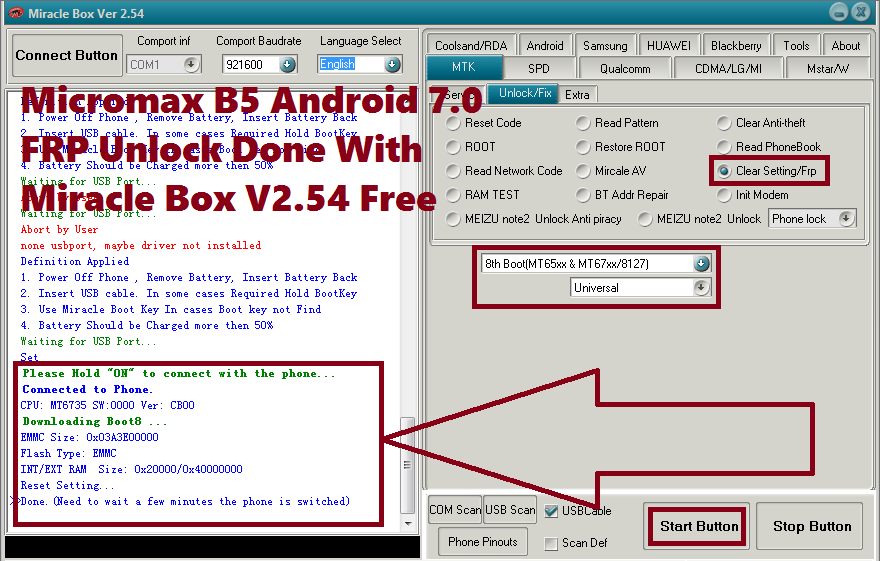
Micromax B5 Android 7.0 FRP Unlock Done With Miracle Box V2.54 Free
Micromax B5 FRP Unlock Done:
  CPU: MT6735 SW:0000 Ver: CB00
  Downloading Boot8 ...
  EMMC Size: 0x03A3E00000
  Flash Type: EMMC
  INT/EXT RAM  Size: 0x20000/0x40000000
  Reset Setting...
  Done.(Need to wait a few minutes the phone is switched)

Micromax B5 Android 7.0 After FRP Unlock  Tool DL Image Fail Solved
Micromax Bharat 5 Tool DL Image Fail Solved:
  Please Hold "ON" to connect with the phone...
  Connected to Phone.
  CPU: MT6735 SW:0000 Ver: CB00
  Downloading Boot8 ...
  EMMC Size: 0x03A3E00000
  Flash Type: EMMC
  INT/EXT RAM  Size: 0x20000/0x40000000
  Checking DL...
>>Verify...Done.


Downloads:
Download Miracle Box V2.54 100% Working Without Box 

  Micromax B5 Read Info Done:
    1. Power Off Phone , Remove Battery, Insert Battery Back
  2. Insert USB cable. In some cases Required Hold BootKey
  3. Use Miracle Boot Key In cases Boot key not Find
  4. Battery Should be Charged more then 50%
  Waiting for USB Port...
  Set
  Please Hold "ON" to connect with the phone...
  Connected to Phone.
  CPU: MT6735 SW:0000 Ver: CB00
  Downloading Boot8 ...
  EMMC Size: 0x03A3E00000
  Flash Type: EMMC
  INT/EXT RAM  Size: 0x20000/0x40000000
  Reading infr(EMMC)...
  WIFI MAC:66F90E01587C
  BT_ADDR:66E90E01587C
  IMEI1:
  IMEI2:  id:MMX_Bharat_5_SW_360_V09_HW_V2.0_20171207
  version:7.0
  model:Micromax Bharat 5
  brand:Micromax
  manufacturer:Micromax
  PROINFO  BaseAddr:0x80000  Size:0x300000
  NVRAM  BaseAddr:0x380000  Size:0x500000
  PROTECT1  BaseAddr:0x880000  Size:0xA00000
  PROTECT2  BaseAddr:0x1280000  Size:0xA00000
  LK  BaseAddr:0x1C80000  Size:0x80000
  PARA  BaseAddr:0x1D00000  Size:0x80000
  BOOT  BaseAddr:0x1D80000  Size:0x1000000
  RECOVERY  BaseAddr:0x2D80000  Size:0x1000000
  LOGO  BaseAddr:0x3D80000  Size:0x800000
  EXPDB  BaseAddr:0x4580000  Size:0xA00000
  SECCFG  BaseAddr:0x4F80000  Size:0x80000
  OEMKEYSTORE  BaseAddr:0x5000000  Size:0x200000
  SECRO  BaseAddr:0x5200000  Size:0x600000
  KEYSTORE  BaseAddr:0x5800000  Size:0x800000
  TEE1  BaseAddr:0x6000000  Size:0x500000
  TEE2  BaseAddr:0x6500000  Size:0x500000
  FRP  BaseAddr:0x6A00000  Size:0x100000
  NVDATA  BaseAddr:0x6B00000  Size:0x2000000
  METADATA  BaseAddr:0x8B00000  Size:0x2500000
  SYSTEM  BaseAddr:0xB000000  Size:0x106800000
  CACHE  BaseAddr:0x111800000  Size:0x19000000
  USERDATA  BaseAddr:0x12A800000  Size:0x278580000
  FLASHINFO  BaseAddr:0x3A2D80000  Size:0x1000000
  Done.


In this way you can bypass frp lock of Micromax Bharat 5 Android 7.0 smartphone and solve TOOL DL Image Fail error of the phone and after read info using Miracle Box you can get the FRP Base Address of the Micromax phone.

Thursday, May 3, 2018

How to Unlock FRP : Samsung SM-J701F Security Patch 2018


Here is another tutorial about how you can unlock FRP lock of Samsung J701F  J7 Nxt or J7 Core having latest security patch update 2018 Android 7.0 Nougat. If the Samsung J7 Nxt phone has the latest security patch February 2018 then the old method (Samsung J7 Nxt FRP unlock Solution) will not work, so here is the latest and updated trick for unlocking FRP lock on the Samsung J7 Nxt having Android 7.0 with Security Patch Update February 2018.
How to Unlock FRP  Samsung J701F Security Patch 2018 - Samsung J7 NXT FRP Unlock New Method

Downloads:

Download SM-J701F (J7 Nxt) Firmware [Link]
Password For SM-J701F Firmware [Link]


Samsung J7 NXT SM-J701F (2018 Patch) FRP Solution:
  • First flash the phone with Odin3 using the above Firmware.
  • Then follow the Calculator Method (If Don't Know Please Visit Here).
HOW TO ENABLE USB DEBUGGING : LOCKED SAMSUNG ANDROID 7.0 NOUGAT

How to Flash Samsung SM-J701F With Odin3 or Odin 3 ?

  • Download the above J7 Nxt Android 7.0 4 file firmware.
  • Download Odin 3 Downloader and Install it on your Computer.
  • Open Odin3 flash tool and select BL, AP, CP and CSC files.
  • Connect the phone with Download Mode (Volume Up + Home Key then Power on the phone, then press Volume up to Confirm)
  • Now click on Start button on Odin3 and wait until you see PASS.

Asus Zenfone 3 Max ( X008DA) 7.0 FRP Unlock Done Without Any Box


Asus Zenfone 3 Max  X008DA which has MediaTek Chip-set and runs on Android 6.0 or Android 7.0. The Asus Zenfone 3 Max after hard reset FRP locked, or after flash it asking Gmail Id and Password, so how to unlock it. Here is the tutorial about how you can unlock Factory Reset Protection (FRP) lock of Asus Zenfone 3 Max MT6737T XD008DA having latest Android operating System.
Asus Zenfone 3 Max FRP Unlock Done - How to Unlock FRP Asus Zenfone Without Box
Here you can know how to unlock FRP of Asus smart phones without using any hardware flashing box and all the process here for flashing and unlocking is free, use these tricks to unlock any smartphone to get more updates please visit this site regularly.

How to Unlock FRP of Asus Zenfone 3 Max Android 7.0?

Downloads:

Download Smart Phone Flash Tool (SP Flash Tool) Asus [Link].
Download Asus FRP unlock Scatter File [Link].

Asus Zenfone FRP Unlock Process:
  • Open Asus SP Flash Tool.
  • Browse and load the "MT6737T_Android_scatter.txt" file.
  • Now click on Format Tab and select Manual Format Flash.
  • Then select Region = EMMC_USER and set the format address below.
Begin address [Hex] 0x13c00000 

Format Length [Hex] 0x100000 
  • Now click on Start and connect the switched off phone to the Computer (Hold Volume Down).
After Format OK remove USB cable and manually power on the phone and now it will not ask any reactivation Gmail Id and Password or FRP lock on the phone.

Saturday, April 28, 2018

Samsung SM-G570F Galaxy J5 Prime FRP Unlock 100% Done Android 7.0


Hi all Mobile Technician friends and welcome to another tutorial from Free Computer Tricks about How to unlock or reset FRP lock of the Samsung J5 Prime SM-G570F? which has the Android 7.0 Nougat operating system. In this article you will know the FRP unlock process of Samsung J5 Prime without downgrading the firmware of the phone.

Factory Reset Protection (FRP):
After hard reset or flashing the Samsung phone you will be asked to enter the Email id and password previously synced with the phone. If you forgot the id and password then it will not possible to use the phone, the phone will ask to enter the FRP Email id and password on the screen and it will not move forward, some people are also called FRP Lock as Wi-Fi lock or Email Lock, Wi-Fi password Lock, Email Id Lock, Password Lock or Google Lock etc. and all these means it stuck on Factory Reset Protection screen or page where you have enter the Email ID and Password previously used on the same phone.
Samsung SM-G570F Galaxy J5 Prime FRP Unlock 100% Done Android 7.0
How to Unlock or Reset FRP Lock of Samsung Galaxy J5 Prime Android 7.0?


  • Enable USB Debugging or ADB Mode on Samsung J5 Prime.
  • Now Open Miracle Box V2.54 which is free and working without Box (Search this site to download Miracle Box V2.54 using the Search Box)
  • Then go to Android Tab and Then ADB(Extra) then select Samsung FRP Reset.
  • Now Switch on the phone and connect to PC.
  • Then Click on Start Button and wait till the FRP lock removed and reboot the phone.

Samsung SM-G750F Galaxy J5 Prime FRP Reset Miracle Box Log:

Definition Applied
  Connecting to Phone,Wait..ok
  Checking phone info...
  Model : SM-G570F
  Android Version : 7.0
  Imei :
  Checking Root Status - Not Rooted.
  Removing Samsung Frp Lock..
  Frp Lock Removed ok..
>>All Done. Reboot..

How to Enable ADB or USB Debugging Mode on Locked Android?

Tags: Android 7.0 frp unlock without box, Samsung Android 7.0 Nougat frp reset done without box, how to unlock frp, how to reset frp, frp unlock tool, free frp unlock tool, free frp reset tool, Miracle box frp unlock free, free miracle box tool software download, Samsung J5 prime frp reset process, 100% frp reset solutions,miracle box software working without box download free here.

How to Repair Unknown Baseband - Samsung J7 2016 J710FN


If you are facing unknown baseband issue on your Samsung J7 2016 J710FN and No signal or No Network or Failed to search Network or No IMEI or Invalid IMEI, then you are in right place, here we describe how you can repair or fix unknown baseband on the Samsung SM-J710FN J7 (6). In simple word you can solve this problem by flashing Samsung phone using latest firmware, and you can flash the phone using Odin3 which is absolutely free and all tools are available in the Internet.

Samsung Unknown Baseband:

This problem arises mainly due to downgrading the firmware, as you know Samsung J7 2016 has one of the latest Android Operating System version 7.0 Nougat and if you have flashed the phone suing any other lower version then the phone has, then you may face Unknown baseband issue on your phone and unable get SIM network. The phone has Android 7.0 Nougat and if you flash the same phone with Android 6.0 Marshmallow or Android 5.0 Lollipop then there may be the same unknown baseband problem on the phone. In some cases when you flash the phone with Combination firmware to remove or bypass FRP Factory Reset Protection then this problem also happens.
Samsung J7 2016 J710FN Unknown Baseband Repair Done
How to Solve J7 2016 SM-J710FN Unknown Baseband?

This is so simple and you can solve this problem by downloading the latest firmware for the phone and flash with Odin3 flasher. You do not need any Software Mobile flashing box or any paid tool to repair Unknown baseband of J7 2016. Samsung J7 2016 Unknown Baseband repaired success without using any Mobile flashing box or any paid tool.

Download Samsung J7 2016 Android 7.0 Nougat firmware with Samsung experience version 8.1 and Odin 3 or Odin3 Samsung flash tool and flash the phone, the problem will be solved. Always download 4 file firmware for Samsung J7 2016 to solve Unknown Baseband problem or No IMEI problem or No Network problem or No Service Problem.

Downloads:

Samsung J7 2016 4 File Firmware
Firmware Zip Name: J710FXXU4BQL3_J710FOXY4BQL3__7.0.zip
Size: 1.5 GB
Android Version: 7.0 Nougat
Samsung J7 2016 (SM-J710FN) Firmware [Download Link]
(Samsung J7 2016 4 file firmware download)

Download Odin 3 or Odin3 Downloader
Odin 3 or Odin3 Samsung Flash Tool [Download Link]

After extract the Samsung J7 2016 Firmware you will get the following 4 files:

AP_J710FXXU4BQL3_CL12710698_QB16134837_REV03_user_low_ship_meta.tar.md5
BL_J710FXXU4BQL3_CL12710698_QB16134837_REV03_user_low_ship.tar.md5
CP_J710FXXU4BQL3_CP8372068_CL12710698_QB16134837_REV03_user_low_ship.tar.md5
CSC_OXY_J710FOXY4BQL3_CL12710698_QB16134837_REV03_user_low_ship.tar.md5

Samsung J7 2016 J710FN Unknown Baseband Repair - Flash With These 4 Files Android 7.0
How to Flash J7 2016 With Odin 3 or Odin3?
  • Download Odin3 from the above link and Open Odin3.
  • Now load BL, AP, CP and CSC firmware files.
  • Connect the Samsung phone with Download Mode (Volume Down + Power Key then press Volume Up).
  • Then click on Start button and wait until the you see PASS.
  • Now the phone will restart and you are done.
  • After flashing please do factory reset for clean install and avoid firmware errors and it's also help to switch on the phone faster.
Note: Flashing will erase all your personal data, please do backup.
Samsung J7 2016 J710FN Flash Done With Odin3
Conclusion:
In this way you can 100% solve or repair Unknown Baseband of Samsung J7 (6) or J7 2016 SM-J710FN without using any Mobile Firmware Flashing Box or any Paid flash tools. So enjoy and fix unknown baseband of Samsung J7 2016.

Monday, December 25, 2017

Panasonic Eluga Ray 700 FRP Unlock - Solved


Hi friends, here we will show how you can remove Google Account lock or Factory Reset Protection (FRP) on your Panasonic ELUGA RAY 700 Android 7.0 Nougat smart phone. This Panasonic smart phone has MediaTek CPU and it can be unlock using a flash tool called Miracle Box V2.27A, which works without box and it can be free download.


Panasonic ELUGA RAY 700 FRP Unlock Free Tool Download Here

Panasonic ELUGA RAY 700 FRP Solution:

1) Open Miracle Box tool.
2) Now go to MTK Tab and then Unlock/Fix Tab.
3) Now choose "Clear Setting/FRP".
4) Now click on "Start" button.
5) Then connect the switched off to Computer.

You can also watch the Video Here

Panasonic ELUGA RAY 700 FRP Unlock Log:

  1. Power Off Phone , Remove Battery, Insert Battery Back
  2. Insert USB cable. In some cases Required Hold BootKey
  3. Use Miracle Boot Key In cases Boot key not Find
  4. Battery Should be Charged more then 50%
  Waiting for USB Port...
  Set Mobistel PreLoader USB VCOM Port (COM6)
  Please Hold "ON" to connect with the phone...
  Connected to Phone.
  CPU: MT6753 SW:0000 Ver: CA00
  Downloading Boot8 ...
  EMMC Size: 0x0747C00000
  Flash Type: EMMC
  INT/EXT RAM  Size: 0x0+0x0
  Reset Setting...
>>Done.(Need to wait a few minutes the phone is switched)

Thursday, December 14, 2017

Moto M XT1663 FRP Unlock Done Without Any Box


Today in this tutorial we will know, how to FRP unlock of Moto M XT1663 without using any Mobile flashing box? The below is the complete process to unlock FRP lock on Motorola Moto M Android 7.0 Nougat smart phone. If the Moto M Google account locked after hard reset then this process will help you to solve this problem. When you hard reset Moto M XT1663 it will ask to enter the correct email id and password used in the phone before hard reset, if you forgot the email id and password you may stuck on the FRP lock screen on the phone. So please follow the below process to solve or remove FRP lock on Moto M MediaTek CPU phone.

Moto M XT1663 All Version MTK FRP Unlock Tool and File Download

Downloads:

Moto M XT1663 FRP File and Tool Here


Moto M FRP Unlock Procedure:

  • Download FRP file and tool from the above link.
  • Extract the zip file using any zip software (You can use 7zip and it's free)
  • Now open flash tool and select Android scatter file.
  • Then click on "Download" button.
  • Now connect the switched off phone to Computer
  • Wait until it show "Download OK"
You can also watch the Video Tutorial Here

Wednesday, December 13, 2017

Samsung J7 Pro (J730GM) Android 7.0 FRP Unlock Solution


Here is the tutorial about, how to remove or bypass FRP lock on Samsung J3 J730GM? As you know Samsung J3 has the Android 7.0 Nougat and runs on Qualcomm chip-set and this can be unlock by following the below steps. There are some free tools and APK required for this Samsung FRP unlock tutorial and these are available on Internet. So let's start the tutorial, how to do FRP unlock on Samsung J3 Android 7.0 Nougat?


Samsung J3 Android 7.0 FRP Unlock Done Without Using Any Box
Download Required:

Search on Google and Download the below tool and Android Application.

Samsung J3 Secret Codes To Be Used For FRP Unlock:

Open Calculator and Use the following Codes


  1. (+30012012732+
  2. *#0808#

Samsung J3 FRP Unlock Process:


  • Install Go Launcher apk and open it (Copy file to SD card and insert in phone)
  • Now open calculator and use the above code.
  • Now USB Setting will Open and Select DM+ACM+ADB.
  • Then Click on "REBOOT"
  • Now Open "Samsung FRP Helper V0.2"and go to "ADB Method".
  • Then click on "Read Info" and then "Remove FRP".
  • You can also watch the complete video on YouTube, please visit the link below.

That's all now you have successfully remove the FRP lock on Samsung J3 Android 7.0, after switch on please enable "Developer Mode" and "OEM Unlock" and factory reset the phone.

Samsung J7 Pro (SM-J730GM) Android 7.0 FRP Unlock Solution Without Any Box

Watch the Video Here.

📚 You May Also Like to Read