Showing posts with label Android 8 FRP. Show all posts

Sunday, December 22, 2019

D&G Unlocker Tool - Free FRP/Google Account Bypass Tool 2020


Download one of the best Free FRP unlock/bypass tool for all the Android smartphones and tablets. D&G Unlocker Tools All in one FRP Lock Bypass is the best and all in one FRP bypass tool for android. Using this tool you can remover FRP lock from Samsung, Lenovo, Xiaomi, Moto, Huawei, HTC, Yuphoria, and all other android devices. Here you can get the latest version of D&G Unlocker Tools All FRP Lock Bypass has been released and you can download it's full setup installer file from the direct download link given in this post.

Free Download D&G Unlocker Tool - Free FRP/Google Account Bypass Tool 2020

If you need to download D&G Unlocker Tools All FRP Lock Bypass, then here is the link please check it below and it's completely free to download and it's also user friendly interface which make this easy to use. So please click on the download D&G Unlocker Tool RAR link below

Download D&G Unlocker Tools RAR


Saturday, May 11, 2019

FreeComputerTricks FRP APK FILEs Download


Downloads

FRP APK FILES/Bypass


Bypass Google Account 2019-2020
FRP APK FILEs Download


Samsung A50 FRP File and Tool Download


As you know you can bypass FRP lock of the new Samsung A50 using frp bypass method, for which you need to install Google Account Manager 8 and Quick shortcut Maker, and here is the direct download link of Google Account Manager 8 and Quick shortcut maker 2.4.0.


Downloads:

Google Account Manager 8 APK | Download Link
Quick Shortcut Maker APK | Download Link

Samsung A50 FRP File and Tool Download - Android FRP 2019

How to Bypass Google Account 2019?

Download both the files and install it on the locked Samsung Android phone or also it helps to remove FRP of other Android smartphones, and here is the basic idea to unlock or reset FRP lock.

  • First try to get into the locked phone.
  • Then install Google account manager .apk
  • Then install Quick shortcut maker .apk
  • Open quick shortcut maker and search Google
  • Tab on Google Account Manger, it will open the log in page.
  • Use log in using Browser and enter any Gmail id and Password.
  • Now come back and setup the phone and you are done.

Sunday, December 2, 2018

All NOKIA Android Smartphone ADB Mode FRP Unlock Tool Free Download Here


How to unlock frp of Nokia 3.1 plus Android smartphone and file download here. Here is the complete info to use the tool and here you can also download the NOKIA FRP Bypass Tool, working on all New Nokia Android smartphones releases by HMD Global. So bypass Google account verification lock on Nokia 3.1 Plus TA-1118 using the small and useful FRP tool. In this procedure you do not need any flashing box to unlock the Nokia phone, just use the trick given in this video and use the Nokia FRP Unlock tool to reset FRP or bypass Google account lock.
 
All NOKIA Android Smartphone ADB Mode FRP Unlock Tool Free Download Here


You can also watch the video tutorial on the Free Computer Tricks YouTube Channel to know how to enable locked Nokia 3.1 Plus Android phone USB debugging and then allow USB debugging on the phone screen and follow the unlock procedure on PC. Here you can also download Nokia 3.1 Plus FRP unlock tool free and use it to reset or unlock Factory Reset Protection of Nokia 3.1 plus phone and this tool is working on all most all Nokia Android phones.
 
NOKIA Android 8.1.0 Google Account Bypass or FRP Unlock Tool - Free Download Here


Nokia 3.1 Plus Software Info:
  • Device Name: Nokia 3.1 Plus
  • Model: TA-1118
  • Android version: 8.1.0
  • Android security patch level: 5 October 2018
  • Baseband version: MOLY.LR12A.R2.MP.V37.P17
Nokia Bypass FRP Google Account Android 8.1.0 Nokia 2/3/5/6/8 and all new models releases, So just follow the tutorial here and download the ADB FRP unlock tool for Nokia New phones and unlock FRP of Nokia all New Android smartphones.
NOKIA Android 8.1.0 FRP Done - Allow USB Debugging on Locked Phone

How To Use Nokia ADB FRP Tool?
  • Download the tool and unzip it using password given below.
  • Now enable ADB or USB debugging on the FRP Locked NOKIA phone (Watch the video below)
  • Now run the BYPASS-FRP.bat in the Nokia FRP folder.
  • Allow USB debugging on phone screen.
  • Now press any key to close FRP Reset Window.
  • Then Reboot the phone and it's done.
Download Nokia Android FRP Unlock Tool:

All Nokia ADB FRP Reset Tool Free Download Here | Download Link
Password = Nokia@FCT@FRP

Search Keywords:
Nokia 1 hard reset
Nokia 3 hard reset
Nokia hard reset
Nokia 3.1 frp
Nokia ta 1083 hard reset
Nokia 3 soft reset
Nokia 1 recovery mode
Nokia 8 hard reset not working
Nokia 3.1 plus hard reset
Nokia TA-1118 hard reset and frp
Nokia HMD Global Android phone hard reset and frp Unlock.
Nokia new Android phone hard reset and google account unlock without box.

How to Hard Reset Nokia 3.1 Plus?
How to hard reset Nokia TA-1118?
Nokia TA-1118 FRP unlock file and tool free download.

Monday, June 11, 2018

Vivo V9 FRP Unlock/Hard Reset/Passcode Reset Solution Here


How to Hard Reset Vivo V9? How to Unlock FRP Vivo V9? and How to Reset Passcode Vivo V9? if you need these solution then here is the answer and follow the below process for Vivo V9 frp, Hard reset and password reset. All Vivo unlock solution is available here, all Android smartphone unlock solution on one website. So here is the method to unlock Vivo V9 using free unlock tools, you can unlock Vivo V9 with UMT Box or MRT Dongle, but fro free solution, need to follow the below steps.

Vivo V9 released on April 2018 in India with Android 8.1 Oreo Operating System, this is the latest Android OS now a days. The phone has 6.3 inches full view display with a resolution of 1080 x 2280 pixels, the phone has Qualcomm MSM8953 Pro Snapdragon 626 Chipset, with Octa core 2.2 GHz Cortex A53 and Adreno 506 GPU. The smartphone comes with 64 GB internal storage, 4 GB RAM and you can expand external storage up to 256 GB using microSD card slot, for information about full phone specifications please visit Official VIVO website.

Vivo V9 All Software/Firmware and Unlock Solution Here

How To Hard Reset Vivo V9?

You can hard reset VIVO V9 using two methods, one is using the Phone Settings and another one is using keys or buttons. If the phone is working fine and you want to just do a factory reset to work the phone faster, then please Go to Settings of the phone, then More Settings and factory reset the phone. Factory reset will erase all your personal data stores in the phone and you may be asked for revivification/reactivation of Google account after hard reset.

Vivo V9 Hard Reset Using Keys:
  • First Switch Off the Phone.
  • Now Press and Hold Volume Up Key then Press Power Button.
  • Now the phone will boot into Recovery Mode.
  • Then select Wipe Data or Factory Reset and Press Power Key to Enter.
  • Then Reboot the phone and you are done.
How To Bypass FRP Vivo V9?

There are some methods you can use to bypass frp lock of the Vivo V9, such as by flashing the phone with Vivo V9 firmware using Vivo flash tool and you can also use Miracle Box free version working without box and also if you have UMT flashing and unlocking box or MRT flashing and Unlocking Dongle.

Vivo V9 FRP Bypass Using Flash Tool:
  • Download Flash Tool and Vivo V9 Firmware.
  • Open the Vivo Qualcomm Flash Tool and browse then select .mbn file.
  • Select Program .xml file and Patch0.xml file.
  • Now connect the phone with Download Mode (Hold Both Volume keys and Connect USB)
  • Now click on download and wait until the flashing process complete.
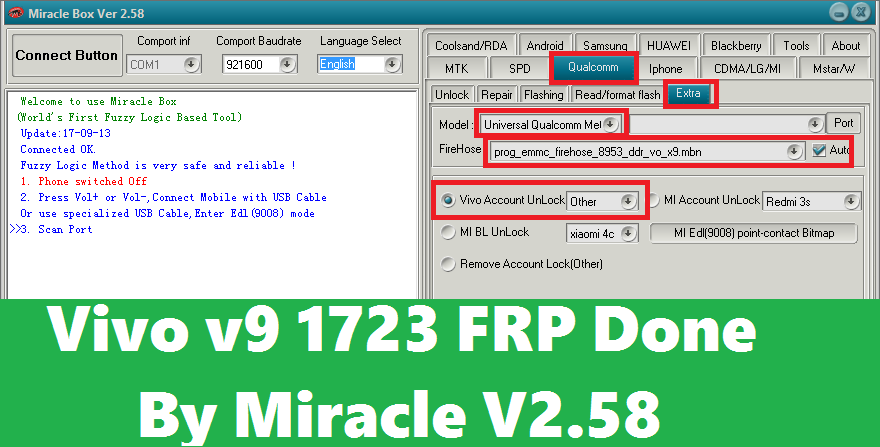
Vivo V9 FRP Unlock Using Free Miracle Box:
  • Download Free Miracle Box Software (100% working without box) Link given below.
  • Open Miracle Box Tool and Go To Qualcomm Tab.
  • Now click on Extra Tab, then select Vivo Account Unlock Others.
  • Click on Start Button and connect the phone with EDL Mode.
  • Hold Both Volume Keys and insert USB Cable for EDL Mode.
  • Download Free Miracle Box Software Download Link
Vivo v9 1723 FRP Done By Miracle V2.58
How To Reset Passcode Vivo V9?

To reset passcode or password of Vivo V9, you can use any one of the above solution, you can either flash the phone with Vivo flash tool and firmware or use the Miracle Box procedure to unlock the phone. After unlock it will not ask for any frp lock or to enter the Gmail Id and password previously used on the phone.

Vivo V9 Stock Firmware Download Here

Vivo V9 Stock Firmware with Flash Tool
 

File Name: Vivo_V9_1.8.8_QFIL_28032018.zip
File Size: 3 GB
Vivo V9 Firmware Link: Click Here To Start Download


Vivo V9 PD1730F Firmware Download
 

File Name: Vivo_V9_PD1730F_MSM8953_EX_A_1.8.8_LA.UM.6.6.r1-03400-89XX.0_QFIL.zip
File Size: 3.5 GB
Vivo V9 PD1730F Firmware Link: Click Here To Download
 

Fastboot Firmware For Vivo V9 and V9 Youth

Fastboot Firmware Vivo V9 PD1730F


PD1730F_EX_A_1.8.8_vivo_qcom_LA.UM.6.6.r1-03400-89xx.0_msm8953.tar.gz
Type: ROM Size: 3.4GB
Firmware Link: Download Here


PD1730F_EX_A_1.7.10_vivo_qcom_LA.UM.6.6.r1-03400-89xx.0_msm8953.tar.gz
Type: ROM Size: 3.4GB
Firmware Link: Download Here


PD1730F_EX_A_1.7.6_vivo_qcom_LA.UM.6.6.r1-03400-89xx.0_msm8953.tar.gz
Type: ROM Size: 3.4GB
Firmware Link: Download Here


Fastboot Firmware Download For Vivo V9 Youth PD1730BF
 
PD1730BF_EX_A_1.3.12_vivo_qcom_LA.UM.6.6.r1-03400-89xx.0_msm8953.tar.gz
Type: ROM Size: 3.1GB 

Firmware Link: Download Here

QFIL Firmware Vivo V9 PD1730F and V9 Youth PD1730BF

QFIL Firmware Vivo V9 PD1730F

PD1730F_EX_A_1.8.8_vivo_qcom_LA.UM.6.6.r1-03400-89xx.0_msm8953_split.tar.gz
Type: ROM Size: 3.4GB

Firmware Link: Download Here

PD1730F_EX_A_1.7.10_vivo_qcom_LA.UM.6.6.r1-03400-89xx.0_msm8953_split.tar.gz
Type: ROM Size: 3.4GB
Firmware Link: Download Here


PD1730F_EX_A_1.7.6_vivo_qcom_LA.UM.6.6.r1-03400-89xx.0_msm8953_split.tar.gz
Type: ROM Size: 3.4GB
Firmware Link: Download Here


Fastboot Firmware Vivo V9 Youth PD1730BF

PD1730BF_EX_A_1.3.12_vivo_qcom_LA.UM.6.6.r1-03400-89xx.0_msm8953_split.tar.gz
Type: ROM Size: 3.2GB
Firmware Link: Download Here


Firmware Credit:- FIRMWARE27

Wednesday, May 30, 2018

[Solved] SM-G570F Galaxy J5 Prime (May 2018 Patch) FRP Unlock


Do you face Custom Binary Blocked by frp error on Galaxy J5 prime or want to update firmware of the phone to latest one or want to know how to bypass frp lock on Samsung G570F or need to download this phone firmware or want to know frp bypass on J5 prime having latest Android operating system, if so then you are in right place where you will know the complete process of how to unlock frp lock on Samsung J5 Prime. The J5 Prime frp unlock can be done without using Combination file, frp unlock file or using any frp bypass APK and if you use combination file or frp unlock file sometimes the phone may not boot up and if you use frp bypass apk method, which also not work on Samsung J5 prime having Android 7.0 with security patch level 1 May 2018, but after following this frp unlock tutorial, you can easily remove frp lock of the phone, please have patience and go through the entire tutorial below.

Steps Must Be Follow To Unlock FRP

Steps:
1) Download SM-G570F Firmware and Flash the phone Using ODIN3 
2) Download Miracle Box Flash Tool (Working Without Box)
3) Watch the Video Tutorial How to Enable USB Debugging.

How to Unlock SM-G570F Galaxy J5 Prime May 2018 Patch FRP Lock - 100% Working Solution Here
SM-G570F FRP Unlock Process Android 7.0:

So we got the basic steps through which the phone can be frp unlocked. Please follow the below described process to flash, USB debugging enable and frp unlock on Samsung J5 Prime. So you can unlock J5 Prime frp unlock in 3 steps. such as flash the phone with firmware which helps to enable ADB or USB debugging easily and download free frp tool 2018, which helps to bypass or reset the frp lock and the final one is watch the video on YouTube to know how to enable USB debugging on locked Android smartphone.

1) Flash SM-G570F Galaxy J5 Prime With FRP Firmware:

So here is the first step you need to follow, which is download J5 prime firmware and flash tool and flash the phone, you can ask why we called it FRP Bypass firmware and the answer is, this is an normal firmware and as after flashing with this we can enable USB debugging, we called FRP Unlock or Bypass Firmware. As you know if you try to enable USB debugging using calculator method on J5 prime having Android 7.0 with Android security patch level 1 May 2018, then it will not work, that means if you open the calculator and execute the ADB enable code the phone Calculator got closed. But after flashing with this firmware you can use the same method to enable ADB and the good thing about this firmware is you will not get any custom binary blocked error while flashing with ODIN3, so let's download the firmware and flash the phone.
How To Flash J5 Prime SM-G570F Android 7.0 Using Odin
SM-G570F Firmware Latest Android Version | Download Here

2) Miracle Box Flash Tool Working Without Box:

Now download Miracle box flash tool which works without any hardware box or Miracle dongle, using this tool we can reset frp of J5 prime. After flashing the phone using the above firmware enable USB debugging (Please watch the Video link given below) and the use the tool to unlock or bypass or reset frp lock on J5 prime Android 7.0 with experience version Android 8.0.
SM-G570F 1 May 2018 Patch FRP Done With Miracle Box
Miracle Box Flash Tool Working Without Box | Download Link

3) Watch the Video Tutorial To Know How To Enable ADB?

Now watch the video tutorial to know how you can easily enable ADB or USB debugging using calculator method, please visit the below link.

J5 Prime Android 7.0 Enable USB Debugging | Video Tutorial Here

Firmware Required To Download:

G570FXXU1BQL2 OJV1BRA1 4Files Firmware
Model: Samsung Galaxy J5 Prime SM-G570F
OS Version: Android 7.0 Nougat
PDA/AP Version: G570FXXU1BQL2
MODEM/CP Version: G570FXXU1BQI6
CSC Version: G570FOJV1BRA1
Security Patch Level : 1 December 2017

Contents Of File:

AP_G570FXXU1BQL2_CL12687762_QB16110527_REV00_user_low_ship_meta.tar.md5
BL_G570FXXU1BQL2_CL12687762_QB16110527_REV00_user_low_ship.tar.md5
CP_G570FXXU1BQI6_CL644522_QB7584828_SIGNED.tar.md5
CSC_OJV_G570FOJV1BRA1_CL12873785_QB16504023_REV00_user_low_ship.tar.md5
HOME_CSC_OJV_G570FOJV1BRA1_CL12873785_QB16504023_REV00_user_low_ship.tar.md5

SM-G570F Galaxy J5 Prime (May 2018 Patch) FRP Unlock
  • First Flash the phone with Firmware (Download link given above)
  • Then watch the video to enable USB debugging and enable it, which called Use Calculator Method To Enable USB Debugging (Video Link given above)
  • Now Download Miracle Box FRP Unlock Tool (Link given above)
  • Open Miracle box and go to Android Tab, then ADB(extra).
  • Now choose or select Samsung FRP Reset and click on Start button.
  • After frp lock removed OK the phone will reboot and you are done.
Important: After frp reset hard reset the phone using phone settings, if you are unable to see the home screen then drag the screen from top to see Settings icon and click on it. While do factory reset it's very important to enable Developer Mode and then enable OEM unlock.

📚 You May Also Like to Read