Showing posts with label Flash Tools. Show all posts

Sunday, December 19, 2021

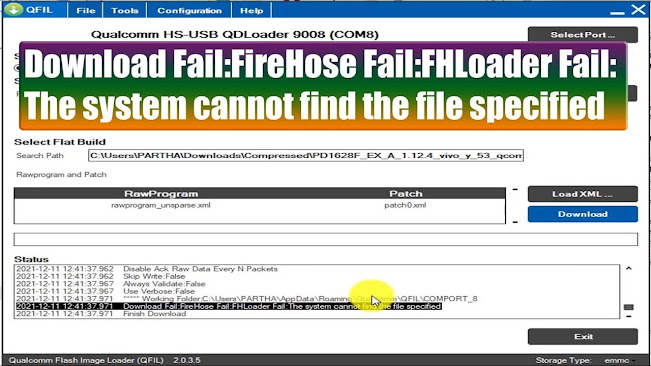
Download Fail:FireHose Fail:FHLoader Fail:The system cannot find the file specified


 Hi all, if you are facing this error while flashing using QFIL "Download Fail:FireHose Fail:FHLoader Fail:The system cannot find the file specified" then please follow the steps in the Video link given below.
Download Fail:FireHose Fail:FHLoader Fail:The system cannot find the file specified


Watch the Video Tutorial Here

https://youtu.be/IxDzvRnB7fY


Download the QFIL/QPST Tool Below

https://www.freecomputertricks.in/2021/12/qfil-setup-download.html


Flash Log:

2021-12-11 12:42:55.492    ***** Working Folder:C:\Users\PARTHA\AppData\Roaming\Qualcomm\QFIL\BHI

2021-12-11 12:42:55.492    Validating Application Configuration

2021-12-11 12:42:55.501    Load APP Configuration

2021-12-11 12:42:55.521    COM:8

2021-12-11 12:42:55.521    PBLDOWNLOADPROTOCOL:0

2021-12-11 12:42:55.521    PROGRAMMER:True

2021-12-11 12:42:55.521    PROGRAMMER:C:\Users\PARTHA\Downloads\Compressed\PD1628F_EX_A_1.12.4_vivo_y_53_qcom_LA.UM.5.3-02910-89xx.0_msm8937_split\prog_emmc_firehose_8917_ddr.mbn

2021-12-11 12:42:55.521    RESETSAHARASTATEMACHINE:False

2021-12-11 12:42:55.521    SAHARAREADSERIALNO:False

2021-12-11 12:42:55.521    SEARCHPATH:C:\Users\PARTHA\Downloads\Compressed\PD1628F_EX_A_1.12.4_vivo_y_53_qcom_LA.UM.5.3-02910-89xx.0_msm8937_split

2021-12-11 12:42:55.521    RAWPROGRAM:

2021-12-11 12:42:55.521    rawprogram_unsparse.xml

2021-12-11 12:42:55.521    PATCH:

2021-12-11 12:42:55.521    patch0.xml

2021-12-11 12:42:55.521    ACKRAWDATAEVERYNUMPACKETS:False

2021-12-11 12:42:55.521    ACKRAWDATAEVERYNUMPACKETS:100

2021-12-11 12:42:55.521    MAXPAYLOADSIZETOTARGETINBYTES:False

2021-12-11 12:42:55.521    MAXPAYLOADSIZETOTARGETINBYTES:49152

2021-12-11 12:42:55.521    ACTIVEBOOTPARTITION:False

2021-12-11 12:42:55.521    ACTIVEBOOTPARTITION:0

2021-12-11 12:42:55.521    PHYPARTITIONS:False

2021-12-11 12:42:55.521    PHYPARTITIONS:0

2021-12-11 12:42:55.521    DEVICETYPE:emmc

2021-12-11 12:42:55.521    PLATFORM:8x26

2021-12-11 12:42:55.521    VALIDATIONMODE:0

2021-12-11 12:42:55.521    RESETAFTERDOWNLOAD:False

2021-12-11 12:42:55.521    SWITCHTOFIREHOSETIMEOUT:30

2021-12-11 12:42:55.521    RESETTIMEOUT:200

2021-12-11 12:42:55.521    RESETDELAYTIME:2

2021-12-11 12:42:55.521    METABUILD:

2021-12-11 12:42:55.521    METABUILD:

2021-12-11 12:42:55.521    FLATBUILDPATH:C:\

2021-12-11 12:42:55.521    FLATBUILDFORCEOVERRIDE:True

2021-12-11 12:42:55.521    QCNPATH:C:\Temp\00000000.qcn

2021-12-11 12:42:55.521    QCNAUTOBACKUPRESTORE:False

2021-12-11 12:42:55.521    SPCCODE:000000

2021-12-11 12:42:55.521    ENABLEMULTISIM:False

2021-12-11 12:42:55.521    AUTOPRESERVEPARTITIONS:False

2021-12-11 12:42:55.521    PARTITIONPRESERVEMODE:0

2021-12-11 12:42:55.521    PRESERVEDPARTITIONS:0

2021-12-11 12:42:55.521    PRESERVEDPARTITIONS:

2021-12-11 12:42:55.521    ERASEALL:False

2021-12-11 12:42:55.521    Load ARG Configuration

2021-12-11 12:42:55.541    Validating Download Configuration

2021-12-11 12:42:55.541    Search path not exist, ignored: C:\Users\PARTHA\Downloads\Compressed\PD1628F_EX_A_1.12.4_vivo_y_53_qcom_LA.UM.5.3-02910-89xx.0_msm8937_split

2021-12-11 12:42:55.541    Invalid programmer path, ignored: C:\Users\PARTHA\Downloads\Compressed\PD1628F_EX_A_1.12.4_vivo_y_53_qcom_LA.UM.5.3-02910-89xx.0_msm8937_split\prog_emmc_firehose_8917_ddr.mbn

2021-12-11 12:42:56.341    Process Index:0

2021-12-11 12:42:56.361    Qualcomm Flash Image Loader (QFIL) 2.0.3.5

2021-12-11 12:43:02.882    Programmer Path:C:\Flash\PD1628F\prog_emmc_firehose_8917_ddr.mbn

2021-12-11 12:43:02.882    Image Search Path: C:\Flash\PD1628F

2021-12-11 12:43:06.242    Image Search Path: C:\Flash\PD1628F

2021-12-11 12:43:06.261    RAWPROGRAM file path: C:\Flash\PD1628F\rawprogram_unsparse.xml

2021-12-11 12:43:06.261    PATCH file path:C:\Flash\PD1628F\patch0.xml

2021-12-11 12:43:17.182    Start Download

2021-12-11 12:43:17.191    Program Path:C:\Flash\PD1628F\prog_emmc_firehose_8917_ddr.mbn

2021-12-11 12:43:17.196    ***** Working Folder:C:\Users\PARTHA\AppData\Roaming\Qualcomm\QFIL\COMPORT_8

2021-12-11 12:44:08.801    Binary build date: Jun 25 2019 @ 03:16:15

2021-12-11 12:44:08.801    QSAHARASERVER CALLED LIKE THIS: 'C:\Users\PARTHA\Downloads\Compressed\Qualcomm_Flash_Image_Loader_v2.0.3.5\QSaharaServer.ex'Current working dir: C:\Users\PARTHA\AppData\Roaming\Qualcomm\QFIL\COMPORT_8

2021-12-11 12:44:08.816    Sahara mappings:

2021-12-11 12:44:08.816    2: amss.mbn

2021-12-11 12:44:08.822    6: apps.mbn

2021-12-11 12:44:08.822    8: dsp1.mbn

2021-12-11 12:44:08.827    10: dbl.mbn

2021-12-11 12:44:08.827    11: osbl.mbn

2021-12-11 12:44:08.827    12: dsp2.mbn

2021-12-11 12:44:08.832    16: efs1.mbn

2021-12-11 12:44:08.832    17: efs2.mbn

2021-12-11 12:44:08.832    20: efs3.mbn

2021-12-11 12:44:08.832    21: sbl1.mbn

2021-12-11 12:44:08.832    22: sbl2.mbn

2021-12-11 12:44:08.832    23: rpm.mbn

2021-12-11 12:44:08.832    25: tz.mbn

2021-12-11 12:44:08.832    28: dsp3.mbn

2021-12-11 12:44:08.832    29: acdb.mbn

2021-12-11 12:44:08.832    30: wdt.mbn

2021-12-11 12:44:08.832    31: mba.mbn

2021-12-11 12:44:08.832    13: C:\Flash\PD1628F\prog_emmc_firehose_8917_ddr.mbn

2021-12-11 12:44:08.832    

2021-12-11 12:44:08.832    12:44:08: ERROR: function: rx_data:246 Error occurred while reading from COM port

2021-12-11 12:44:08.841    

2021-12-11 12:44:08.841    12:44:08: ERROR: function: sahara_main:982 Sahara protocol error

2021-12-11 12:44:08.841    

2021-12-11 12:44:08.841    12:44:08: ERROR: function: main:320 Uploading  Image using Sahara protocol failed

2021-12-11 12:44:08.841    

2021-12-11 12:44:08.841    

2021-12-11 12:44:08.841    Download Fail:Sahara Fail:QSaharaServer Fail:Process fail

2021-12-11 12:44:08.846    Finish Download

2021-12-11 12:45:28.363    Start Download

2021-12-11 12:45:28.363    Program Path:C:\Flash\PD1628F\prog_emmc_firehose_8917_ddr.mbn

2021-12-11 12:45:28.374    ***** Working Folder:C:\Users\PARTHA\AppData\Roaming\Qualcomm\QFIL\COMPORT_8

2021-12-11 12:45:28.623    Binary build date: Jun 25 2019 @ 03:16:15

2021-12-11 12:45:28.629    QSAHARASERVER CALLED LIKE THIS: 'C:\Users\PARTHA\Downloads\Compressed\Qualcomm_Flash_Image_Loader_v2.0.3.5\QSaharaServer.ex'Current working dir: C:\Users\PARTHA\AppData\Roaming\Qualcomm\QFIL\COMPORT_8

2021-12-11 12:45:28.634    Sahara mappings:

2021-12-11 12:45:28.644    2: amss.mbn

2021-12-11 12:45:28.644    6: apps.mbn

2021-12-11 12:45:28.644    8: dsp1.mbn

2021-12-11 12:45:28.644    10: dbl.mbn

2021-12-11 12:45:28.649    11: osbl.mbn

2021-12-11 12:45:28.649    12: dsp2.mbn

2021-12-11 12:45:28.649    16: efs1.mbn

2021-12-11 12:45:28.649    17: efs2.mbn

2021-12-11 12:45:28.654    20: efs3.mbn

2021-12-11 12:45:28.654    21: sbl1.mbn

2021-12-11 12:45:28.654    22: sbl2.mbn

2021-12-11 12:45:28.654    23: rpm.mbn

2021-12-11 12:45:28.654    25: tz.mbn

2021-12-11 12:45:28.654    28: dsp3.mbn

2021-12-11 12:45:28.654    29: acdb.mbn

2021-12-11 12:45:28.654    30: wdt.mbn

2021-12-11 12:45:28.663    31: mba.mbn

2021-12-11 12:45:28.663    13: C:\Flash\PD1628F\prog_emmc_firehose_8917_ddr.mbn

2021-12-11 12:45:28.663    

2021-12-11 12:45:28.663    12:45:28: Requested ID 13, file: "C:\Flash\PD1628F\prog_emmc_firehose_8917_ddr.mbn"

2021-12-11 12:45:28.663    

2021-12-11 12:45:28.663    12:45:28: 328972 bytes transferred in 0.187000 seconds (1.6777MBps)

2021-12-11 12:45:28.663    

2021-12-11 12:45:28.663    

2021-12-11 12:45:28.663    

2021-12-11 12:45:28.663    12:45:28: File transferred successfully

2021-12-11 12:45:28.663    

2021-12-11 12:45:28.663    

2021-12-11 12:45:28.673    NOTE: Target requested image 13 which is DeviceProgrammer. Forcing QUIT. This is by design, ** All is well ** SUCCESS!!

2021-12-11 12:45:28.673    

2021-12-11 12:45:28.673    

2021-12-11 12:45:28.673    12:45:28: Sahara protocol completed

2021-12-11 12:45:28.673    Sending Programmer Finished

2021-12-11 12:45:28.673    Switch To FireHose

2021-12-11 12:45:28.673    Wait for 3 seconds...

2021-12-11 12:45:31.683    Max Payload Size to Target:49152 Bytes

2021-12-11 12:45:31.687    Active Boot Partition:0

2021-12-11 12:45:31.687    Device Type:emmc

2021-12-11 12:45:31.693    Platform:8x26

2021-12-11 12:45:31.693    Disable Ack Raw Data Every N Packets

2021-12-11 12:45:31.693    Skip Write:False

2021-12-11 12:45:31.693    Always Validate:False

2021-12-11 12:45:31.693    Use Verbose:False

2021-12-11 12:45:31.703    ***** Working Folder:C:\Users\PARTHA\AppData\Roaming\Qualcomm\QFIL\COMPORT_8

2021-12-11 12:45:31.703    Download Fail:FireHose Fail:FHLoader Fail:The system cannot find the file specified

2021-12-11 12:45:31.703    Finish Download

2021-12-11 12:47:05.403    Image Search Path: C:\Flash\PD1628F

2021-12-11 12:47:05.403    RAWPROGRAM file path: C:\Flash\PD1628F\rawprogram_unsparse.xml

2021-12-11 12:47:05.403    PATCH file path:C:\Flash\PD1628F\patch0.xml


Thursday, December 16, 2021

QFIL Setup Download - Download Qualcomm Flash Image Loader (QFIL) Latest 2022


 Here you can download the Qualcomm Flash Image Loader (QFIL) to flash Android smartphones, Please download the Qualcomm Flash Image Loader (QFIL) or QPST Tool - Qualcomm Product Support Tools (QPST). Download the QFIL setup file and install it on your computer.

QFIL Setup Download


Procedure:

Download the QPST Tool - Qualcomm Product Support Tools (QPST) and install the software on your Computer and go to the installed folder or location then open the Qualcomm folder ---> QPST ----->bin---->then open QFIL and flash your Qualcomm Android smartphone.

Builds\Release\Installers\QPST.2.7.496.1.exe and Qualcomm USB Driver V1.0


DOWNLOADS

QPST.2.7.496.1 ------------- Download Link


Download and install the QPST then run QFIL


Thursday, October 21, 2021

Download SPD_Research_Tool_R4.0.0001 For Spreadtrum/SPD Chipset Phones


 SPD_Research_Tool_R4.0.0001, Download SPD_Research_Tool_R4.0.0001 For Spreadtrum/SPD Chipset Phones, You can flash all smartphones which has SPD or Spreadtrum chipset, So download the flash tool and enjoy.


Download SPD Research Tool R4.0.0001 For Micromax Smart Phone

Micromax Q402+ Flash Tool

Micromax SPD Flash Tool


MediaFire Link

 SPD_Research_Tool_R4.0.0001

Google Drive Link

SPD_Research_Tool_R4.0.0001

Sunday, December 22, 2019

D&G Unlocker Tool - Free FRP/Google Account Bypass Tool 2020


Download one of the best Free FRP unlock/bypass tool for all the Android smartphones and tablets. D&G Unlocker Tools All in one FRP Lock Bypass is the best and all in one FRP bypass tool for android. Using this tool you can remover FRP lock from Samsung, Lenovo, Xiaomi, Moto, Huawei, HTC, Yuphoria, and all other android devices. Here you can get the latest version of D&G Unlocker Tools All FRP Lock Bypass has been released and you can download it's full setup installer file from the direct download link given in this post.

Free Download D&G Unlocker Tool - Free FRP/Google Account Bypass Tool 2020

If you need to download D&G Unlocker Tools All FRP Lock Bypass, then here is the link please check it below and it's completely free to download and it's also user friendly interface which make this easy to use. So please click on the download D&G Unlocker Tool RAR link below

Download D&G Unlocker Tools RAR


Monday, July 8, 2019

LG_2-3G_Tool_9_60.Exe and LG_2-3G_Tool_9_61.Exe Download


Z3x LG tool download latest setup exe here. So friends if you have Z3x LG tool then download and install the latest version of LG 2G 3G Tool here to get latest features from the z3x team developers. You can also use z3x shell to download the latest version of LG tool and here you can download LG tool setup without z3x shell.
z3x LG 2G 3G Tool Download Latest Setup

If open z3x shell you will find the following software:

LG_2-3G_Tool_9_56.Exe
8 Months Ago
80.41 Mb
10k


LG_2-3G_Tool_9_57.Exe
8 Months Ago
80.40 Mb
6k


LG_2-3G_Tool_9_58.Exe
8 Months Ago
81.29 Mb
6k


z3x lg2-3g tool - z3x shell

LG_2-3G_Tool_9_59.Exe
8 Months Ago
81.33 Mb
44k


LG_2-3G_Tool_9_60.Exe
4 Months Ago
81.37 Mb
30k


LG_2-3G_Tool_9_61.Exe
2 Months Ago
81.13 Mb
19k


LG_2-3G_Tool_9_62.Exe
3 Weeks Ago
81.12 Mb
12k


LG_Sgold3_Tool_3.7.1.4_fix.Exe
5 Years Ago
21.49 Mb
328k


MTK Smart V2.6.1.4.Exe
3 Years Ago
31.05 Mb
136k


DOWNLOAD LG_2-3G_TOOL

Download LG_2-3G_Tool_9_60.Exe | Download Link


Download LG_2-3G_Tool_9_61.Exe | Download Link

Sunday, July 7, 2019

MRT Key New Update Version 3.21 Download Here (4th July, 2019*)


Hi friends, welcome to Free Computer Tricks website, if you have MRT dongle then here the MRT Key New Update Version 3.21 Download and install to get latest features to flash phones.

Download MRT Key Update v3.21 - Free Download Direct Link

MRT KEY Ver 3.21 New update (vivo MTK 6765 cpu and huawei 8A 9E add) - 4/7/2019

Download Links

Download MRT KEY V3.21 Google Drive Link
Download MRT Key v3.21 MShared Link

Download MRT Key v3.21 Android File Host Link

Friday, May 17, 2019

SP FLash Tool V5.1904 : Latest Versions 2019 Free Download Here


Download Latest version SP Flash Tool or Smart Phone Flash Tool Here. Latest version of SP Flash Tool For MediaTek (MTK) Firmware Flashing, Download Latest Version 2018-2019 SP Flash Tools.

Hi friends, here is the latest and all updated links to download SP Flash Tool. 

Download SP Flash Tool V5.1904 - Smart Phone Flash Tool

Download SP Flash Tool V5.1904 
Smart Phone Flash Tool Version 5.1904

Download SP Tool V5.1904 | Download Link Here

Miracle Box Crack v2.58 100% Working Without Box


Here you can download Miracle box crack or Miracle box loader free and direct download link available, so please visit here to download Miracle box v2.58 cracked with loader working without box. Miracle box FRP unlock, password unlock, flashing and mi account unlock etc.

Download miracle box full crack 2019, working without box.
Miracle box crack v2.58 free download


Miracle Box crack v2.58 download free with loader and 100% working

Miracle Box v2.58 Mega Download Link | Download Here

Miracle Box v2.58 Mediafire Download Link | Download Here
(Password = fct@computer)

Monday, May 13, 2019

Miracle Motorola v2.03 Tool | Miracle Moto v2.03 Thunder Edition 8th May 2019


Miracle Motorola v2.03 Tool | Miracle Moto v2.03 Thunder Edition 8th May 2019
Version 2.03 Miracle Thunder Edition
Released on 08th May 2019


Free For Huawei Pack Users
Free For FRP Pack Users.
Free For Miracle FRP Dongle.

1. Add Motorola OTA Update Downloader.
2. Add Auto Update Tools.
3. Fix Some Bugs.
4. Add Network Repair.

Moto Thunder Tool Free Download v2.03

5.Supported Model List:
Motorola XT-1068
Motorola XT-1541
Motorola XT-1550
Motorola XT-1562
Motorola XT-1602
Motorola XT-1609
Motorola XT-1622
Motorola XT-1635
Motorola XT-1640
Motorola XT-1642
Motorola XT-1643
Motorola XT-1650
Motorola XT-1675
Motorola XT-1676
Motorola XT-1677
Motorola XT-1684
Motorola XT-1686
Motorola XT-1767
Motorola XT-1794
Motorola XT-1801
Motorola XT-1803


Setup_Miracle_Moto_Tool_2.03.exe

Download Miracle Moto Thunder Tool v2.03 | Download Here

Wednesday, November 21, 2018

King Tool Latest Full Crack Setup and Keygen Download For SamSung - LG - Xiaomi - Oppo Unlock and Software Repair Tool


King Dung Tool Crack setup 2018 and working as tested, so here is the tool you can download and use to flash and unlock Android smartphone. The King Tool supports Samsung, LG, Xiaomi and Oppo phone to unlock, FRP reset, Factory Reset, Bootloader unlock and many more things. 
https://www.freecomputertricks.in/

For Google account unlock and FRP reset and Password/Pin unlock, this free GSM unlock tool is very useful. To download this tool please go through this topic to get the download link of Android latest version unlock tool and free download King Dung Tool Crack setup with full feature working.


Free King Tool V1.0 Crack Setup and Keygen Download For SamSung - LG - Xiaomi - Oppo Unlock and Software Repair Tool.

King Dung Tool Crack Download:
King Tool v1.0 crack setup direct download link | Download Link 1
King Tool v1.0 crack setup direct download link | Download Link 2

Free King Tool V1.0 Crack Setup and Keygen Download For SamSung - LG - Xiaomi - Oppo Unlock and Software Repair Tool
Samsung:
Exynos CPU :- Make Dual SIM, Unlock Exynos, MSL Reset, Write Cert, Write Cert UART
Qualcomm :-  King Unlock/Write xSEC/Read QCN/Write QCN/Read Code
Remove Please Call Me: Remove on D/L and Remove On TWRP
Kings KNOX/MDM: Remove on D/L
All Samsung: Bypass FRP/Read Info/Reboot D/L/Recovery

LG:
Read Info/Read QCN/Write QCN/Read SEC/ Write SEC/wipe SEC Zone
LG Sprint: King Unlock Sprint/ Disable Hands Free Activation/ Read MSL/SPC
IMEI Tools, IMEI/MEID Repair, Download Mode, Normal Mode, Remove Google Account

LG Features:

- LG ReadInfo COM
- FRP Reset
- LG IMEI Repair
- LG Backup/Restore/Reset Security
- LG Read/Write QCN
- LG Sprint Unlock
- LG Read SPC/MSL
- Disable Hands Free Activation
- Reboot DownloadMode
- Reboot Out DownloadMode
Support All LG 2015-2018 series

Xiaomi:
Read Info
Mi Bypass Tools: BYpass FRP (ADB) / Remove Mi Cloud (ADB)
QCN Tools: Read QCN / Write QCN
IMEI Tools: MEID Repair / IMEI Write
Reboot Tools: Recovery / Unlock Bootloader ? Sysytem / Reboot EDL


Xiaomi Features:

- Xiaomi Read Info
- FRP Reset
- Xiaomi IMEI Repair
- Reboot to EDL Mode
- Remove Mi Account
- Read/Write QCN
- Unlock Bootloader (SuperFast)


OPPO:
Read Info
King Tools: Unlock Networks / WIPE Security Oppo
QCN Tools: Read QCN / Write QCN
Misc Tools: Enable Diagnostic Port / Disable Update OTA

Tuesday, November 13, 2018

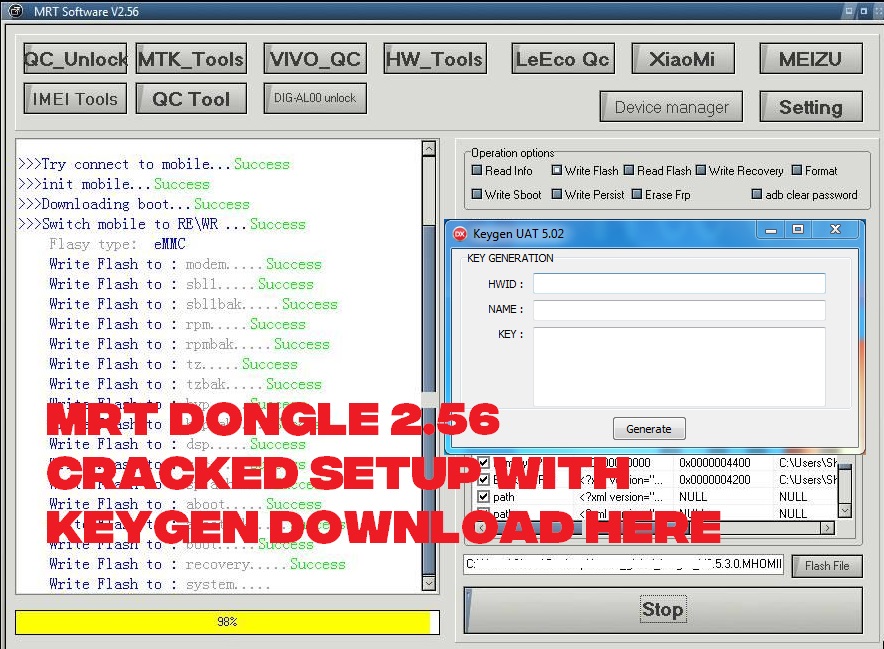
MRT Dongle 2.56 Cracked Setup With KeyGen Download Here


MRT dongle software version 2.56, you can use this tool or Windows software without the MRT dongle and this version is working fine for flashing and unlocking any latest Android smartphones. So download the free Android unlock tool which supports all most all new devices from VIVO, OPPO, MICROMAX, XOLO, IBALL, ONEPLUS AND SAMSUNG, along with all Qualcomm, MTK and Spreadtrum CPU based phone unlocking and flashing. This tool is very useful for Reset or Bypass Factory Reset Protection (FRP) or Google account verification, so here is the free download link for MRT Dongle 2.56 with key gen.

How to Install MRT Software 2.56?
  • Download the software and key gen from the link given below.
  • Unzip the software using the password provided.
  • Now Open the MRT 2.56 Crack Setup and Install it using the Installation Password given in Setup Pass.txt inside the folder.
  • Now Open MRT_2.56 Crack and copy the HWID and Use the KeyGen to generate key.
  • Now copy and paste the key in the activation window.
  • Now Open the MRT_2.56 Crack.exe and it will work fine.
MRT Dongle Key Crack and KeyGen

MRT Dongle Key Crack and KeyGen Use?

This tool is used for unlocking and flashing Android smartphones. Using this version or MRT dongle also supports various devices to unlock FRP, Repair IMEI and it can also fixed all other Mobile software issues. This too is very use full for VIVO and OPPO FRP unlock, flashing and Hard Reset and which supports VIVO and OPPO both Qualcomm and MediaTek CPU to Unlock and Reset.
 
MRT 2.56 Crack Setup+Keygen Download Free

MRT Flash and Unlock Tool 2.56 Download:

Download MRT Dongle 2.56 Setup + KeyGen | Download Link
Password for zip file = FCT@mrt256

Download free Android flash tool and frp unlock tool crack software with loader or keygen, free download of MRT flash and unlock tool without dongle with activation key.

Monday, November 5, 2018

Download Samsung Z3X Pro Latest Version Working Without Box - Z3X 29.5 With LOADER


Hi friends, here is the anther tutorial from Free Computer Tricks, in this topic you will get the download link of Samsung z3x pro version working without box with loader. As you all know the z3x box or z3x pro box is one of the most popular software repair box for all Samsung basic and smartphones. So if you need to repair Samsung Android IMEI, Unlock Samsung phone, Samsung FRP Unlock and along with that you can fix many more software issues of the phone. Here is the free z3x pro software which works without box and 100% working loader with test report.
Samsung Z3X Pro New Working Without Box - Download Free

Here you can download Z3x pro tool free and 100% working, download z3x 29.5 with loader, as you know z3x pro v29.5 has most advance feature which helps to unlock/repair imei/FRP unlock/read write flash file etc. of all most all Samsung Android phone. To download z3x pro 29.5 with crack loader please visit the below link and to know about the supported device and feature please go through the topic.

FLASH INSTRUCTIONS:

1. Choose correct flash file(s).
2. If you have PIT file chosen, then you must check "Repartition" option.
3. Check flashing options if needed (Repartition, EFS clear, Boot update).
4. Power on the phone in download mode (turn off phone, hold Volume Down + Home + Power).
5. Connect the phone to PC with USB cable, install drivers if needed.
6. Press "Flash" button.

BACKUP INSTRUCTIONS:

Phone must be rooted!
If the software can't root the phone automatically, 
then you must root your device manually.

1. Power on the phone.
2. Tap 7 times on "Build number" in "Settings"-"About phone" to enable "Developer options", go to "Settings"-"Developer options" and enable "USB debugging".
3. Connect the phone to PC with USB cable, install drivers if needed.
4. Select device in ADB settings.
5. Press "Read EFS" button to read backup or "Write EFS" to restore or press "Write CERT" to restore certificates.

To backup/restore QCN, phone diagnostic port must be enabled.

  1. Power on the phone.
  2. Type *#0808# and select "DM+MODEM+ADB".
  3. Type *#9090# and select "DM/DUN over HSIC".
  4. Connect the phone to PC with USB cable, install drivers if needed.
  5. Select diagnostic port in port settings.
  6. Press "Read QCN" button to read NV backup or "Write QCN" to restore.

 
Samsung Z3X Pro -  Z3X 29.5 With LOADER

UNLOCK INSTRUCTIONS:

Micro-USB cable:

  1. Phone must be powered on.
  2. Type *#0808# and select "DM+MODEM+ADB".
  3. Type *#9090# and choose USB (or "DM/DUN over HSIC").
  4. Reboot phone.
  5. Connect USB cable, install drivers if needed.
  6. Select Samsung diagnostic port in port settings.
  7. Press "Unlock" button for direct unlock. 


REPAIR INSTRUCTIONS:

Repair IMEI/Serial/BT/WiFi/Product Code:

  1. Power on the phone.
  2. Type *#0808# and select "DM+MODEM+ADB".
  3. Reboot phone.
  4. Connect USB cable, install drivers if needed.
  5. Select Samsung diagnostic port in port settings.
  6. Press "Reset MSL" button to deactivate security.
  7. Wait till phone reboot.
  8. Tap 7 times on "Build number" in "Settings"-"About phone" to enable "Developer options", go to "Settings"-"Developer options" and enable "USB debugging".
  9. Select device in ADB settings.
  10. Fill values what you need to repair.
  11. Press "Repair" button.


Reset EFS, Disable Factory Mode:

Phone must be rooted!
If the software can't root the phone automatically, 
then you must root your device manually.

1. Power on the phone.
2. Tap 7 times on "Build number" in "Settings"-"About phone" to enable "Developer options", go to "Settings"-"Developer options" and enable "USB debugging".
3. Connect the phone to PC with USB cable, install drivers if needed.
4. Select device in ADB settings.
5. Press "Reset EFS" if you need to reset it.

Be carefully, do not perform this without necessity. Backup will be created automatically.

6. If you have yellow table on your device screen, then press "Disable Factory Mode" button.

Wipe EFS/NVM:

If you have "IMEI null/null" or "Phone baseband unknown" errors,
Then you can try to repair this errors with this function.  

1. Power on the phone in download mode (turn off phone, hold Volume Down + Home + Power).
2. Connect USB cable, install drivers if needed.
3. Press "Wipe EFS/NVM" button to deactivate security.
4. Wait till phone reboot.
 

Download Samsung Z3X Pro Latest Version Working Without Box  -  Z3X 29.5 With LOADER

Download Samsung Tool PRO 29.5 + Loader | Download Link
Password for the zip file is = fct@samtool

How to Use the Tool?
  • Download Z3x pro latest tool and loader from the above link.
  • Extract the zip file using the password given above.
  • Now double click on the Z3X 29.5 LOADER.exe to open.
  • Then click on TRY to open the tool
Watch the YouTube Video Here - Testing Report of Z3x Pro V29.5

Saturday, October 20, 2018

UMT Dongle Pro V3.2 Update Setup Download - Xiaomi Mi Account Relock Issue Solved


Hi friends here is another update from Ultimate Multi Tool (UMT) UMTv2 / UMT Pro - QcFire v3.2 released Minor Update download and Xiaomi Anti Relock Added. So if you are using UMT dongle and need to update to the latest version of the UMT software setup, then here is the solution for this, download the UMT latest update setup as on 11-10-2018 and install on your PC. As you know UMT is one of the most popular flashing box/dongle for latest Android version smartphones and this update can help you remove Mi accounts of new Xiaomi phones with other Android device unlock of Factory Reset Protection (FRP Lock).

So download the UMT v2 or UMT pro dongle full new setup October 2018, QcFire V3.2 to enjoy latest smartphone unlock and flashing. With this update you will get more devices supports Google Factory Reset Protection lock remove, read and write firmware, Reset lock such as Password, Pattern and face lock etc. Xiaomi EDL mode Mi account remove and Xiaomi FRP Reset, Motorola Boot Repair, Boot Loader Unlock EDL mode, Disable Mi account of latest Mi 5 series, Factory reset of Mi phone with sideload mode Mi assistance mode, Reboot to EDL mode from Fastboot Mode and many more options, so download and install UMT dongle pro updates to get the latest features of the flash tool.
UMT Dongle Pro V3.2 Update Setup Download - Xiaomi Mi Account Relock Issue Solved


UMTv2 / UMT Pro - QcFire v3.2 - Minor Update - Xiaomi Anti Relock Added..

UMT Team has announced
UMTv2 / UMT Pro
Innovative and Intelligent


QcFire v3.2
The Ultimate Qualcomm Tool


QcFire supports hundreds of devices more than listed

Supported Functions
- Read / Write Firmware
- IMEI Repair in FTM + Flash Mode (ZTE)
- Backup / Restore QCN (ZTE)
- Backup / Reset / Restore Security (EFS)
- Reset FRP (Google Factory Reset Protection)
- Format UserData
- Read Pattern Lock (Android < 6.0, Un-Encrypted Devices Only)
- Reset Locks (PIN, Password, Pattern w/o Data Loss, Un-Encrypted Devices Only)
- Enable Diag (Need OEM Unlock, May not work on BL Locked Devices)
- Reboot to EDL from Fastboot
- Reset Mi Account for Xiaomi Devices
- Disable Mi Account for Xiaomi Devices
- Factory Reset (sideload Mode) for Xiaomi Devices
- Disable / Restore Locks for Encrypted Userdata
- Motorola Boot Repair
- Xiaomi EDL Locked Device Service
- Bootloader Unlock in EDL Mode for some Xiaomi Devices


Note : Some features are device/brand specific, may not work on all devices.

Added:

Xiaomi Anti Relock Method
- Use Read & Tools > Xiaomi Special > Anti Relock
- You need to connect phone with USB Debugging Enabled.
- It will disable Account Relock on connecting to Internet.
- You will not be able to use Mi Account feature.
- To revert back, just Wipe phone.


It Has Begun...
Keep Following Us...
Some Nice Updates Are On The Way...

WARNING : According to (UMT Gsm Forum)
ESN / MEID / IMEI REPAIR IS INTENDED TO REPAIR ESN / MEID / IMEI TO ORIGINAL ONE WRITTEN ON PHONE BACK LABEL / BOX. THEY DO NOT ENDORSE OR ENCOURAGE ESN / MEID / IMEI CHANGING. ITS ILLEGAL. USER IS SOLE RESPONSIBLE FOR ANY ILLEGAL ACTIVITY DONE WITH USE OF FEATURES PROVIDED IN THEIR SOFTWARE, NOT LIMITED TO ESN / MEID / IMEI.


ANY USER USING THE SOFTWARE FOR ILLEGAL PURPOSE WILL BE SOLE RESPONSIBLE FOR HIS ACTS. AS THE UMT TEAM CONDEMN USE OF THEIR SOFTWARE FOR ANY ILLEGAL PURPOSE.

STATUTORY WARNING - READ CAREFULLY (According to the official support forum)
Using International Edition of our software is prohibited by Indian Law.
We strictly advice you to use Indian Edition if you are in India.
If you use International Edition in India, it may cause legal action against you by local law enforcement agencies.
We will not be liable for any loss or damaged caused.


How to Download UMT Pro Setup Updates:
 

Download UMT Support Access.

or 

Download Mirror - Google Drive and Mega.

Friday, September 14, 2018

[Download] Mi Flash Pro Tool V3.3.703.67


Hi ! Welcome to the website and here is the another interesting and very useful tutorial for end users as well as for the Mobile Technicians, if the need to flash Mi smartphones and Download EDL Mode or Fastboot ROM and Recovery ROM. Here we are sharing the Mi flash pro tool and you can download it here, as this is the pro tool means Mi Flash Tool Professional which has more features then the normal Mi Flash Tool, So let's download the latest MiFlashPro Tool.

If you don’t know about MiFlashPro software/tool, here’s a short description. This tool will help you to flash and restore your Xiaomi smartphone, you can easily download the required ROM using the software interface, flash from recovery mode without unlocking the bootloader. It will work even if forgot the key lock pattern or fingerprint. In my opinion this is an ultimate tool for flashing and recovering Xiaomi devices.
Mi Flash Pro Tool V3.3.703.67 - Xiaomi Mi Flash Pro Tool 2018


Big thanks to Xiaomi for starting the development on Mi Flash Pro, this is a revolution in modifying, flashing and bootloader unlocking. In addition Mi Flash Pro is a universal tool for both MTK and Qualcomm devices. Comes with inbuilt SP FlashTool and Mi Flash software and In order to use MiFlashPro with it’s full feature you must have Mi account.

Here are some interesting features to pay attention to:
  • Download required firmware ROM right from the MiFlashPro.
  • Recovery mode flashing without unlocking the bootloader.
  • Factory reset from Custom ROMs.
  • Fingerprint reset.
  • Always check software for updates! In the latest 3.3.703.67 version we’ve got support for more Xiaomi devices.
Download Mi Flash Pro 3.3.703.67 (Developed by Xiaomi)

~~~~~~~~~~~~~~~~~ DOWNLOAD LINKS ~~~~~~~~~~~~~~~~~

(ADBDriverInstaller.exe)
Qualcomm Drivers | ADB Driver Installer | Download Here

(MTK Driver Auto Installer v5.1453)
MTK Drivers | MTK Driver Auto nstaller | Download Here

Download MiFlashPro Latest Version 2018-2019

MiFlashPro v3.3.703.67 | miflash_pro_en_3.3.703.67_setup.exe

Mi Flash Pro Tool V3.3.703.67 | Download Link 1
Mi Flash Pro Tool V3.3.703.67 | Download Link 2

Friday, August 17, 2018

Xiaomi Mi Flash Tool 2018 - Download Xiaomi Mi Flash Tool Latest Version Here


Xiaomi Redmi Mi Flash Tool is an official flashing tool, which is developed by Xiaomi Inc. for flashing or downloading or upgrading Stock firmware on any Mi Smartphones and Tablets. Xiaomi Flash Tool is very helpful when your device is hanged or bricked or you want to install Stock ROM. To use this tool you need to download Xiaomi Mi Fastboot STOCK ROMs and flash with this tool and it will not work with Recovery ROM or OTA Package.
 
Xiaomi Mi Flash Tool 2018 - Download Xiaomi Mi Flash Tool Latest Version Here

To use this Mi Flash tool you need to have an Windows computer with 32-bit or 64-bit Operating Sysytem. Then download the Mi Latest Flash Tool 2018 from the below link and flash any Xiaomi Mi Android smartphones. 

DOWNLOAD Xiaomi Flash Tool MiFlash v2018.5.28.0
 
Direct Download Links

Xiaomi Flash Tool Mi Flash Tool v2018.5.28.0
 

Download Link 1

Download Link 2

Download Link 3    Log in required


Wednesday, May 30, 2018

Download All Flash Tools Latest Version 2018 - MediaTek, Spreadtrum and Qualcomm


Download all Mobile flash tool latest version 2018 here. To flash smartphone you need to use flash tool to flash/download firmware to the phone. Here we provides latest version of flash tool for MediaTek (MTK), Spreadtrum (SPD) and Qualcomm chip-set based Android smartphone. These flash tools are free and easy to flash or download or upgrade firmware of the phone.

MediaTek flash tool or it's called Smart Phone flash tool in short it's called SP Flash Tool, by using this tool you can flash all most all MTK based Android smartphones. Spreadtrum flash tool has tow different version of flash tool one is Upgrade Download Tool and the other one is Research Download Tool. To flash Qualcomm based smartphone you can use Qualcomm Flash Image Loader or so called QFIL Tool, it also has two different tool one is QFIL Flash Tool and another one is Qualcomm Product Support Tool or so called QPST Tool. Along with these flash tool one more flash tool is very important which can flash .CPB firmware files called YGDP Flash Tool and it supports all the platform such as MediaTek, Qualcomm and Spreadtrum Chipset phones. Please go through this topic to know how to use these Mobile flash tools and download the latest version of Mobile flash tools here.
Download All Flash Tool Latest Version 2018 - MediaTek, Spreadtrum and Qualcomm

SP Flash Tool (MediaTek Flash Tool)

The SP Flash Tool (Smart Phone Flash Tool) is used for flashing, downloading, upgrading and Unlocking Android smartphones runs on MediaTek or MTK Chipset platform. This is a small flash tool comes with zip file and you do not need to install this on your Computer, to use this tool just download and extract it and run SP Flash Tool .exe file directly from the folder. To flash firmware using this tool is very easy, just download any MTK firmware and extract it, then open SP Flash Tool, then load the Scatter.txt file and flash the phone. Download SP Flash Tool Latest version from the below link.

Downloads

SP Flash Tool V5.1816 [SP Flash Tool 2018] SP Flash Tool Latest Version | Download Here

SPD Flash Tool (Spreadtrum Flash Tool)

This tool is specially used for flashing, Upgrading and Unlocking Android smartphones having Spreadtrum Chipset. This flash tool supports .PAC file format, so flash using this tool you need to download SPD flash file and use the Firmware.PAC file with this flash tool and flash the phone. As I said before there are two different version of this flash tool, in some cases if the flashing failed with SPD Upgrade Flash Tool then you can try the SPD Research Download Tool and you will success with that. Download SPD Flash Tool latest version from the below link.

Downloads

Download SPD_Upgrade_Tool_R19.0.0001 (SPD Flash Tool Latest Version Download) | Download Link

Password= fct@2022

Download SPD Research Download Tool Latest Version 2018 | Download Link

Qualcomm Flash Tool (QFIL and QPST Flash Tool)

This tool can be used on Qualcomm Chipset based Android smartphones to flash firmware or Official ROM. 

Downloads

QFIL Latest Flash Tool Download (Qualcomm Flash Tool Latest Version) | Download Link

Download QPST Flash Tool Latest Version 2018 Here | Download Link


YGDP Flash Tool (Universal Flash Tool For All Mobiles)

The YGDP flash tool can be used for flashing MediaTek, Qualcomm and Spreadtrum Chipset based Android smartphones. Yes this flash tool can download/upgrade/flash firmware into these chipset based phones. This flash tool works on some particular MediaTek phones and in that case SP Flash tool can't flash the phone for example Micromax Canvas Nitro A311 which MediaTek MT6592 chipset, can be flash with YGDP Flash Tool using Micromax A311 CPB firmware.

Downloads

Download YGDP Latest Flash Tool 2018 | Download Link

So these are the most useful flash tools you must have to flash various Android smartphones, having Qualcomm, MediaTek and Spreadtrum Chip-set. Download these free Mobile flash tools latest version 2018 and flash your Android smartphones for free.

Sunday, April 22, 2018

MRT Dongle V2.37 Full Working Setup Download


MRT Dongle is a Mobile repair tool for flashing and unlocking Android smart phones. This tool supports for flashing, unlocking frp, password unlock, IMEI repair and bootloader unlock etc. of the Xiaomi, VIVO, Huawei, Coolpad and many more MediaTek MTK chipset.

According to the MRT Dongle Official Site, There are have many features inside the MRT Software, such as : 
  • BK Vivo FRP unlock\imei repair\flash.
  • OPPO FRP unlock\imei repair\flash.
  • HongMi(MTK CPU) unlock password\frp unlock\imei repair\flash.
  • Meizu Phones without Open Mobile phone Flash and Unlock Password \Frp(Account) Remove By One Click
    supported with Aliyun OS system. 
  • Supported with HUAWEI FRP Remove\Unlock Bootloader\ReLock Bootloader
  • LeEco Qualcomm FRP Full Support (account\google id) remove(connect the internet without lock again)
  • Support X800,X800+,X900,X900+ ..
  • Supported all MTK Android Phone Set. Even last chip MT6580 or MTK X10 6753 6752 6595 6795...
  • (old CPU set like MTK 6575 6577 6572 6571 was supported also)
MRT Dongle Latest Setup 2018 V2.37 Full Working Setup Download
DOWNLOAD LINK

Download MRT Dongle V2.37 [Download Link 1] and [Download Link 2]

Wednesday, December 20, 2017

GSM Aladdin Tool Full Working Download Free


In this topic you will know, how to download GSM Aladdin Tool which works without Aladdin dongle. As you know GSM Aladdin is very known flash and unlock tool for all most all Android smart phones and it also support various CPU platform i.e. MTK/MediaTek, Mstar, Spreadtrum, RDA and Qualcomm etc. and it also supports many of the smart phone brands i.e. Samsung, Nokia, Intex, Micromax, Lava, Xolo, Oppo, Vivo, HTC, LG, Allwinner, Huawei, Motorola, Xiaomi Mi, Spice and all other Android devices and Tabs etc.

GSM Aladdin Flash Tool Working Without Dongle Free Download
MediaTek Read Pattern and FRP Unlock:

The GSM Aladdin flash tool supports for read pattern lock and unlock Factory Reset Protection (FRP) on various MediaTek (MTK) Android smart phones, so use this free tool for flashing and unlock of MediaTek phones.

How to Use?

Download GSM Aladdin v2 working without box/dongle and extract the zip file and open the tool and then lick on connect, then you can choose any one of the tabs as per the phone's CPU and brand, then choose the function you want to execute and then click on Start button, that's all just wait until the process complete and you are done.

GSM Aladdin Functions or Options:

You will find various options on the GSM Aladdin flash tool and the function or options are divides as per the CPU/Chip-set and phone's brand and you will see some various tabs i.e. Android, Samsung, MediaTek, LG/Mi, Huawei, HTC, Nokia, RDA, Mstar and Spreadtrum etc.

What you can do with GSM Aladdin Tool?

You can do various jobs using GSM Aladdin box on your Android devices, it includes Factory Reset Protection (FRP) Unlock, Motorola FRP Unlock, Samsung FRP Unlock, MediaTek FRP Unlock, Read Gmail Id, Reset Gmail, Install App, Reboot to bootloader, Reboot Fastboot, Read pattern, Unlock phone, Google Lock Unlock, Backup App, Restore App, Backup and Restore Contacts, Read Info, Wipe Data, Lock bootloader, Unlock bootloader, Wipe user data, Samsung FRP Unlock, Spreadtrum FRP Unlock, Nokia Unlock and Flashing, HTC FRP and Read Pattern and Unlock, Mstar flashing and Unlock, RDA flashing and Unlock, Spreadtrum Flashing and Unlock, Huawei flashing and Unlock, Virus Remove and many more things on the Android smart phones.  
DOWNLOADS:

Download GSMAladdin or GSM Aladdin V2 from the below link and it's working without box and dongle.

Download GSM Aladdin V2
Password = freecomputertricks


📚 You May Also Like to Read