Showing posts with label LG Mobile Flashing. Show all posts

Monday, July 8, 2019

LG_2-3G_Tool_9_60.Exe and LG_2-3G_Tool_9_61.Exe Download


Z3x LG tool download latest setup exe here. So friends if you have Z3x LG tool then download and install the latest version of LG 2G 3G Tool here to get latest features from the z3x team developers. You can also use z3x shell to download the latest version of LG tool and here you can download LG tool setup without z3x shell.
z3x LG 2G 3G Tool Download Latest Setup

If open z3x shell you will find the following software:

LG_2-3G_Tool_9_56.Exe
8 Months Ago
80.41 Mb
10k


LG_2-3G_Tool_9_57.Exe
8 Months Ago
80.40 Mb
6k


LG_2-3G_Tool_9_58.Exe
8 Months Ago
81.29 Mb
6k


z3x lg2-3g tool - z3x shell

LG_2-3G_Tool_9_59.Exe
8 Months Ago
81.33 Mb
44k


LG_2-3G_Tool_9_60.Exe
4 Months Ago
81.37 Mb
30k


LG_2-3G_Tool_9_61.Exe
2 Months Ago
81.13 Mb
19k


LG_2-3G_Tool_9_62.Exe
3 Weeks Ago
81.12 Mb
12k


LG_Sgold3_Tool_3.7.1.4_fix.Exe
5 Years Ago
21.49 Mb
328k


MTK Smart V2.6.1.4.Exe
3 Years Ago
31.05 Mb
136k


DOWNLOAD LG_2-3G_TOOL

Download LG_2-3G_Tool_9_60.Exe | Download Link


Download LG_2-3G_Tool_9_61.Exe | Download Link

Thursday, September 20, 2018

LG K535D Flash File | Upgrade | Unbrick | USB Driver | Flash Tool Etc.


Here we provide LG K535D Firmware or flash file and Upgrade Tool LG Bridge and LG K535D USB driver etc. So if you need to flash or Upgrade or recover or unbrick the LG K535D, then here is the all in one solution for all LG phone which can be Upgrade or Flash firmware using Official LG flash tool. To use this tool you must have a Computer with Internet connection and if you are using LG Bridge then no need to download the firmware, the tool will automatically download the firmware for the phone and Upgrade the phone.

And here we also given the K535D firmware download link, if you need to download the firmware and use any third party flash tool to flash the phone, along with that you can download LG all Mobile USB driver or LG flashing Drivers and if you need flash your Old LG phones then you can use LG PC Suite. There are to major tools provided by LG one is LG Bridge which is for New models and LG PC Suite which is for Older models.
LG K535D Flash File - Upgrade - Unbrick - USB Driver - Flash Tool Etc.

LG K535D Online Upgrade Tool (LG Bridge):

This is the best process to flash or upgrade the K535D Mobile using LG Bridge, so the below the download link of LG Bridge and USB driver for K535D, download and install these and visit the YouTube Tutorial to Know how to flash the LG phone using LG Bridge, Tutorial link given below.

LG Upgrade/Flashing Requirements:

LGBridge_Setup.exe
LGMobileDriver_WHQL_Ver_4.2.0.exe

Other Tools and Files You May Download

LGMobileSupportTool.exe
LGPCSuite_Setup.exe
K535D20d_00_0329.kdz

How to Flash/Upgrade LG K53D Using LG Bridge | YouTube Tutorial 

~~~~~~~~~~~~~~~~~~~~ DOWNLOADS ~~~~~~~~~~~~~~~~~~

LG-K535D Software Update PC Sync USB Driver LG Bridge | Download Link

Other Download Links:

LG K535D Firmware | Download Link

LG PC Suite Download (Windows and Mac) | Download link


LG Bridge Firmware download location:
 

You can save the LG firmware downloaded with LG Bridge for future use, but after flash complete the kdz file will be deleted automatically, so how you can backup the kdz firmware downloaded through the online upgrade of the phone using LG Bridge. Here I will show you how you can save the LG firmware downloaded through LG Bridge, when you flash or upgrade the phone using LG Bridge, it will download the firmware to the PC and then starts the Upgrade process, at that time when the upgrade process continues you can copy the LG KDZ flash file to the different location on the PC for future use. To copy the firmware first go the the download location of the firmware (given below), where username is your user name used on the Windows PC.

C:\Users\username\AppData\Local\LG Electronics\LG Bridge\SWUpgrade\Image


LG Flash Tool and USB Driver Download (Direct Link):

If you are facing any difficulty to download the tool and USB drivers, then here in the below we are giving the direct download link for all the necessary tools for LG Mobile phones. You can download the following files and drivers for LG smartphones.

Download | LGBridge_Setup.exe
Download | LGMobileDriver_WHQL_Ver_4.2.0.exe
Download | LGMobileSupportTool.exe
Download | LGPCSuite_Setup.exe 

LG Flash Tool and USB Driver | Download Here

Password for the .rar or Zip file is = fct@computer

Saturday, May 12, 2018

How to Flash LG H630D (LG G4 Stylus) Using LG Flash Tool


How to Flash LG H630D LG G4 Stylus Using LG Flash Tool 2014 and With LG Mobile Support Tool? LG H630D USB Driver, Firmware and Flash Tool Download


Here is the another tutorial about how you can flash LG H630D LG G4 Stylus Android 5.0 smart phone. This phone can be flash with official LG flash tool using LG official stock ROM. As you know the LG G4 Stylus comes with Qualcomm MSM8916 Chipset and Quad-core 1.2 GHz Cortex A53 CPU and runs on Android 5.0 Lollipop platform. If you look at the screen size of the phone it has 5.7 inches IPS LCD with Capacitive touchscreen. In this article you will get the download link of LG kdz flash file and LG flash tool and finally you can flash the LG H630D smart phone yourself for free, to flash LG smart phones you need to have a Computer or Laptop with Windows Operating System and Internet connection to download LG flash tool and .kdz firmware with this LG firmware download or upgrade or flashing tutorial.
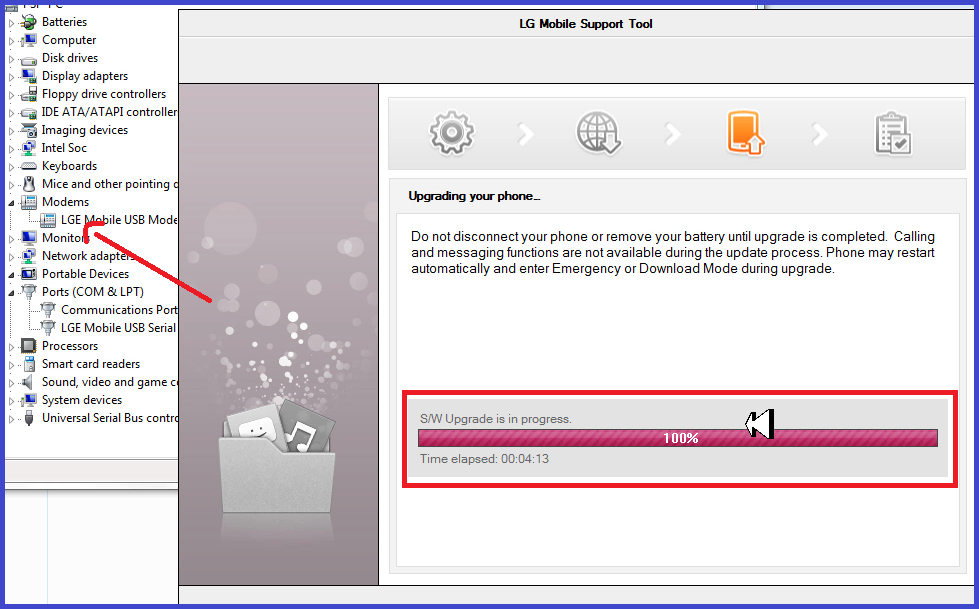
How to Flash LG H630D Using LG Flash Tool - LG Modem Driver Installation and SW Upgrade - LG Mobile Support Tool
Why To Flash LG G4 Stylus?
You may ask why we need to flash the LG H630D phone? If the phone is stuck or hang on LG logo and you are unable use the phone then you must flash the phone by downloading the firmware. If you have other software problems on your LG phone such as Applications are not working properly, While using Internet it gets stuck, Unfortunately Android stop error, Gallery stopped working, Continuously restarts etc. or any other software problem you face in your phone.

What Happen If You Flash The Phone?
If you flash the LG G4 Stylus phone it will solve the software issues on your Android smartphone as described in above para. The important thing is when you flash the phone it may erase your all data stored in the phone, so please do backup if possible. Most of the advance mobile users flashing the phone to get the updated operating system on their phone if released, so in that case you can upgrade the phone by using the latest Android firmware or flash file. If the system files are missing on your phone and not working properly, in that situation you need to flash the phone.

Downloads Required For LG H360D Flashing:

LG All in One Mobile USB Driver | Download  (Password = fct)
LG Flash Tool 2014 KDZ Flashing Software | Download
LG H360D kdz Firmware | Download
LG MOBILE SUPPORT TOOL | Download (Password = fct)

How to Flash LG H630D (LG G4 Stylus)?
  • Download LG flash tool, USB driver and Firmware from the above links.
  • Open LG Flash Tool 2014 and Select KDZ file.
  • Now click on "Normal Flash" and then click start, it will open LG Mobile Support Tool.
How to Flash LG H630D Using LG Flash Tool 2014
  • Now connect the LG phone with Download Mode (Press and Hold Volume Up Key then connect the phone to PC using USB cable)
  • Wait until the software upgrade process complete.
  • Then finally you see Software upgrade is complete and phone reboot automatically.
  • Watch Video Tutorial How to Flash LG G4 Stylus | YouTube Link
LG H630D Flash Done Using LG Flash Tool - LG Mobile Support Tool - LG Official Flash Tool
Conclusion:
So in this way we can flash the LG phone for the Model number LG H630D LG G4 Stylus using free LG flash tool and firmware. The LG G4 Stylus firmware link and flash tool link and LG USB driver link is given above in this article, just download these files to your Windows computer and flash the phone.

Thursday, September 21, 2017

LG LS770 Configuring Your Phone - Solved


You may notice that, after Hard Reset LG LS770 smart phone it will stuck on the screen called "Configuring Your Phone" and it will not move forward. So here in this topic we will discuss, how to solve this problem on LG smart phones for the Model LS770. The below is the complete and working process to solve "Configuring Your Phone" on LG phones for the Model LG LS770.

LG LS770 Configuring Your Phone Solution Here

How to Solve LG LS770 Configuring Your Phone?
 
1- Hard reset the phone.
2- After Switch On Go to Accessibility and scroll down to Switch Access and Turn ON.
3- Now go back and click on Next.
4- Do not connect to any WiFi just lick Next.
5- Now it will show "Your Phone is not configured"
6- Now press the Volume Up + Volume Down + Power Key at the same time For 3 Seconds then release all keys
7- Then Click the back button on touch screen
8- Now you will see two option "Retry" and "Skip"
9- Then just click on Skip and the click Next

That's all now you have successfully bypass the Configure Scree on LG LS770 Android smart phone.

Wednesday, May 20, 2015

LG GS190 Read Unlock Code Done with Volcano Tool V2.9.9


How to flash LG GS190? You can flash the phone using Volcano Tool. The below is the complete steps to flash LG GS190 Using Volcano Tool V2.9.9. The phone has a MTK CPU MT6226 and can be read unlock code with Volcano box.

LG GS190 Read Unlock Code Volcano Tool
  • Open volcano tool
  • Go to MTK tab
  • Select Unlock Code
  • Connect the phone to PC
  • Click on Start


How to Flash LG GS190 With Volcano Tool to Read User Code or Unlock Code
LG GS190 Volcano Tool Log:


Detection initiated, connect the phone and power on it...
  Vcc: null
  Gnd: 5
  RX: 3, TX: 2
 
  Connecting...
  Hardware version:8B02
  Software version:8B01
  CPU TYPE:6226
  Internal version:8A00
  CPUID   :3E02E01F
  Boot downloading complete!
  Flash ID: 00EC227E22632260
  Flash Type:  NOR_KAL5563CAM          
  Chip Capacity: 0x2000000(32MB)
  Mobile phone software version for:GS190-00-V10h-404-XX-FEB-05-2010
  Baud adjust...complete.
  Read phone information success.
  Available Ports:COM1 COM6
   
  Mobile Information:
  Baseband chip Version:MT6226M, E02
  DSP Firmware Version:2005.04.12
  DSP Patch Version:1.0
  Software Version:GS190-00-V10h-404-XX-FEB-05-2010
  Hardware Version:EP1

>>Audio Version:Melody V0.0

Saturday, May 3, 2014

LG A120 Volcano Tool (Read Flash, Read Info and IMEI Done)


LG A120 Read Flash, Read Info and IMEI Repair done with Volcano Tool, the below is the procedure to flash LG A120 with Volcano Box.


How to Read Flash LG A120 With Volcano Tool?


  • Open Volcano Tool
  • Go to MTK Tab
  • Tick on Read Flash
  • Tick on Auto Detect Pinouts
  • Click on Run
  • Connect P05B JIG to LG A120 and Box Power Cable
  • Then Press Power Button


LG A120 Volcano Tool Boot Key = Power Button


LG A120 Read Flash Success With Volcano Tool


LG A120 Read Info Success With Volcano Tool


LG A120 Read Info Volcano Tool MTK 6223 CPU


LG A120 IMEI Repair Volcano Tool


LG A120 IMEI Repair Volcano Tool


LG A120 Read Flash Volcano Tool Log:

Detection initiated, connect the phone and power on it...
  Vcc: null
  Gnd: 5
  RX: 3, TX: 2 
  Connecting...
  Hardware version:8A05
  Software version:8A00
  CPU TYPE:6223
  Internal version:0000
  CPUID   :575C0C00
  Boot downloading complete!
  Flash ID: 00EC225700000000
  Flash Type:  NOR_K5L6433ABM          
  Chip Capacity: 0x800000(8MB)
  Mobile phone software version for:A120-00-V10a-404-XX-JUL-19-2010
  Baud adjust...complete.
  Flash reading complete!
  usercode:0000
>>The data has been saved in C:\Users\PARTHA\Desktop\LG A120\A7265_PCB01_GSM_MT6223_S00.A120-00-V10A-404-XX-JUL-19-2010.BIN, size: 8 M.


📚 You May Also Like to Read