Showing posts with label Android Tool. Show all posts

Monday, July 8, 2019

LG_2-3G_Tool_9_60.Exe and LG_2-3G_Tool_9_61.Exe Download


Z3x LG tool download latest setup exe here. So friends if you have Z3x LG tool then download and install the latest version of LG 2G 3G Tool here to get latest features from the z3x team developers. You can also use z3x shell to download the latest version of LG tool and here you can download LG tool setup without z3x shell.
z3x LG 2G 3G Tool Download Latest Setup

If open z3x shell you will find the following software:

LG_2-3G_Tool_9_56.Exe
8 Months Ago
80.41 Mb
10k


LG_2-3G_Tool_9_57.Exe
8 Months Ago
80.40 Mb
6k


LG_2-3G_Tool_9_58.Exe
8 Months Ago
81.29 Mb
6k


z3x lg2-3g tool - z3x shell

LG_2-3G_Tool_9_59.Exe
8 Months Ago
81.33 Mb
44k


LG_2-3G_Tool_9_60.Exe
4 Months Ago
81.37 Mb
30k


LG_2-3G_Tool_9_61.Exe
2 Months Ago
81.13 Mb
19k


LG_2-3G_Tool_9_62.Exe
3 Weeks Ago
81.12 Mb
12k


LG_Sgold3_Tool_3.7.1.4_fix.Exe
5 Years Ago
21.49 Mb
328k


MTK Smart V2.6.1.4.Exe
3 Years Ago
31.05 Mb
136k


DOWNLOAD LG_2-3G_TOOL

Download LG_2-3G_Tool_9_60.Exe | Download Link


Download LG_2-3G_Tool_9_61.Exe | Download Link

Monday, November 30, 2015

How to Type in Odia Language on Samsung Galaxy J7 - Odia Language Help On Android Device


Now many of the Android Smartphone support Regional language, so here is the tutorial how to enable this feature to write regional language for message or on the web. If the handset support to view the language you want to use then you can also write/type the language using settings, here is the example of Odia/Oriya Language, suppose you able to see the odia text someone sent to you then that means your mobile phone support odia language, so to write in odia you have to do some settings on the phone, the below is the details of settings for odia input or odia typing or odia language on Android Smartphones.

Odia Typing on Samsung J7

  • Go to Settings

Odia input on Samsung mobile go to settings
  • Then Language & Input

Click on Language and Input
  • Samsung Keyboard

Under Keyboard and input methods click on Samsung Keyboard
  • Select Input Language

Select input languages to add odia language for typing

  • Choose Input Languages

Choose the language you want add, here it's Odia
Now you have successfully add Odia language to the phone to type in Odia, for any other regional language you can follow the above process to add their regional language to the phone.

To type in odia open the typing and hold the space key and swipe left or right to change the language inputs. For example open message and type a new message, the keyboard will automatically now hold the space key and swipe left or right to write in odia Language and enjoy.


Saturday, September 6, 2014

How to Hard Reset and Pattern Unlock Galaxy Tab China I30 Rockchip CPU


Rockchip calling tablet hard reset and pattern unlock solution, Galaxy tab copy which has a Rockchip CPU RK2928-G. I30 Model No. and Tsintech I30 RK2928 CPU, Cortex-A9, 1.5GHz. So here is the topic to hard reset galaxy tab china i30 with Rockchip hard reset tool, see the below details to hard reset and pattern unlock of Rockchip CPU Tablet.

Galaxy Samsung Tab China Hard reset Done
This process is success on Galaxy Tab I30 china Tablet and the same can be done on some other tablet having Rockchip CPU. Rockchip hard reset and pattern unlock done with the below process. Rockchip android tool to hard reset and pattern unlock Rockchip RK292X Device.


Rockchip Hard Reset and Pattern Unlock Solution

  • Download RockChip Android Tool (RockChip Android Tool.rar)
  • Switch On the Tablet and Connect to PC
  • Now Open RKAndroidTool.exe (RockChip Android Tool)
  • Click on Switch (Which boot the device in to Download Mode)
Rockchip Android Tool switch the device to download mode
  • Install Rockchip USB Driver 
Rockchip USB Driver installed RK292X Device
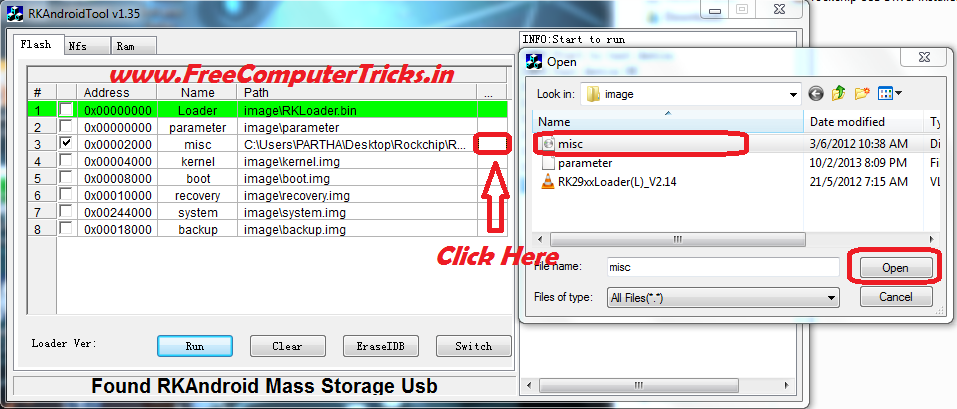
  • Select Only No.3 on Android Tool V1.35 (misc image\misc.img)
  • Click on the last right side of the No.3 row then select misc.img file
Rockchip select misc image file to hard reset
  • Now Click on RUN


Rockchip Android Tablet hard reset done
The misc.img and RockChip USB driver for Windows 7 can be found inside the RockChip Android Tool Folder.

📚 You May Also Like to Read