September 06, 2014 PARTHASARATHI PANDA
Rockchip calling tablet hard reset and pattern unlock solution, Galaxy tab copy which has a Rockchip CPU RK2928-G. I30 Model No. and Tsintech I30 RK2928 CPU, Cortex-A9, 1.5GHz. So here is the topic to hard reset galaxy tab china i30 with Rockchip hard reset tool, see the below details to hard reset and pattern unlock of Rockchip CPU Tablet.
 |
| Galaxy Samsung Tab China Hard reset Done |
This process is success on Galaxy Tab I30 china Tablet and the same can be done on some other tablet having Rockchip CPU. Rockchip hard reset and pattern unlock done with the below process. Rockchip android tool to hard reset and pattern unlock Rockchip RK292X Device.
Rockchip Hard Reset and Pattern Unlock Solution
- Download RockChip Android Tool (RockChip Android Tool.rar)
- Switch On the Tablet and Connect to PC
- Now Open RKAndroidTool.exe (RockChip Android Tool)
- Click on Switch (Which boot the device in to Download Mode)
 |
| Rockchip Android Tool switch the device to download mode |
- Install Rockchip USB Driver
 |
| Rockchip USB Driver installed RK292X Device |
- Select Only No.3 on Android Tool V1.35 (misc image\misc.img)
- Click on the last right side of the No.3 row then select misc.img file
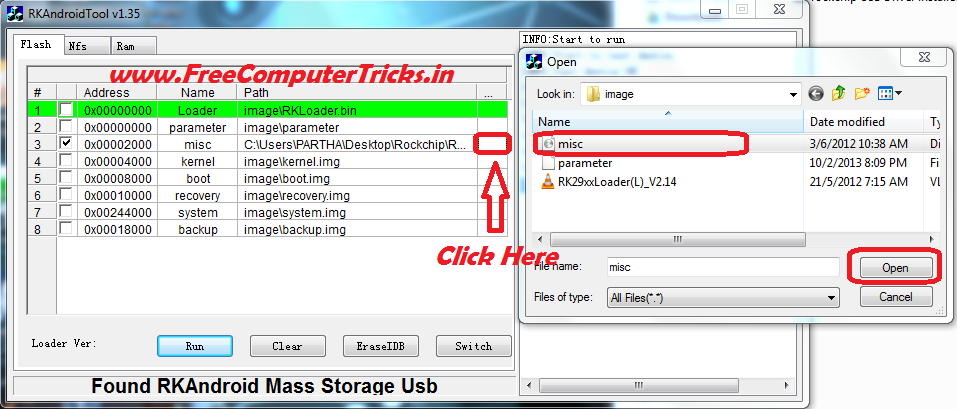 |
| Rockchip select misc image file to hard reset |
 |
| Rockchip Android Tablet hard reset done |
The misc.img and RockChip USB driver for Windows 7 can be found inside the RockChip Android Tool Folder.


