Showing posts with label Pattern Unlock. Show all posts

Sunday, December 19, 2021

Oppo F5/A79/A83 Pattern Lock /FRP Remove Done By Miracle Box


Oppo F5/A79/A83 Pattern lock remove and FRP done by Miracle Box, Please check the below image for settings on the Miracle Thunder Edition Ver. 7.5. Oppo A83 MT6763 Pattern lock remove done by Miracle Thunder Box.


Oppo F5/A79/A83 Pattern Lock /FRP Remove Done By Miracle Box


How to Remove Pattern Lock?


Open the Miracle Box Software

Then do the settings as per the image

Click on the Start Button

Connect the switched off phone to PC


Free Computer Tricks YouTube Channel

https://www.youtube.com/c/FreecomputertricksIn/videos


PSP Studio (ଓଡ଼ିଆ)

https://www.youtube.com/user/part20001/videos


Saturday, March 31, 2018

How to Unlock Pattern and Password Lock of Oppo A57 (CPH1701) - (Solved)


Here is the topic about, how to pattern unlock of Oppo A57 CPH1701? To hard reset or unlock pattern you need to flash the Oppo A57 phone. Download Oppo A57 firmware CPH1701EX_11_A.05_170120.zip file and Msm Download Tool by searching the Internet and follow the below steps to hard reset and unlock pattern of the phone.

Download Oppo flash tool and firmware file to flash Oppo A57, then follow the below process to flash the phone. To flash oppo phone you need to use MsmDownloadTool or so called Msm Download tool. In this article you will get the full described process to flash the Oppo phone, Download Oppo A57 firmware and Download Oppo A57 flash tool, please go through the below topic.
OppoA57 (CPH1701) Flash and Pattern Unlock Done

Oppo A57 CPH1701 Hard Reset and Patten Unlock Solution Here:
  • Extract Oppo A57 firmware.
  • Download and extract MSM Download Tool and copy into the firmware folder.
  • Now open the download tool.
  • Now connect the phone into EDL mode (Hold both volume and connect USB).
  • Then click on Start button and wait until the download process complete

Firmware and Flash Tool Download:

Download Oppo A57 CPH1701 latest Firmware | Download Link

After download success unplug the phone and switch on the phone manually, after switch on setup the phone and use it and now you have successfully hard reset the Oppo phone for the model A57.

Monday, October 9, 2017

Panasonic P55 Novo or Nova Read Pattern Lock - Solved


How to read pattern lock code on Panasonic P55 Novo? Here is the solution for read pattern lock on Panasonic P55 Novo MTK Android smart phone. You can read pattern lock of Panasonic smart phones using Miracle tool or Volcano Tool or any other flashing with MTK Android feature, and here is the example of Miracle Box and here you know the process to read pattern lock of P55 Novo using Miracle Box. If you do not want to delete or erase user data then this process will help you to remove pattern lock on Panasonic P55 by reading the pattern lock code with Miracle tool.

Panasonic P55 Novo Read Pattern Lock Success - www.freecomputertricks.in - Mobistel Preloader USB Driver

If you need to unlock pattern lock on Panasonic Android smart phone P55 Novo without losing data, then this process with help you to read pattern lock code on Panasonic MediaTek Android smart phone P55 Nobo using Miracle Box. Please follow the below process to read pattern lock code on Panasonic MTK phones. This process will work for any Android smartphone having MediaTek CPU and here is the example for Panasonic P55 Novo or Panasonic P55 Nova.

Panasonic P55 Novo Read Pattern Lock:

1) Open Miracle Box.
2) Go to "MTK" tab then "Unlock/Fix" and select "Read Pattern".
3) Now connect the switched off phone to PC, and install Mobistel USB Driver.
4) Wait until the process complete, now you will see the Pattern CODE in number i.e. 25846.
5) Now switch on the phone and draw the pattern according the code you read.

How to Use Pattern Lock Code To Unlock Pattern Lock?

When you read pattern code using Miracle Box or any other Android flashing box, it shows numeric code for the pattern lock on the phone. If you need to know how to use these codes to unlock pattern for your Android smart phone, then please see the below image, for example the read pattern code is 25846 and see how to use it.

How to Use Pattern Lock Numeric Codes to Draw and Unlock Pattern Lock on Android Smart Phones

Monday, August 8, 2016

HTC 816G Read Pattern Success With Miracle Box


So here is the topic, how you can read pattern lock of HTC 816G using Miracle Box. With this process you can read the pattern lock and unlock the Android phone without data loss. See the below details and follow the steps to read and unlock pattern lock of HTC 816G using Miracle Tool or Box.

HTC 816G Unlock Pattern Lock Without Data Loss.

  • Open Miracle Box
  • Go to MTK ---> Unlock/Fix Tab
  • Select 8th Boot
  • Click on Start Button
  • Now connect the switch off phone to PC using USB Cable

HTC 816G Read Pattern Done With Miracle Box
The read pattern code will show in the info panel and in the format of numeric number i.e. 753185 and to unlock the phone drag the pattern according to the numbers.

Now you have successfully unlock the pattern of HTC 816G without any loss of data.

Sunday, March 15, 2015

Celkon Win 400 Windows Smartphone Hard Reset and Restart Problem Solved


Celkon Win 400 Restart problem solved by hard reset and the hard reset process is given below. With the hard reset you can also do a factory reset of the device, that means any customization will be removed on the phone after a hard reset.

Celkon Win 400 Windows Phone 8.1 Hard Reset Done

Here the problem of the Celkon Win 400 was blinking or restarting on logo and this is solved after hard reset of the Mobile Phone.


Celkon Win 400 Hard Reset
Volume Down + Power Key
When Exclamatory Mark appear Press buttons in this order
Press Volume Down 2 Times Then Power Button and Then Volume Up then down
The device will Restart and do the factory reset with Settings icon
Then finally the device will restart and you have done


Celkon Win 400 Windows Smartphone Hard Reset and Restart Problem Solved with Keys

Monday, September 15, 2014

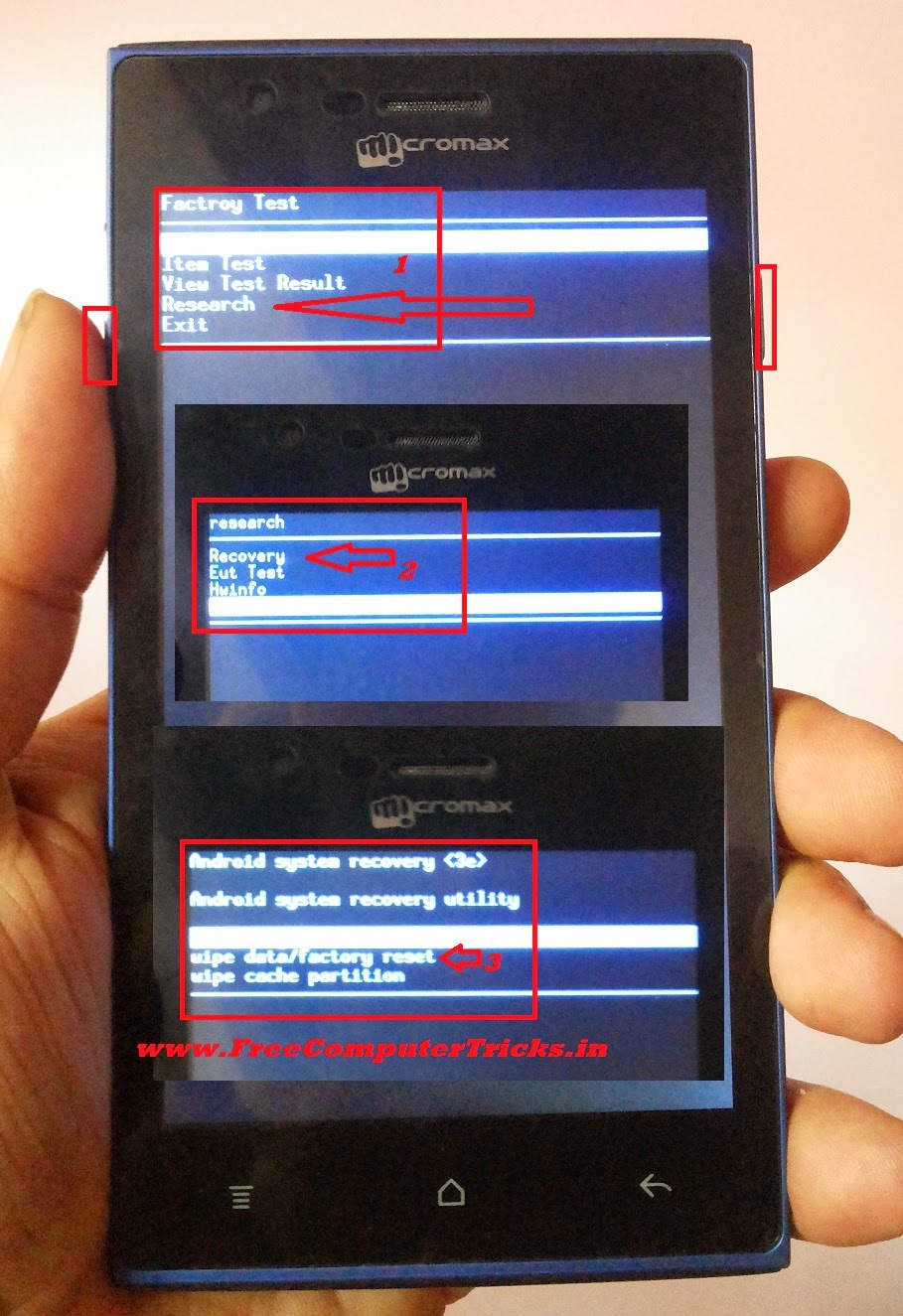
Micromax A075 Hard Reset and Pattern Unlock Solution


How to hard reset and unlock pattern of Micromax A075? see the below details to hard reset or pattern unlock of Micromax A075. Micromax A075 which runs Android Platform and the recovery option is slightly different then others.

Micromax A075 Hard Reset
  • Switch Off the Phone
  • Now press Volume UP + Power Button Until Factory Test
  • Then Move down and select Research and Press Power Button To OK
  • Select Recovery Press Power Button
  • Now the mobile will reboot in Recovery Mode
  • Select wipe data/factory reset and press Power key to OK
  • Then Reboot the device


How to Hard Reset Micromax A075


That's all now the Micromax A075 has been reset and the pattern lock also removed. Remember while hard reset all the data will be lost on the phone memory.

Wednesday, September 10, 2014

Micromax Ninja A54 Hard Reset and Pattern Unlock Android Smartphone


How to hard reset and remove pattern lock of Micromax A54? so here below is the procedure to hard reset and pattern unlock solution of Micromax A54.

Micromax A54 Hard Reset

  • Switch off the phone
  • Press and hold Volume Up + Power
  • Then wipe data/factory reset


Micromax a54 hard reset done
Micromax A54 Software Download Procedure 
 

  • Download and Extract the Micromax A54 Firmware to SD card (Memory Card)
  • Software/Firmware file name should be like - Micromax A54 LQAEB32_2013-01-23_factory_update.zip
  • Put the SD or memory card to the device
  • Press Power key and Volume up key together (Do not connect the phone to computer)
  • Wait until it power on, then flashing start automatically

Friday, September 5, 2014

How To Hard Reset XPAD Simmtronics SIMM X722 - Android Tab Hard Reset With Android Multi Tools


How To Hard Reset XPAD Simmtronics SIMM X722 Android Tab with Android Multi Tools V1.1, see the below to hard reset Xpad SIMM X722 with Android Multi tools, in this way you can hard reset, pattern unlock and factory reset of Android Tablet Xpad SIMM X722.


Hard Reset XPAD Simmtronics SIMM X722 with Android Mutitool v1.1

Hard Reset XPAD SIMM X722


  • Download and Install Android Multi Tools V1.1
  • Switch on the Tablet and Connect to PC
  • Open Android Multi Tool V1.1
  • Click on Check Device
  • Then  Click on Search Device/Read CPU Info
  • Now Click on Wipe Device Data


Monday, September 1, 2014

Micromax A51 Hard Reset and Pattern Unlock Solved


Micromax A51 hard reset and pattern lock solution, here is the topic about hard reset of Micromax A51 with buttons, see the below details.

Micromax A51 hard reset with keys


Micromax A51 Hard Reset
  • Switch off the phone
  • Press and hold Volume Up + Power till Android Logo appear
  • Now press Home Soft Key to see Android Recovery Options
  • Now hold the mobile and move up down you can see the blue mark will move up down, hold it carefully and balance it then Press Right Soft Key to OK
  • Remember Right Soft Key is OK


Micromax A51 hard reset done with buttons
We can go to Android system recovery easily, but can not select the options, because Volume Up/Down key will not work at that time. So try the above process 3-4 times you must success.

Micromax A40 Hard Reset and Pattern Unlock Solution


How to hard reset or unlock pattern lock of Micromax A40? the below is the detailed procedure to hard reset and pattern unlock of Micromax A40 using Fastboot Mode and with Android Multi tools.

Micromax A40 Fastboot Mode


Press and Hold Volume Down + Power Key For Fastboot Mode
Micromax A40 Fastboot Mode

Micromax A40 Hard Reset

  • Put the phone in to Fastboot Mode (Volume Down+Power Key)
  • Connect the phone to PC using USB Cable and let the Fastboot driver to be install
  • Open Android Multi Tools
  • Press 8 then press Enter Key


Micromax a40 hard reset on fastboot mode android multi tool
That's all, after wipe data on fastboot mode the device will restart and the hard reset process for Micromax A40 is success.


Tuesday, August 26, 2014

How to Hard Reset and Pattern Unlock Intex Aqua I5 - Intex Aqua I-5 Hard Reset Solution


Intex Aqua I5 hard reset and pattern unlock successfully solved, to know how to hard reset Intex Aqua Android Smartphone please see the below details. 


Intex Aqua i5 Hard reset and pattern unlock solution done

Intex Aqua i5 Hard Reset


  • Press Volume down + power key until you see Android Logo
  • Press power key to see android system recovery options
  • Press Volume down and select wipe data/factory reset
  • Press volume up key to OK

Search Tags: Intex Aqua i5 quad core android mobile unable to do factory reset solved, Intex Aqua i5 Hard Reset, Intex Hard Reset All Models, Hard Reset in Intex Android Mobiles, How to Pattern unlock Intex Aqua, Intex Aqua Factory Reset Solution, Intex Aqua I5 MTK 6589M hard reset,intex aqua i5 factory reset

Micromax A116 Hard Reset and Pattern Unlock 100% Solved


How to hard reset Micromax A116 canvas HD with keys? as you know with A116 we can go to the recovery mode but can not OK the task to wipe data/factory reset. So here is the complete procedure to hard reset Micromax A116 using hard keys/soft keys, the main thing on A116 is we have to press two soft key at the same time to OK/Enter.

Micromax A116 Hard reset solution is 100% working and tested OK.

Micromax A116 Hard Reset and Pattern Unlock 100% Solved with Buttons


Micromax A116 Canvas HD Hard Reset

  • Press Volume Down + Volume Up + Power Button
  • Then Volume UP for Recovery Mode
  • Press Power button to see Recovery Options
  • Now press volume down and select wipe data/factory reset
  • Press Two soft key at the same time to OK
  • Now Press volume Down and select yes-delete all user
  • Then again press two soft key at the same time to OK


Remember power switch is not the OK button on the Micromax A116, but here I press left soft key and Menu Soft key at the same time and the work has done. Now the Micromax A116 has been successfully reset to factory settings and unlock the pattern lock.

Monday, August 25, 2014

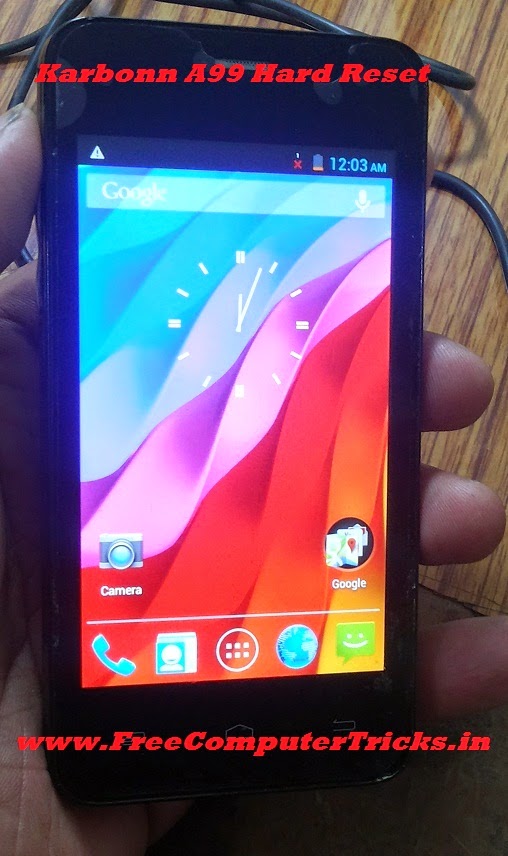
Karbonn A99 Hard Reset and Pattern Unlock Done With Keys


How to hard reset Karbonn A99 with buttons? this topic is about hard reset and pattern unlock of Karbonn A99 with keys/buttons. With hard reset of Karbonn A99 you can solve the pattern lock, hang on Karbonn Logo, erase/delete all use data and Karbonn Hang or restart problem. So see the below process to Hard Reset Karbonn A99.

Karbonn A99 Hard Reset Done with Keys

Karbonn A99 Hard Reset


  • Switch Off the Phone
  • Press and Hold Volume Down + Power Key For Factory Mode
  • Press Volume Down and Select Clear eMMC then Press Power Button to OK
  • Wait till the process complete (It will take 2 to 5 minutes)
  • After that the device will restart automatically

Karbonn A99 Hard Reset and Pattern Unlock


Now the Karbonn A99 has been successfully hard reset and the phone is set to factory default. Remember after Clear eMMC the device will restart automatic and takes 2 to 4 minutes to complete switch ON and also the wipe data/factory reset/ formatting will take 2 to 5 minutes, so don't worry about that just keep patience and let the hard reset process to complete.


Search tags:
karbonn a99 hard reset, karbonn a99 hard reset code, Karbonn A99 hangs on logo, Karbonn A99 hang and restart problem solved, Karbonn A99 pattern unlock done with keys, Karbonn A99 Pattern Lock Unlock, karbonn a99 pattern lock.


Wednesday, August 20, 2014

Lava iris 355 Hard Reset and Pattern Unlock Solution


Lava iris 355 pattern lock solution and here you can know how to hard reset, pattern unlock, pattern lock remove of Lava iris 355 Android smartphone. The below is the process to unlock pattern and hard reset of Lava iris 355 with keys.


Lava iris 355 hard reset power + volume up


Lava iris 355 Hard Reset


  • Press Power Button + Volume Up
  • Now you will see Factory Mode
  • Press Volume Down and Select Clear Flash
  • Press Power Button to OK

Monday, August 18, 2014

Reconnect RPSPG3201 Hard Reset and Pattern Unlock Solution


Here you will know how to hard reset and pattern unlock of Reconnect RPSPG3201? see the below steps to hard reset and unlock pattern lock of the mobile phone. Reconnect RPSPG3201 which has the Android 2.3.5.

Reconnect RPSPG3201 hard reset done with buttons

Reconnect RPSPG3201 Hard Reset


  • Volume Down + Volume Up + Power Button You see Android logo with Exclamatory Triangle
  • Press Home Button Android system Recovery 
  • Volume Down and select wipe data/factory reset
  • Press Left Soft key to Enter
  • Volume down and select Yes -- delete all user data
  • Press left soft key to Enter
  • Reboot the device 


It will take some time to switch ON, so wait for 2 to 4 minutes, after the phone will switched ON and you see the menu.

Karbonn A35 Hard Reset and Pattern Unlock Done With Android Multi Tool


Karbonn A35 hard reset and pattern unlock done with android multi tool and with keys. To hard reset karbonn A35 go Android system recovery mode with Android multitool and select wipe data with buttons. See the below step by step procedure to hard reset karbonn A35 with Android Multi Tool version 4.0.

karbonn a35 hard reset and pattern unlock done with android multi tool


Karbonn A35 Hard Reset


  • Switch ON the Mobile and connect to PC and let all the driver install
  • Open Uni-Android Tool {Open Android Multi Tool (Uni-Android Tool V-4.0)}
  • Press No. 3 on keyboard and press Enter Key
  • Now the Karbonn A35 will reboot in recovery mode (you will see an Android Log)

Karbonn A35 hard reset and pattern unlock with Uni- android tool version 4.0


  • Now Press Volume Down for Recovery Options
  • Then Select wipe data/factory reset and Press Power Button
  • Volume Down go to Yes--delete all user data and Press Power Button

Saturday, August 16, 2014

Micromax A068 Hard Reset and Pattern Unlock Done With Keys


How to hard reset Micromax A068 ? Here is the precess to unlock the pattern lock or hard reset or factory reset Micromax A068 with buttons, just go to the recovery mode by pressing the buttons and wipe data/factory reset the Micromax Mobile Android smartphones. See the below steps to hard reset or pattern unlock Micromax A068.


Micromax 068 Hard reset pattern unlock and factory reset with keys- Micromax Pattern Lock Solutions

Micromax A068 Hard Reset and Pattern Unlock Solution


  • Switch Off the Phone
  • Press Volume UP + Volume Down + Power Button
  • Now Press Volume Up For Recovery Options
  • Then Press Volume Down Recovery Mode
  • Press Volume Down and Select Wipe data/factory reset
  • Press Left Soft Key to OK
  • Then Reboot the device


Search Tags:

micromax a068 hard reset, How to reset Micromax Bolt a068, Micromax Android Mobile Hard Reset, Micromax bolt a068 hard reset, micromax a068 too many pattern attempts, How to Unlock Micromax Phone after too many Failed Pattern Attempts, forgot pattern lock, Android smartphone pattern unlock solutions, all model of micromax pattern lock solutions 100% solved.

Micromax A59 Hard Reset and Pattern Unlock Solutions 100% Solved


In this topic you will know how to hard reset or remove pattern lock of Micromax A59, if you forgot the pattern lock then this topic will help you to get over the pattern lock problem of Micromax A59 and you will able to know the process to unlock the pattern lock of Micromax. The below is the complete and tested procedure to hard reset and pattern unlock of Micromax A59.

Micromax A59 Hard Rest Pattern Unlock Factory Reset Too Many Pattern Attempts Pattern Lock Solution 100% Solved

Micromax A59 Hard Reset and Pattern Unlock


  • Switch off the device
  • First Press Power Button then suddenly Press Volume Down key (Release the power button and hold the volume down key until you see Android Logo)
Note: First press power key and within 2 to 3 seconds Press Volume Down button and release the power key only.
  • When you see Android logo Press Volume Up to see the Android Recovery Menu
  • Now press Volume Down key to select Wipe data/factory reset
  • Then Press Power Key to OK


Reboot the device and now you have successfully removed the pattern lock of Micromax A59.

Wednesday, August 13, 2014

Karbonn A27+ Hard Reset and Pattern Unlock Done - www.FreeComputerTricks.in


Karbonn A27+ hard reset and pattern lock remove done with keys, as you know with recovery mode of Karbonn A27+ we can't wipe data/factory reset and on Fastboot mode also. So to hard reset or do a pattern unlock you have to go to the Factory mode on Karbonn A27+ and Clear eMMC. To hard reset Karbonn A27+ follow the below steps.

Karbonn A27+ Factory Mode For Hard Reset and Pattern Unlock

Karbonn A27+ Hard Reset and Pattern Unlock


  • Press and hold Volume Down + Power Until factory mode
  • Then Press Volume down to select Clear eMMC
  • Now Press power key to OK

That's all now you can see on the karbonn screen Formatting/Data...

Then the phone will Reboot and you are done


Karbonn A27+ Recovery Mode and Fastboot Mode

Press and Hold Volume Up + Power Key

Karbonn A27+ Recovery Mode and Fastboot Mode


But both in recovery mode and fastboot mode you can not wipe data, so follow the above steps in Factory mode to wipe data/hard reset and pattern unlock.

Search Tags: Too Many Pattern attempts Solution, karbonn a27 hard reset, karbonn a27 plus Hard reset, Unlock Android phone after too many pattern attempts, Karbonn A27+ Hard Reset, Restore Karbonn A27 Pattern Lock, karbonn a27+ pattern lock solution, karbonn a27+ pattern unlock solution, karbonn a27 plus pattern lock solution

Sunday, August 3, 2014

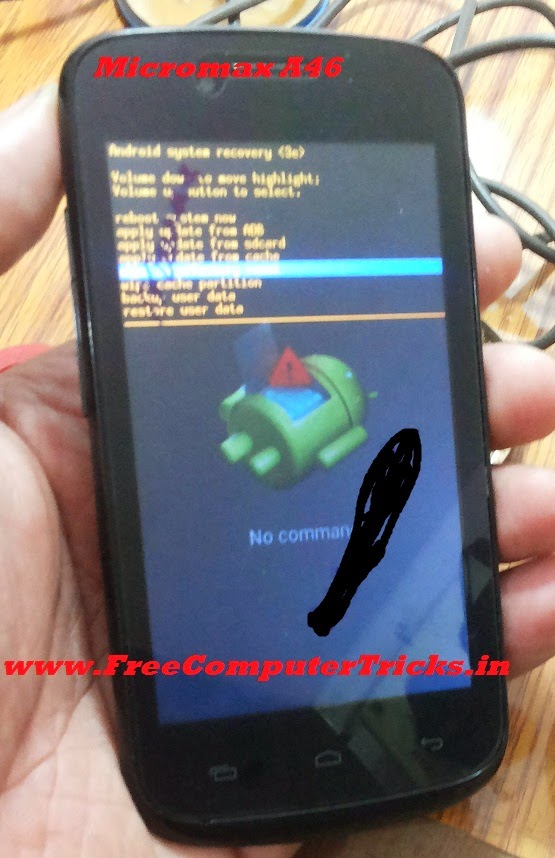
How to Hard Reset Micromax A46 - Micromax A46 Android V.4.2.2 Wipe Data Done With Keys


Here is the procedure to hard reset/factory reset of Micromax A46 which runs on Android Version 4.2.2, this can be done with keys, just go to the Android system recovery menu and wipe data/factory reset. The below is the steps to hard reset Micromax A46 Android 4.2.2 Smartphone.


Micromax A46 Hard Reset Done

  • Press Volume Up + Power Key Until you see Android System Recovery
  • Press Volume Down and Come to Wipe Data/Factory Reset
  • Press Volume Up to Select/Enter (Volume Up Key is for Enter or to complete the action)


Micromax A46 hard reset and pattern unlock done with keys

After wiping data reboot the device, that's all now you have successfully done the hard reset or factory reset of Micromax A46.

📚 You May Also Like to Read