Showing posts with label Pattern Unlock Micromax. Show all posts

Monday, September 1, 2014

Micromax A40 Hard Reset and Pattern Unlock Solution


How to hard reset or unlock pattern lock of Micromax A40? the below is the detailed procedure to hard reset and pattern unlock of Micromax A40 using Fastboot Mode and with Android Multi tools.

Micromax A40 Fastboot Mode


Press and Hold Volume Down + Power Key For Fastboot Mode
Micromax A40 Fastboot Mode

Micromax A40 Hard Reset

  • Put the phone in to Fastboot Mode (Volume Down+Power Key)
  • Connect the phone to PC using USB Cable and let the Fastboot driver to be install
  • Open Android Multi Tools
  • Press 8 then press Enter Key


Micromax a40 hard reset on fastboot mode android multi tool
That's all, after wipe data on fastboot mode the device will restart and the hard reset process for Micromax A40 is success.


Tuesday, August 26, 2014

Micromax A116 Hard Reset and Pattern Unlock 100% Solved


How to hard reset Micromax A116 canvas HD with keys? as you know with A116 we can go to the recovery mode but can not OK the task to wipe data/factory reset. So here is the complete procedure to hard reset Micromax A116 using hard keys/soft keys, the main thing on A116 is we have to press two soft key at the same time to OK/Enter.

Micromax A116 Hard reset solution is 100% working and tested OK.

Micromax A116 Hard Reset and Pattern Unlock 100% Solved with Buttons


Micromax A116 Canvas HD Hard Reset

  • Press Volume Down + Volume Up + Power Button
  • Then Volume UP for Recovery Mode
  • Press Power button to see Recovery Options
  • Now press volume down and select wipe data/factory reset
  • Press Two soft key at the same time to OK
  • Now Press volume Down and select yes-delete all user
  • Then again press two soft key at the same time to OK


Remember power switch is not the OK button on the Micromax A116, but here I press left soft key and Menu Soft key at the same time and the work has done. Now the Micromax A116 has been successfully reset to factory settings and unlock the pattern lock.

Saturday, August 16, 2014

Micromax A068 Hard Reset and Pattern Unlock Done With Keys


How to hard reset Micromax A068 ? Here is the precess to unlock the pattern lock or hard reset or factory reset Micromax A068 with buttons, just go to the recovery mode by pressing the buttons and wipe data/factory reset the Micromax Mobile Android smartphones. See the below steps to hard reset or pattern unlock Micromax A068.


Micromax 068 Hard reset pattern unlock and factory reset with keys- Micromax Pattern Lock Solutions

Micromax A068 Hard Reset and Pattern Unlock Solution


  • Switch Off the Phone
  • Press Volume UP + Volume Down + Power Button
  • Now Press Volume Up For Recovery Options
  • Then Press Volume Down Recovery Mode
  • Press Volume Down and Select Wipe data/factory reset
  • Press Left Soft Key to OK
  • Then Reboot the device


Search Tags:

micromax a068 hard reset, How to reset Micromax Bolt a068, Micromax Android Mobile Hard Reset, Micromax bolt a068 hard reset, micromax a068 too many pattern attempts, How to Unlock Micromax Phone after too many Failed Pattern Attempts, forgot pattern lock, Android smartphone pattern unlock solutions, all model of micromax pattern lock solutions 100% solved.

Micromax A59 Hard Reset and Pattern Unlock Solutions 100% Solved


In this topic you will know how to hard reset or remove pattern lock of Micromax A59, if you forgot the pattern lock then this topic will help you to get over the pattern lock problem of Micromax A59 and you will able to know the process to unlock the pattern lock of Micromax. The below is the complete and tested procedure to hard reset and pattern unlock of Micromax A59.

Micromax A59 Hard Rest Pattern Unlock Factory Reset Too Many Pattern Attempts Pattern Lock Solution 100% Solved

Micromax A59 Hard Reset and Pattern Unlock


  • Switch off the device
  • First Press Power Button then suddenly Press Volume Down key (Release the power button and hold the volume down key until you see Android Logo)
Note: First press power key and within 2 to 3 seconds Press Volume Down button and release the power key only.
  • When you see Android logo Press Volume Up to see the Android Recovery Menu
  • Now press Volume Down key to select Wipe data/factory reset
  • Then Press Power Key to OK


Reboot the device and now you have successfully removed the pattern lock of Micromax A59.

Sunday, August 3, 2014

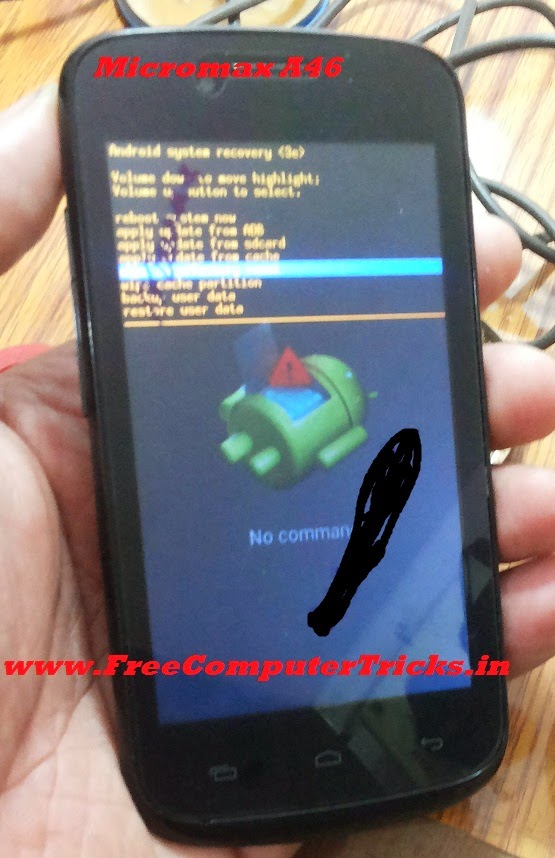
How to Hard Reset Micromax A46 - Micromax A46 Android V.4.2.2 Wipe Data Done With Keys


Here is the procedure to hard reset/factory reset of Micromax A46 which runs on Android Version 4.2.2, this can be done with keys, just go to the Android system recovery menu and wipe data/factory reset. The below is the steps to hard reset Micromax A46 Android 4.2.2 Smartphone.


Micromax A46 Hard Reset Done

  • Press Volume Up + Power Key Until you see Android System Recovery
  • Press Volume Down and Come to Wipe Data/Factory Reset
  • Press Volume Up to Select/Enter (Volume Up Key is for Enter or to complete the action)


Micromax A46 hard reset and pattern unlock done with keys

After wiping data reboot the device, that's all now you have successfully done the hard reset or factory reset of Micromax A46.

Friday, August 1, 2014

Micromax A87 Hard Reset and Pattern Unlock Solution


Micromax A87 hard reset and pattern unlock done with keys, the below is the process to hard reset wipe data/factory reset of Micromax A87 mobile phone. See the details below.

Micromax A87 Hard Reset

  • Press Volume Up + Power Button
  • When Android System Recovery Option Appear
  • Select Wipe Data/Factory Reset


Micromax A87 Hard Reset on Android System Recovery Option
 

  • Volume Up and Down to select
  • Press Power Button to Perform the Action

Tuesday, July 29, 2014

Micromax A62 Hard Reset and Pattern Unlock Done With Android Multi Tools


Micromax A62 unlock pattern and hard reset done with Android Mutitool, this phone is already enabled the USB Debugging mode, so when you insert the USB cable it will connect the ADB Interface or ADB Mode and with this mode you can Wipe Data using Android Multi Tool. The below is the process to hard reset or pattern unlock of Micromax A62 using Android Multi Tool.

Micromax A62 Hard Reset With Android Multi Tools


Micromax A62 Hard Reset

  • Switch On the Phone
  • Connect the USB Cable and Let the Driver Install
  • Now Open Android Multi Tools
  • Press 5 on Keyboard and Hit Enter Key (5=Wipe Data)


micromax a62 wipe data done android multi tool


That's all after Wipe Data the device will restart and the phone has been set to factory defaults of any custom setting of the phone will wipe out. It has been tested and work fine.

Saturday, July 19, 2014

Micromax A60 Hard Reset and Pattern Unlock Done With Key


Micromax A60 hard reset and pattern unlock can be done with key, the below is the details to unlock pattern and hard reset of A60 Micromax. By doing hard reset or wipe data/factory reset you can reset the Android Mobile to Factory defaults and all your data saved in that phone will be erased.
Micromax A60 Android Recovery Menu Press Call Key to See the Wipe Data
Micromax A60 Hard Reset

 
  • Press Home (Soft Key) + Center + Power On Key 
  • When you see Android Log with a Triangle symbol 
  • Then Press the Call Button to see the Recovery Menu, Where you can wipe data/factory reset the phone
  • Click the Center Button to Enter or to perform the action
Micromax A60 Hard Reset (Home +Center+Power Key)
 

After wipe data reboot the phone, that's all now the phone has been set to the factory defaults and all you customization made to the phone is deleted.

Saturday, May 17, 2014

Micromax A61 Hard Reset and Pattern Unlock Solved - www.FreeComputerTricks.in


Micromax A61 Pattern lock solution and Hard Reset or how to do a factory reset, the below tutorial is about the Micromax wipe data/factory reset with keys and with the help of Android Multi Tool to Enter into Recovery Mode. If you do a factory reset or hard reset at that time the phone will reset all setting and delete use data and also all type security issues. If you forgot the pattern lock or any other pin for your Micromax A61 then this topic will help you to recover the phone by hard reset. This is the safe and easiest method to hard reset/factory reset of Micromax A61.

Micromax A61 Hard Reset done FreeComputerTricks.in


Micromax A61 Hard Reset with Android Multi Tool


  • Switch off the phone and Connect USB Cable
  • Let the Driver to be Installed
  • Disconnect the phone otherwise it goes to charging mode
  • Now Open Android Multi Tool
  • Press Numeric key 3 on keyboard (Do not press Enter)

Micromax A61 Hard Reset Done with Android Multi Tool


  • Open Device Manager on your Computer (Start-->Accessories-->Run Type DEVMGMT.MSC and Press Enter Windows 7) or (Windows Key +R Type DEVMGMT.MSC and Press Enter)
  • Now connect the Micromax A61
  • When you see Android Phone/Android ADB Interface hit Enter

Android Phone ADB Interface

  • The device will restart in Recovery Mode (Enter To Recovery Mode)
  • Now press Volume Up For Recovery Option
  • Select Wipe Data/Factory Reset
  • Press Power Button to Enter

After wipe data reboot the phone, now you have successfully hard reset the Micromax A61 with the help of Android Multi Tool.

This process is tested and 100% working, read carefully the full tutorial and follow step by step to hard reset Micromax A61.


Note : The Android Phone (Android ADB Interface) in the Device Manager will be for 3 to 4 seconds, then the phone goes to charging mode, at that time the Android ADB Interface will not be in Device Manager, So when you see Android Phone press 3 and Hit Enter it will work otherwise not.

Saturday, March 1, 2014

Micromax A74 Hard Reset, Pattern Unlock Done - www.FreeComputerTricks.in


How to hard reset Micromax A74 Android 4.2.2 Mobile Phone ? Here is the way how you can do it through the keys.


Micromax A74 Mobile Hard Reset Keys


  • Press Volume - + Power Button
  • You will see some line written in China language 
  • Don't worry just go the the last line by pressing volume down key and to select press the power button.

Micromax A74 Hard Reset


  • That's all now your device will restart and the Micromax A74 has been set to factory default.


Search Tags: How to hard reset micromax a74, micromax a74 remove pattern lock, micromax a74 volcano box, micromax a74 pattern unlock, micromax a74 pattern lock removed with keys, micromax a74 hard reset key.


Monday, January 6, 2014

Micromax A35 Pattern Lock Removed With Android Multi Tools (Micromax A35 Fastboot Mode)


Micromax A35 pattern lock/hard reset done by using android multi tools and here is the way how you can do it yourself. If you have Mobile work shop then this trick will help you to format/hard reset/remove pattern unlock of Micromax A35 mobile phone. Please follow the steps below to remove pattern lock for the mobile Micromax A35.


Steps:

  • Download Android Multi Tools v1.02b (Using Google Search)

  • Now on the Micromax A35 Press Volume Down + Power Key For Fastboot Mode (20 to 30 Seconds)

  • Connect the USB Cable to the Phone

  • Install the Adb Driver on the Computer

  • Now open Android Multi Tools

  • Enter 8 to Wipe Data/Cache On Fastboot Mode

That's all now your device will restart automatically and you have successfully removed the pattern lock for the Micromax A35


Note: All Data will be erased on the phone while you do a Wipe Data.


Micromax A35 pattern Lock Solution (FreeComputerTricks.in)

Thursday, January 2, 2014

Micromax A67 Pattern Lock Solution - Micromax A67 Pattern Lock Removed With Volcano Box


Micromax A67 pattern lock successfully removed with volcano tool v2.4.2 and here is the process how to unlock pattern for the mobile micromax a67.


Micromax A67 Pattern Lock Solution Volcano Box

  • Use Volcano Tool v2.4.2 then go the MTK Tab

  • Click on One Key Root


  • Choose ADB Root and Click Run

  • Your Device will restart after successfully rooted

  • Now Choose Wipe_All (Hard Reset) or you can choose Reset Gmail (To reset pattern lock only)


  • Click on Run

  • Then your micromax a67 will again restart and it's done

Micromax A67 Pattern Lock Removed with Volcano


Tuesday, December 24, 2013

Micromax A72 Hard Reset and Remove Pattern Lock Using Volcano Box


How to hard reset micromax A72 to remove pattern lock ?


Steps: 

  • Open Volcano Tool and Use Jig P-05B

  • Go to MTK Tab

  • Tick on Read Info

  • Then Click on Run

  • When You See Analyzing Rx and Tx...


  • Now connect The Micromax A72 to Volcano box with cable (Use Phone's Battery) (don't use box power cable)

  • Then Press Volume Down + Power button until android logo appear

  • Then Press the Soft Menu Button to get wipe Data option ( Down Left Button)

See the Screen shot Below---


Micromax A72 pattern Lock Remove - When you see this (Analyzing Rx and Tx) Connect Jig to the Phone and Press Volume Down + Power Button Until the Android Logo Appear


When You see this on your Micromax A72 that means your work is done - Use the soft menu key to go to the recover menu


Micromax A72 patter Lock Removed 100% Solved


Friday, September 13, 2013

Micromax A35 Bolt Android Smartphone Hard Reset/Hard Format


Here is the way how to format or hard reset your Micromax A35 Bolt Android Smartphone. Before you are going to format the Android smartphone do the followings.

  • First charge your battery up to 70% or More
  • Backup your Phone-book, Message etc. Which on the Phone Memory
  • Remove SIM card and Memory Card
 
Micromax A35 Bolt Android Smartphone Hard Reset


Steps For Hard Reset Micromax Bolt A35

  • Switch Off the Phone
  • Press and Hold Volume Down Key + Power Key for 20-30 Seconds (Until Fastboot appear on Screen)
  • Now your mobile is on Fastboot mode
  • Download Android Multi Tool
  • Connect the micromax a35 to your PC via USB Cable
  • Open the Android Multi Tool and Press '8' on your Computer Keyboard
  • After completing the reset process your mobile will boot in normal mode
  • Wait for sometime to Complete the Process
  • Now your Micromax A35 Bolt has been reset to factory default


Need to Download

  1. Android Multi Tool
  2. Fastboot USB Driver


This Android multi Tool and Fastboot USB driver can be download by using Google Search.


Wednesday, September 11, 2013

Micromax A35 Pattern Lock Solution - Too Many Pattern Attempts Micromax Android


Here is the way, how to unlock Android phones after too many pattern attempts in micromax A35 Android Phone. Follow the steps below to unlock your Android micromax A35 phone.

pattern unlock solution micromax a35


Steps to Pattern Lock Solution Android Micromax:


1) Switch Off the Mobile phone

2) Press Volume Down + Power Button For 20 to 30 Seconds to boot your micromax a35 with Fastboot mode.

3) Download Android Multi Tools v1.02b and Run the application


Android Multi Tools v1.02b


4) Then Press 8 on the computer keyboard


That's all now your micromax a35 pattern lock removed successfully


Search Tags:

  • micromax a35 pattern lock solution
  • micromax a35 pattern lock hard reset
  • micromax a35 pattern lock remove


📚 You May Also Like to Read