Showing posts with label Pattern Unlock Solution. Show all posts

Tuesday, May 19, 2015

Celkon A66 Hard Reset and Pattern Unlock Done With Volcano Tool Using ADB Mode


How to hard reset and pattern unlock Celkon A66? the below is the way to hard reset or factory reset and pattern lock solution for the Celkon A66. Celkon A66 which runs on Android 4.1.2 can be hard reset using ADB Mode.

Celkon A66 Hard Reset With Volcano Tool

  • Switch ON the phone and connect to the PC
  • Open volcano tool
  • Go to Android tab
  • Then go to ADB MODE tab
  • Select ADB Root and click on start
  • After root success the device will restart
  • Now select wipe all and click on start
  • After factory reset the mobile phone will restart


Celkon A66 Hard Reset and Pattern Unlock Done With Volcano Tool

Celkon A66 Volcano Tool Log:


Root process may restart the device several times, keep your device and data lines connected correctly.
  Getting Root privileges, please wait...
  Device Model: Celkon A66
  Android Release: 4.1.2

  Root Success,the device is restarting.


 Being cleared, please wait...
  Clear OK, device is restarting.


Sunday, May 17, 2015

Micromax A99 Hard Reset and Pattern Unlock Solution


How to hard reset Micromax A99? the below is the way to hard reset and pattern unlock for the Micromax A99 Android Smartphone. The Micromax A99 can be hard reset or do a factory defaults using the buttons.


Micromax A99 Hard Reset

  • Switch Off the Device 
  • Press Volume up + power key
  • Then Volume up key and select recovery press volume down key to OK
  • Now press volume up + power key at the same time for recovery option
  • Select wipe data and press power key to Enter


Micromax A99 Hard Reset Done With Buttons

Thursday, May 7, 2015

Samsung Galaxy S Plus I9001 Hard Reset and Pattern Unlock Solution


Here is the step by step process to hard reset the Samsung Galaxy S Plus I9001, So friends see the below details to Hard reset the phone using key. If you forgot the pattern lock or pin lock, then this will help you regarding that, just hard reset the phone using the following process the mobile phone will go to the factory defaults.


Hard reset will erase all data on the phone.

Samsung I9001 Hard Reset and Pattern Unlock 100% Solved


Samsung Galaxy i9001 Hard Reset Done
  • Switch Off the Device 
  • Now Hold The Both Volume Key (Up+Down)
  • Then Press Power Key
  • When You See Samsung Logo Release the Power Key Only 
  • Then after sometime Android Logo Will appear
  • Now Press the Left Soft Key To See Android Recovery Option
  • Wipe Data/Factory Reset

Saturday, April 25, 2015

HTC Desire 820 (D820u) Hard Reset and Pattern Unlock Solution


Here is the HTC Desire 820 or D820u hard reset, fastboot and recovery mode details, through which you can hard reset or factory reset the Desire 820. To hard reset and remove pattern lock on HTC D820 follow the steps below.


HTC Desire 820 Hard Reset

  1. Switch Off the Device
  2. Now press Volume Down + Power Key
  3. Release the power key after vibrate and hold the Volume Down key
  4. Now you will see android logo or red exclamatory mark
  5. Now press Volume Up + Power button at the same time to see recovery option
  6. Then Wipe data or factory reset


HTC Desire 820 Hard Reset Done
So now you have successfully hard reset the HTC desire 820 or D820u, follow the above steps to hard reset, flash or fastboot mode for HTC D820.

Tuesday, March 17, 2015

Lava Iris 349 Plus Wipe Data or Hard Reset Done With Volcano Tool


How to hard reset Lava Iris 349+ ? You can hard reset this phone using Volcano Android Tool, first you have to Root the device then wipe data or Reset Gmail using Volcano Tool/ Volcano Android Tool.

Device Model: Iris 349+
Android Release: 2.3.6


Lava Iris 349+ Root With Volcano Tool
  • Open Volcano tool
  • Go to Android Tab then ADB MODE
  • Select ADB Root
  • Connect USB Cable to the phone and Click Star
  • After root success the device will be restart

Lava Iris Root Success With Volcano Tool ADB Mode
Lava Iris 349 Plus Hard Reset/Wipe Data With Volcano Tool
  • After Root Success
  • Select Wipe All
  • Click on start


Lava Iris 349 Plus Wipe Data Hard Reset Done With Volcano Tool
In this way you can remove the pattern lock of Lava Iris 349+ and also do a factory reset of the device. While doing hard reset all data will be lost.

Sunday, March 15, 2015

Karbonn A108 Android Smartphone Hard Reset and Pattern Unlock Solution


How to hard reset Karbonn A108 Mobile phone? see the below details to hard reset Karbonn A108 Android smartphone. Karbonn A108 which has a Android Operating System and can be hard reset through Recovery Mode.


Karbonn A108 Hard Reset
Volume Down + Power
Enter recovery and press power key
Then Wipe Data/Factory reset


Karbonn A108 Android Smartphone Hard Reset Done

Wednesday, December 24, 2014

Oplus Xonphone 5 Hard Reset and Pattern Unlock Solution


How to hard reset and pattern unlock Oplus Xonphone 5? see the below details to hard reset and pattern lock solution.


Oplus Xonphone 5 Hard Reset
  • Switch off the phone
  • Connect Charger and Press Volume Up + Power for recovery menu
  • Now press power button to see the recovery option
  • Volume Down and select wipe data/factory reset
  • Press Volume Up to OK


Oplus Xonphone 5 Hard Reset and Pattern Unlock Solution

Micromax A59 Hard Reset, Pattern Unlock and Pin Lock Solution


How to hard reset Micromax A59 with Android Tool and Buttons? the below is the complete solution to had reset Micromax A59 by which the phone goes to a factory settings and all the customization will be removed.  


Micromax A59 Hard Reset Solution
Micromax A59 Hard Reset


  • First Press Power Button
  • Then press & hold volume Down and leave power button
  • When Android logo appear Press volume UP
  • Select Wipe data/factory reset press Power Button to OK

Thursday, December 18, 2014

Moto E Hard Reset and Pattern Unlock Done


How to hard reset Moto E or Motorola XT1022? The below is the process to pattern unlock and hard reset the Moto E and here is the process for Motorola XT1022.

Moto E Android Recovery Menu to hard reset
Moto E Hard Reset
 

  • Switch Off the device
  • Hold Volume Down Key and Just Press the Power Button
  • Press Volume Down Select Recovery and Press Volume Up to OK
  • When see the Android logo press Volume Up and Power Key for Recovery Options
  • Now select wipe data/factory reset and Press power button to OK
or
  • Switch Off the device
  • Hold Volume Down Key and Power Button For Fastboot Mode

Moto E XT1022 Hard Reset and Pattern Unlock Solution with Android Tool
  • Then connect the phone to Computer using USB Cable 
  • Open Android Multi tool
Motorola XT1022 Moto E Fastboot Mode to Hard Reset Using Android Tool

  • Press No. 8 and Hit Enter
  • Now the device will reboot and the hard reset done


Thursday, December 11, 2014

Micromax A092 Hard Reset and Pattern Unlock Done


How to hard reset or pattern unlock of the Micromax A092? the micromax A092 hard reset can be done with keys, just follow the below instruction to hard reset/wipe data in recovery mode for the A092 android smartphone.


Micromax A092 Hard Reset
  • Press and hold Volume Up + Power Key
  • Then select wipe data/factory reset
  • Press Volume Up for OK


Micromax A092 Hard Reset, factory reset or wipe data done

Wednesday, September 17, 2014

Karbonn A51+ Android KitKat Hard Reset and Pattern Unlock


How to hard reset Karbonn A51+ which has runs on latest Android 4.4 KitKat? the below is the details to hard reset and pattern unlock solution for karbonn A51+.
Karbonn A51+ With Android KitKat Operating System
Karbonn A51+ Hard Reset


  • Volume Down + Power (Until Karbonn log with features with full screen)
Karbonn A51+ Pattern Unlock Factory Mode to Clear Flash


  • Press Volume UP to see Factory Mode
Karbonn A51+ Android Kit Kat Hard Reset and Pattern Unlock With Factory Mode and Format Flash
  • Select Clear Flash and Press Power Button To OK

Tuesday, September 16, 2014

Spice Mi-426 Hard Reset and Pattern Unlock Solution


Spice Mi 426 hard reset and pattern unlock done, the below is the process to hard reset and unlock pattern. With the hard reset you can restore the device to factory default, all the data on this device will be lost.


Spice Mi-426 Hard Reset
  • Switch off the phone
  • Now Press Volume Down + Power key for Factory Mode
  • Select Clear Flash and Press Power Button


Spice Mi 426 hard reset done with keys
Then the device will restart automatically and the mobile has been set to factory defaults successfully.

Saturday, September 6, 2014

How to Hard Reset and Pattern Unlock Galaxy Tab China I30 Rockchip CPU


Rockchip calling tablet hard reset and pattern unlock solution, Galaxy tab copy which has a Rockchip CPU RK2928-G. I30 Model No. and Tsintech I30 RK2928 CPU, Cortex-A9, 1.5GHz. So here is the topic to hard reset galaxy tab china i30 with Rockchip hard reset tool, see the below details to hard reset and pattern unlock of Rockchip CPU Tablet.

Galaxy Samsung Tab China Hard reset Done
This process is success on Galaxy Tab I30 china Tablet and the same can be done on some other tablet having Rockchip CPU. Rockchip hard reset and pattern unlock done with the below process. Rockchip android tool to hard reset and pattern unlock Rockchip RK292X Device.


Rockchip Hard Reset and Pattern Unlock Solution

  • Download RockChip Android Tool (RockChip Android Tool.rar)
  • Switch On the Tablet and Connect to PC
  • Now Open RKAndroidTool.exe (RockChip Android Tool)
  • Click on Switch (Which boot the device in to Download Mode)
Rockchip Android Tool switch the device to download mode
  • Install Rockchip USB Driver 
Rockchip USB Driver installed RK292X Device
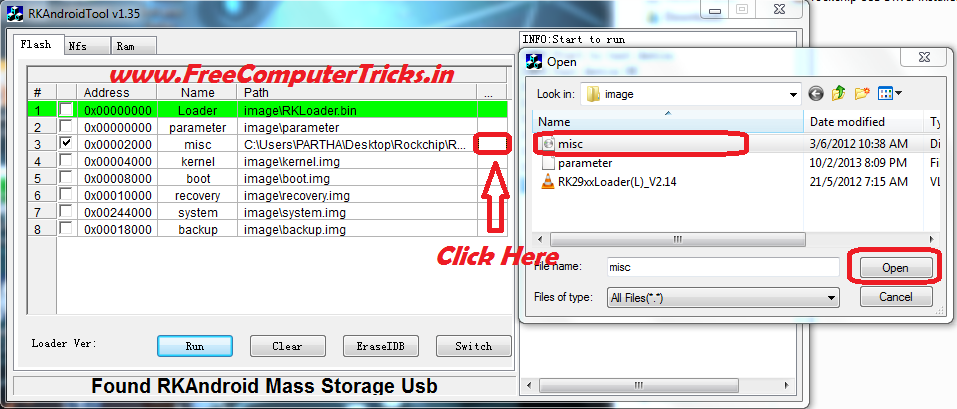
  • Select Only No.3 on Android Tool V1.35 (misc image\misc.img)
  • Click on the last right side of the No.3 row then select misc.img file
Rockchip select misc image file to hard reset
  • Now Click on RUN


Rockchip Android Tablet hard reset done
The misc.img and RockChip USB driver for Windows 7 can be found inside the RockChip Android Tool Folder.

Friday, September 5, 2014

How To Hard Reset XPAD Simmtronics SIMM X722 - Android Tab Hard Reset With Android Multi Tools


How To Hard Reset XPAD Simmtronics SIMM X722 Android Tab with Android Multi Tools V1.1, see the below to hard reset Xpad SIMM X722 with Android Multi tools, in this way you can hard reset, pattern unlock and factory reset of Android Tablet Xpad SIMM X722.


Hard Reset XPAD Simmtronics SIMM X722 with Android Mutitool v1.1

Hard Reset XPAD SIMM X722


  • Download and Install Android Multi Tools V1.1
  • Switch on the Tablet and Connect to PC
  • Open Android Multi Tool V1.1
  • Click on Check Device
  • Then  Click on Search Device/Read CPU Info
  • Now Click on Wipe Device Data


Tuesday, September 2, 2014

Xolo Q800 W2213 Hard Reset and Pattern Unlock Solution


XOLO Q800 W2213 hard reset and pattern unlock done, see the below process to unlock pattern for Xolo Q800 and do the hard reset.

Xolo Q800 Hard Reset
  • Volume down + power key for factory mode
  • Press Volume Down and Select Clear eMMC
  • Now Press Power Key to OK


Xolo Q800 W2213 hard reset and pattern unlock done with buttons
 

That's all now Xolo Q800 W2213 successfully done the hard reset and pattern unlock.

Monday, September 1, 2014

Micromax A51 Hard Reset and Pattern Unlock Solved


Micromax A51 hard reset and pattern lock solution, here is the topic about hard reset of Micromax A51 with buttons, see the below details.

Micromax A51 hard reset with keys


Micromax A51 Hard Reset
  • Switch off the phone
  • Press and hold Volume Up + Power till Android Logo appear
  • Now press Home Soft Key to see Android Recovery Options
  • Now hold the mobile and move up down you can see the blue mark will move up down, hold it carefully and balance it then Press Right Soft Key to OK
  • Remember Right Soft Key is OK


Micromax A51 hard reset done with buttons
We can go to Android system recovery easily, but can not select the options, because Volume Up/Down key will not work at that time. So try the above process 3-4 times you must success.

Tuesday, August 26, 2014

How to Hard Reset and Pattern Unlock Intex Aqua I5 - Intex Aqua I-5 Hard Reset Solution


Intex Aqua I5 hard reset and pattern unlock successfully solved, to know how to hard reset Intex Aqua Android Smartphone please see the below details. 


Intex Aqua i5 Hard reset and pattern unlock solution done

Intex Aqua i5 Hard Reset


  • Press Volume down + power key until you see Android Logo
  • Press power key to see android system recovery options
  • Press Volume down and select wipe data/factory reset
  • Press volume up key to OK

Search Tags: Intex Aqua i5 quad core android mobile unable to do factory reset solved, Intex Aqua i5 Hard Reset, Intex Hard Reset All Models, Hard Reset in Intex Android Mobiles, How to Pattern unlock Intex Aqua, Intex Aqua Factory Reset Solution, Intex Aqua I5 MTK 6589M hard reset,intex aqua i5 factory reset

Micromax A116 Hard Reset and Pattern Unlock 100% Solved


How to hard reset Micromax A116 canvas HD with keys? as you know with A116 we can go to the recovery mode but can not OK the task to wipe data/factory reset. So here is the complete procedure to hard reset Micromax A116 using hard keys/soft keys, the main thing on A116 is we have to press two soft key at the same time to OK/Enter.

Micromax A116 Hard reset solution is 100% working and tested OK.

Micromax A116 Hard Reset and Pattern Unlock 100% Solved with Buttons


Micromax A116 Canvas HD Hard Reset

  • Press Volume Down + Volume Up + Power Button
  • Then Volume UP for Recovery Mode
  • Press Power button to see Recovery Options
  • Now press volume down and select wipe data/factory reset
  • Press Two soft key at the same time to OK
  • Now Press volume Down and select yes-delete all user
  • Then again press two soft key at the same time to OK


Remember power switch is not the OK button on the Micromax A116, but here I press left soft key and Menu Soft key at the same time and the work has done. Now the Micromax A116 has been successfully reset to factory settings and unlock the pattern lock.

Monday, August 25, 2014

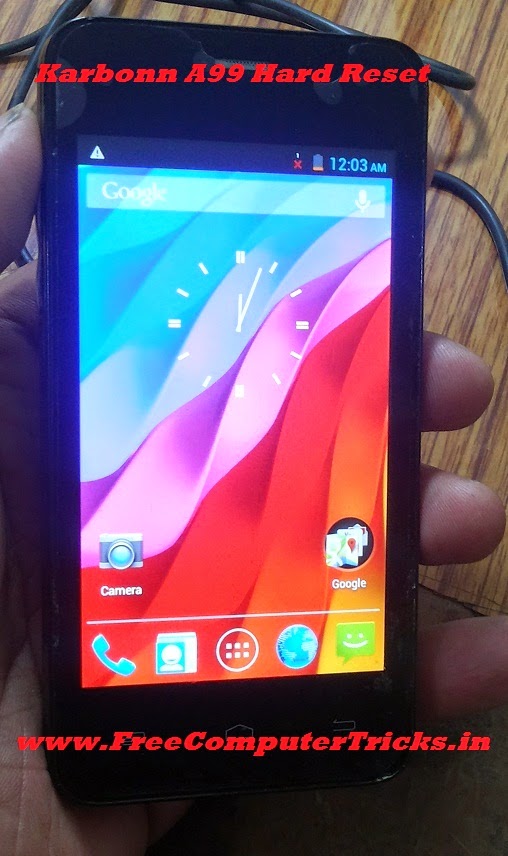
Karbonn A99 Hard Reset and Pattern Unlock Done With Keys


How to hard reset Karbonn A99 with buttons? this topic is about hard reset and pattern unlock of Karbonn A99 with keys/buttons. With hard reset of Karbonn A99 you can solve the pattern lock, hang on Karbonn Logo, erase/delete all use data and Karbonn Hang or restart problem. So see the below process to Hard Reset Karbonn A99.

Karbonn A99 Hard Reset Done with Keys

Karbonn A99 Hard Reset


  • Switch Off the Phone
  • Press and Hold Volume Down + Power Key For Factory Mode
  • Press Volume Down and Select Clear eMMC then Press Power Button to OK
  • Wait till the process complete (It will take 2 to 5 minutes)
  • After that the device will restart automatically

Karbonn A99 Hard Reset and Pattern Unlock


Now the Karbonn A99 has been successfully hard reset and the phone is set to factory default. Remember after Clear eMMC the device will restart automatic and takes 2 to 4 minutes to complete switch ON and also the wipe data/factory reset/ formatting will take 2 to 5 minutes, so don't worry about that just keep patience and let the hard reset process to complete.


Search tags:
karbonn a99 hard reset, karbonn a99 hard reset code, Karbonn A99 hangs on logo, Karbonn A99 hang and restart problem solved, Karbonn A99 pattern unlock done with keys, Karbonn A99 Pattern Lock Unlock, karbonn a99 pattern lock.


Wednesday, August 20, 2014

Lava iris 355 Hard Reset and Pattern Unlock Solution


Lava iris 355 pattern lock solution and here you can know how to hard reset, pattern unlock, pattern lock remove of Lava iris 355 Android smartphone. The below is the process to unlock pattern and hard reset of Lava iris 355 with keys.


Lava iris 355 hard reset power + volume up


Lava iris 355 Hard Reset


  • Press Power Button + Volume Up
  • Now you will see Factory Mode
  • Press Volume Down and Select Clear Flash
  • Press Power Button to OK

📚 You May Also Like to Read