Moto Fastboot FRP Unlock Tool - Reset/Bypass All Moto Qualcomm FRP Lock For Free !!!
Hi all, here is another interesting tutorial about Factory Reset Protection FRP bypass. If you have Moto any model with Qualcomm CPU or Chipset then use this method of Fastboot FRP Unlocking using the Free Fastboot Boot FRP Tool for Moto Qualcomm based phones. This method is so easy and working on Android 7.0 on any Moto smartphone having Qualcomm chip-set. So please follow the below tutorial to know how to remove FRP of Moto using Fastboot Mode.

Here you can also download the Moto Fastboot FRP Unlock tool for free and it's small Windows software or tool, that can do the FRP unlock of any Moto smartphone with Fastboot mode, you can also watch video tutorial on YouTube to know how to use the FRP tool, tested on Moto Qualcomm Android 7.0.
How To Enable USB Debugging On Moto Locked?
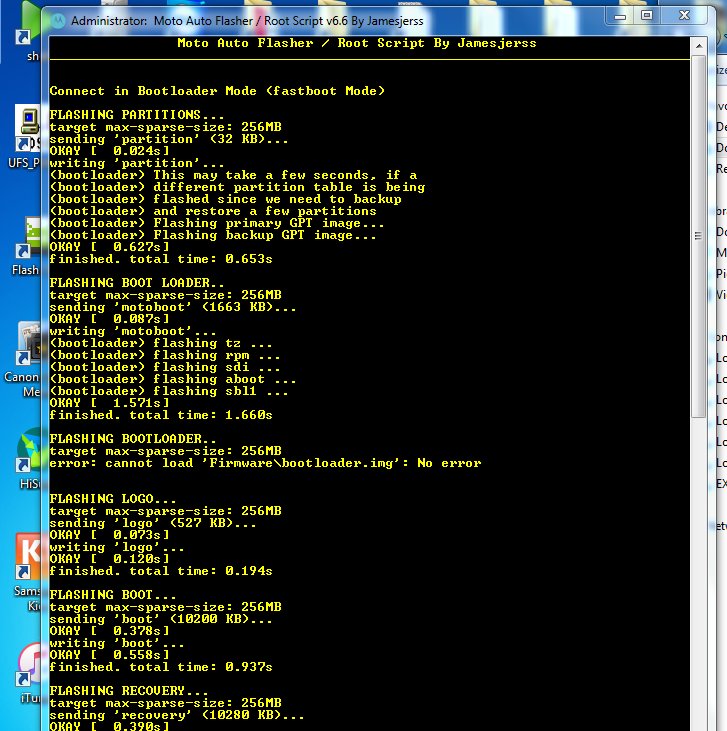
If you need to know how to enable USB debugging on a frp locked Moto phone, without using internet or any other Android application, then here is the best way to enable ADB or USB debugging on a FRP Locked Moto smartphone runs on Qualcomm chip-set. To enable ADB this tool is very use full and easy to use, just put the phone to Fastboot Mode and execute the small FRP tool and it will do the reset procedure automatically, and you need to do one thing just Allow USB Debugging and tick the Always allow from this computer and then click on OK, and finally this tool will unlock the FRP lock of the phone.
How to Use Moto Fastboot FRP Tool?
Here is full procedure to know, how to use Moto Fastboot FRP tool and where to download it, as said before you can also watch out YOUTUBE video tutorial to know the success report of this Moto Fastboot FRP Tool.
Steps:
Watch Moto FRP Unlock Tool Video Tutorial Here (Watch Here)
Moto Models Supports With This FRP Tool:
All most all Moto Lenovo Qualcomm based Android 7.0 phone is supported with this frp tool and to know the procedure you can watch YouTube video tutorial about How to use Moto Lenovo Fastboot FRP Unlock tool, visit the above link.
Moto FRP Never Easy Before:
After using this tool, you can easily remove/bypass/reset frp lock of any Motorola Lenovo smartphone using the fastboot mode or bootloader mode of the moto phone, here you can download the Fastboot frp unlock tool moto free and without password but you need to enter password to open the tool and the password given below and thank you to the creator of this tool.
Moto Android 7.0 FRP Bypass Fastboot Tool:
This small tool can help a lot, to unlock frp lock of the Moto Android 7.0 and it's tested on so many models of Moto runs Android 7.0 and you can also try this tool on Android 8.1 Moto Qualcomm smartphone. Just put the phone to Bootloader or Fastboot Mode and use the frp unlock tool and in the last step Allow USB Debugging on the phone screen and you are done.
Moto Fastboot FRP Tool | Download Link
Password to open the tool = iguru4life
Moto ADB (Android Debug Bridge)
In this process and using this tool you can enable the ADB interface of the Moto phone which is FRP locked or google account locked. If you are searching to know how to enable USB debugging or ADB on the frp locked moto phone then here is the solution, which enable ADB on the moto phone and do the frp reset of the phone automatically. Please watch the video (link given above) and know the full procedure to use this Fastboot FRP Unlock Tool.
Here you can also download the Moto Fastboot FRP Unlock tool for free and it's small Windows software or tool, that can do the FRP unlock of any Moto smartphone with Fastboot mode, you can also watch video tutorial on YouTube to know how to use the FRP tool, tested on Moto Qualcomm Android 7.0.
 |
| Moto Fastboot FRP Unlock Tool - Bypass All Moto Qualcomm FRP Lock Tool For Free !!! |
How To Enable USB Debugging On Moto Locked?
If you need to know how to enable USB debugging on a frp locked Moto phone, without using internet or any other Android application, then here is the best way to enable ADB or USB debugging on a FRP Locked Moto smartphone runs on Qualcomm chip-set. To enable ADB this tool is very use full and easy to use, just put the phone to Fastboot Mode and execute the small FRP tool and it will do the reset procedure automatically, and you need to do one thing just Allow USB Debugging and tick the Always allow from this computer and then click on OK, and finally this tool will unlock the FRP lock of the phone.
How to Use Moto Fastboot FRP Tool?
Here is full procedure to know, how to use Moto Fastboot FRP tool and where to download it, as said before you can also watch out YOUTUBE video tutorial to know the success report of this Moto Fastboot FRP Tool.
Steps:
- Download the Moto Fastboot FRP Tool (Link given below)
- Open the tool and use the password (Given in this page below the download link)
- Now put the phone to Fastboot Mode and connect to PC
- Then the tool will automatically do the things and the phone may reboot several times.
- In the last step Allow USB Debugging on the phone screen and the again reboot and it's done.
Watch Moto FRP Unlock Tool Video Tutorial Here (Watch Here)
Moto Models Supports With This FRP Tool:
All most all Moto Lenovo Qualcomm based Android 7.0 phone is supported with this frp tool and to know the procedure you can watch YouTube video tutorial about How to use Moto Lenovo Fastboot FRP Unlock tool, visit the above link.
Moto FRP Never Easy Before:
After using this tool, you can easily remove/bypass/reset frp lock of any Motorola Lenovo smartphone using the fastboot mode or bootloader mode of the moto phone, here you can download the Fastboot frp unlock tool moto free and without password but you need to enter password to open the tool and the password given below and thank you to the creator of this tool.
Moto Android 7.0 FRP Bypass Fastboot Tool:
This small tool can help a lot, to unlock frp lock of the Moto Android 7.0 and it's tested on so many models of Moto runs Android 7.0 and you can also try this tool on Android 8.1 Moto Qualcomm smartphone. Just put the phone to Bootloader or Fastboot Mode and use the frp unlock tool and in the last step Allow USB Debugging on the phone screen and you are done.
~~~~~~~~~~ DOWNLOADS ~~~~~~~~~~
Moto Fastboot FRP Tool | Download Link
Password to open the tool = iguru4life
Moto ADB (Android Debug Bridge)
In this process and using this tool you can enable the ADB interface of the Moto phone which is FRP locked or google account locked. If you are searching to know how to enable USB debugging or ADB on the frp locked moto phone then here is the solution, which enable ADB on the moto phone and do the frp reset of the phone automatically. Please watch the video (link given above) and know the full procedure to use this Fastboot FRP Unlock Tool.