Showing posts with label Moto Flash Tool. Show all posts

Friday, May 17, 2019

Miracle Box Crack v2.58 100% Working Without Box


Here you can download Miracle box crack or Miracle box loader free and direct download link available, so please visit here to download Miracle box v2.58 cracked with loader working without box. Miracle box FRP unlock, password unlock, flashing and mi account unlock etc.

Download miracle box full crack 2019, working without box.
Miracle box crack v2.58 free download


Miracle Box crack v2.58 download free with loader and 100% working

Miracle Box v2.58 Mega Download Link | Download Here

Miracle Box v2.58 Mediafire Download Link | Download Here
(Password = fct@computer)

Tuesday, September 25, 2018

Moto Fastboot FRP Unlock Tool - Reset/Bypass All Moto Qualcomm FRP Lock For Free !!!


Hi all, here is another interesting tutorial about Factory Reset Protection FRP bypass. If you have Moto any model with Qualcomm CPU or Chipset then use this method of Fastboot FRP Unlocking using the Free Fastboot Boot FRP Tool for Moto Qualcomm based phones. This method is so easy and working on Android 7.0 on any Moto smartphone having Qualcomm chip-set. So please follow the below tutorial to know how to remove FRP of Moto using Fastboot Mode.

Here you can also download the Moto Fastboot FRP Unlock tool for free and it's small Windows software or tool, that can do the FRP unlock of any Moto smartphone with Fastboot mode, you can also watch video tutorial on YouTube to know how to use the FRP tool, tested on Moto Qualcomm Android 7.0.
Moto Fastboot FRP Unlock Tool - Bypass All Moto Qualcomm FRP Lock Tool For Free !!!

How To Enable USB Debugging On Moto Locked?

If you need to know how to enable USB debugging on a frp locked Moto phone, without using internet or any other Android application, then here is the best way to enable ADB or USB debugging on a FRP Locked Moto smartphone runs on Qualcomm chip-set. To enable ADB this tool is very use full and easy to use, just put the phone to Fastboot Mode and execute the small FRP tool and it will do the reset procedure automatically, and you need to do one thing just Allow USB Debugging and tick the Always allow from this computer and then click on OK, and finally this tool will unlock the FRP lock of the phone. 

How to Use Moto Fastboot FRP Tool?

Here is full procedure to know, how to use Moto Fastboot FRP tool and where to download it, as said before you can also watch out YOUTUBE video tutorial to know the success report of this Moto Fastboot FRP Tool.

Steps:
  • Download the Moto Fastboot FRP Tool (Link given below)
  • Open the tool and use the password (Given in this page below the download link)
  • Now put the phone to Fastboot Mode and connect to PC
  • Then the tool will automatically do the things and the phone may reboot several times.
  • In the last step Allow USB Debugging on the phone screen and the again reboot and it's done.
That's all now you have successfully bypass/unlock/remove Moto FRP lock using the free Moto FRP Reset Tool 2018. For more details you can watch the YouTube Video Tutorial link given below.

Watch Moto FRP Unlock Tool Video Tutorial Here (Watch Here)

Moto Models Supports With This FRP Tool:

All most all Moto Lenovo Qualcomm based Android 7.0 phone is supported with this frp tool and to know the procedure you can watch YouTube video tutorial about How to use Moto Lenovo Fastboot FRP Unlock tool, visit the above link.

Moto FRP Never Easy Before:

After using this tool, you can easily remove/bypass/reset frp lock of any Motorola Lenovo smartphone using the fastboot mode or bootloader mode of the moto phone, here you can download the Fastboot frp unlock tool moto free and without password but you need to enter password to open the tool and the password given below and thank you to the creator of this tool.

Moto Android 7.0 FRP Bypass Fastboot Tool:

This small tool can help a lot, to unlock frp lock of the Moto Android 7.0 and it's tested on so many models of Moto runs Android 7.0 and you can also try this tool on Android 8.1 Moto Qualcomm smartphone. Just put the phone to Bootloader or Fastboot Mode and use the frp unlock tool and in the last step Allow USB Debugging on the phone screen and you are done.

~~~~~~~~~~ DOWNLOADS ~~~~~~~~~~

Moto Fastboot FRP Tool | Download Link
Password to open the tool = iguru4life

Moto ADB (Android Debug Bridge) 

In this process and using this tool you can enable the ADB interface of the Moto phone which is FRP locked or google account locked. If you are searching to know how to enable USB debugging or ADB on the frp locked moto phone then here is the solution, which enable ADB on the moto phone and do the frp reset of the phone automatically. Please watch the video (link given above) and know the full procedure to use this Fastboot FRP Unlock Tool.

Thursday, April 26, 2018

Sigma Key Big Moto Update Sigma Software v.2.27.17 Download


SigmaKey Software v2.27.17 released on 19th April 2018 and With this release we have added support for Moto E3 / E3 Power / Moto C / Moto C Plus / Moto E / Moto E Plus / Moto E4 / Moto E4 Plus series and more..

MTK Tab:
Released Direct Unlock / Get unlock codes operations for new Motorola devices:
Moto E3, Moto E3 Power, Moto C, Moto C Plus, Moto E, Moto E Plus, Moto E4, Moto E4 Plus, XT1700, XT1706, XT1721, XT1723, XT1724, XT1725, XT1750, XT1754, XT1755, XT1756, XT1760, XT1761, XT1762, XT1763, XT1764, XT1769, XT1770, XT1771, XT1772, XT1773


Sigma Key Update Setup Download or Sigma Software Latest Setup v.2.27.17 Download
SigmaKey Official Website
SigmaKey or Sigma Software Updates
Download SigmaKey V2.27.17


How to Install Sigma Software?
 

Download the Sigmakey or sigma software latest version from the above link and install with setup file, it supports Windows operating system. To install and use this software you must have Sigma Key box, this box is used for flashing and unlocking smartphones and the latest sigma software setup comes with big moto updates.

System requirements:

Minimum system requirements:
1 GB of RAM
20 MB of free space on the hard drive
Intel Celeron (R) CPU 2.26 GHz processor


Recommended system requirements:
Windows 7
4 GB of RAM
2 GB of free space on the hard drive
Intel Core™2 Duo 2.93 GHz processor


Supported OS:
XP (32/64-bit)
Vista (32/64-bit)
7 (32/64-bit)
Server 2008


How to Use Sigma Key Box?
  • Connect SigmaKey/SigmaBox to PC USB port
  • Install SigmaKey/SigmaBox drivers
  • Update (activate) your SigmaKey/SigmaBox
  • Now use Sigma Key or Sigma Box

Download Sigmakey box and dongle driver

Drivers for Box and Dongle [Download Link]

Phone USB Drivers

Alcatel Android Smartphones USB Host Driver (Version 2.0.8.8)
ACER Qualcomm Smartphones Drivers
Motorola Android Smartphones USB Driver (Version 5.4.0)
Huawei Android Driver (Version 2.0.6.4)
Huawei U8680 / U8730 / U8800 / U8860 Driver (Version 2.0.6.601)
Huawei U8686 Driver
Qualcomm Huawei Phones Drivers
Huawei U8850 USB Driver (Version 1.7.0)
Huawei U9000 USB Driver (Version 2.2.0)
Huawei U8520 Driver
Huawei S7 Mediapad Driver
ZTE V889F V880G V955 A2 V71A V11A Driver
ZTE Android Smartphones USB Driver (Version 1.2066.1.3)
ZTE Handset Driver (Version 5.2066.1.8)
ZTE Orange Boston Driver
Skypephone AMOI WP-S1 USB / Bmobile QW130 Driver
Kyocera C6522/C6530 Driver
Micromax Q415 Driver


Download Here

MTK devices:
MTK USB Driver
Version 1.0948.0
Drivers for Alcatel MTK Android smartphones
Drivers for ZTE MTK Android smartphones


Download Here

Broadcom devices:
Drivers for Broadcom smartphones

 
Download Here


Virtual COM Port Drivers:
Prolific Cable Drivers (Version 2.0.13.130)
FTDI Drivers (Version 2.6.0.0)
FTDI Drivers (Version 2.04.06)


Download Here

Monday, August 14, 2017

How to download Motorola correct firmware version


Here is the tutorial about, how you can download Motorola smartphone correct firmware? Using the simple fastboot command and trick you will easily find appropriate firmware version for the Motorola phone. With this fastboot command you will get the firmware version, product, Android version and cid etc. of the Moto phone.

How To Download Correct Firmware For Motorola Smart Phone?

Here is the example of Motorola XT1068, as you know there are so many version of Android firmware now but you need to choose the correct firmware to download and flash the phone, just see the below details to know the correct firmware version of Moto XT1068. To do that put the phone in to fastboot mode (Volume Down + Power Key) now connect the phone to PC and run the below fastboot command and read carefully how to find the correct firmware version for the device.

How to Download Motorola Correct Firmware Version of Moto XT1068

Motorola Phone Fastboot Getvar All:

Just the put the phone in to Fastboot Mode and run the below command.
Open the command prompt (best to use  Minimal ADB and Fastboot setup)
Download and install Minimal ADB and Fastboot setup and open it
Now run the Command: fastboot getvar all and press Enter
Just wait for some seconds it will show all the required information about Moto Phone.

fastboot getvar all

< waiting for any device >
(bootloader) slot-count: not found
(bootloader) slot-suffixes: not found
(bootloader) version: 0.5
(bootloader) version-bootloader: 4887
(bootloader) product: titan
(bootloader) secure: yes
(bootloader) hwrev: 0x8400
(bootloader) radio: 0x5
(bootloader) emmc: 16GB Sandisk REV=07 PRV=01 TYPE=57
(bootloader) ram: 1024MB Elpida S4 SDRAM DIE=4Gb
(bootloader) cpu: MSM8226 CS
(bootloader) serialno: ZX1D6242HF
(bootloader) cid: 0x0007
(bootloader) channelid: 0xc0
(bootloader) uid: FF9E7C040F000000000000000000
(bootloader) unlocked: no
(bootloader) securestate: locked
(bootloader) iswarrantyvoid: no
(bootloader) mot_sst: 0
(bootloader) max-download-size: 536870912
(bootloader) reason: Volume down key pressed
(bootloader) imei: xxxxxxxxxxxxxxx
(bootloader) meid:
(bootloader) date: 08-11-2014
(bootloader) sku: XT1068
(bootloader) battid: (null)
(bootloader) iccid:
(bootloader) cust_md5:
(bootloader) max-sparse-size: 268435456
(bootloader) current-time: "Wed May 17 11:30:28 UTC 2017"
(bootloader) ro.build.fingerprint[0]: motorola/titan_retaildsds/titan_um
(bootloader) ro.build.fingerprint[1]: tsds:6.0/MPB24.65-34-3/3:user/rele
(bootloader) ro.build.fingerprint[2]: ase-keys
(bootloader) ro.build.version.full[0]: Blur_Version.24.81.3.titan_retail
(bootloader) ro.build.version.full[1]: dsds.retaildsdsall.en.03
(bootloader) ro.build.version.qcom[0]: AU_LINUX_ANDROID_LNX.LA.3.5.1_RB1
(bootloader) ro.build.version.qcom[1]: .04.04.02.048.045
(bootloader) version-baseband: MSM8626BP_1032.3116.99.00R EMEA_DSDS_CUST
(bootloader) kernel.version[0]: Linux version 3.4.42-g0a0ded4 (hudsoncm@
(bootloader) kernel.version[1]: ilclbld87) (gcc version 4.8 (GCC) ) #1 S
(bootloader) kernel.version[2]: MP PREEMPT Mon Aug 22 14:27:42 CDT 2016
(bootloader) sdi.git: sdi.git
(bootloader) sbl1.git: sbl1.git
(bootloader) rpm.git: rpm.git
(bootloader) tz.git: tz.git
(bootloader) aboot.git: git=MBM-NG-V48.87-0-g1b80345
(bootloader) partition-type: raw
(bootloader) partition-size:
(bootloader) qe:
(bootloader) productid:
(bootloader) sutinfo:
(bootloader) ro.carrier: retin
all: listed above
finished. total time: 34.947s

After get the getvar all info just find out the below lines and note it for the firmware information.

(bootloader) product: titan
(bootloader) emmc: 16GB Sandisk REV=07 PRV=01 TYPE=57
(bootloader) cid: 0x0007
(bootloader) sku: XT1068
(bootloader) ro.build.fingerprint[0]: motorola/titan_retaildsds/titan_um
(bootloader) ro.build.fingerprint[1]: tsds:6.0/MPB24.65-34-3/3:user/rele

For example:

Here you need the firmware for XT1068 with following details

sku: XT1068 means the Motorola phone model No. XT1068
CID: 0x0007 means CID7
tsds:6.0 means Android version 6.0
motorola/titan_retaildsds/titan_um means titan_retaildsds is the product name
MPB24.65-34-3/3:user/rele means MPB24. 65-34-3 is detail version info.

So you need to download the firmware for the Moto XT1068 is must be like the below.

XT1068_TITAN_RETAILDSDS_6.0_MPB24.65-34-3_cid7_CFC.xml

Download the above firmware for the moto xt1068 smartphone and flash the phone with correct firmware version. If you flash moto with correct firmware version you will not get any error message while flashing otherwise you may not able to flash the phone.

Thursday, April 21, 2016

How To Flash / Install Firmware on Moto E


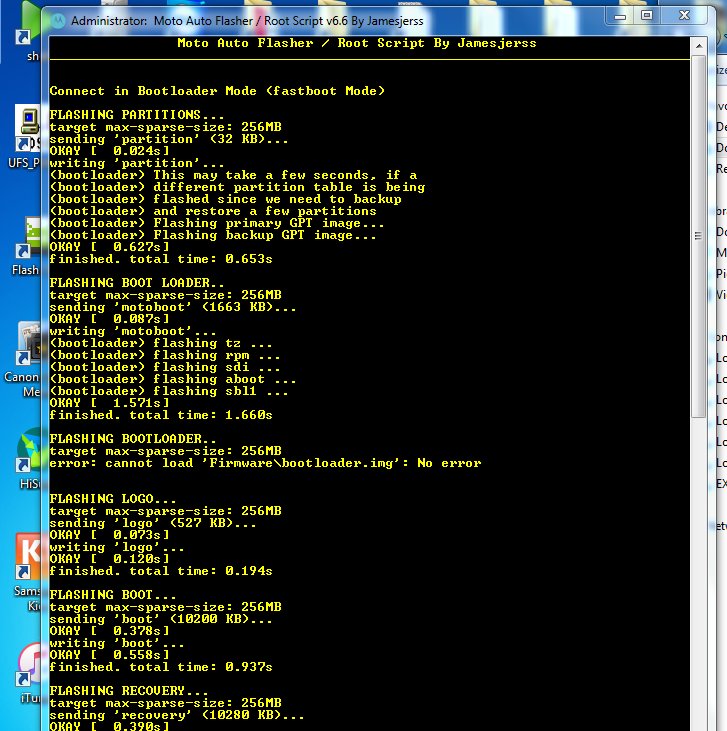
Here is the topic abut how you can flash or write firmware on Moto series, this process will work almost all Moto series. In this way you can flash Moto G, Moto E etc. using this Moto Auto Flash Tool v6.6 tool, follow the below details to flash the Motorola Android Phones.

Downloads:
Moto Auto Flash Tool v6.6 Tool

MOTO FIRMWARE DOWNLOAD MOTO E 2nd GEN
XT1506_OTUS_RETEU_DS_5.0.2_LXC22.99-13_cid7_subsidy-DEFAULT_CFC.xml.rar

Supported Features:
Flash Stock/ Custom Recovery
Flash Boot.img / Modem.bin
Reboot Menu / Wipe Menu
Firmware Downloading
Motorola Flashing
Root Moto E,G,X etc All Gen
Frp Remove [Need Adb Debugging]
Bootloader Unlocked Warning Remove
Bootloader Unlock
Check For Script Update
Read Partition Table [Need Root]

Mote E 2nd Gen flash done with Tool
After flash complete start the phone and wait till boot process finish, you may get boot loader error message on the screen, to remove that flash with logo.bin using this Moto Auto Flash Tool v6.6.


📚 You May Also Like to Read