Showing posts with label Fastboot Mode. Show all posts

Friday, September 14, 2018

Android Fastboot Mode !


Like Android Recovery option, Android Fastboot Mode also very useful to do some extra thing with the phone, such as Hard Reset, Read Info, Version Info, FRP Unlock, Erase Persist, Erase Config etc. using Fastboot Command or you can also download the small ADB and Fastboot tool to use this functions.

So here we will discuss about how you can easily boot in to Fastboot Mode on your Android smartphone, and almost all Android devices are have this option but the boot technique is different. The below is the details to boot into bootloader of the Android smartphone and it's supports all version of Android operating system.
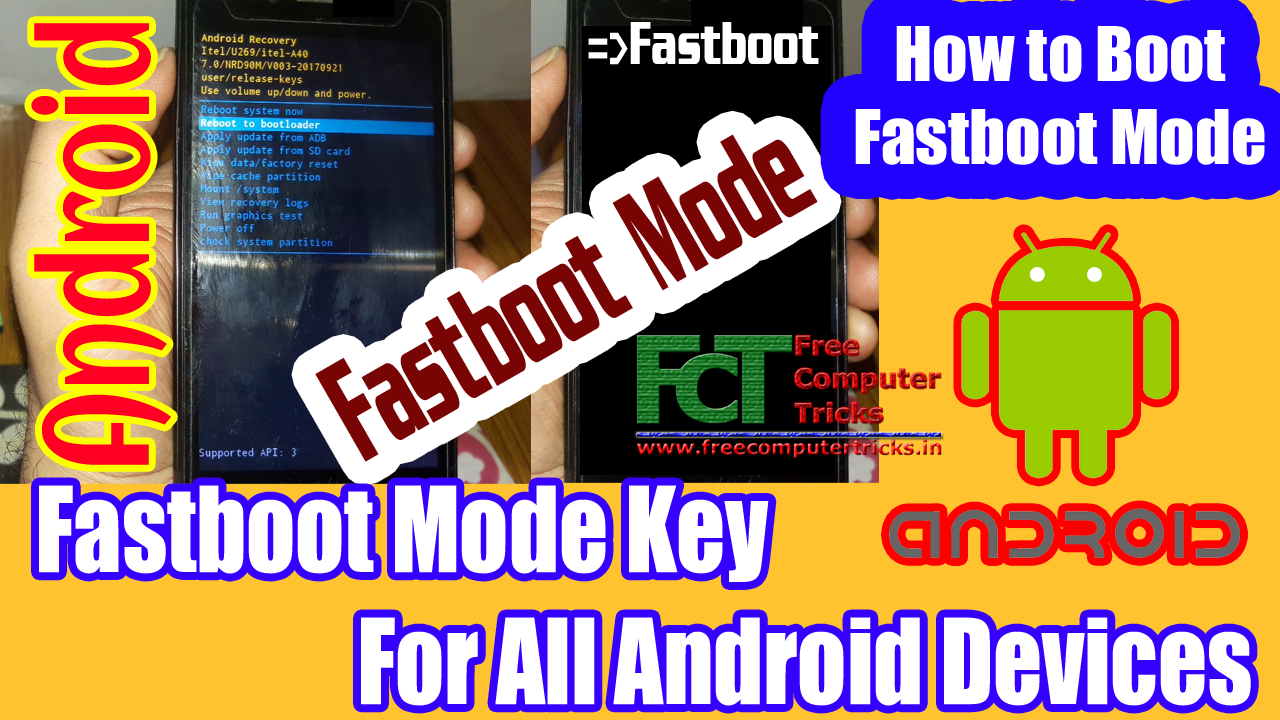
Android Fastboot Mode !


Android Fastboot Mode Method 1:

There are various procedure to boot to bootloader, and we will discuss one by one that you can understand it better. Boot into fastboot mode is easy and simple but you need to find the proper boot key of the particular phone. So you can try the following key or button combination to boot into Fastboot Mode.

Steps:
  • First press Power Button and (after 2 seconds) then Hold Volume Up or Down Key.
  • Now you will find Fastboot Written on the top of the screen
  • And that is the Fastboot Mode
Android Fastboot Mode Method 2:

Not all the smartphones can boot directly to fastboot mode, but there also an option or way through which you can boot the phone to fastboot mode using the Android Recovery Option.

Steps:
  • Boot the phone to Recovery Mode
  • Now chose the option "Reboot to bootloader"
  • And now the phone will reboot to fastboot mode
You can try the following button combination to boot the phone to Recovery Mode.

1) Hold the Power key and press Volume Up or Volume Down.
2) First hold the Volume up or down key then press power button.
3) Hold both Volume Key and press Power Key.
4) Volume Up + Home Key + Power key


Monday, August 14, 2017

How to download Motorola correct firmware version


Here is the tutorial about, how you can download Motorola smartphone correct firmware? Using the simple fastboot command and trick you will easily find appropriate firmware version for the Motorola phone. With this fastboot command you will get the firmware version, product, Android version and cid etc. of the Moto phone.

How To Download Correct Firmware For Motorola Smart Phone?

Here is the example of Motorola XT1068, as you know there are so many version of Android firmware now but you need to choose the correct firmware to download and flash the phone, just see the below details to know the correct firmware version of Moto XT1068. To do that put the phone in to fastboot mode (Volume Down + Power Key) now connect the phone to PC and run the below fastboot command and read carefully how to find the correct firmware version for the device.

How to Download Motorola Correct Firmware Version of Moto XT1068

Motorola Phone Fastboot Getvar All:

Just the put the phone in to Fastboot Mode and run the below command.
Open the command prompt (best to use  Minimal ADB and Fastboot setup)
Download and install Minimal ADB and Fastboot setup and open it
Now run the Command: fastboot getvar all and press Enter
Just wait for some seconds it will show all the required information about Moto Phone.

fastboot getvar all

< waiting for any device >
(bootloader) slot-count: not found
(bootloader) slot-suffixes: not found
(bootloader) version: 0.5
(bootloader) version-bootloader: 4887
(bootloader) product: titan
(bootloader) secure: yes
(bootloader) hwrev: 0x8400
(bootloader) radio: 0x5
(bootloader) emmc: 16GB Sandisk REV=07 PRV=01 TYPE=57
(bootloader) ram: 1024MB Elpida S4 SDRAM DIE=4Gb
(bootloader) cpu: MSM8226 CS
(bootloader) serialno: ZX1D6242HF
(bootloader) cid: 0x0007
(bootloader) channelid: 0xc0
(bootloader) uid: FF9E7C040F000000000000000000
(bootloader) unlocked: no
(bootloader) securestate: locked
(bootloader) iswarrantyvoid: no
(bootloader) mot_sst: 0
(bootloader) max-download-size: 536870912
(bootloader) reason: Volume down key pressed
(bootloader) imei: xxxxxxxxxxxxxxx
(bootloader) meid:
(bootloader) date: 08-11-2014
(bootloader) sku: XT1068
(bootloader) battid: (null)
(bootloader) iccid:
(bootloader) cust_md5:
(bootloader) max-sparse-size: 268435456
(bootloader) current-time: "Wed May 17 11:30:28 UTC 2017"
(bootloader) ro.build.fingerprint[0]: motorola/titan_retaildsds/titan_um
(bootloader) ro.build.fingerprint[1]: tsds:6.0/MPB24.65-34-3/3:user/rele
(bootloader) ro.build.fingerprint[2]: ase-keys
(bootloader) ro.build.version.full[0]: Blur_Version.24.81.3.titan_retail
(bootloader) ro.build.version.full[1]: dsds.retaildsdsall.en.03
(bootloader) ro.build.version.qcom[0]: AU_LINUX_ANDROID_LNX.LA.3.5.1_RB1
(bootloader) ro.build.version.qcom[1]: .04.04.02.048.045
(bootloader) version-baseband: MSM8626BP_1032.3116.99.00R EMEA_DSDS_CUST
(bootloader) kernel.version[0]: Linux version 3.4.42-g0a0ded4 (hudsoncm@
(bootloader) kernel.version[1]: ilclbld87) (gcc version 4.8 (GCC) ) #1 S
(bootloader) kernel.version[2]: MP PREEMPT Mon Aug 22 14:27:42 CDT 2016
(bootloader) sdi.git: sdi.git
(bootloader) sbl1.git: sbl1.git
(bootloader) rpm.git: rpm.git
(bootloader) tz.git: tz.git
(bootloader) aboot.git: git=MBM-NG-V48.87-0-g1b80345
(bootloader) partition-type: raw
(bootloader) partition-size:
(bootloader) qe:
(bootloader) productid:
(bootloader) sutinfo:
(bootloader) ro.carrier: retin
all: listed above
finished. total time: 34.947s

After get the getvar all info just find out the below lines and note it for the firmware information.

(bootloader) product: titan
(bootloader) emmc: 16GB Sandisk REV=07 PRV=01 TYPE=57
(bootloader) cid: 0x0007
(bootloader) sku: XT1068
(bootloader) ro.build.fingerprint[0]: motorola/titan_retaildsds/titan_um
(bootloader) ro.build.fingerprint[1]: tsds:6.0/MPB24.65-34-3/3:user/rele

For example:

Here you need the firmware for XT1068 with following details

sku: XT1068 means the Motorola phone model No. XT1068
CID: 0x0007 means CID7
tsds:6.0 means Android version 6.0
motorola/titan_retaildsds/titan_um means titan_retaildsds is the product name
MPB24.65-34-3/3:user/rele means MPB24. 65-34-3 is detail version info.

So you need to download the firmware for the Moto XT1068 is must be like the below.

XT1068_TITAN_RETAILDSDS_6.0_MPB24.65-34-3_cid7_CFC.xml

Download the above firmware for the moto xt1068 smartphone and flash the phone with correct firmware version. If you flash moto with correct firmware version you will not get any error message while flashing otherwise you may not able to flash the phone.

How to get motorola smart phone device information


Here is the tutorial about how you can get the device firmware information with the use of simple fastboot command. With this technique you will get all most all information about the Motorola smart phone on your computer screen. In this you will get the device IMEI No., Product version, emmc capacity, firmware version, cid information, serial no., bootloader unlock status and radio info etc.

Motorola fastboot getvar all:

How To Get Moto Smart Phone Device Information?

Put the Motorola phone into fastboot mode and run the below command

Command: fastboot getvar all

Motorola fastboot command getvar all

< waiting for any device > 
(bootloader) slot-count: not found 
(bootloader) slot-suffixes: not found 
(bootloader) version: 0.5 
(bootloader) version-bootloader: 4887 
(bootloader) product: titan 
(bootloader) secure: yes 
(bootloader) hwrev: 0x8400 
(bootloader) radio: 0x5 
(bootloader) emmc: 16GB Sandisk REV=07 PRV=01 TYPE=57 
(bootloader) ram: 1024MB Elpida S4 SDRAM DIE=4Gb 
(bootloader) cpu: MSM8226 CS 
(bootloader) serialno: ZX1D6242HF 
(bootloader) cid: 0x0007 
(bootloader) channelid: 0xc0 
(bootloader) uid: FF9E7C040F000000000000000000 
(bootloader) unlocked: no 
(bootloader) securestate: locked 
(bootloader) iswarrantyvoid: no 
(bootloader) mot_sst: 0 
(bootloader) max-download-size: 536870912 
(bootloader) reason: Volume down key pressed 
(bootloader) imei: xxxxxxxxxxxxxxx 
(bootloader) meid: 
(bootloader) date: 08-11-2014 
(bootloader) sku: XT1068 
(bootloader) battid: (null) 
(bootloader) iccid: 
(bootloader) cust_md5: 
(bootloader) max-sparse-size: 268435456 
(bootloader) current-time: "Wed May 17 11:30:28 UTC 2017" 
(bootloader) ro.build.fingerprint[0]: motorola/titan_retaildsds/titan_um 
(bootloader) ro.build.fingerprint[1]: tsds:6.0/MPB24.65-34-3/3:user/rele 
(bootloader) ro.build.fingerprint[2]: ase-keys 
(bootloader) ro.build.version.full[0]: Blur_Version.24.81.3.titan_retail 
(bootloader) ro.build.version.full[1]: dsds.retaildsdsall.en.03 
(bootloader) ro.build.version.qcom[0]: AU_LINUX_ANDROID_LNX.LA.3.5.1_RB1 
(bootloader) ro.build.version.qcom[1]: .04.04.02.048.045 
(bootloader) version-baseband: MSM8626BP_1032.3116.99.00R EMEA_DSDS_CUST 
(bootloader) kernel.version[0]: Linux version 3.4.42-g0a0ded4 (hudsoncm@ 
(bootloader) kernel.version[1]: ilclbld87) (gcc version 4.8 (GCC) ) #1 S 
(bootloader) kernel.version[2]: MP PREEMPT Mon Aug 22 14:27:42 CDT 2016 
(bootloader) sdi.git: sdi.git 
(bootloader) sbl1.git: sbl1.git 
(bootloader) rpm.git: rpm.git 
(bootloader) tz.git: tz.git 
(bootloader) aboot.git: git=MBM-NG-V48.87-0-g1b80345 
(bootloader) partition-type: raw 
(bootloader) partition-size: 
(bootloader) qe: 
(bootloader) productid: 
(bootloader) sutinfo: 
(bootloader) ro.carrier: retin 
all: listed above 
finished. total time: 34.947s

Saturday, March 25, 2017

Lenovo K6 Note FRP Removed Without Any Box


Here is the tutorial about, how you can remove FRP lock on Lenovo K6 Note ? the details process and flash tool is given below. You can remove Lenovo FRP by using and simple fastboot tool, which download link is given below. Remove Lenovo FRP lock without using any software box. 

Lenovo K6 Note FRP Solutions:

1) Volcano Inferno Tool : Using this tool you can remove FRP on Lenovo K6, but for this you need to have Voclano box and Inferno dongle, if you have the Volcano box and inferno key then put the Lenovo k6 into fastboot mode and do the FRP unlock.

2) If you have any other software box i.e. FALCON BOX or KEY, INFINITY CHINESE MIRACLE TOOL, MIRACLE BOX or any other box which support Qualcomm FRP remove using fastboot mode. 

But here is the way to remove FRP on Qualcomm Android smartphones and lenovo K6, so see the below process to remove FRP on Lenovo K6 Qualcomm CPU Android smartphone.
Lenovo FRP Solution Without Using Any Software Box

Lenovo K6 Note FRP Solution Without Box:

1) Download fastboot FRP remove tool, go to the below link and download it.
FRP Reset Tool

2) Now put the Lenovo K6 into fastboot mode (Volume up + Power)
3) Open the FRP Tool
4) Press 0 (Zero) and press Enter key
5) Now it will erase the FRP and reboot the phone

That's all now after reboot just check the phone, it will not ask any FRP reactivation on Lenovo K6 Note. This process may work on any other Lenovo Android smartphones having Qualcomm CPU or can be used on any other brand phones having Qualcomm CPU. How to remove Qualcomm FRP Lock? this process will help you to remove FRP lock on Qualcomm CPU.

Saturday, March 29, 2014

How to Hard Reset Karbonn A5 & Pattern Lock Solution with Fastboot Mode


To hard reset the Karbonn A5 and for pattern lock solution please follow the steps below.


Karbonn A5 Wipe Data/Cache On Fastboot Mode


1) Press Volume Up + Power Button on Karbonn A5 to Enter Fastboot Mode

2) Now Connect the phone to PC using USB Data Cable

3) Let the ADB driver to be install

4) Open the Android Multi Tools

5) Press No. 8 and then press Enter Key


Karbonn A5 Wipe Data on Fastboot Mode to remove pattern lock


That's all after completing the process the will be restart and you have successfully unlock the pattern for your Karbonn A5. Remember all data will be lost on the phone storage.


If you want to reset the pattern lock only then you can try Number 4 to reset Gmail only, some time it may not work.

📚 You May Also Like to Read