Showing posts with label Android FRP Solutions. Show all posts

Sunday, May 19, 2019

RBSoft v1.4 / RBSoft Tool v1.5 Full Working Download Link Here


Download rbsoft mobile tool software for qcn repair, imie repair, qualcomm frp and qualcomm imei repair and many more, download link given below, please download RBSoft tool v1.4 or RBSoft Mobile tool 1.5 and enjoy.

RBSoft 1.4 or RBSoft 1.5 Download Full

Download Link, MediaFire (Password = rbsoftfct)
Download RBSoft v1.5 | Download Here

Tuesday, November 13, 2018

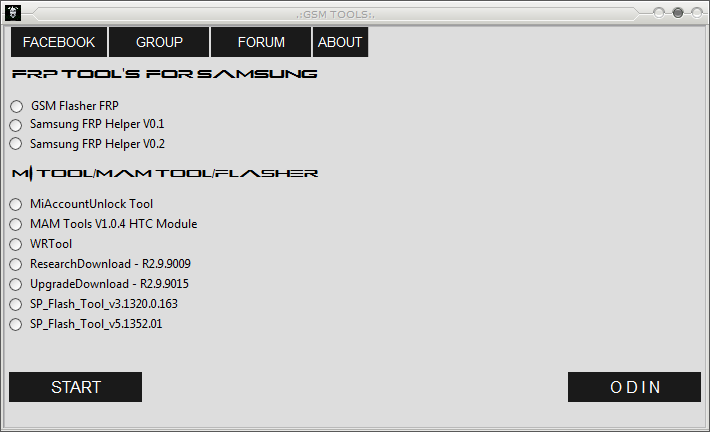
New FRP/Google Account Bypass and Flash Tool For Samsung, Xiaomi, HTC, SPD, Qualcomm and MediaTek Etc.


Hi friends, today you will get another Factory Reset Protection bypass tool or so called Google Account remove or bypass tool for all most all Android versions and this supports Samsung, Xiaomi Redmi, HTC, Spreadtrum, Qualcomm and MediaTek, so download and enjoy the new FRP/Google account bypass tool and unlock all recent Android smartphones without any paid tool. This tool works on all most all Samsung, Mi, HTC Android phones and it also supports other devices having Spreadtrum, Qualcomm and MediaTek chipset Android phones.

FRP BYPASS AND FLASHING TOOL:
  • File Name: GSM TOOLS BY gadgets Doctor.zip
  • Tool Type: FRP Bypass or Google Account Remove Tool.
  • File Size: 100 MB
  • Download Link: MediaFire
  • Password: GADGETS DOCTOR

How to Use This FRP/Google Account Bypass GSM TOOL?

  • Download the FRP Unlock Tool (Link Given Below)
  • Unzip the file using the password - GADGETS DOCTOR
  • Now Open the Tool and choose the option you need
  • Now click on Start button and connect the phone with Fastboot Mode or ADB Mode.
  • After Unlock Success Remove the phone and Switch it ON.
 
New FRP/Google Account Bypass and Flash Tool For Samsung, Xiaomi, HTC, SPD, Qualcomm and MediaTek Etc.

GSM FRP Bypass Tool Features:
  • GSM Flasher FRP
  • Samsung FRP Helper V0.1
  • Samsung FRP Helper V0.2
  • Mi Account Unlock Tool
  • MAM Tools V1.0.4 HTC Module
  • WR Tool
  • Research Download Tool
  • Upgrade Download Tool
  • SP Flash Tool
  • ODIN 3

You can use all the above options or function on the same tool in the GSM TOOL, and it's free to use for every one, so download the new FRP bypass tool and use to unlock and flash any Android smartphones.

Download Link: https://devoloperxda.blogspot.com/2017/05/a-new-frpgoogle-account-bypass-and.html

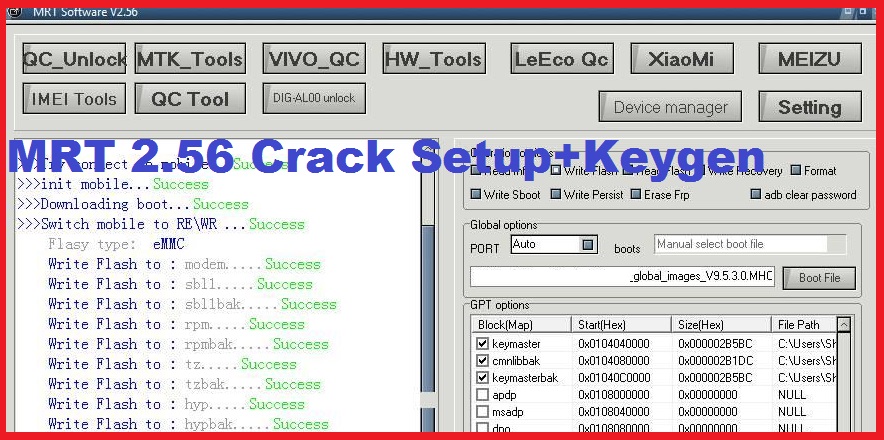
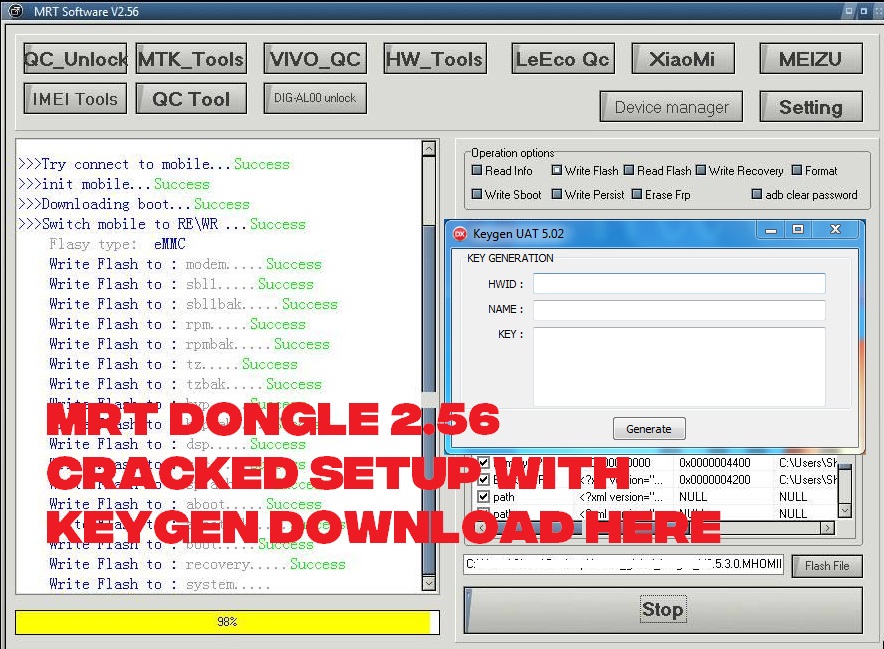
MRT Dongle 2.56 Cracked Setup With KeyGen Download Here


MRT dongle software version 2.56, you can use this tool or Windows software without the MRT dongle and this version is working fine for flashing and unlocking any latest Android smartphones. So download the free Android unlock tool which supports all most all new devices from VIVO, OPPO, MICROMAX, XOLO, IBALL, ONEPLUS AND SAMSUNG, along with all Qualcomm, MTK and Spreadtrum CPU based phone unlocking and flashing. This tool is very useful for Reset or Bypass Factory Reset Protection (FRP) or Google account verification, so here is the free download link for MRT Dongle 2.56 with key gen.

How to Install MRT Software 2.56?
  • Download the software and key gen from the link given below.
  • Unzip the software using the password provided.
  • Now Open the MRT 2.56 Crack Setup and Install it using the Installation Password given in Setup Pass.txt inside the folder.
  • Now Open MRT_2.56 Crack and copy the HWID and Use the KeyGen to generate key.
  • Now copy and paste the key in the activation window.
  • Now Open the MRT_2.56 Crack.exe and it will work fine.
MRT Dongle Key Crack and KeyGen

MRT Dongle Key Crack and KeyGen Use?

This tool is used for unlocking and flashing Android smartphones. Using this version or MRT dongle also supports various devices to unlock FRP, Repair IMEI and it can also fixed all other Mobile software issues. This too is very use full for VIVO and OPPO FRP unlock, flashing and Hard Reset and which supports VIVO and OPPO both Qualcomm and MediaTek CPU to Unlock and Reset.
 
MRT 2.56 Crack Setup+Keygen Download Free

MRT Flash and Unlock Tool 2.56 Download:

Download MRT Dongle 2.56 Setup + KeyGen | Download Link
Password for zip file = FCT@mrt256

Download free Android flash tool and frp unlock tool crack software with loader or keygen, free download of MRT flash and unlock tool without dongle with activation key.

Wednesday, October 3, 2018

TECNO i3 Android 7.0 Google Account Unlock Tool and File Download


How to unlock Google account verification or Gmail lock or Google re-verification lock on your Android device and this tutorial is for Android smartphone for the TECNO i3 Android 7.0. By following this tutorial you can easily remove the FRP lock or Google lock of the Android device, as this device is has MediaTek MTK Chipset and it can be unlock using SP flash tool.

To know the unlock process you can watch the video tutorial link given below and here you can download the Flash tool and unlock file for TECNO i3 to reset or unlock FRP settings of the phone. Please go through the below details to download the file and tool.
TECNO i3 Android 7.0 Google Account Unlock Tool and File Download

Download the Google Account verification bypass or FRP unlock file from the below link and watch the video tutorial to know how to format the FRP lock of the phone using SP Flash Tool. If you have facing any problem during this process, please ask through comments either here or Video tutorial on YouTube.

TECNO i3 FRP Unlock Procedure:-
  • Download the FRP file from the link given below.
  • Open SP Flash Tool
  • Select Download Agent DA_SWSEC.bin
  • Select Android Scatter File MT6737M_Android_scatter.txt
  • Now go to FORMAT Tab and Select Manual Format
  • Use the text file to know the Format Address and Length
  • Click on Start button
  • Now connect the switched off phone by holding the Volume Down Key

DOWNLOAD LINK:-

TECNO i3 FRP Unlock Tool and Flash Tool and FRP Address Download Below
Gmail Google Account Verification Unlock Android TECNO | Download Here

Download Tecno i3 SP Flash TOOL
Download Smartphone Flash Tool (SP Flash Tool) | Download Link Here

TECNO I3 FRP WATCH THE VIDEO TUTORIAL ON YOUTUBE
TECNO i3 Android 7 0 FRP Unlock Done - SP Flash Tool

Wednesday, May 23, 2018

Lava Z50 FRP Unlock and Tool DL Image Fail Final Solution Here


Hi friends, welcome to another interesting tutorial from Free Computer Tricks, today this tutorial belongs to How to unlock frp on Lava Z50? final solution. So here we will give the tested and 100% working solution fro bypass frp on Lava Z50 which has a MediaTek MT6737M chipset. This process includes the frp bypass without using any Mobile flashing box or any other special flash tools. In this article you will know how to bypass frp unlock and solve Tool DL Image flail solution of Lava Z50 using Smart Phone Flash Tool or so called SP Flash Tool.
Lava Z50 FRP Unlock Final Solution Here and Lava Z50 Tool DL Image Fail Solution

As you know the Lava Z50 released on March 2018 in India and let's know some technical features of this phone. It's a Dual SIM LTE smart phone with Android Oreo operating system runs on MediaTek MT6737M platform, the phone also has a Quad-core 1.1 GHz Cortex A53 CPU and Mali T720MP2 GPU with 8 GB internal storage and 1 GB RAM, you can also expand it upto 64 GB using microSD card slot. If yo look at the camera features it has 5 MP auto-focus main camera and 5 MP front camera. The phone has a Li-Po 2000mAh removable battery and with other basic features such as Wi-Fi, Bluetooth, GPS, Radio, Accelerometer sensor, proximity sensor etc. This is one of the cheapest smartphone in India, available with a price tag INR 4.399/-* approx, you can check the current price of the phone on any online store.

How To Bypass FRP On Lava Z50 Final Solution Here Using SP Flash Tool:

Steps:
  • Download Lava Z50 FRP Solution zip file (Download Link Given Below)
  • After extract you will get Lava Z50 Flash Tool and FRP Bypass Files.
  • Now Open SP Flash Tool (Open SP Flash Tool v5.1708 Folder and Double Click on flash_tool.exe).
  • Now load Android scatter file (MT6737M_Android_scatter.txt) in the Flash File Images folder.
  • Now go to Format Tab on SP Flash Tool and select Manual Format Flash.
  • Now Specify the region, begin address and length of the format area 
Region: EMMC_USER
Begin Address [HEX]: 0x6a00000
Format Length [HEX]: 0x100000
  • Now Click on Start and connect switched off Lava Z50 Phone to Computer Using USB cable. (Sometimes you need to press the boot key, Lava Z50 boot keys = switch of the phone and Hold the volume down key then connect the phone to PC)
  • After format OK remove the phone and switch on the phone and you are done.
How To Bypass FRP On Lava Z50 Final Solution Using SP Flash Tool
Lava Z50 After FRP Unlock Tool DL Image Fail - Solution:

If you are facing Tool DL Image Fail after flashing or unlocking frp on the Lava Z50 Android smartphone then here is the solution. If the phone is showing Tool DL Image fail then it's continuously restarts and you unable to use the phone, but after following the below steps you can easily recover the phone to normal mode.

Steps:
  • It's similar to the above FRP unlock step but instead of Format here we do Flash or Download Firmware Using SP flash tool.
  • Download Lava Z50 FRP Solution.rar file from the below link.
  • Open SP Flash Tool and Load MT6737M_Android_scatter file.
  • Then select Download Only and then select Only Cache (Untick all other see the image below)
  • Now go to Options --> Option --> Download and Select USB Checksum and Storage Checksum.
  • Now Click on Download button and connect the phone using boot key (same as frp process above)
  • After Download OK remove the phone and switch on it, now it will work fine without Tool DL Image Fail error on your Lava Z50.
Lava Z50 After FRP Unlock Tool DL Image Fail - Solution

Downloads:
Download Lava Z50 FRP Bypass Solution Files | Download Link
Password for the Zip File: FCT

Saturday, April 7, 2018

All FRP Unlock Tools Free Download Here - Android Factory Reset Protection Unlock


All frp unlock or frp reset tool free download here in this article. If you are searching for how to unlock or reset Factory Reset Protection FRP on any Android smart phone having any version of Android operating system. This topic is very useful for Mobile Technicians or who repair Mobile phones or having phone repair shop, these useful frp unlock tool can help you to solve flashing and unlocking issues on any Android Mobile devices. So download all frp unlock tools and all frp reset tool for free and you will get all download links to the tools here in this tutorial.

All FRP Unlock Tools Free Download Here - Android Factory Reset Protection Unlock

MediaTek FRP Unlock Tool/Reset Tool:

For MTK MediaTek Android phones, you can download Mediatek MTK frp reset/unlock tool and use it to unlock any MTK chipset phone runs on any version of Android operating system. The tool is very useful for Mobile repair personnel having a repair shop, to use this tool you need to download and install for free, no need to use any flashing box, just use this FRP unlock tool free and working without box.

Download MediaTek FRP Unlock Tool

Spreadtrum SPD FRP Unlock Tool/Reset Tool:

If you are unable skip the Wi-Fi connection page on the SPD phone after Hard Reset and it's asking to verify your account because the phone was reset, to continue sign in with a Google account that was previously synced on this device. That means you need the Factory Reset Protection FRP unlock to solve this problem on any Android device. Here you can download free SPD chipset frp unlock tool/reset tool for Android mobile phones having Spreadtrum SPD cpu, please visit the below link to download unlock tool latest version.

Download SPD FRP Unlock Tool

You May Also Like:

Android Fastboot All USB Driver Download For FRP Unlock and Hard Reset.

How to Flash with ADB Sideload Option.

Lava FRP Unlock Solutions.

Moto FRP Unlock Solutions.

Qualcomm FRP Unlock Tool:

If the phone has Qualcomm cpu/chipset then you can use this tool to unlock frp lock or to do a reset of Factory reset protection on Android smart phones. The tool is free and you can download it here (from the below link) and very useful tool for unlocking frp on Qualcomm base smart phones. The tool is supproted many of the phone having Qualcomm chip-set such as Micromax, Lava, Xolo, Moto, Oppo, Vivo and  Spice etc. Download All Qualcomm frp unlock tool free form the below link.

Download Qualcomm FRP Unlock Tool

So using these above frp unlock tools, you can unlock/reset/bypass frp lock of all most all Android smart phones, these tools are free and easy to use so download all frp unlock tool and enjoy happy unlocking of Android smart phones. This is the all in one solution for frp unlock tool free download, frp bypass tool, frp reset tool, Android all in one frp unlock tool 2018 free download, factory reset protection unlock/reset/bypass tool, free frp unlock solutions available here.

Friday, March 30, 2018

Honor 7X (BND-AL10) FRP 2018 - FRP Unlock


Here is the another topic, about how to do frp unlock Honor 7x BND-AL10? The below is the complete tutorial about frp unlock honor 7x, BND-AL10 frp unlock can be done without using any flashing box just use an APK file and install it on the phone and follow some steps.

Honor 7X (BND-AL10) FRP Bypass 2018 -  FRP Unlock Solution


Honor 7X FRP 2018 - BND-AL10 FRP Unlock

How to FRP Unlock of Honor 7x BND AL10?

  • Switch on the phone and connect to the Internet (SIM-WiFi).
  • Now touch the screen with two finger and hold it to enable TalkBack.
  • Then make a 'L' shape mark on the screen 2-3 times to open TalkBack settings.
  • Now go to the "Help" settings and search "how to get started with Talk Back".
  • Then you will see an YouTube video, just open the video in YouTube App.
  • Now go to the "YouTube Privacy Policy" and it will open in Google Chrome.
  • Now search and install "S7+-+S7+Edge+Fix.apk" and Open it.
  • Now search for "Huawei Home" and open it, you will now see the home screen of the phone.
  • Now log in to the Play Store using your Gmail id and Password.
  • Then restart the phone.
In this way you can bypass or unlock FRP lock of Honor 7X BND-AL 10 without using any paid flash tool, just follow the free process to unlock FRP lock on Honor 7X without using any flash tool, follow this tutorial and enjoy free Android unlocking here.

Monday, December 25, 2017

Panasonic Eluga Ray 700 FRP Unlock - Solved


Hi friends, here we will show how you can remove Google Account lock or Factory Reset Protection (FRP) on your Panasonic ELUGA RAY 700 Android 7.0 Nougat smart phone. This Panasonic smart phone has MediaTek CPU and it can be unlock using a flash tool called Miracle Box V2.27A, which works without box and it can be free download.


Panasonic ELUGA RAY 700 FRP Unlock Free Tool Download Here

Panasonic ELUGA RAY 700 FRP Solution:

1) Open Miracle Box tool.
2) Now go to MTK Tab and then Unlock/Fix Tab.
3) Now choose "Clear Setting/FRP".
4) Now click on "Start" button.
5) Then connect the switched off to Computer.

You can also watch the Video Here

Panasonic ELUGA RAY 700 FRP Unlock Log:

  1. Power Off Phone , Remove Battery, Insert Battery Back
  2. Insert USB cable. In some cases Required Hold BootKey
  3. Use Miracle Boot Key In cases Boot key not Find
  4. Battery Should be Charged more then 50%
  Waiting for USB Port...
  Set Mobistel PreLoader USB VCOM Port (COM6)
  Please Hold "ON" to connect with the phone...
  Connected to Phone.
  CPU: MT6753 SW:0000 Ver: CA00
  Downloading Boot8 ...
  EMMC Size: 0x0747C00000
  Flash Type: EMMC
  INT/EXT RAM  Size: 0x0+0x0
  Reset Setting...
>>Done.(Need to wait a few minutes the phone is switched)

Thursday, December 14, 2017

Moto M XT1663 FRP Unlock Done Without Any Box


Today in this tutorial we will know, how to FRP unlock of Moto M XT1663 without using any Mobile flashing box? The below is the complete process to unlock FRP lock on Motorola Moto M Android 7.0 Nougat smart phone. If the Moto M Google account locked after hard reset then this process will help you to solve this problem. When you hard reset Moto M XT1663 it will ask to enter the correct email id and password used in the phone before hard reset, if you forgot the email id and password you may stuck on the FRP lock screen on the phone. So please follow the below process to solve or remove FRP lock on Moto M MediaTek CPU phone.

Moto M XT1663 All Version MTK FRP Unlock Tool and File Download

Downloads:

Moto M XT1663 FRP File and Tool Here


Moto M FRP Unlock Procedure:

  • Download FRP file and tool from the above link.
  • Extract the zip file using any zip software (You can use 7zip and it's free)
  • Now open flash tool and select Android scatter file.
  • Then click on "Download" button.
  • Now connect the switched off phone to Computer
  • Wait until it show "Download OK"
You can also watch the Video Tutorial Here

All MediaTek MT6753 CPU FRP Unlock Solution Free


Here in this topic you will know how to do FRP unlock on MediaTek MT6753 CPU smart phones runs on Android Operating System. For MTK FRP unlock you need to use a tool called Miracle Box v2.27A and you can download it free on the Internet and it's working fine without box. To know the step by step process to unlock Factory Reset Protection or FRP on an Android smart phone having MTK CPU, please see the below. This process works on almost all MediaTek MT6753 CPU on the smart phone i.e. LYF FRP Unlock, Intex FRP Unlock, Micromax FRP Unlock, Xolo FRP Unlock, Oppo FRP Unlock, Lava FRP Unlock, Moto FRP Unlock, Lenovo FRP Unlock, Panasonic FRP Unlock, HTC FRP Unlock and Others.


All MTK Free FRP Unlock Solution

Downloads:

Miracle Box 2.27A (Search and download)
Miracle Box 2.54 Free Download Here (Work Without Box)

MediaTek MT6753 CPU FRP Unlock Process:
  • Open Miracle Box version 2.27A
  • Then go to MTK tab and then Unlock/Fix tab.
  • Now select "Clear Setting/FRP".
  • Click on Start button and connect the switch off phone to Computer.
  • Then wait until you see Reset Setting Done
You can also watch "All MediaTek CPU FRP Unlock" Video Here

Download free MediaTek FRP Unlock Tool Miracle Box free to unlock Factory Reset Protection on any Android smart phone, MTK FRP unlock tool, MediaTek FRP unlock tool free download, all MTK MediaTek Factory Reset Protection tool, Free frp unlock tool, MediaTek FRP unlock tool 2018 free download here, unlock all mtk cpu frp lock free, Android frp unlock tool free download, MTK Android FRP unlock tool 100% working, latest frp unlock tool for all Android smart phone free download here, 100% working frp unlock/remove tool free download.

Wednesday, December 13, 2017

LYF Water 9 LS-5506 MT6753 FRP Bypass Solution


In this tutorial we will know how to bypass or remove FRP lock on LYF Water 9 LS-5506? As you know LYF Water 9 has MediaTek MT6753 chip-set and to do FRP unlock you need Mobile flashing box and software and here we use Miracle Box v2.27A for FRP Unlock of LYF Water 9. As you know Miracle Box v2.27A works without box and it's available on the Internet, please search and download the tool and follow the below steps to unlock Factory Reset Protection (FRP) of LYF Water 9 LS-5506.

LYF Water 9 LS-5506 Free FRP Unlock Solution

Downloads:

Miracle Box v2.27A Without Box (Search on Google and Download)


LYF Water9 LS-5506 FRP Unlock Solution:

  • Open Miracle Box version 2.27A
  • Then go to MTK tab and then Unlock/Fix tab.
  • Now select "Clear Setting/FRP".
  • Click on Start button and connect the switch off phone to Computer.
  • Then wait until you see Reset Setting Done.

That's all now switch on the phone and see you have successfully remove the FRP lock on LYF water 9 MediaTek MT6753 using Miracle Box.

How to Bypass FRP - LYF Water 9 LS 5506 MT6753 Watch Video Here

Samsung J7 Pro (J730GM) Android 7.0 FRP Unlock Solution


Here is the tutorial about, how to remove or bypass FRP lock on Samsung J3 J730GM? As you know Samsung J3 has the Android 7.0 Nougat and runs on Qualcomm chip-set and this can be unlock by following the below steps. There are some free tools and APK required for this Samsung FRP unlock tutorial and these are available on Internet. So let's start the tutorial, how to do FRP unlock on Samsung J3 Android 7.0 Nougat?


Samsung J3 Android 7.0 FRP Unlock Done Without Using Any Box
Download Required:

Search on Google and Download the below tool and Android Application.

Samsung J3 Secret Codes To Be Used For FRP Unlock:

Open Calculator and Use the following Codes


  1. (+30012012732+
  2. *#0808#

Samsung J3 FRP Unlock Process:


  • Install Go Launcher apk and open it (Copy file to SD card and insert in phone)
  • Now open calculator and use the above code.
  • Now USB Setting will Open and Select DM+ACM+ADB.
  • Then Click on "REBOOT"
  • Now Open "Samsung FRP Helper V0.2"and go to "ADB Method".
  • Then click on "Read Info" and then "Remove FRP".
  • You can also watch the complete video on YouTube, please visit the link below.

That's all now you have successfully remove the FRP lock on Samsung J3 Android 7.0, after switch on please enable "Developer Mode" and "OEM Unlock" and factory reset the phone.

Samsung J7 Pro (SM-J730GM) Android 7.0 FRP Unlock Solution Without Any Box

Watch the Video Here.

Saturday, December 9, 2017

All MTK MT6735 FRP Unlock Solution Free


Today we will know, how to unlock Factory Reset Protection (FRP) on MediaTek Android smart phone for the model MT6735 chip-set? MediaTek MT6735 CPU can be unlocked by using most of the software box or flashing box but here is the process to unlock MediaTek FRP using Miracle Box and you can use the software or tool totally free. As you know Miracle Box Version 2.27A with patch can be downloaded from the Internet  and it will work fine without using the Miracle Box.

MediaTek MT6735 FRP Unlock Solution:

1) Download Miracle Box version 2.27A.
2) Open Miracle Box and Select MTK Tab and then select "Unlock/Fix".
3) Now select "Clear Setting/FRP".
4) Click on "Start" button and connect the switched off phone to PC.
5) Now wait until the process is complete and you are done.


All MTK MediaTek  Free FRP Unlock Solution (www.freecomputertricks.in)

USB Driver:

When you flash or do FRP unlock using Miracle box please use "Mobistel" USB driver, which is always work better with the Miracle Tool.

Mobistel USB Driver For MediaTek Phones - Download Here

Mobistel Cynus T1-CDC Serial.rar

How To Download Miracle Box 2.27A Free?

Search on Google "Miracle Box 2.27A" you will find so many download link to download this version of Miracle box and this version is working fine without Miracle Box.

Download Free FRP Unlock Tool Here

Download free flashing and unlocking tool for the latest Android device runs on MediaTek, SPD and Qualcomm CPU/chipset. Miracle box v2.54 100% working without box download it from the above link and enjoy free flashing and frp unlocking, all in one frp unlock tool, mtk frp unlock tool 2018, latest frp unlock tool, mediatek frp unlock tool, frp unlock tool free download, factory reset protection unlock tool free download, miracle box frp unlock tool latest setup free download here, spd frp unlock took, Qualcomm frp unlock tool, mediatek frp unlock tool download.

Monday, November 20, 2017

Coolpad Note 5 (September 2017 Patch) FRP Unlock Solution Here


Here you will find the perfect way to unlock Factory Reset Protection (FRP) on Coolpad Note 5 Android version 6.0.1 and this solution also work on Coolpad Note 5 having September security patch. As you know after the security patch of September 2017, it's not easy to do FRP unlock Coolpad Note 5 runs on Android 6.0.1 but by following this tutorial you can easily do the FRP unlock on this phone. In this process you do not need any flashing box and it's free by using an Android App and you can do the FRP Unlock on Coolpad Note 5 having latest updates.

Coolpad Note 5 FRP Unlock Done Using Test DPC APK


Coolpad Note 5 Android 6.0.1 FRP Unlock Solution:

1) Download and Install Test DPC APK on the phone.
2) Now open the Test DPC App and select "set up managed profile" click SET UP.
3) Next page "Set up your Profile" Again click on SET UP.
4) Now it will ask you to encrypt the phone, click on the encrypt then click on "ENCRYPT PHONE" to encrypt the phone.
5) Then the phone will restart, after switch on click on setup home.
6) After switch on click "SKIP" Insert SIM and Wi-Fi, then you will see the Test DPC page again click on "SET UP" and click on OK.
7) When it come back to the Wi-Fi page click "SKIP" and then click "SKIP ANYWAY" and then Click on "SET UP PHONE" 3-4 times.
8) Now press the power key to turn off the screen light and press it again.
9) Now drag from the top side on the screen, you will see setting icon click on it.
10) Now enable Developer Mode and enable OEM Unlocking and then do hard reset.

That's all now you have successfully remove the FRP on the phone Coolpad Note 5 which runs on Android 6.0.1 having latest update 2017.

Coolpad Note 5 FRP Unlock Done Version Info:

Build Number : V039
Device Name : 3600I
Model Number : Coolpad 3600i
Android Version : 6.0.1
CPU : Qualcomm MSM8952
RAM: 4 GB
Internal Memory :32 GB
Baseband Version :MPSS.TA.2.1.c1-00111-8976_GEN_PACK-1.69365.1.104824.11 [Sep 6 2017 11:03:07]
Kernel Version : 3.10.84-perf
Android security patch level : September 1, 2017

You can watch the Complete Video Tutorial On YouTube.

Sunday, November 12, 2017

Oppo A37fw Hard Reset 100% Working


How to hard reset OPPO A37fw? Here you will know all the working process to hard reset OPPO A37fw Android 6.0 smart phone. OPPO hard reset using Qualcomm FRP Reset Tool called "RBSoft V1.6 Mobile Tool", see the below process to Hard Reset OPPO A37fw. In this topic we will know the complete process to Hard Reset OPPO A37fw using "RBSoft V1.6 Mobile Tool" and "Msm8x39DownloadTool".

OPPO A37fw Hard Reset With RBSoft V1.6 Mobile Tool

OPPO A37fw Hard Reset:

1) Download "RBSoft V1.6 Mobile Tool" and Open it.
2) Then go to "Qualcomm" Tab.
3) Now put the OPPO phone to EDL Mode and Connect USB Cable.
4) Then Click on "Format User Data" and wait until the process complete.

OPPO A37fw Hard Reset Log:

Searching For EDL Port...Found At COM3
Building Connection...Ok
Reading Cpu Info...Ok
Sending Loader To Device...Ok
Waiting programmer to boot...Ok
Sending Config Data...Ok
Reading Partition List...Ok
Searching useradata...Found
Formating Userdata...Ok
Rebooting Device...Ok
RBSoft V1.6 Mobile Tool


OPPO Hard Reset and FRP Unlock Using Flash Tool

OPPO Qualcomm USB Driver Download 

Download All Mobile Firmware

Oppo A37fw FRP Unlock Free Method 2


In the previous tutorial, we got the process to reset FRP lock using "RBSoft Mobile Tool" and if you are not success with that process, then here is the another process or Method to unlock FRP, which called "Oppo A37fw FRP Unlock Free Method 2". This method is free and you can easily Hard Reset and do FRP unlock on Oppo A37fw. To use this method you need to download Oppo A37fw Qualcomm Firmware and Install QLoader USB driver and flash the phone. See the below details to download Oppo A37fw firmware, flash tool and USB driver and know how flash and unlock FRP of Oppo A37fw Android smart phone.

OPPO A37fw FRP Unlock Flash Done With Msm8x39DownloadTool

Note: This topic is only for Tutorial purpose and we are not responsible for any damage happen to the phone, do it at your own risk.

This process is tested and working fine for us, so here we will share the complete process to unlock FRP of Oppo smart phones for the model Oppo A37fw Android smart phone.

OPPO A37fw FRP Unlock Success:

1) Download OPPO A37fw Firmware A37fEX_11_A.22_170522.zip
2) Now put the phone to EDL Mode
3) Extract Oppo Firmware ZIP file and then open the Msm8x39DownloadTool.exe
4) Now click on "Start" button and wait until the process complete.
5) When you see "USB Download Completed" remove the USB cable and switch on the phone.

Oppo A37fw Firmware A37fEX_11_A.22_170522.zip

Qualcomm USB Driver Download:

To download Qualcomm USB driver please go to the below page.

Download USB driver for Qualcomm Snapdragon

Download OPPO USB Driver Auto Installer Setup File
(Password for the zip file = freecomputertricks)

OPPO A37fw EDL Mode = Press and Hold Both Volume Keys then Connect USB Cable.

Saturday, November 11, 2017

Oppo A37FW FRP Unlock Free Method 1


In this tutorial you will know about, how to unlock Factory Reset Protection (FRP) of OPPO smart phone for the model OPPO A37fw Android 6.0? In this method you need a software or tool called "RBSoft V1.6 Mobile Tool" which is available on the Internet to download. Download and install "RBSoft V1.6 Mobile Tool" on your Computer and then install Qualcomm EDL USB Driver, links are provided in this topic.

Oppo A37fw frp unlock using RBSoft Mobile Tool

How to FRP Unlock OPPO A37fw?

1) Open "RBSoft V1.6 Mobile Tool".
2) Go to "Qualcomm" tab.
3) Now put the OPPO phone to EDL Mode and install driver.
4) Now click on "Reset FRP" button and wait until the process complete.

Qualcomm EDL Mode Driver  Download:

Download Qualcomm Snapdragon EDL mode driver and install on the Computer. This driver helps you to flash the phone using EDL mode and work on any Qualcomm Snapdragon chip-set Android smart phones.

File Name: Qualcomm Drivers.zip
Supported OS: Windows 7/8/8.1/10
Version: 32 Bit & 64 Bit
Size: 9.2MB


Download Qualcomm EDL Mode Driver Here (Manual Installation)

or

File Name: Qualcomm USB Driver Setup File.zip
Supported OS: Windows 7/8/8.1/10
Version: 32 Bit & 64 Bit
Size: 10MB


Download Qualcomm USB Driver Setup File Here

Note: For Windows 64 bit Operating System, you need to boot the Operating System into the test mode, for example if you are using Windows 7 64bit OS, then reboot it to test mode otherwise the driver will not work on it. To enable test mode on Windows 7 64bit Reboot the system and press F8 and choose "Disable Driver Signature Enforcement" and it will now boot to test mode and the Qualcomm driver will work.

OPPO A37fw Qualcomm EDL Mode:

How to boot into EDL mode of OPPO A37fw? Use the following method to boot Oppo Android smart phone into EDL mode to flash or write firmware.

Hold both volume keys and connect USB cable for EDL mode on Oppo A37fw.

Oppo FRP Reset OK log:

Searching For EDL Port...Found At COM3
Building Connection...Ok
Reading Cpu Info...Ok
Sending Loader To Device...Ok
Waiting programmer to boot...Ok
Sending Config Data...Ok
Reading Partition List...Ok
Searching frp...Found
Reseting frp...Ok
Found
Reseting frp...Ok
Rebooting Device...Ok
RBSoft V1.6 Mobile Tool


Oppo A37fw FRP Reset or Unlock Free Method 2

Saturday, October 21, 2017

How to Remove MTKLogger and Factory From Appearing on Each Boot


How to remove or disable MTKLogger and Factory from appearing on each boot on Android smart phone? As you know when you flash Qualcomm Android smart phones i.e. Panasonic, Coolpad and other phones or other phones runs on Qualcomm CPU, after flash when you switched on the phone, you will see the "factory" written on the top of the screen on the startup screen. So here is the solution for this problem.

How to Remove MTKLogger and Factory From Appearing on Each Boot

Step1:

How to Remove or Disable and clear MTK Logger

  • Swipe the screen from top side and open notification
  • Now you will see MTKLogger is running, click on this to open mtklogger
  • Then click on "Stop" button to stope mtklogger (Red colour Stop button)
  • After stop now click on delete button and it will open "Clear MTKLog Files"
  • Now click on "CLEAR ALL" and then click "OK"

Step2:
 
How to Remove "Factory" Being Appeared on Screen

  • Open Dial pad
  • Dial *#9527*#
  • Click on DM
  • Type RD Personnel Password : 54321
  • If DM Flag value is "1" Choose "OK" DM mark will become "0"
  • If DM colour turn green from red, then choose "Close"
  • Select "sure"
  • Reboot Now "Factory" and "MTK Logger" is gone

Key Tags:

How to remove factory written on start up screen Qualcomm phones.
When switch on the phone it shows "factory" on boot screen.
After flash Panasonic modem volume up down show on screen.
After flash Coolpad note 3 shown "factory" on boot screen but phone is working fine.
After flash coolpad note 3 lite set OK, but shown "factory" on boot screen on each boot.
How to disable "factory" on coolpad smart phone.
How to bypass up down modem on coolpad phone after flash.

Wednesday, September 20, 2017

Oppo Qualcomm EDL Mode Reset FRP and Format User Data


Here you will know the complete process and free frp tool on Qualcomm CPU phones. If you are searching for how to hard reset and frp lock Oppo smart phones, having Qualcomm CPU or chip-set then you are in right place, here you will download free frp and hard reset tool for Oppo smart phones and do the hard reset and frp unlock on any model of Oppo smart phone having Qualcomm processor.

Oppo Qualcomm EDL Mode Reset FRP, Hard Reset and Format User Data

As you know on some Oppo smart phones, if you forgot the Pattern lock or PIN or Password then you may not able to hard reset the phone. When you try to hard reset the phone, whether it's through hard key or settings it will ask to confirm the lock code you used on that particular device. If the Oppo phone is runs on Qualcomm CPU then do not worry, you can easily hard reset and unlock frp lock on this device by using the free frp and hard reset tool edl mode.

How To Use This Tool?

1- Download Qualcomm EDL Mode Hard Reset and FRP Tool from the below link.
2- Extract the zip file, it may ask for password (see below).
3- Now open the tool and go to Qualcomm Tab.
4- Connect the phone with EDL mode to PC.
5- Now click on "Reset FRP" or "Format User Data" It depends what you need to do, then wait until the reset process compete and you are done.

Downloads:

Qualcomm EDL Mode FRP and Hard Reset Tool Here.

If you choose Reset FRP then it will do the frp unlock on the phone and if it's "format userdata" then it will do a factory reset of the phone.

Note: This topic is only for tutorial purpose and we are not responsible for any kind of damage happens to the phone.

Password = fctfrptool

📚 You May Also Like to Read