Showing posts with label Flashing Tools. Show all posts

Monday, May 13, 2019

Miracle Motorola v2.03 Tool | Miracle Moto v2.03 Thunder Edition 8th May 2019


Miracle Motorola v2.03 Tool | Miracle Moto v2.03 Thunder Edition 8th May 2019
Version 2.03 Miracle Thunder Edition
Released on 08th May 2019


Free For Huawei Pack Users
Free For FRP Pack Users.
Free For Miracle FRP Dongle.

1. Add Motorola OTA Update Downloader.
2. Add Auto Update Tools.
3. Fix Some Bugs.
4. Add Network Repair.

Moto Thunder Tool Free Download v2.03

5.Supported Model List:
Motorola XT-1068
Motorola XT-1541
Motorola XT-1550
Motorola XT-1562
Motorola XT-1602
Motorola XT-1609
Motorola XT-1622
Motorola XT-1635
Motorola XT-1640
Motorola XT-1642
Motorola XT-1643
Motorola XT-1650
Motorola XT-1675
Motorola XT-1676
Motorola XT-1677
Motorola XT-1684
Motorola XT-1686
Motorola XT-1767
Motorola XT-1794
Motorola XT-1801
Motorola XT-1803


Setup_Miracle_Moto_Tool_2.03.exe

Download Miracle Moto Thunder Tool v2.03 | Download Here
Tuesday, November 13, 2018

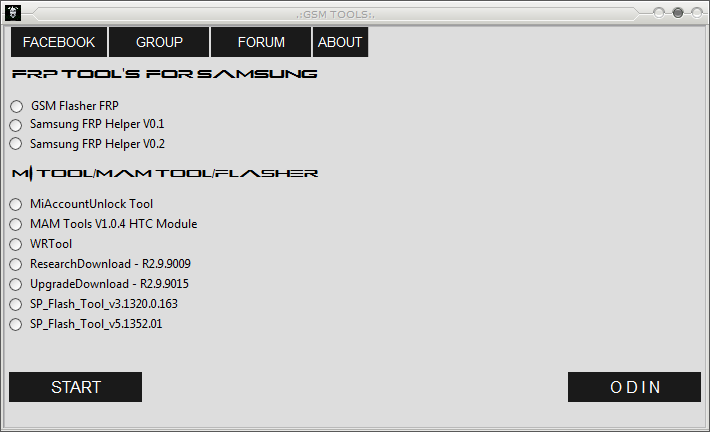
New FRP/Google Account Bypass and Flash Tool For Samsung, Xiaomi, HTC, SPD, Qualcomm and MediaTek Etc.


Hi friends, today you will get another Factory Reset Protection bypass tool or so called Google Account remove or bypass tool for all most all Android versions and this supports Samsung, Xiaomi Redmi, HTC, Spreadtrum, Qualcomm and MediaTek, so download and enjoy the new FRP/Google account bypass tool and unlock all recent Android smartphones without any paid tool. This tool works on all most all Samsung, Mi, HTC Android phones and it also supports other devices having Spreadtrum, Qualcomm and MediaTek chipset Android phones.

FRP BYPASS AND FLASHING TOOL:
  • File Name: GSM TOOLS BY gadgets Doctor.zip
  • Tool Type: FRP Bypass or Google Account Remove Tool.
  • File Size: 100 MB
  • Download Link: MediaFire
  • Password: GADGETS DOCTOR

How to Use This FRP/Google Account Bypass GSM TOOL?

  • Download the FRP Unlock Tool (Link Given Below)
  • Unzip the file using the password - GADGETS DOCTOR
  • Now Open the Tool and choose the option you need
  • Now click on Start button and connect the phone with Fastboot Mode or ADB Mode.
  • After Unlock Success Remove the phone and Switch it ON.
 
New FRP/Google Account Bypass and Flash Tool For Samsung, Xiaomi, HTC, SPD, Qualcomm and MediaTek Etc.

GSM FRP Bypass Tool Features:
  • GSM Flasher FRP
  • Samsung FRP Helper V0.1
  • Samsung FRP Helper V0.2
  • Mi Account Unlock Tool
  • MAM Tools V1.0.4 HTC Module
  • WR Tool
  • Research Download Tool
  • Upgrade Download Tool
  • SP Flash Tool
  • ODIN 3

You can use all the above options or function on the same tool in the GSM TOOL, and it's free to use for every one, so download the new FRP bypass tool and use to unlock and flash any Android smartphones.

Download Link: https://devoloperxda.blogspot.com/2017/05/a-new-frpgoogle-account-bypass-and.html

Wednesday, May 9, 2018

How to Flash Firmware Using YGDP Tool - Yulong General Download Platform


In this article you will know how to flash stock firmware on your smartphone and you can also know how to downgrade and upgrade phone firmware. This guide is very helpful to Mobile Technicians and also other people who are looking for flashing firmware on Qualcomm chip-set smartphones and Tablets. You can also know how to recover/fix/unbrick the smartphone if it's having Software problem.

What is YGDP?
The Yulong General Download Platform (YGDP) is small Windows software which helps to flash stock firmware on the smartphones. This tool supports to flash firmware ROM on your smartphone and commonly used for Qualcomm Chipset based smartphone, but you can also this tool to flash MediaTek Chipset and Spreadtrum Chipset based smartphones. The YGDP flash tool is supports all the firmware having .CPB file extension to download firmware on your phone.
How to Flash Firmware Using YGDP Tool - Yulong General Download Platform
How to Flash Firmware Using YGDP Tool?
As I said before this tool is for flashing stock firmware on your smartphone and to use it you need to download the smartphone Firmware and YGDP Tool [Download Link] and extract the firmware and select CPB file in YGDP tool then flash the phone.

Requirements:
Download YGDP Flash Tool [Link]
You Need Smartphone CPB Firmware.
Download YGDP USB Driver Here [Link]

Steps to Flash CPB Firmware Using YGDP Tool?
  • Download Smartphone Firmware.
  • Then download YGDP Tool from the above link and extract it.
  • Now open YGDP Tool select User: Assembly Click on Login.
YGDP Tool Login - How to flash firmware uisng YGDP Tool
  • Now click on Config it will open a new Window where you can select the CPB File.
  • Now browse and select CPB file and click on Apply.
  • Then click on Start button and connect the phone to the Computer.
  • Wait until the flashing process complete (100%).

Wednesday, April 18, 2018

Top 5 Best Mobile Flashing Box You Must Have


As you know there are so many Mobile flashing box are available in the market or online, and some times it's difficult to choose which flashing box is really very useful for a Mobile technician having Mobile phone repairing shop. Most of the Mobile repair box manufacturer claims that they have the latest feature to flash and unlock Android smart phones as well as feature phones, but if you see it will not work up to that level, that means they advertising interesting features but practically these features are not available with the box, so most of the new Mobile technicians confused to take the right decision to buy a Mobile flashing box which suitable or supports latest technology of the phone, so here we are giving some best mobile flashing box which are really very useful and a new user can take right choice to buy Mobile Flashing Box. 

Top 5 Best Mobile Flashing Box You Must Have For Your Mobile Phone Repairing Shop
The best Mobile phone flashing box is which are come with latest feature and supports all most all latest Android smart phone and feature phones. It should have the capacity to fix the phone issues such as read flash, write flash, frp unlock, read NV data, read phone book, reading password, reading pattern lock data, IMEI repairing, formatting, reading user code, network unlock, wipe user data, unlock phone, reboot to recovery, reboot to bootloader, reboot to edl mode, Google lock unlock, reading Email ID, reset Gmail, by pass mi account, unlock bootloader, wipe cache, clear settings, enable adb mode, read user code and many more things.


Top 5 Best Mobile Phone Flashing Box 2018 For Mobile Repairing

1. Advance Turbo Flasher (ATF):

The ATF box (Advance Turbo Flasher) has the features to flash all model of Nokia and Microsoft and New Nokia feature phone and smart phone, you can flash and unlock the Nokia phones using this tool. This box supports to flash and unlock Nokia phones including Lumia Windows phone, BB5 phones, Nokia Android, Nokia Infineon, DCT4 and DCT3 phones.
Advance Turbo Flasher (ATF) - Nokia Phone Repairing and Flashing Box

The latest version of ATF box software setup is v12.70 which includes some fix for flashing and unlocking Nokia phones [ATF Box Support Site].

UNLOCK & REPAIR

* Can Repair Super dongle key of SL1,SL2,Sl3
* Can Repair Sim Lock Data of SL1,SL2
* Can Remove Simlock Via Codes of SL1,SL2,
* Can Remove Simlock for so called "SL3"
(New RAPIDO)
* 5800d (RM-356) - v31.0.008 - v30.0.011 - v31.0.101
* 6790s-1c (RM-492)
* 6790s-1b (RM-599)
* E63 (RM-437) - v400.21.013
* E71 (RM-346) - v400.21.013
* N96 (RM-247) - v30.033 - v30.101


More Stable BB5 FBUS Flashing (Support New PROTOCOL)

[Download ATF Box V12.70 Latest Setup]

2. Z3X Box For Samsung Flashing and Unlocking:


Z3x box is one of the best flashing and unlocking box for Samsung phones. It has Samsung Tool and Samsung 2G Tool and if you have upgrade the box you will get Samsung Tool Pro features. Samsung Tool Pro supports all most all latest smart phones including latest version of Android 7.0 Nougat and 8.0 Oreo for FRP unlocking and flashing, if you have the Z3x box you can easily download all latest version Samsung Firmware using Z3x Shell software. The latest version Z3x pro includes the following features.
Z3X Samsung Tool and 2G Tool and Samsung Tool PRO
Samsung Tool PRO 31.2/31.3 Released 

Samsung Tool Pro Features:

Added:-

- support SM-J327T (support Unlock TMB (via server) for latest FW (Bit2) and KNOX1) - first in the world 
- support SM-J327T1 (support Unlock TMB (via server) for latest FW (Bit2) and KNOX1) - first in the world 
- support SM-J250N (Flashing, Read/Write QCN, Read/Write EFS, Read/Write SEC, Direct READ codes via server, reboot download/recovery)
- support SM-T825C (Flashing, Read/Write QCN, Read/Write EFS, Read/Write SEC, Direct READ codes via server, reboot download/recovery)
- support SM-T827 (Flashing, Read/Write QCN, Read/Write EFS, Read/Write SEC, Direct READ codes via server, reboot download/recovery)
- support SM-T827V (Flashing, Read/Write QCN, Read/Write EFS, Read/Write SEC, Direct READ codes via server, reboot download/recovery)
- support SM-T397U (Flashing, Read/Write EFS, Read/Write CERT, Unlock (Root), Direct Read codes (via Server), Repair(Root))
Support new security for unlock/repair/patch cert for Exynos 8890 chip-set (G930F, G935F)

Z3X-BOX Samsung Tool 20.0/20.5

Features Z3x Samsung Tool 2.0

Added:
- Each operation have own page now,
- Automatic HELP shown *now inside log for each operation,
- Settings page(with log of settings inside),
- Skin selecting,
- Direct download firmware build in sw,
- Added button «switсh to flash mode»
- Added profiles for selected flash file for each phone,
- History of all operations(history logs), need right mouse click on log,
- Autocheck of Samsung sw updates,


Changes:
- No internet connection or server required for unlock/read codes(need download local DB),
- Totally new GUI,
- Totally new SW Super fast core,
- New icons (grey colour),


Improved:
- flashing algo for most of phones,
- unlock/repair algo for most of phones,

Added:


- support for android 5.x phones (msl error at this moment)
- addition support GT-i8260 direct imei repair
- addition support GT-i8262 direct imei repair
- addition support GT-i8260B direct imei repair
- addition support GT-i8262B direct imei repair
- addition support GT-i8260L direct imei repair
- addition support GT-i8262L direct imei repair
- addition support GT-i8260E direct imei repair
- addition support GT-i8262E direct imei repair
- addition support GT-i8260D direct imei repair

- addition support GT-i8262D direct imei repair

Addition function added (SAFE Direct Unlock/Imei repair/SN/BT/WiFi/Product Code)without root, without wipe EFS) this solution will not touch any calibration data, means network LTE/3G will work:

The Following Models Can Direct Unlock/Imei repair/SN/BT/WiFi/Product Code

GT-I8730, GT-I8730T, GT-I9190, GT-I9192, GT-I9195, GT-I9195L, GT-I9195T, GT-I9197, GT-I9200, GT-I9205, GT-I9208, GT-I9230, GT-I9235, GT-I9295, GT-I9305, GT-I9305T, GT-I9505, GT-I9506, GT-I9508, GT-N7005, GT-N7105, GT-N8020, SC-02E, SC-O3D, SC-03E, SC-04E, SC-06D, SGH-I257, SGH-I257M, SGH-I317, SGH-I317M, SGH-I337, SGH-I337M, SGH-I437, SGH-I467, SGH-I497, SGH-I527, SGH-I527M, SGH-I537, SGH-I547C, SGH-I747, SGH-I747M, SGH-I747U, SGH-M819N, SGH-M919, SGH-M919N, SGH-M919V, SGH-T779, SGH-T889, SGH-T889V, SGH-T999, SGH-T999L, SGH-T999N, SGH-T999V, SHV-E250L, SHV-E250S, SM-C105, SM-G7102, SM-G730A, SM-G730V, SM-G730W8, SM-T217A, SM-T217T etc. without root, without wipe EFS first in the world.


Addition function added name: SAFE DIRECT UNLOCK WITHOUT WIPE EFS, WITHOUT KNOX RESET, WITHOUT ROOT + added important function WRITE CERT VIA USB CABLE without root for cert based phones.

GT-I8730,GT-I8730T,GT-I9190
GT-I9192,GT-I9192I,GT-I9195,GT-I9195L,GT-I9195T,GT-I9197,
GT-I9200,GT-I9205,GT-I9208,GT-I9210,GT-I9230,GT-I9235,GT-I9295,
GT-I9300I,GT-I9301I,GT-I9301Q,GT-I9305,GT-I9305T,GT-I9505,GT-I9506,
GT-I9508,GT-I9515,GT-I9515L,GT-N7005,GT-N7105,GT-N8020,GT-S7275B,

SC-01F,SC-02E,SC-O3D,SC-03E,SC-04E,SC-05D,SC-06D,SGH-I257,SGH-I257M,
SGH-I317,SGH-I317M,SGH-I337,SGH-I337M,SGH-I437,SGH-I467,SGH-I497,
SGH-I527,SGH-I527M,SGH-I537,SGH-I547C,SGH-I577,SGH-I667,SGH-I717,SGH-I717D, SGH-I717M,SGH-I717R,SGH-I727,SGH-I727R,SGH-I747,GT-S7275R,GT-S7275T, SGH-I747M,SGH-I747U,SGH-I757,SGH-I757M,SGH-I957,SGH-I957D,SGH-I957M, SGH-M919,SGH-M919N,SGH-M919V,SGH-T699,SGH-T769,SGH-T779,SM-A500FU, SGH-T879,SGH-T889,SGH-T889V,SGH-T989,SGH-T989D,SGH-T999,SGH-T999L, SGH-T999N,SGH-T999V,SHV-E250L,SHV-E250S,SM-A3000,SM-A3009,SM-A300F,SM-A300FU, SM-A300H,SM-A300M,SM-A300XU,SM-A300XZ,SM-A300YZ,SM-A5000,SM-A5009,SM-A500F, SM-A500G,SM-A500H,SM-A500M,SM-A500XZ,SM-A7000,SM-A7009,SM-A700FD,SM-A700H, SM-C105,SM-G3502C,SM-G3502I,SM-G3502L,SM-G3502T,SM-G3509I,SM-G350L,SM-G357FZ, SM-G3606,SM-G3608,SM-G3609,SM-G360BT,SM-G360F,SM-G360G,SM-G360GY, SM-G360M,SM-G360P,SM-G386W,SM-G5108,SM-G5108Q,SM-G5109,SM-G5306W,SM-G5308W,SM-G5309W, SM-G530BT,SM-G530F,SM-G530FZ,SM-G530H,SM-G530M,SM-G530Y,SM-G710,SM-G7102,SM-G7102T, SM-G7105,SM-G7105H,SM-G7105L,SM-G7106,SM-G7108,SM-G7200,SM-G730A,SM-G730V,SM-G730W8, SM-G800H,SM-G860P,SM-G9006V,SM-G9006W,SM-G9008V,SM-G9008W,SM-G9009D,SM-G9009W,SM-G900A, SM-G900AZ,SM-G900F,SM-G900FD,SM-G900FQ,SM-G900I,SM-G900K,SM-G900L,SM-G900M,SM-G900P, SM-G900R4,SM-G900S,SM-G900T,SM-G900T1,SM-G900V,,SGH-I957R,SGH-M819N, SM-G900W8,SM-G901F,SM-N9005,SM-N9006,SM-N9008,SM-N9008V,SM-N9009,SM-N900A, SM-N900P,SM-N900R4,SM-N900S,SM-N900T,SM-N900U,SM-N900V,SM-N900W8,SM-N910A, SM-N910F,SM-N910G,SM-N910P,SM-N910R4,SM-N910T,SM-N910W8,SM-T217A,SM-T217T.


Download Z3x Samsung Tool 20.5

3. Miracle Box (One of the best China Mobile Flash Tool):

Miracle box one of the best china mobile flashing box, you can use this box to flash and unlock MediaTek MTK, Spreadtrum SPD and Qualcomm chipset phones. The latest version of Miracle Box V2.72 has the following features, to use latest Miracle Box Setup V2.72 you need Miracle Box with Dongle.

Miracle Box Flashing and Unlocking for All Feature and Smart Phones

Miracle Box
Truly for China Mobile
-:V 2.72 THUNDER Update:-

 What News in Version 2.72

1. MTK Add GIONEE Read/Write/Format Support.
Models:GIONEE 8001/S11.

2. MTK Add Skip Preloader for Write.
3. MTK Improve EMMC Format and FRP Remove. 
4. Qualcomm add QiKu 360 Read/Write/Format Support.
Models:
360 N5
360 Q5
360 N5A
360 N5S
s360 N6 Pro


5. Qualcomm Improve Xiaomi Account Remove.
Models:
Xiaomi 5s
Xiaomi 5s Plus
Xiaomi 5x
Xiaomi Max
Redmi Note 5
Redmi Note 5A


6. Wiko Mobile Qualcomm.
MSM 8909
MSM 8916
MSM 8917
MSM 8936
MSM 8937
MSM 8940
MSM 8953


7. Motrola Qualcomm added.
XT1802 Moto G5S Plus
XT1802 Moto G5S Plus LT
XT1804 Moto G5S Plus LT
XT1805 Moto G5S Plus LT
XT1806 Moto G5S Plus LT


8.SPD Add new SC7731G support.
9.SPD Improve SC9832 Boot Add New Mobile Support.
10.Android Improve Xiaomi Remove All Lock in Recovery.

11. Coolpad Qualcomm
Models.
Coolpad 3622A
Coolpad 3632A
Coolpad 3635A Generic Mode
Coolpad 3635A Qualcomm Mode
Coolpad Note 3S Y91-i00 


12.Software fix some bugs

Download Miracle Box V2.54 Working Without Miracle Box and Dongle

4. Volcano Box:

Volcano Box is also help you to flash and unlock some MTK, SPD and Qualcomm phones, this tool is helpful to flash and unlock or read password for feature phones. The latest version of Volcano Box Tool is Volcano Utility V3.1.0 you can download the latest version of Volcano Utility [Volcano Box All Updates].
Volcano Box MTK, Qualcomm, SPD and MStar Flashing and Unlocking Tool
  Volcano Box Latest Setup Download Here


5. UFS 3  or UFS Turbo Flasher:

The SarasSoft UFS 3 or now updated the box to UFS Turbo can be used for flashing and unlocking of Nokia, Samsung, LG, Sony and many more phones, it also supports some of the Android smart phones. SarasSoft UFS 3 features are given below.
SarasSoft UFS 3 - UFS Turbo China Mobile Flasher and Unlock Tool
 UFS Turbo Box - Main Features
  • High-Speed USB interface (480 MHz)
  • On-board High-Speed USB Hub
  • On-board USB RID control (Samsung, LG JIG emulation)
  • High-Speed UART communication up to 3.686.400 Bauds
  • High-Speed F-Bus transfer (up to 16 MHz)
  • Programmable BSI resistance
  • On-board VPP generator (12V)
  • Custom VBat, VPP, RX, TX and BSI connectors
  • Universal USB cable that supports all possible Samsung and LG models
  • USB/UART switch on USB cable
  • Factory Programming Mode (FPGM) for Samsung Android devices
  • World's first USB cable in GSM history that uses USB 3.0 standard
  • Smartcard Protected

UFS Turbo Box - Supported Models Below:-

Nokia:
1100, 3100, 3100b, 3108, 3200, 3200b, 3300, 3360, 3510, 3510i, 3530, 3590, 3595, 5100, 5140, 6108, 6610, 6610i, 6100, 6200, 6220, 6310, 6310i, 6500, 6510, 6590, 6600, 6650, 6800, 6820, 7200, 7210, 7250, 7250i, 7600, 7650, 8310, 8390, 8910, 8910i, 3600, 3650, 7650, 6600, N-Gage, 3620, N-Gage QD, 9290, 9210, 9210i, 2100, 3110, 3210, 3310, 3315, 3330, 3350, 3390, 3410, 3610, 5110, 5110i, 5130, 5190, 5210, 5510, 6080, 6110, 6130, 6138, 6150, 6190, 6210, 6250, 7110, 8210, 8250, 8290, 8850, 8855, 8890, 9110, 9110i

Samsung:
B3310i, B5330, B5330B, B5330L, B5330T, B5510, B5510B, B5510L, B5510T, B5512, B5512B, B7510, B7510B, B7510L, B7800, B7810, B9062, B9120, B9150, B9388, C3011, C3200, C3310, C3310R, C3312, C3312R, C3313T, C3322i, C3330, C3332, C3350, C3350M, C3353, C3530, C3530L, C3560, C3590, C3592, C3750, C3752, D600, D700, D705, D710, D720, E110S, E1151, E120K, E120L, E120S, E140K, E140L, E140S, E150S, E160K, E160L, E160S, E170K, E170L, E170S, E210K, E210L, E210S, E2152i, E220S, E2230, E2230L, E2230M, E2232, E230K, E230L, E230S, E2330, E2330B, E2330C, E2350B, E250K, E250L, E250S, E2530, E2600, E2600M, E2652, E2652W, E270K, E270L, E270S, E275K, E275S, E300K, E300L, E300S, E310K, E310L, E310S, E330K, E330L, E330S, E370D, E370K, E400K, E400S, E470S, E500L, E500S, EK-GC100, EK-GC110, EK-GC120, EK-GC200, EK-GN100, EK-GN120, EK-GN120A, EK-KC120K, EK-KC120L, EK-KC120S, i100, i110, i200, i200PP, i257, i257M, i317, i317M, s337, i337M, i337Z, i339, i400, i405, i405U, i407, i415, i435, i435L, i437, i437P, s437Z, i467, i467M, i497, i500, i500A, i509, i509U, i510, i515, i519, i527, i527M, i535, i535PP, i537, i545, i545L, i547, i547C, i559, i569, i577, i579, i589, i605, i619, i629, i659, i679, i699, i699i, i705, i717, i717D, i717M, i717R, i727, i727R, i739, i747, i747M, i757, i757M, i759, i777, i779, i800, i809, i815, i827, i827D, i829, i847, i857, i869, i879, i879E, i889, i896, i897, i899, i905, i909, i915, i919, i919U, i925, i925U, i927, i927R, i929, i939, i939D, i939i, i957, i957D, i957M, i957R, i959, i987, i997, i997R, i5500, i5500B, i5500L, i5500M, i5503, i5503T, i5508, i5510, i5510B, i5510L, i5510M, i5510T, i5700, i5700E, i5700L, i5700R, i5800, i5800D, i5800L, i5801, i6500U, i7500, i7500C, i7500H, i7500L, i7500U, i7680, i8150, i8150B, i8150T, i8160, i8160L, i8160P, i8190, i8190L, i8190N, i8190T, i8200, i8200L, i8200N, i8200Q, i8250, i8258, i8260, i8260E, i8260L, i8262, i8262B, i8262D, i8268, i8520, i8530, i8550E, i8550L, i8552, i8552B, i8558, i8580, i8730, i8730T, i9000, i9000B, i9000M, i9000T, i9001, i9003, i9003L, i9008, i9008L, i9010, i9018, i9020, i9020A, i9020T, i9023, i9050, i9060, i9060-DS, i9060C, i9060i, i9060L, i9060M, i9063T, i9070, i9070P, i9080E, i9080L, i9082, i9082C, i9082i, i9082L, i9082X, i9088, i9100, i9100G, i9100M, i9100P, i9100T, i9103, i9105P, 19108, i9118, i9128, i9128E, i9128i, i9128V, i9150, i9152, i9152P, i9158, i9158P, i9158V, i9168, i9168i, i9190, i9192, i9192i, i9195, i9195H, i9195i, i9195L, i9195T, i9197, i9200, i9200X, i9205, i9208, i9210, i9210T, i9220, i9228, i9230, i9235, i9250, i9250M, i9260, i9268, i9295, i9300, i9300i, i9300T, i9301i, i9301Q, i9305, i9305N, i9305T, i9308, i9308i, i9500, i9502, i9505, i9505G, i9506, i9507, i9507V, i9508, i9508V, i9515, i9515L, ISW11SC, L300, L520, L600, L700, L710, L720, L720T, L900, M100S, M110S, M130K, M130L, M180K, M180L, M180S, M180W, M190S, M200K, M200S, M220L, M240S, M250K, M250L, M250S, M290K, M290S, M305W, M340D, M340K, M340L, M340S, M380K, M380S, M380W, M420K, M420S, M430W, M440S, M460D, M480K, M480S, M480W, M485W, M486W, M500W, M570K, M570S, M580, M580D, M585D, M720, M819N, M820, M830, M840, M910, M919, M919N, M919V, M920, M930, M950, N075T, N5100, N5105, N5110, N5120, N7000, N7000B, N7005, N7100, N7100T, N7102, N7102i, N7105, N7105T, N7108, N7108D, N719, N8000, N8003, N8005, N8010, N8013, N8020, P1000, P1000L, P1000M, P1000N, P1000R, P1000T, P1010, P1013, P3100, P3100B, P3105, P3108, P3110, P3113, P5100, P5110, P5113, P5200, P5210, P5213, P5220, P6200, P6200L, P6200N, P6201, P6210, P6211, P6800, P6810, P709, P709E, P7100, P729, P7300, P7300B, P7310, P7320, P7320T, P739, P7500, P7500D, P7500M, P7500R, P7500V, P7501, P7503, P7510, P7511, P8110, R530, R530C, R530M, R530U, R530X, R720, R740C, R760, R760X, R820, R830, R830C, R880, R890, R920, R930, R940, R950, R960, R970, R970C, R970X, S3310i, S3350, S3350M, S3353, S3550, S3550C, S3550L, S3800W, S3802, S3802W, S5220, S5220R, S5222, S5222R, S5229, S5280, S5282, S5283B, S5292, S5296, S5300, S5300B, S5300L, S5300T, S5301, S5301B, S5301L, S5302, S5302B, S5303, S5303B, S5310, S5310B, S5310C, S5310E, S5310G, S5310i, S5310L, S5310M, S5310T, S5312, S5312B, S5312C, S5312L, S5312M, S5360, S5360B, S5360L, S5360T, S5363, S5367, S5368, S5369, S5570, S5570B, S5570i, S5570L, S5578, S5660, S5660B, S5660L, S5660M, S5660V, S5670, S5670B, S5670L, S5690, S5690L, S5690M, S5690R, S5698, S5820, S5830, S5830B, S5830C, S5830D, S5830G, S5830i, S5830L, S5830M, S5830T, S5830V, S5830Z, S5831i, S5838, S5839i, S6010, S6010L, S6010W, S6012, S6012B, S6102, S6102B, S6102E, S6102L, S6102T, S6102Z, S6108, S6293T, S6310, S6310B, S6310L, S6310N, S6310T, S6312, S6313T, S6352, S6358, S6500, S6500D, S6500L, S6790, S6790E, S6790L, S6790N, S6792L, S6800, S6802, S6802B, S6810, S6810B, S6810E, S6810L, S6810M, S6810P, S6812, S6812B, S6812C, S6812i, S6818, S6818V, S720C, S7262, S7270, S7270L, S7272, S7272C, S7273T, S7275B, S7275R, S7275T, S7278, S7278U, S730G, S730M, S735C, S738C, S7390, S7390E, S7390G, S7390L, S7392, S7392L, S7500, S7500L, S7500T, S7500W, S7508, S7560, S7560M, S7562, S7562C, S7562i, S7562L, S7562U, S7566, S7568, S7568i, S7572, S7580, S7580E, S7580L, S7582, S7582L, S7583T, S7710, S7710L, S7898, S7898i, S950C, S959G, S960L, S968C, S970G, SC-01 C, SC-01 D, SC-01 E, SC-01 F, SC-01 G, SC-02B, SC-02C, SC-02D, SC-02E, SC-02F, SC-02G, SC-03D, SC-03E, SC-03G, SC-04D, SC-04E, SC-04F, SC-05D, SC-06D, SC-L21, SC-L22, SC-L23, SC-L24, SC-T21, SM-0100H, SM-0100M, SM-0100MU, SM-A3000, SM-A3009, SM-A300F, SM-A300FU, SM-A300G, SM-A300H, SM-A300M, SM-A300XU, SM-A300XZ, SM-A300YZ, SM-A5000, SM-A5009, SM-A500F, SM-A500FU, SM-A500G, SM-A500H, SM-A500K, SM-A500L, SM-A500M, SM-A500S, SM-A500XZ, SM-A500Y, SM-A500YZ, SM-A7000, SM-A7009, SM-A700F, SM-A700FD, SM-A700H, SM-A700K, SM-A700L, SM-A700S, SM-A700X, SM-A700YD, SM-C101, SM-C105, SM-C105A, SM-C105K, SM-C105L, SM-C105S, SM-C105W, SM-C111, SM-C1116, SM-C111M, SM-C115, SM-C1158, SM-C115L, SM-C115M, SM-C115W, SM-E500F, SM-E500H, SM-E500M, SM-E7000, SM-E7009, SM-E700F, SM-E700H, SM-E700M, SM-G110B, SM-G110H, SM-G110M, SM-G130BT, SM-G130E, SM-G130H, SM-G130HN, SM-G130M, SM-G310A, SM-G310HN, SM-G310R5, SM-G3139D, SM-G313F, SM-G313H, SM-G313HN, SM-G313HU, SM-G313HY, SM-G313HZ, SM-G313M, SM-G313ML, SM-G313MU, SM-G313MY, SM-G313U, SM-G316HU, SM-G316ML, SM-G350, SM-G3502, SM-G3502C, SM-G3502i, SM-G3502L, SM-G3502T, SM-G3502U, SM-G3508, SM-G3508i, SM-G3508J, SM-G3509, SM-G3509i, SM-G350E, SM-G350L, SM-G350M, SM-G3518, SM-G3556D, SM-G3558, SM-G3559, SM-G355H, SM-G355H-SS, SM-G355HN, SM-G355HQ, SM-G355M, SM-G355M-SS, SM-G3568V, SM-G357FZ, SM-G357M, SM-G3586V, SM-G3588V, SM-G3589W, SM-G3606, SM-G3608, SM-G3609, SM-G360BT, SM-G360F, SM-G360G, SM-G360GY, SM-G360H, SM-G360HU, SM-G360M, SM-G360P, SM-G360V, SM-G3812, SM-G3812B, SM-G3815, SM-G3818, SM-G3819, SM-G3819D, SM-G3858, SM-G386F, SM-G386T, SM-G386T1, SM-G386U, SM-G386W, SM-G5108, SM-G5108Q, SM-G5109, SM-G5306W, SM-G5308W, SM-G5309W, SM-G530BT, SM-G530F, SM-G530FZ, SM-G530H, SM-G530M, SM-G530Y, SM-G710, SM-G7102, SM-G7102T, SM-G7105, SM-G7105H, SM-G7105L, SM-G7106, SM-G7108V, SM-G7109, SM-G710K, SM-G710L, SM-G710S, SM-G7200, SM-G720AX, SM-G720N0, SM-G730A, SM-G730V, SM-G730W8, SM-G7508Q, SM-G7509, SM-G750A, SM-G750F, SM-G750H, SM-G800F, SM-G800H, SM-G800H-SS, SM-G800M, SM-G800R4, SM-G800X, SM-G800Y, SM-G8508S, SM-G850A, SM-G850F, SM-G850FQ, SM-G850K, SM-G850L, SM-G850M, SM-G850S, SM-G850T, SM-G850W, SM-G850X, SM-G850Y, SM-G860P, SM-G870A, SM-G870F, SM-G870W, SM-G9006V, SM-G9006W, SM-G9008V, SM-G9008W, SM-G9009D, SM-G9009W, SM-G900A, SM-G900AZ, SM-G900F, SM-G900FD, SM-G900FQ, SM-G900H, SM-G900i, SM-G900K, SM-G900L, SM-G900M, SM-G900MD, SM-G900P, SM-G900R4, SM-G900R6, SM-G900R7, SM-G900S, SM-G900T, SM-G900T1, SM-G900V, SM-G900W8, SM-G901F, SM-G906K, SM-G906L, SM-G906S, SM-G9092, SM-G9098, SM-G910S, SM-J100F, SM-J100FN, SM-N750, SM-N7500Q, SM-N7502, SM-N7505, SM-N7505L, SM-N7506V, SM-N7507, SM-N7508V, SM-N7509V, SM-N750K, SM-N750L, SM-N750S, SM-N900, SM-N9000Q, SM-N9002, SM-N9005, SM-N9006, SM-N9007, SM-N9008, SM-N9008S, SM-N9008V, SM-N9009, SM-N900A, SM-N900K, SM-N900L, SM-N900P, SM-N900R4, SM-N900S, SM-N900T, SM-N900U, SM-N900V, SM-N900W8, SM-N900X, SM-N9100, SM-N9106W, SM-N9108V, SM-N9109W, SM-N910A, SM-N910C, SM-N910F, SM-N910G, SM-N910H, SM-N910K, SM-N910L, SM-N910P, SM-N910R4, SM-N910S, SM-N910T, SM-N910U, SM-N910V, SM-N910W8, SM-N910X, SM-N9150, SM-N915A, SM-N915D, SM-N915F, SM-N915FY, SM-N915G, SM-N915J, SM-N915K, SM-N915L, SM-N915P, SM-N915R4, SM-N915S, SM-N915T, SM-N915V, SM-N915X, SM-N916K, SM-N916L, SM-N916S, SM-P600, SM-P600X, SM-P601, SM-P602, SM-P605, SM-P605K, SM-P605L, SM-P605M, SM-P605S, SM-P605V, SM-P607T, SM-P900, SM-P900X, SM-P901, SM-P905, SM-P905F0, SM-P905M, SM-P905V, SM-P907A, SM-R130, SM-R350, SM-R380, SM-R381, SM-R382, SM-R750, SM-R750A, SM-R750B, SM-R750D, SM-R750J, SM-R750P, SM-R750T, SM-R750V, SM-R750W, SM-S765C, SM-S780L, SM-S890L, SM-S902L, SM-S975L, SM-T110, SM-T110X, SM-T111, SM-T111M, SM-T111NQ, SM-T113, SM-T116, SM-T116NU, SM T116NY, SM-T210, SM-T2105, SM-T210L, SM-T210R, SM-T210X, SM-T211, SM-T211M, SM-T212, SM-T215, SM-T217A, SM-T217S, SM-T217T, SM-T230, SM-T230NT, SM-T230NU, SM-T230X, SM-T231, SM-T232, SM-T235, SM-T235Y, SM-T237P, SM-T2519, SM-T2556, SM-T2558, SM-T255S, SM-T310, SM-T310X, SM-T311, SM-T312, SM-T315, SM-T315T, SM-T320, SM-T320X, SM-T321, SM-T322, SM-T325, SM-T327A, SM-T330, SM-T330NU, SM-T331, SM-T331C, SM-T332, SM-T335, SM-T335K, SM-T335L, SM-T337A, SM-T337T, SM-T337V, SM-T360, SM-T365, SM-T365M, SM-T365Y, SM-T520, SM-T525, SM-T530, SM-T530NN, SM-T530NU, SM-T530X, SM-T531, SM-T532, SM-T535, SM-T537A, SM-T537R4, SM-T537V, SM-T700, SM-T700X, SM-T705, SM-T705C, SM-T705M, SM-T705W, SM-T705Y, SM-T707A, SM-T707D, SM-T707V, SM-T800, SM-T800X, SM-T805, SM-T805C, SM-T805K, SM-T805L, SM-T805M, SM-T805S, SM-T805W, SM-T805Y, SM-T807A, SM-T807J, SM-T807P, SM-T807R4, SM-T807T, SM-T807V, SM-T900, SM-V700, SM-W2014, SM-W2015, SM-Z130H, T399, T399N, T499, T499V, T499Y, T589, T589R, T589W, T599, T599N, T599V, T679, T679M, T699, T759, T769, T779, T839, T849, T859, T869, T879, T889, T889V, T939, T959, T959D, T959P, T959V, T959W, T969V, T989, T989D, T989N, T999, T999L, T999N, T999V, W789, W899, W999, W2013

Sony Ericsson:
A3618, P800, P802, P900, P908, R520, R600, T100, T200, T202, T208, T230, T300, T306, T310, T312, T39, T600, T610, T616, T628, T630, T65, T66, T68, T68i, Z200, Z600, Z608


LG:
A290, E500, GT370, GU230GO, KM553, KM555, KM555e, KM555g, KM555R, S367, T370, T375, T385, T385b, T395, T500GO, T505GO, T565, T565b, T575


Samsung Flashed Success With HWK UFS Check Here

UFS 3 and UFS Turbo Latest Setup Download

Monday, April 2, 2018

Miracle Box V2.71 Latest Setup Download 19/03/2018


Miracle Box Reloaded V2.71 Released on 19th Mar 2018, here you can download the latest Miracle Box setup 2018, download and install latest updates of Miracle Box and enjoy.

 Miracle Box
Truly for China Mobile
Miracle 2.71 Reloaded Update

Miracle Box V2.71 Latest Setup Download 19th Mar 2018

What News in Version 2.71

1.Samsung Add Reset Frp/Reactivation/EE Locks

2.Samsung Improve ADB FRP Remove

3.Qualcomm Add CoolPad Support
Modles Coolpad:
CoolPad 3600i
CoolPad 5200s
CoolPad 5263
CoolPad 5263c
CoolPad 5263s
CoolPad 5311
CoolPad 5313s
CoolPad 5316
CoolPad 5360
CoolPad 7105
CoolPad 7236
CoolPad 7251
CoolPad 7560I
CoolPad 8297T02
CoolPad 8297W01
CoolPad 8297l-100
CoolPad 8297l-S00
CoolPad 8675A
CoolPad 8675W100
CoolPad A8-930
CoolPad A8-101
CoolPad C103
CoolPad C106
CoolPad Play6
CoolPad SK3_s00
CoolPad SK3_u00
CoolPad Y60-C1
CoolPad Y70-C
CoolPad Y72-S00
CoolPad Y76101
CoolPad Y75
CoolPad Y76-U00
CoolPad Y90-G00
CoolPad Y91-100
CoolPad Y91-U00


4.MTK Add CoolPad Support
5.MTK Add Koleos Support
6.SPD Improve SC9830A/SC9832 Support
7.RDA Improve SC6533 Auto Format
8.Android Add Moto Bootloader Repair
9.Android Add Xiaomi ADB Account Remove


10. Motrola Qualcomm added
Moto Z2 Play XT1710-02
Moto Z2 Play XT1710-06
Moto Z2 Play XT1710-07
Moto Z2 Play XT1710-08
Moto Z2 Play XT1710-09
Moto Z2 Play XT1710-10
Moto Z2 Play XT1710-11


11. Alcatel Wide Big List Model Added added
More then 340+ Models Added


12.Software fix some bugs

Download Miracle Box V2.71 Update Setup (Mega Link)

Download Miracle Box V2.71 Update Setup (Google Drive Link)

Wednesday, December 20, 2017

GSM Aladdin Tool Full Working Download Free


In this topic you will know, how to download GSM Aladdin Tool which works without Aladdin dongle. As you know GSM Aladdin is very known flash and unlock tool for all most all Android smart phones and it also support various CPU platform i.e. MTK/MediaTek, Mstar, Spreadtrum, RDA and Qualcomm etc. and it also supports many of the smart phone brands i.e. Samsung, Nokia, Intex, Micromax, Lava, Xolo, Oppo, Vivo, HTC, LG, Allwinner, Huawei, Motorola, Xiaomi Mi, Spice and all other Android devices and Tabs etc.

GSM Aladdin Flash Tool Working Without Dongle Free Download
MediaTek Read Pattern and FRP Unlock:

The GSM Aladdin flash tool supports for read pattern lock and unlock Factory Reset Protection (FRP) on various MediaTek (MTK) Android smart phones, so use this free tool for flashing and unlock of MediaTek phones.

How to Use?

Download GSM Aladdin v2 working without box/dongle and extract the zip file and open the tool and then lick on connect, then you can choose any one of the tabs as per the phone's CPU and brand, then choose the function you want to execute and then click on Start button, that's all just wait until the process complete and you are done.

GSM Aladdin Functions or Options:

You will find various options on the GSM Aladdin flash tool and the function or options are divides as per the CPU/Chip-set and phone's brand and you will see some various tabs i.e. Android, Samsung, MediaTek, LG/Mi, Huawei, HTC, Nokia, RDA, Mstar and Spreadtrum etc.

What you can do with GSM Aladdin Tool?

You can do various jobs using GSM Aladdin box on your Android devices, it includes Factory Reset Protection (FRP) Unlock, Motorola FRP Unlock, Samsung FRP Unlock, MediaTek FRP Unlock, Read Gmail Id, Reset Gmail, Install App, Reboot to bootloader, Reboot Fastboot, Read pattern, Unlock phone, Google Lock Unlock, Backup App, Restore App, Backup and Restore Contacts, Read Info, Wipe Data, Lock bootloader, Unlock bootloader, Wipe user data, Samsung FRP Unlock, Spreadtrum FRP Unlock, Nokia Unlock and Flashing, HTC FRP and Read Pattern and Unlock, Mstar flashing and Unlock, RDA flashing and Unlock, Spreadtrum Flashing and Unlock, Huawei flashing and Unlock, Virus Remove and many more things on the Android smart phones.  
DOWNLOADS:

Download GSMAladdin or GSM Aladdin V2 from the below link and it's working without box and dongle.

Download GSM Aladdin V2
Password = freecomputertricks


Wednesday, July 1, 2015

Micromax X261 Read Flash Done With Volcano Tool Using Volcano Power Cable and JIG


How to flash Micromax X261 using Volcano Tool? the below is the way to flash Micromax X261 with volcano tool. The phone has MTK 6252 CPU and the complete flashing procedure is given below.

Micromax X261 CPU Details:
Hardware version:CB02
Software version:0101
CPU TYPE:6252
Internal version:8B00
Flash ID: 00C2002500370000
Flash Type: SF_MX25U6435E              
Chip Capacity: 0x800000(8MB)
Mobile phone software version for:1500B_0301_V1315


How to flash Micromax X261 Using Volcano Tool
Open volcano tool
Go to MTK tab
Select Read flash
Choose boot_11
Click on Start


Micromax X261 Read Flash Done With Volcano Tool
Now go to Detect tab
Select Type = [D+/D-] MTK USB & Mstar Do Find Boot
Click on Detect then Click on Set Pinout

Micromax X261 Pinout Settings Volcano Tool
That's all now you will read flash of the Micromax X261, using volcano tool, see above 2 image for better understand.

Micromax X261 Volcano Tool Log:
Analysis of USB port,Please insert phone USB cable.
  Analysis of USB port,Please insert phone USB cable.
  Analysis of USB port,Please insert phone USB cable.
  Vcc: null
  Gnd: 5
  Analysis of USB port,Please insert phone USB cable.
  D+ = 3, D- = 2
  Detection D+/D- with 5.71 seconds.
  Analysis of USB port,Please insert phone USB cable.
  New USB device: (VID_0E8D&PID_0003)
  UsbVcc(VCC) = 1 10, BOOT(Pull Down) = 4
  Analysis of USB port,Please insert phone USB cable.
  Analysis of USB port,Please insert phone USB cable.
  Pinout setting complete.
  Connecting...
  Hardware version:CB02
  Software version:0101
  CPU TYPE:6252
  Internal version:8B00
  Boot downloading complete!
  Flash ID: 00C2002500370000
  Flash Type: SF_MX25U6435E             
  Chip Capacity: 0x800000(8MB)
  Mobile phone software version for:1500B_0301_V1315
  Baud adjust...complete.
  Flash reading complete!
  privacy:1230
  privacy:123458
  usercode:1230
  usercode:123458


Tuesday, May 5, 2015

How to Flash Micromax A75 Using SP Flash Tool


Here is the process to flash Micromax A75 with Smartphone flash tool. The below is the step by step process to flash the Micromax Mobile phone using flash tool.

Micromax A75 CPU Details:
Media Tek CPU (MT6572)


Downloads:
Micromax A75 Firmware/Flash File (Micromax_A75_0201_V3021.rar
SmratPhone Flash tool (SP Flash Tool v3.1344.214)


Micromax A75 Flash Done with SP flash tool using Modified Cable

Micromax A75 Flash With SP Flash Tool
  • Open SP flash tool
  • Load MT6573_Android_scatter.txt
  • Click on Download
  • Connect the phone using Modified USB Cable

Monday, February 2, 2015

Spice M-6800 Format Success With Volcano Tool - USB Mode


How to format Spice M6800 with volcano tool? the below is the complete process to format the phone with volcano tool using USB cable. See the below details to format the phone and other software issues, i.e. read flash, write flash etc.


Spice M-6800 after switch ON the display light is blinking Solution, if you have face this problem of blinking display light then flash the phone of format the phone, it will OK and work fine for me.

Spice M-6800 Format Done Volcano Tool
  • Open volcano tool
  • Go to MTK tab
  • Select boot 11
  • Tick on USB Mode
  • Click Run
  • Now connect the phone to PC holding the Center Button of M-6800


Spice M-6800 Format and Blinking Light Solutions
M-6800 volcano log:
Hardware version:8A02
  Software version:8A00
  CPU TYPE:6236
  Internal version:0000
  Boot downloading complete!
  Flash ID: 009800B100000055
  Flash Type: NAND_TC58NYG0S8C          
  Chip Capacity: 0x8000000(128MB)
  Baud adjust...complete.
  Flash reading complete!
  Spend time: 92.5 s

Thursday, August 7, 2014

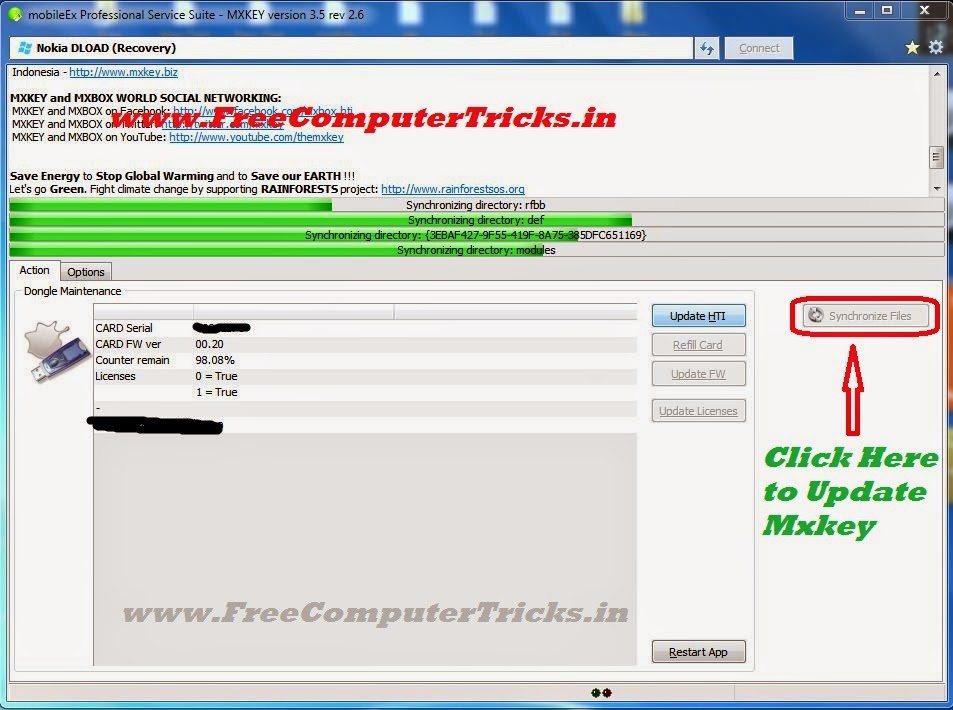
How to Update Mxkey Online - Get Mxkey Latest Updates


As you know Mxkey Latest update and setup file is mobileEx_setup_v3.5_rev2.6(20130509), but after installation of the setup you can update Mxkey to get important file by synchronizing files online, that means you can get some important updates for Mxkey. The below is the process to update Mxkey online.


Mxkey Update Online

  • Open Mxkey mobileEx 3.5 (rev2.6)
  • Click on Synchronize Files

Mxkey Update Online Process

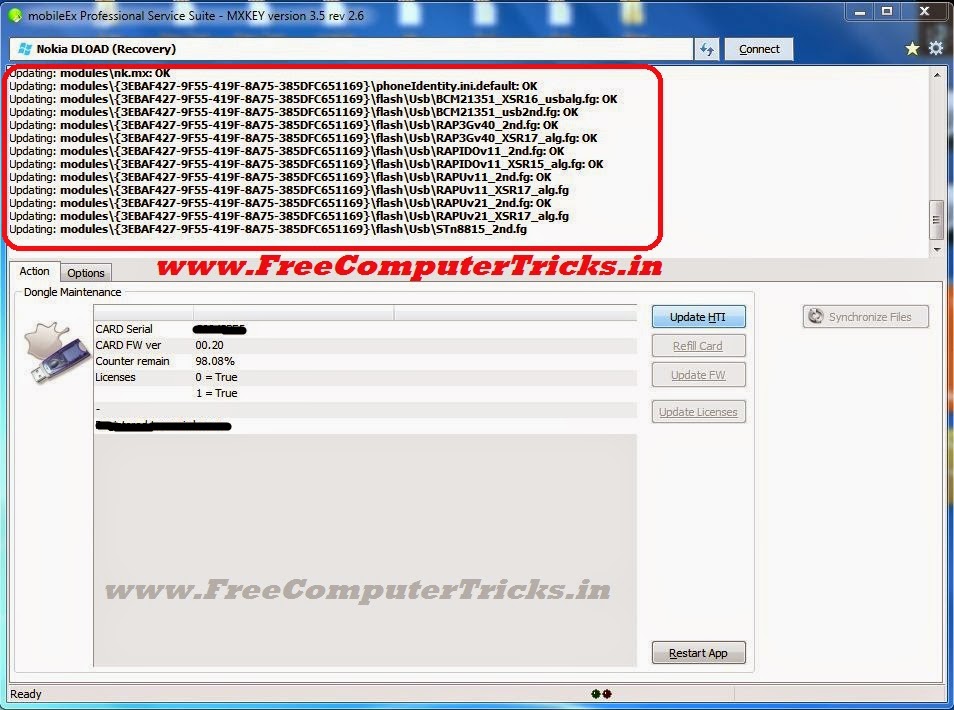
  • Then Click on Update

MXKEY - Update Sync

  • Now Important files are Updating, wait till finish

Mxkey Updating Online

  • Now Click on Yes restart application

mxkey update complete restart application click yes


That's all now you have successfully update Mxkey to the latest setup, enjoy mxkey.

Mxkey No Security Dongle Detected Windows 7 Solved


Mxkey no security detected problem on Windows 7, if you are facing this problem then this guide will help you to completely solve the "Mxkey no security dongle detected" issue. Here you can know about the step by step procedure to overcome the problem and get solution. The below is the procedure to solve 'No security dongle detected' for Windows 7.


Mxkey No Security Dongle Detected Windows 7
Mxkey No Security Dongle Detected Solution

1) Uninstall any old version of Mxkey and Install New Version
2) Do not download the Mxkey setup from other site, always download from official site of Mxkey.
3) While Installing Mxkey, Install all drivers you prompt at the time of Installation.
4) To update Smart Card Drive always use the path C:\mobileEx\3.5
5) After Installation Restart the Computer.

Mxkey Latest Version mobileEx_setup_v3.5_rev2.6(20130509)

Follow the above steps for installing Mxkey on Windows 7, then you will be solved the problem of No security dongle detected.


After installing Mxkey software connect the Mxkey to the computer and check device manager for the drivers are installed or not. In mxkey two driver must install automatically 1) USB Token Device 2) USB Token Holder, if these driver is not installed then you may have the problem in setup, just reinstall the Mxkey setup downloaded from official site, your problem will be solved.


Mxkey No security dongle detected Windows 7 Solved 100%
If these two driver are installed successfully then you can use Mxkey and the no security dongle detected problem will solve. If you want to install Smart card driver, then just update the driver and give the path C:\mobileEx\3.5, the smart card will automatically install.


Note: If there is no light blinks in the Mxkey dongle, that means the Mxkey device is not working and it's a hardware fault.

Thursday, July 17, 2014

How to Flash Samsung S7562 With Odin - A Complete Procedure


Here is the topic how to flash Samsung s7562 with Odin, to flash Samsung s7562 with Odin follow the below steps.


How to flash Samsung S7562 with Odin3

Samsung S7562 Flash Odin


  • Open Odin3 v3.7
  • Select PIT file signed_kyle_v2_0604.pit
  • Boot Loader BOOTLOADER_S7562XXALK1_1102401_REV02_user_low_ship.tar
  • PDA CODE_S7562XXALK1_1102401_REV02_user_low_ship.tar
  • PHONE MODEM_S7562XXALJ3_1102401_REV02_user_low_ship.tar
  • CSC CSC_OXE_S7562OXEALL1_20121207.144751_REV02_user_low_noship.tar


Samsung S7562 Flash Done with Odin 3 v3.07

  • Then put the Samsung S7562 into Download Mode (Volume Down + Home +Power Key)
  • Then Connect the USB Cable to Computer and Click Start.
 

📚 You May Also Like to Read