Showing posts with label MXKEY. Show all posts

Thursday, August 7, 2014

How to Update Mxkey Online - Get Mxkey Latest Updates


As you know Mxkey Latest update and setup file is mobileEx_setup_v3.5_rev2.6(20130509), but after installation of the setup you can update Mxkey to get important file by synchronizing files online, that means you can get some important updates for Mxkey. The below is the process to update Mxkey online.


Mxkey Update Online

  • Open Mxkey mobileEx 3.5 (rev2.6)
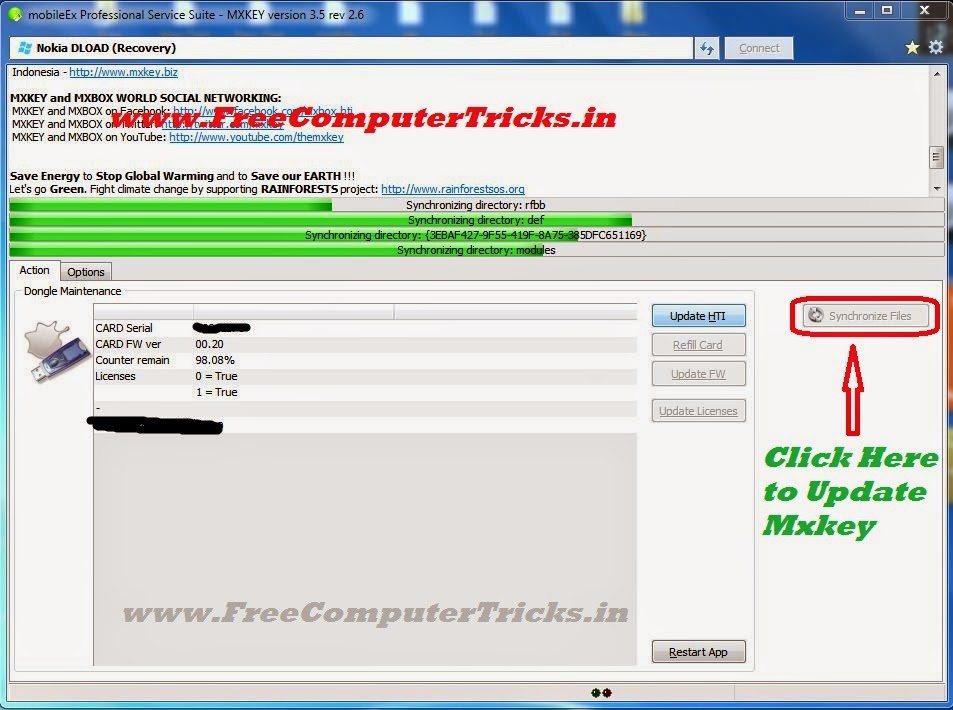
  • Click on Synchronize Files

Mxkey Update Online Process

  • Then Click on Update

MXKEY - Update Sync

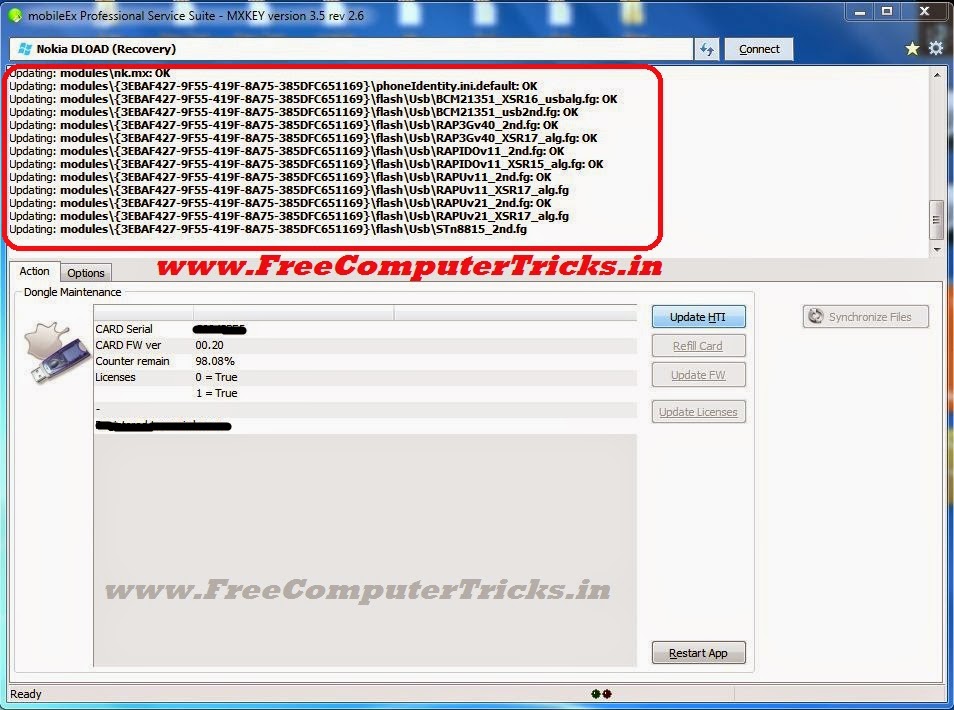
  • Now Important files are Updating, wait till finish

Mxkey Updating Online

  • Now Click on Yes restart application

mxkey update complete restart application click yes


That's all now you have successfully update Mxkey to the latest setup, enjoy mxkey.

Mxkey No Security Dongle Detected Windows 7 Solved


Mxkey no security detected problem on Windows 7, if you are facing this problem then this guide will help you to completely solve the "Mxkey no security dongle detected" issue. Here you can know about the step by step procedure to overcome the problem and get solution. The below is the procedure to solve 'No security dongle detected' for Windows 7.


Mxkey No Security Dongle Detected Windows 7
Mxkey No Security Dongle Detected Solution

1) Uninstall any old version of Mxkey and Install New Version
2) Do not download the Mxkey setup from other site, always download from official site of Mxkey.
3) While Installing Mxkey, Install all drivers you prompt at the time of Installation.
4) To update Smart Card Drive always use the path C:\mobileEx\3.5
5) After Installation Restart the Computer.

Mxkey Latest Version mobileEx_setup_v3.5_rev2.6(20130509)

Follow the above steps for installing Mxkey on Windows 7, then you will be solved the problem of No security dongle detected.


After installing Mxkey software connect the Mxkey to the computer and check device manager for the drivers are installed or not. In mxkey two driver must install automatically 1) USB Token Device 2) USB Token Holder, if these driver is not installed then you may have the problem in setup, just reinstall the Mxkey setup downloaded from official site, your problem will be solved.


Mxkey No security dongle detected Windows 7 Solved 100%
If these two driver are installed successfully then you can use Mxkey and the no security dongle detected problem will solve. If you want to install Smart card driver, then just update the driver and give the path C:\mobileEx\3.5, the smart card will automatically install.


Note: If there is no light blinks in the Mxkey dongle, that means the Mxkey device is not working and it's a hardware fault.
Tuesday, August 27, 2013

MXKEY v3.5 revision 2.6, Public-Release - Download MXKEY Latest Driver and Software


MXKEY is a device, which helps to flash Nokia mobiles. Here is the mxkey software 'mobileEx_setup_v3.5_rev2.6(20130509).exe' for those who are repair Nokia Mobiles. 


MXKEY v3.5 revision 2.6, Public-Release

Release Note


v3.5 revision 2.6, Public-Release
NOKIA module updated to version 2.6
added: WP8 support
Refurbish Flashing support by USB
Recovery(Dead) Flashing support by USB
added: Service Utility for WP8
Factory Reset without flashing
Read/Write Production Data(Product Code,PSN,HW version, etc.
Read/Write WP8 NV items )*
Read/Write WP8 CERTIFICATE(NPC,CCC,HWC,RDC) )*
Write CoverColor )*


added: SuperDongle Auth for WP8 phones
SuperDongle Auth is required to write important/secure data
bugfixed: RAPUV2 security repair function
revised internal fire module to enable download firmware package by product codeadded latest flash update v 12.46.000.1 to setup minor bugfix
Write function require SuperDongle Auth
SL3 Logger updated to version 2.6 minor bugfix and improvements
FIRE module updated to version 1.5 minor bugfix and improvements 


Download MXKEY latest version software and driver 'mobileEx_setup_v3.5_rev2.6(20130509).exe' HERE


📚 You May Also Like to Read