Showing posts with label Odin3. Show all posts

Friday, August 24, 2018

Galaxy J7 Nxt (SM-J701F/DS) FRP Unlock File and Flash Tool Free!


How to unlock FRP or bypass frp of Galaxy J7 Nxt SM-J701F/DS Android 7.0? and here is the procedure to unlock and enable USB debugging of Samsung J7 Nxt using flash file and flash tool, which is completely free and download link given below. You do not need to use any paid flashing box or flash tool to flash the Samsung phone J7 Nxt having Android 7.0 version with Samsung Experience version 8.1. The phone's FRP unlock done using a small file which can be flash through Odin3 and after flashing this file just hard reset the phone and connect to PC, the USB debugging mode will automatically on just allow on the phone screen and unlock Samsung FRP using free Miracle box or you can use any other flash tool box. It is tested on 1 February 2018 security patch and you can try it on other version of security patch updates. This video is only made for tutorial purpose and do at your own risk.
Galaxy Nxt FRP Unlock File and Tool For All Android Version


Android 7.0 frp unlock file Samsung J7 Nxt
Android 8.1 frp unlock file download and flash tool for Samsung J701F
Samsung 7.0 1st February 2018 security patch FRP unlock done without login
Samsung 7.0 FRP unlock done using odin

Samsung J7 Nxt frp unlock file free download 


Download the below frp flash file and flash tool and flash the phone using Odin flash tool and then use Free Miracle box tool software to unlock the phone. After flashing the frp unlock file of Samsung Android phone, the has automatically enable the USB debugging for you, then you can just do what ever you want to do with the phone.

Procedure :-

1) Connect phone with download mode using (volume down + home + power).
2) Connect the phone to Computer and open Odin3.
3) Select Eng boot_J701FXXU1AQF3.tar in CP in Odin and Start.
4) After flash complete Hard Reset the phone, USB Debugging will be automatically enabled.
5) Then FRP reset with miracle, z3x, umt or any other flash tool . 

~:DOWNLOADS:~

J701F FRP File and Flash Tool [Download Link]
Password = fctj701f

Search this website and download Miracle box working without box and using that tool you can remove the Samsung FRP.

So here is the complete procedure to remove FRP on Samsung J7 Nxt using FRP file and tool and it's working on any version of Android OS. Use the flash file and flash the phone using ODIN 3, then use Miracle box and remove FRP, it's so easy and simple.

Sunday, May 13, 2018

Samsung J7 SM-J700F Android 6.0 FRP Unlock Done With ODIN


How to Unlock FRP Lock Of Samsung J7 SM-J700F Android 6.0 Using ODIN? Samsung J7 FRP Unlock File Download and ODIN3 Samsung Flasher or Downloader Tool Download Here.

Samsung J7 has got the Android 6.0.1 update and the Android security patch level updated as of 1st August 2017 with security software version ASKS v1.2 Release 161011 SMR Aug-2017 Release MS. The device also gets the Knox version KNOX 2.6, Standard SDK 5.6.0, Premium SDK 2.6.0, Customization SDK 2.6.0, Container 2.6.0, CEP 2.0.1, Enterprise Billing 1.2.0, OTP 2.6.0, SE for Android 2.4.0, SSO 2.5.0, Shared Devices 2.6.0, TIMA 3.2.007 and VPN 2.2.5. These are the technical information of Android update that the Samsung J7 J700F has now a days as of 13 May 2018.

Here in this article you will come to know, how to do frp bypass on your Samsung J7 having Android 6.0 Operating System. If you forgot the Email id and password of the phone previously used in that phone then if you Factory Reset the phone it will ask the Email id and password to move forward or to get into the phone. If you remember the Gmail id and Password it helps you to restore your contacts and all other data it backed up. If you do not know the email and password then this tutorial will help your to bypass or unlock or reset frp lock of Samsung J7, please go through the below steps.

Happy Mother's Day - A Mother can take the place of all others but whose place no one else can take - Love Your Mother and Be Kind Of Her (Sunday, 13 May - Mother's Day 2018 in India)

Samsung J7 FRP Bypass Android 6.0
You can bypass frp lock of Samsung J7 using Odin3 Downloader or so called Odin flash tool or some other call the tool as ODIN. To bypass frp please download the below "FRP Unlock J7 File" and download Odin3, then flash the phone.
https://www.freecomputertricks.in - How to Bypass FRP Unlock of Samsung J7 Android 6.0 Using Odin3

Steps:
  • Download Odin3 from the below link.
  • Download J7 FRP unlock file.
  • Now open Odin3 and click on AP Tab and select Exynos.tar file.
  • Then put the phone into Download Mode (Volume Up + Power Key, then press Volume up)
  • Connect the phone to the Computer using USB cable.
  • Now click on Start button on Odin Flash Tool and wait until you see PASS.
  • That's all now your phone will reboot and go to the settings, then enable Developer Mode and then OEM unlock, then finally do a Factory Reset.

There are two files in the zip file use Exynos CPU file on Samsung J7 to bypass frp lock.

Exynos_cpu FRP unlock File
Qualcomm_cpu FRP Unlock File
Samsung J7 Android 6.0 FRP Lock - How to Flash With Odin
Downloads:
J7 FRP Bypass File | Download
Odin3 Downloader V 3.12.5 | Download

Some Expected Questions or Problems May Arise After Flashing Samsung J7 With FRP Unlock. Frequently Asked Questions and Answers:

Question: After flash with FRP unlock file my phone is showing Unfortunately Stop for all apps.
Ans: After switch on please go to the settings and do a Factory Reset, do not forgot to enable Developer Mode and OEM Unlock.

Question: After flashing with J7 frp file using Odin, unable to bypass frp.
Ans: Please follow the above process carefully, if still you are facing problem to bypass frp then do hard reset with enabling OEM unlock or after flashing with this frp unlock file you can use Miracle Box 2.54 use the Samsung Tab and do Reset FRP.

Question: Where to download Miracle Box Software v2.54, working without box?
Ans: Search this site using the Google Search Box (On the Left Side Bar) for "Miracle Box V2.54" and Download it.

Question: How to Bypass FRP Lock of Samsung J7 using Miracle Box?
Ans: First flash with the frp unlock file with Odin3, after flashing it will automatically enable the USB debugging, then switch on the phone and connect to the Computer, Now open Miracle Box 2.54 and go to the ADB Tab and use FRP unlock option or put the phone into Download mode after flash and then go to Samsung Tab then select Reset FRP.

This Tutorial Is Very Helpful For The Following Questions:
How Bypass FRP Google Account Samsung Odin Method?
Samsung J7 SM-J700F FRP Unlock Google Account With One Click.
What is the easy way for Samsung 7.0 FRP Lock Remove With Odin Tool?
How to unlock FRP Google Account Unlock J7 J710FN Using Odin?
How to Reset Samsung FRP Google Account By Odin3?
Bypass Google Account Samsung J7 SM J700F Using Odin3 Downloader 2018.
Samsung J7 FRP Remove and FRP File Download.
How to Bypass FRP of Samsung J7 Android 6.0?

Saturday, September 16, 2017

J700F sw rev check fail device 4 binary 3 - 100% Tested Soluiton Here


When you flash the Samsung J7 (J700F/DD) you may get this error called 'sw rev check fail device 4 binary 3' or something similar to this with the changing of numbers i.e. 'sw rev check fail device 2 binary 1' and 'sw rev check fail device 3 binary 2' etc. So here we will discuss about these errors on Samsung J700F while flashing firmware and give the 100% working solution here. 

The Error "SW REV. Check Fail" On J7 I Faced Today:

Today when I flash the Samsung J7 using 'Odin3 flash tool' it shows the error "sw rev check fail device 4 binary 3" on download mode screen on the smart phone and on Odin3 it shows fail, and when I try to switch ON the device, it won't switched ON, only shows an error message like "An error has occurred while updating  the device software. Use the Emergency recovery function in the Smart Switch PC Software". Then I try to use the "Smart Switch" PC software to recover the phone but when put Model No. and S.N. Number on "Smart Switch" it shows not found any firmware for this Model please type the correct Model No. and Serial No. although I provided correctly according to the IMEI sticker on the phone. I also try to solve this problem using 'Kies' but it shows same error and then I try to search on "Internet" but did not get the exact solution for this, but after a long time finally, I solved this error and here share the process to help others.


Samsung J7, J700f sw rev check fail device 4 binary 3 100% Solution Here

Why This Error Comes?

This error comes due to downgrade the phone software, that means if the phone has updated to latest Android version 6.0.1 on J7 and you try to flash with 5.0 Android version. After upgrade to Android version 6.0.1 the Boot Loader of the phone also updated so it does not allow Downgrade the Boot Loader.

Solution For SW REV Check Fail on Samsung J7:

This step by step procedure is tested on Samsung J7 (J700F/DD) model and 100% working for me. Please follow the below process to recover Samsung J7.

Steps:

1- Download J700F Latest Firmware (Android Version 6.0.1) Here
2- Download Odin3 (v3.12.7) Here
3- Now extract the firmware and you will get
J700FXXU4BQE3_J700FODD4BQE1_J700FXXU4BQF4_HOME.tar.md5
4- Now extract odin3_v3.12.7.zip and Open "Odin3 v3.12.7.exe"
5- Now click on "AP" and select the "HOME.tar" File
6- Now put the Samsung J7 into Download Mode (Volume Down+Home+Power Key and Then Press Volume UP to confirm)
7- Now click on Start button on Odin3 and wait until the flashing process complete.

That's all now you have successfully recovered the Samsung J700F using Odin3 and latest Android 6.0.1 firmware. If still you are facing any problem with J700F while flashing firmware, please ask through comments.

This topic is 100% Solution For These Below Errors on J700F/DD Firmware Flashing:

j700f sw rev check fail device 4 binary 3
sw rev. check fail device 2 binary 1 j700f
Sw Rev. Check Fail Device Solution
How to fix sw rev check fail device 3, binary 2 SM-j700F
sw rev check fail device 3 binary 2 j700f
How to fix sw rev check fail device 3, binary 1
Samsung J700F sw rev check fail device 3 binary 2
sw rev. check fail device 2 binary 1 j700f
j700f sw rev check fail
samsung j7 sw rev check fail device binary 0 how To Fix
sw rev check fail device 2 binary 1 j700h
sw rev check fail device 3 binary 1 j700f
sw rev check fail device 3 binary 2 j700f Samsung Galaxy J7
Emergency firmware recovery J700F Kies and Smart Switch not success 

Thursday, July 17, 2014

How to Flash Samsung S7562 With Odin - A Complete Procedure


Here is the topic how to flash Samsung s7562 with Odin, to flash Samsung s7562 with Odin follow the below steps.


How to flash Samsung S7562 with Odin3

Samsung S7562 Flash Odin


  • Open Odin3 v3.7
  • Select PIT file signed_kyle_v2_0604.pit
  • Boot Loader BOOTLOADER_S7562XXALK1_1102401_REV02_user_low_ship.tar
  • PDA CODE_S7562XXALK1_1102401_REV02_user_low_ship.tar
  • PHONE MODEM_S7562XXALJ3_1102401_REV02_user_low_ship.tar
  • CSC CSC_OXE_S7562OXEALL1_20121207.144751_REV02_user_low_noship.tar


Samsung S7562 Flash Done with Odin 3 v3.07

  • Then put the Samsung S7562 into Download Mode (Volume Down + Home +Power Key)
  • Then Connect the USB Cable to Computer and Click Start.
 

Sunday, July 13, 2014

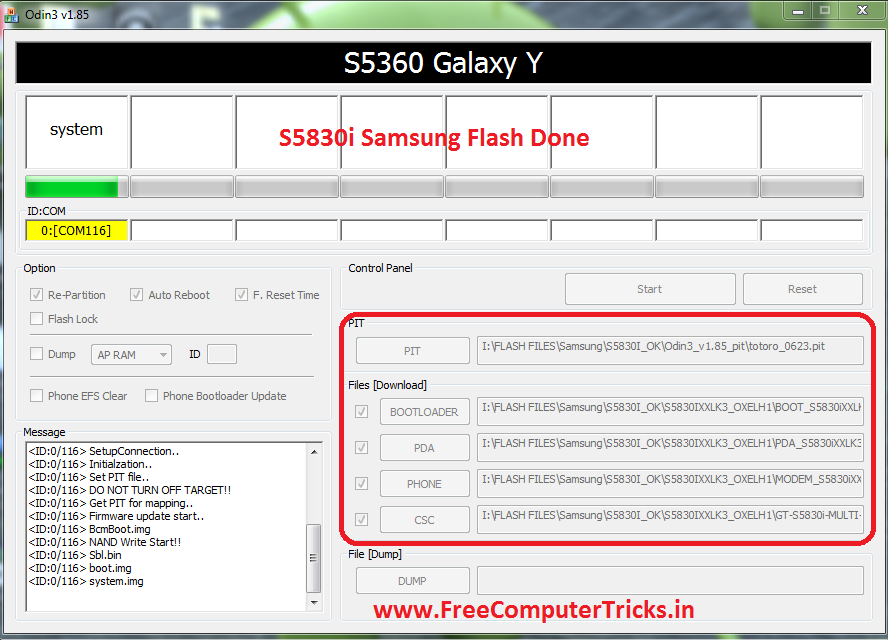
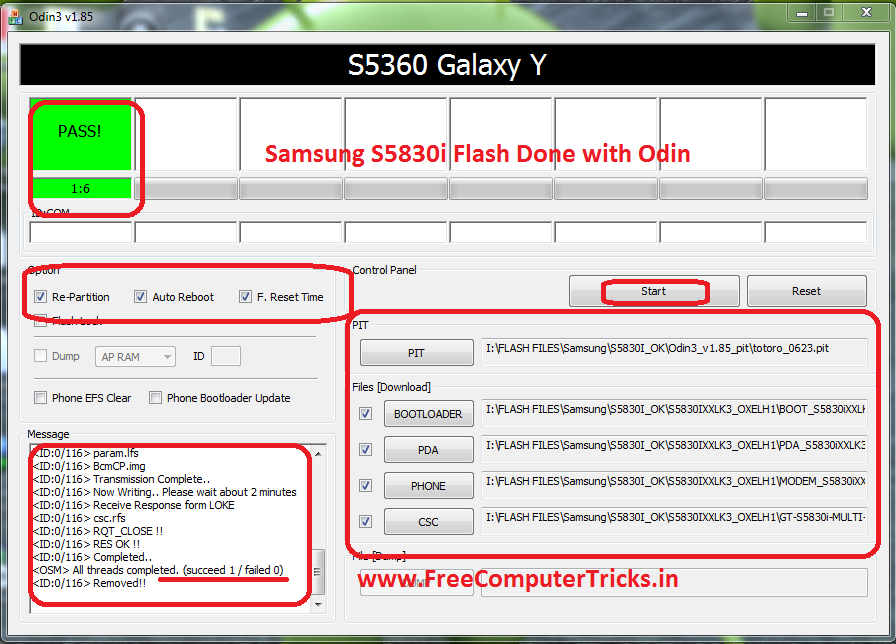
How to Flash Samsung S5830i With Odin - Samsung S5830i Flash Done With Odin3 V1.85


Here is the process to flash Samsung S5830i with Odin3, the below steps will guide you to flash the mobile phone using Odin. To flash with Odin you do not need any software box, to do that you should have a CA 101 Cable and a Computer.

Samsung S5830i Flash Done With Odin


Download


Odin3_v1.85_pit (totoro_0623.pit)
S5830IXXLK3_OXELH1 Samsung Firmware

These can be download from Internet.


Samsung S5830i Flash Odin3 Step By Step

  • Open Odin3 v1.85
  • Click on PIT Button and Select totoro_0623.pit
  • BOOT LOADER = BOOT_S5830iXXLK1_REV00.tar
  • PDA = PDA_S5830iXXLK3_REV00.tar
  • PHONE = MODEM_S5830iXXLK1_REV00.tar
  • CSC = GT-S5830i-MULTI-CSC-OXELH1_RST.tar
  • Put Samsung S5830i Download Mode/Odin Mode = Press Volume Down + Home + Power Button 
  • Now Click on Start


How to Flash S5830i Odin Help and Process
When you see PASS! that means the flashing process of Samsung S5830i is complete. In this process you can solve the restart problem of S5830i/blinking solution of S5830i.

Friday, July 4, 2014

How to Flash Samsung S5360 With Odin - www.FreeComputerTricks.in


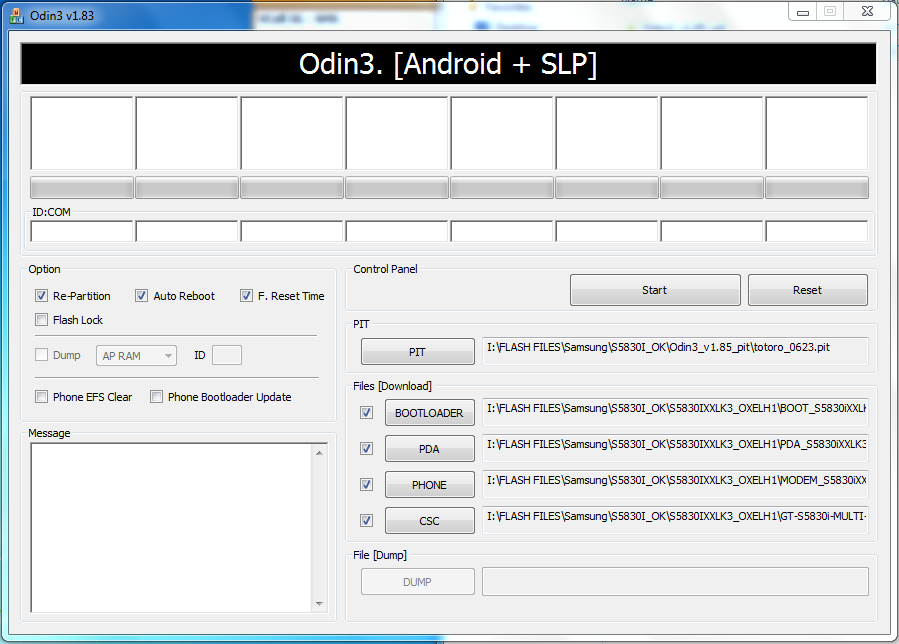
Here is the complete process or step by step process to flash Samsung S5360 with Odin. Samsung S5360 Restart problem solved by flashing with Odin3. Download the Samsung Firmware for S5360 and Odin3 V1.84 with totoro_0623.pit file and flash with Odin, the below is the process to flash S5360 with Odin.


Required Files To Flash S5360

  • Samsung S5360 Flash File
  • Odin 3 with Pit File
  • A micro USB Cable


Samsung S5360 Flash with Odin


How to Flash S5360 With Odin


  • Open Odin3_v1.84
  • Click on PIT Tab and Select totoro_0623.pit
  • BOOTLOADER = DefaultCalDataWithBoot_S5360XXKK5_REV05.tar
  • PDA = PDA_S5360XXKK6_REV05.tar
  • PHONE = MODEM_S5360XXKK5_REV05.tar
  • CSC = GT-S5360-MULTI-CSC-OXEKK1.tar
  • Put the S5360 into Download Mode and connect with USB Cable (Download Mode S5360 = Volume Down + Home + Power then Volume Up)
  • Now Click on Start


How to flash S5360 with Odin (Odin Flashing Process S5360)

Let the Flash finished, when you see All threads completed and PASS! that means you have completed the flashing of S5360.

Wednesday, December 25, 2013

Samsung S5830i Flash Done With Odin3 V1.85 - How To Flash Samsung S5830i


How to flash Samsung S5830i using ODIN3?

Follow the below steps to flash your Samsung s5830i with Odin3

File Needed

Samsung Firmware i.e. S5830IXXLK3_OXELH1 which can be download from support area or using Google Search

Odin3_v1.85 with Pit (Odin3 v1.85 and totoro_0623.pit)


Flash Samsung S5830i with Odin 3


Steps:


  • Open Odin 3

  • Click on PIT Tab and Select totoro_0623.pit file

  • Click on BOOTLOADER and Select BOOT_S5830iXXLK1_REV00.tar

  • Click on PDA and Select PDA_S5830iXXLK3_REV00.tar

  • Click on PHONE and Select MODEM_S5830iXXLK1_REV00.tar

  • Click on CSC and Select GT-S5830i-MULTI-CSC-OXELH1_RST.tar

  • Put the Samsung S5830i to Download Mode ( Volume Down + Volume Up + Power Key, then Volume UP)

  • Connect the Phone to your computer with USB Cable

  • Then Click on Start wait until complete


That's all Now you have flashed your Samsung S5830i mobile phone


Note: You may need Samsung Mobile USB Drivers, so for that it's better to install Samsung Kies on the Computer.


📚 You May Also Like to Read