Showing posts with label Samsung Firmware Download. Show all posts

Thursday, February 23, 2023

Samsung Firmware Update


Samsung firmware

Samsung firmware refers to the software that runs on Samsung devices, including smartphones, tablets, and other electronic devices. The firmware includes the operating system, device drivers, and other essential software components that enable the device to function properly.

Samsung releases firmware updates periodically to improve the performance, security, and stability of their devices. Firmware updates can also introduce new features and functionality to the device. These updates are usually available through the device's Settings app, and users can manually check for updates and download them over Wi-Fi or mobile data.

It's important to keep your Samsung device's firmware up to date to ensure optimal performance and security. However, it's recommended to back up your important data before updating your device's firmware, as updates can sometimes cause data loss or other issues.
Samsung Firmware Update

Samsung Firmware Update

To update your Samsung firmware, follow these steps:


  1. Connect your Samsung device to a Wi-Fi network or mobile data network.
  2. Go to your device's Settings app.
  3. Scroll down and select "Software update" or "System updates."
  4. Tap "Download and install" or "Check for updates."
  5. If an update is available, tap "Download and install" to start the update process. Depending on the size of the update, it may take some time to complete.
  6. After the update is downloaded, your device will automatically restart and install the update.


Note: Make sure your device has sufficient battery life before starting the update process. If your device's battery is low, connect it to a charger before starting the update. Additionally, it's recommended to back up your important data before updating your device's firmware, as updates can sometimes cause data loss or other issues.

Monday, November 26, 2018

J7 Max FRP Done - Combination File | Firmware | Flash Tool


Samsung Galaxy J7 Max (G615F) FRP unlock procedure using Odin 3 and Combination file, here you will also get the Video tutorial to know the complete procedure to unlock FRP or Google Account Reset using Samsung Combination file and firmware and free flash tool. So please go through this topic to download the J7 Max working combination file and full firmware and follow this FRP unlock procedure to unlock the phone.

Note: This topic is only for Tutorial Purpose, Follow the procedure completely at your own risk and we are not responsible for any damage happened to the phone.

Download J7 Max Combination File and Firmware and Flash Tool:

Here you can download J7 Max combination file which helps you to remove FRP lock of the phone. As you know combination file is used for boot any locked Samsung phone to Factory Mode and where you can enable the USB debugging through the Developer mode and then easily remove or bypass or reset the Google Account Lock or Factory Reset Protection Lock. So here is the Samsung Combination file download link for J7 Max and this file can be flash using Odin3, and then follow the below steps carefully.

Galaxy J7 Max FRP Unlock Using Combination File:
  • Download J7 Max Combination file (link given below).
  • Download Odin3 download tool (Link given below).
  • Now open Odin and Load the combination file in AP Tab.
  • Then put the phone to Download Mode ( Hold Volume Down + Home + Power Key then press Volume Up key to confirm)
  • Now flash the phone with combination file and then the phone will automatically restarts.
  • Now you will see the phone desktop and go to the Settings and then enable Developer Mode.
  • Now Enable USB Debugging Mode.
  • Then Use free Z3X box to remove FRP (Download Link Given below)
  • Now flash the phone with the firmware you have downloaded (Only Flash AP)
J7 Max Android 7.0 FRP ODIN - Combination File and Firmware and FRP Bypass Tool

That's all now the phone has unlocked and you can use the phone. So if you are facing difficulties to unlock/bypass FRP of Samsung phone then you can follow this tutorial and download all Samsung Combination file here, if you need any Samsung Combination file, then please ask through comments.

Note: The firmware link provided here, only download AP (Do not download BL otherwise the phone may goes dead)


~~~~::: Downloads :::~~~~

Download J7 Max Combination File   | Download Link
Password = gsmdevoloper@imteyaj

Download J7 Max Firmware INS File | Download Link
Download Odin3 Downloader Tool    | Download Link

Friday, August 31, 2018

J5 (SM-J500F) VoLte Indian Firmware Free Download - Android 6.0.1


Samsung J5 SM-J500F VoLte Issue after flash and here is the final and tested solution to enable Volte after flashing with J5 Volte firmware Android 6.0.1. Here you can download J5 VoLte firmware which tested and 100% working and ODIN 3 flash tool to flash the phone. Download the Volte firmware free and direct link given below and extract the zip file and flash using Odin3 flasher. This is the 4 file firmware with pit file, just flash the AP, CP, BL and CSC using Odin 3, using the Samsung Download Mode (Volume Down + Home +Power Key).

Download and Fix VoLte for J500F, J5 Stock ROM Android 6.0.1 with Volte supported. Firmware Volte for Sam Mobile J500F Marshmallow Update firmware, flash the Samsung Galaxy J5 with Volte firmware and solve after flash Volte problem on the phone. After flashing Samsung J5 No Volte and LTE signal only shows 4G while using Reliance Jio SIM, if you are facing this problem then here is the solution for you, please follow the process step by step and 100% you will solve the Volte issue on Samsung J5 Android smartphone.
Samsung Galaxy J5 (SM-J500F) VoLte Indian Firmware Free Download - Android 6.0


J500F Firmware Details:

J500FXXU1BRC1_ODD1BQL1
AP_J500FXXU1BRC1_CL10808387_QB17352744_REV00_user_low_ship_MULTI_CERT.tar.md5
BL_J500FXXU1BRC1_CL10808387_QB17352744_REV00_user_low_ship_MULTI_CERT.tar.md5
CP_J500FDDU1BQG1_REV00_CL2210784_QB6948156.tar.md5
CSC_ODD_J500FODD1BQL1_CL10808387_QB16277894_REV00_user_low_ship_MULTI_CERT.tar.md5
J5LTE_EUR_OPEN.pit

Galaxy J5 Software Info:

Android Version : 6.0.1
Baseband Version : J500FDDU1BQG1
Android Security Patch Level : 1 August 2017

Downloads:

Download J500F VoLte Flash File {Download Link}

For Password watch the Complete Video on YouTube Here and you will find the password given in the video.

Odin 3 Flash Tool Download 


Odin3 Flash Tool V 3.12.5 | Download

Wednesday, May 30, 2018

Samsung G570F Galaxy J5 Prime FRP Bypass Firmware


Here is the topic/tutorial about how you can flash Samsung SM-G570F Galaxy J5 Prime using latest firmware, which helps you to unlock the phone. You can flash the phone having Android 7.0 and Android 8.0 experience version and won't get any binary errors while flashing the J5 prime phone. If you are facing Custom Binary Blocked By FRP while flashing Samsung phone, then this firmware will help you to recover your phone without any errors, this process is tested and 100% working.

Galaxy J5 Prime SM-G570F Firmware:
The firmware is one of the latest firmware for the phone, which have Android 7.0 version and Samsung experience version 8.0. You can flash the phone using this OTA firmware to upgrade or install a fresh Operating System on the J5 prime phone. If the phone J5 Prime hangs on Logo and restarts then flash with this firmware it will solve the issue. You can also download latest firmware for the model here and flash the phone using ODIN3 flash tool.
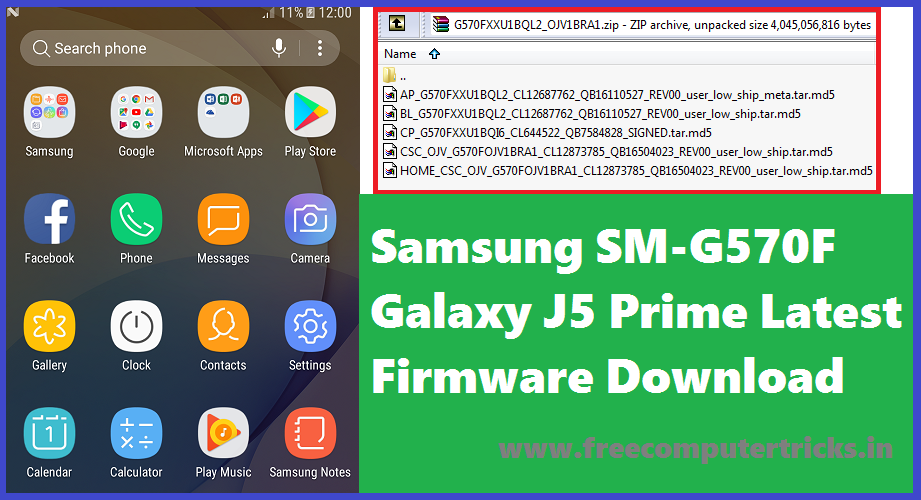
Samsung SM-G570F Galaxy J5 Prime Latest Firmware Download

Why It's Called FRP Bypass Firmware?

As I said before about the firmware version of this file, which has Android 7.0 and experience version 8.0 and Android security patch level version 1 December 2017, so in this version the Calculator ADB enable method will work fine, and the firmware can flash on the J5 prime phone having Android 7.0 with security patch 1 May 2018. As you know after 1 May 2018 Android security path level the Calculator method to enable USB debugging not work. So here is the finally and tested solution to unlock frp on J5 Prime which have Android security patch level 1 May 2018, what you have to do is just download the firmware and Samsung ODIN flash tool and flash the phone, then use the USB ADB or Debugging method and then use any flashing box tool to unlock frp. You can get an another topic on this website to know how to unlock frp for free using free tool and also to know how to unlock frp on Samsung J5 Prime having security patch level 1 May 2018, Links available below.

SM-J570F Firmware Download:

File Name: G570FXXU1BQL2_OJV1BRA1 4Files Firmware
OS Version: Android 7.0 Nougat
PDA/AP Version: G570FXXU1BQL2
MODEM/CP Version: G570FXXU1BQI6
CSC Version: G570FOJV1BRA1

Security Patch Level : 1 December 2017
File Size: 2 GB

Contents Of File:
 

AP_G570FXXU1BQL2_CL12687762_QB16110527_REV00_user_low_ship_meta.tar.md5
BL_G570FXXU1BQL2_CL12687762_QB16110527_REV00_user_low_ship.tar.md5
CP_G570FXXU1BQI6_CL644522_QB7584828_SIGNED.tar.md5
CSC_OJV_G570FOJV1BRA1_CL12873785_QB16504023_REV00_user_low_ship.tar.md5
HOME_CSC_OJV_G570FOJV1BRA1_CL12873785_QB16504023_REV00_user_low_ship.tar.md5

Downloads:

SM-J570F Firmware | Download Here

ODIN3 Downloader Odin3_v3.13.1.zip Samsung Flash Tool | Download Here

Download latest firmware update for SM-G570F and flash the Samsung phone, using this firmware you flash the phone and update the phone to latest Android operating system. Download link is given above and visit the download firmware link and get your latest firmware for Samsung SM-G570F Galaxy J5 Prime Android 7.0.

Saturday, September 16, 2017

J700F sw rev check fail device 4 binary 3 - 100% Tested Soluiton Here


When you flash the Samsung J7 (J700F/DD) you may get this error called 'sw rev check fail device 4 binary 3' or something similar to this with the changing of numbers i.e. 'sw rev check fail device 2 binary 1' and 'sw rev check fail device 3 binary 2' etc. So here we will discuss about these errors on Samsung J700F while flashing firmware and give the 100% working solution here. 

The Error "SW REV. Check Fail" On J7 I Faced Today:

Today when I flash the Samsung J7 using 'Odin3 flash tool' it shows the error "sw rev check fail device 4 binary 3" on download mode screen on the smart phone and on Odin3 it shows fail, and when I try to switch ON the device, it won't switched ON, only shows an error message like "An error has occurred while updating  the device software. Use the Emergency recovery function in the Smart Switch PC Software". Then I try to use the "Smart Switch" PC software to recover the phone but when put Model No. and S.N. Number on "Smart Switch" it shows not found any firmware for this Model please type the correct Model No. and Serial No. although I provided correctly according to the IMEI sticker on the phone. I also try to solve this problem using 'Kies' but it shows same error and then I try to search on "Internet" but did not get the exact solution for this, but after a long time finally, I solved this error and here share the process to help others.


Samsung J7, J700f sw rev check fail device 4 binary 3 100% Solution Here

Why This Error Comes?

This error comes due to downgrade the phone software, that means if the phone has updated to latest Android version 6.0.1 on J7 and you try to flash with 5.0 Android version. After upgrade to Android version 6.0.1 the Boot Loader of the phone also updated so it does not allow Downgrade the Boot Loader.

Solution For SW REV Check Fail on Samsung J7:

This step by step procedure is tested on Samsung J7 (J700F/DD) model and 100% working for me. Please follow the below process to recover Samsung J7.

Steps:

1- Download J700F Latest Firmware (Android Version 6.0.1) Here
2- Download Odin3 (v3.12.7) Here
3- Now extract the firmware and you will get
J700FXXU4BQE3_J700FODD4BQE1_J700FXXU4BQF4_HOME.tar.md5
4- Now extract odin3_v3.12.7.zip and Open "Odin3 v3.12.7.exe"
5- Now click on "AP" and select the "HOME.tar" File
6- Now put the Samsung J7 into Download Mode (Volume Down+Home+Power Key and Then Press Volume UP to confirm)
7- Now click on Start button on Odin3 and wait until the flashing process complete.

That's all now you have successfully recovered the Samsung J700F using Odin3 and latest Android 6.0.1 firmware. If still you are facing any problem with J700F while flashing firmware, please ask through comments.

This topic is 100% Solution For These Below Errors on J700F/DD Firmware Flashing:

j700f sw rev check fail device 4 binary 3
sw rev. check fail device 2 binary 1 j700f
Sw Rev. Check Fail Device Solution
How to fix sw rev check fail device 3, binary 2 SM-j700F
sw rev check fail device 3 binary 2 j700f
How to fix sw rev check fail device 3, binary 1
Samsung J700F sw rev check fail device 3 binary 2
sw rev. check fail device 2 binary 1 j700f
j700f sw rev check fail
samsung j7 sw rev check fail device binary 0 how To Fix
sw rev check fail device 2 binary 1 j700h
sw rev check fail device 3 binary 1 j700f
sw rev check fail device 3 binary 2 j700f Samsung Galaxy J7
Emergency firmware recovery J700F Kies and Smart Switch not success 

Samsung J7 (J700F) Android 6.0.1 Firmware Downlaod - J700FXXU4BQE3


If you are searching for Samsung Galaxy J7 J700F/DD firmware, then you can download it here. Here is the download link of Samsung J7 J700F/DD firmware for the Android version 6.0.1, download the firmware and flash the faulty phones. This is the latest version of J7 firmware with Android version 6.0.1 download it from direct link below.

Samsung J700F Firmware Details:

J700FXXU4BQE3_J700FODD4BQE1
J700FXXU4BQE3_J700FODD4BQE1_J700FXXU4BQF4_HOME.tar.md5

Model: SM-J700F/DD
File Name : J700FXXU4BQE3    J700FODD4BQE1   J700FXXU4BQF4
Android Version: 6.0.1
File Size:  2.2GB (after extract)
Download Zip File Size: 1.18GB


Samsung J700F Flash OK J700FXXU4BQE3_J700FODD4BQE1 Android Version 6.0.1

Downloads:

Download Samsung Galaxy J700F firmware from the below links.

To download J700F firmware go here and then download it from the first link which is androidfilehost link.

J700F/DD Official Firmware

Download the above firmware for Samsung Galaxy J7 J700F and flash the J7 Android smart phone, this the official firmware and latest firmware which can be download here.

📚 You May Also Like to Read