Showing posts with label Mi Account Unlock. Show all posts

Tuesday, April 24, 2018

How to Remove Mi Account or Reset FRP Mi Max 2


As we know Mi Max 2 from Xiaomi has released on June, 2017 and it has IPS LCD capacitive touchscreen, 16M colors, 6.44 inches Display with Android 7.1.1 (Nougat) Operating System and runs on Qualcomm MSM8953 Snapdragon 625 chipset. The phone also has Octa-core 2.0 GHz Cortex-A53 CPU and Adreno 506 GPU with 4 GB RAM and with Internal Storage of 32/64/128 and you can also expand external storage up to 256 GB and comes with MIUI (Mi User Interface)  MIUI 8.0 up to 8.5 and here is the tutorial about how you can unlock Mi account or reset frp lock on the Mi Max 2 smart phone.
How to Remove Mi Account or Reset FRP Mi Max 2 using Miracle Box
How to Reset FRP LOCK REMOVE DONE WITH FASTBOOT MODE?

Definition Applied
Connecting to Phone,Wait..ok
Wipe data...
erasing 'userdata'... OKAY

Done.
Definition Applied
Connecting to Phone,Wait..ok

Wipe cache...
erasing 'cache'... OKAY
Done.
Definition Applied
Exit fastboot...

Connecting to Phone,Wait..ok
>>Done.


How to Reset or Unlock Mi Account of Mi Max 2 - Miracle Box?
  • Download Miracle Box Free Working without Box Here.
  • Open Miracle Box
  • Go to Android Tab and then select Home ADB
  • Now select "Wipe User Data" under the Fastboot Mode option
  • Now put the Mi Max 2 phone to Fastboot mode (Volume Down + Power Key).
  • Then click on Start button and wait until the process complete.

Thursday, April 12, 2018

All MIUI 9 Mi Account Unlock Solution


Here you will know how to unlock Xiaomi Redmi Mi cloud verification account having latest MIUI 9 on the Redmi phone. As you know now most of the Xiaomi phone has the latest MIUI update which is MIUI 9, you can get the OTA update of you phone by visiting the Mi official site and you can also use your phone to search latest MIUI update through the update online feature of the phone. When you hard reset or factory reset the Mi phone having MIUI 9 it will difficult to bypass the Mi cloud account and it will ask to enter the Mi account details to go further and use the phone. Mi MIUI 9 Mi account frp and unlock solution is given in this article, so please go through the topic and know how to remove/bypass/unlock/frp of the MIUI 9.


MIUI 9 Xiaomi Redmi Mi FRP Free Unlock Solutions

MIUI 9 Mi Account Unlock Solution:

So today we will discuss how to unlock or bypass or remove Xiaomi Redmi Mi cloud account? there are various methods available on the internet to unlock MIUI 9 mi account, but most of those methods are failed to unlock the phone, after a long research we will find the 100% working solution to unlock mi account runs on latest MIUI 9 of the Xiaomi Android 7.0 Nougat phones. This process or method includes a small trick, which is downgrade the operating system of the xiaomi mi phones, that means downgrade the phone with respective fastboot/edl mode ROM then it will erase the Xiaomi Redmi Mi account for you. To use this method you need to download the old stable fastboot ROM for Mi phone which is MIUI 8 with Android 6.0 Marshmallow.

Most of the people download the wrong firmware for their Mi phone, as you know you need fastboot ROM and Mi Flash Tool to Unlock Mi account by flashing the phone using EDL Mode. So before you start please find the correct firmware ROM for the Mi phone and then flash it and downgrade to unlock Mi phones. Remember to download Fastboot ROM not the Recovery mode ROM for the Xiaomi phone.

You May Like These Links Below:-

How to Unlock MIUI 9 Mi Account Free?
  • Download Mi Fastboot ROM as per the Phone's Model Number.
  • Download Latest Mi Flash Tool (Xiaomi Mi Flash Tool 2017425).
  • Boot the Mi Phone into EDL Mode or Fastboot Mode (if supports Fastboot Flashing).
  • For Xioami EDL Mode Test Point You Can Visit [Mi EDL Mode Solution]
  • Connect the phone to PC and Install Mi EDL Mode USB Driver [Mi Driver Download] or [All Mi USB Driver Download]
  • Extract the Fastboot ROM (Use 7zip to extract)
  • Open the Mi Flash tool and select the Mi ROM folder.
  • Now click on Refresh  and then select "Clean All and Lock" or "Flash_All_Lock.bat"
  • Then click on Flash and wait until the process complete.
Xiaomi Redmi MIUI 9 Mi Account Unlock Solved - Mi FRP, Mi Unlock Tool, Mi Account Bypass and MIUI 9 Unlock Tool

Note: After downgrade to MIUI 9 to MIUI 8 the phone takes 5 to 10 minutes to complete the switch on process, so please have patience.

Note: Before Flashing please take a backup of your important data.

Monday, April 9, 2018

Redmi Note 4X MIUI 9 Mi Account Unlock Solution


How to unlock mi account/bypass mi account/redmi frp unlock of Xiaomi Redmi 4 2016100? If you are searching for unlocking/bypass mi account of the Redmi 4X with easy method, then you are in right place here you will know how to unlock mi account runs on latest MIUI 9 version. If you have updated the Xiaomi phone to MIUI 9 and if you hard reset the phone it will ask to enter the Mi cloud account and password previously used in the phone and if you forgot the mi account id and password, then you may unable to use the phone, but after going through this topic you can find the proper way to unlock the latest MIUI 9 of your Xiaomi Redmi 4X and here is the tutorial about Mi account unlock/bypass and Mi frp unlock of Xiaomi Redmi Note 4 2016100. Mi unlock tool, mi account bypass tool and mi account frp unlock tool, use the following steps below in this article.


MIUI 9 Redmi Note 4X Mi Account Unlock 100% Solved

MIUI 9 Global Public Beta ROM Supported Devices:
 

MIUI 9 is now available for Mi MIX 2, Redmi Note 4 MTK, Redmi Note 4 Qualcomm/Redmi Note 4X, Mi 6, Mi Note 2, Mi 5, Mi 5s, Mi 5s Plus, Mi Max, Mi Max Prime, Mi Max 2, Mi 3, Mi 4, Redmi 3, Redmi 3S, Redmi Note 3 Qualcomm, Redmi Note 3 Special Edition, Redmi Note 2, Redmi 4/4X, Redmi 4A, Redmi Note 5A/Y1 Lite, Redmi Note 5A Prime/Y1.


MIUI 9 Global Beta ROM Download Links

MIUI 9 Global Beta ROM 8.2.1 Download Links

MIUI 9 Global Stable ROM For Redmi Note 4X India:

Now most of the Redmi device can get the latest MIUI 9 with Android 7.1 Nougat, The Redmi 4 Global (India Version) users has a Excited news, After a long time, Most awaited MIUI 9 Global Stable ROM for Redmi 4 Global (India Version) Released. Here comes the MIUI 9 Global Beta ROM V9.1.1.0.NAMMIEI with Android Nougat 7.1 for Redmi 4 Global (India Version). It's time to update your phone.


MIUI 9 Global Stable ROM Download Links

MIUI 9 Global Stable ROM Download Links

Note: This ROM is not for Redmi 4 Prada/Prime/4A (According to the Official Mi Website)

MIUI 9 Global Stable ROM For Redmi Note 4X

How to Unlock Mi Account on Redmi Note 4X?

  • Download MIUI Global Stable ROM [Visit This Link]
  • Download Mi Flash Tool 2018 [Mi Flash Tool Link]
  • Now put the Mi Note 4 into EDL Mode [Visit For EDL Mode Note 4]
  • Extract the downloaded MIUI ROM (Use WinRAR and then 7zip to extract the file)
  • Open Mi Flash Tool and connect the phone to the Computer.
  • Select "Flash All and Lock" for unlock Mi account/bypass mi account/mi account frp unlock.
  • Then flash the phone and wait until the process is complete.
  • After downgrade to MIUI 8 from MIUI 9 it will take 5 to 10 minutes to complete the switch on process, please do not panic.

ROM Download Information:

Visit the above MIUI 8 Global stable ROM download link and download the below Redmi Note 4 flash file.

mido_global_images_V8.2.10.0.MCFMIDL_20170602.0000.00_6.0_global_dfea5718af.tgz

Note: Please do backup important data before flashing.


So with above tutorial we know how to unlock mi account of Redmi Note 4X having MIUI 9, redmi mi account unlock tool, how to unlock frp lock of mi MIUI 9, redmi note 4 2016100 mi account unlock 100% working, miui9 mi account unlock done without any box, redmi flashing, mi rom download, xiaomi redmi firmware download, xiaomi redmi fastboot ROM download, xiaomi redmi edl mode ROM/firmware download.

Tuesday, April 3, 2018

Download Mi Account Remove Tool 2018 : Remove or Bypass Mi Cloud Verification


Mi account remove or unlock tool Download. If you are using Xiaomi Mi phones and if you forgot the Mi account login details then you might search to bypass/unlock/remove Mi account, so here is the free and 100% working Mi account unlock tool for you, just download the tool and unlock/remove/bypass the Mi account verification. Here is the Mi Account remove tool 100% working and tested and free download to end your search and unlock the Mi account.

What is Mi Account?

As you know Mi account is helps to access Mi cloud, where you can sync your phone's data such as Video, audio, contacts and messages etc. as per the storage limit you provided for free. Mi cloud account helps you to restore and wipe data remotely by login to your Mi account, you can also set other security features such as, it helps to find your lost phone. If you are buying a new Mi phone, then just login using your existing Mi account ID and password, all your old phone data will be synced to the new Mi phone.

Mi Account Remove/Unlock Tool:

Mi account remove tool is small and easy to use tool, which helps you to remove or unlock or bypass Mi account. If you hard reset the Mi phone and forgot your Mi account login details, then this tool will help you to remove the Mi account lock and after unlock you can use a new Mi account. So by using this Mi account remove tool you can unlock Mi cloud account of the device which may associated with existing Mi account.

Supported Operating System:

Mi account remove tool is supports and works on Windows only, To use this Mi account unlock/remove tool, you must have a Computer with Windows operating system. Mi account remove tool supports all most all version of Windows OS such as Windows XP, Vista, 7, 8, 8.1 and 10. So you can run this Mi account remove tool on these platforms to unlock Mi account. The Mi account remove tool is very useful when you forgot the Mi account ID and Password. Please follow the process to know how to unlock Mi cloud account in this topic.

You May Also Like To Read:-

How to Unlock Redmi Note 4 Mi Account?
How to Unlock Redmi Mi 4A (2016116) Mi Account?
How to Unlock/Remove Xiaomi Mi Note 4 (2016100) Mi Account?
How to Unlock Xiaomi Redmi 5A MCI3B Mi Account?
All About Redmi Mi Account Remove or Bypass


How to Use Mi Account Remove Tool?
  • Download Mi account remove tool from the below download link.
  • Open the Mi account remove tool.
  • Switch off the phone and press volume up +Power button.
  • Then chose the recovery mode and connect the phone to PC.
  • Now open "Mi account unlock tool.exe" from the Mi account unlock tool folder.
  • Now click on "INFORMATION" if the tool get the phone information, that means the Mi phone is connected to the PC properly.
  • Now click on Bypass Mi Account.
  • After unlock successfully the phone will reboot automatically.
  • Now you have successfully unlocked the Mi account and enjoy.

Download Mi Account Remove Tool - Mi account unlock and bypass tool
 Download Mi Account Remove Tool:

Download the Mi account unlock/remove/bypass tool from the below link and enjoy unlocked Mi account.

Download Mi Account Unlock Tool Here.


 #download mi account unlock tool free #how to unlock mi account #how to unlock,bypass and remove mi cloud account #free mi account remove tool download #mi account frp #mi account tool #mi account unlock tool 2018 #latest mi account unlock tool #mi cloud account verification bypass #mi frp account unlock tool #Xiaomi mi account unlock tool #Xiaomi frp tool free download #Xiaomi Redmi Mi account remove tool #Xiaomi account unlock tool #Xiaomi cloud account unlock tool. 

Monday, April 2, 2018

How to Remove Mi Account Without ReLock Issue With Miracle Box V2.72


Here is the tutorial for the Miracle Box users, how to remove Xiaomi Mi account without re-lock issue. If you are using Miracle Box then please update to the latest beta version 2.72 and unlock Mi account permanently. To use this feature user must be updated to latest version of Miracle Box reloaded V2.72 and follow the below steps.

Mi Account Remove Permanent Solution, as you know if unlock Mi account sometimes it getting locked again when the phone is connected to the Internet, so how you can overcome the problem or chance to re-lock of Mi account, if you are looking for how to remove Mi account without re-lock chance, then using the Miracle Box you can easily do it, please see the below step by step process to unlock Mi account with re-lock issue.

Mi Account Remove Without ReLock Issue With Miracle Box v.2.72
How to Recover Your Mi Account ID and Password?

In case you made a factory reset or hard reset the Mi phone, if will ask to enter the Mi account details i.e. Mi account ID and Password to unlock the phone as well as to use the Mi cloud services. If forgot the Mi account password then click on "Forgot Password" option to recover your Mi account. To recover the Mi account you must give the Mi account user Id (your registered Email Id) and enter the security details you given at the time of register of sign up process of the Mi account but if you forgot both the Mi account user Id and password, it may difficult to recover but using the Miracle Box you can remove/unlock Mi account permanently on the updated Android phone also.
How to Unlock Mi Account Without Re-Lock Chance?

  • Open Miracle Box V2.72
  • Go to Qualcomm Tab then Click on Extra Tab.
  • Put the phone into EDL Mode and connect to the PC.
  • Select the COM Port.
  • Select Mi account Unlock.
  • Now choose the phone Model.
  • Then click on Start Button and wait until the process complete.
 #download mi account unlock tool free #how to unlock mi account #how to unlock,bypass and remove mi cloud account #free mi account remove tool download #mi account frp #mi account tool #mi account unlock tool 2018 #latest mi account unlock tool #mi cloud account verification bypass #mi frp account unlock tool #Xiaomi mi account unlock tool #Xiaomi frp tool free download #Xiaomi Redmi Mi account remove tool #Xiaomi account unlock tool #Xiaomi cloud account unlock tool #Miracle Box #How to use Miracle Box #Mi account unlock miralcle Box #Flashing Tools #Miracle Box Mi account unlock options, frp unlock tool, all in one frp unlock tool download for mi phones, Mediatek frp unlock tool, spd frp unlock tool, qualcomm frp unlock tool, android frp unlock tool free download, frp unlock tool 2018 free download, mi frp unlock tool free download, xiaomi frp unlock redmi mi phone. mtk frp unlock tool, mtk frp unlock tool free download.

Friday, March 30, 2018

Xiaomi Redmi 5A MCI3B Mi Account Unlock - Solved


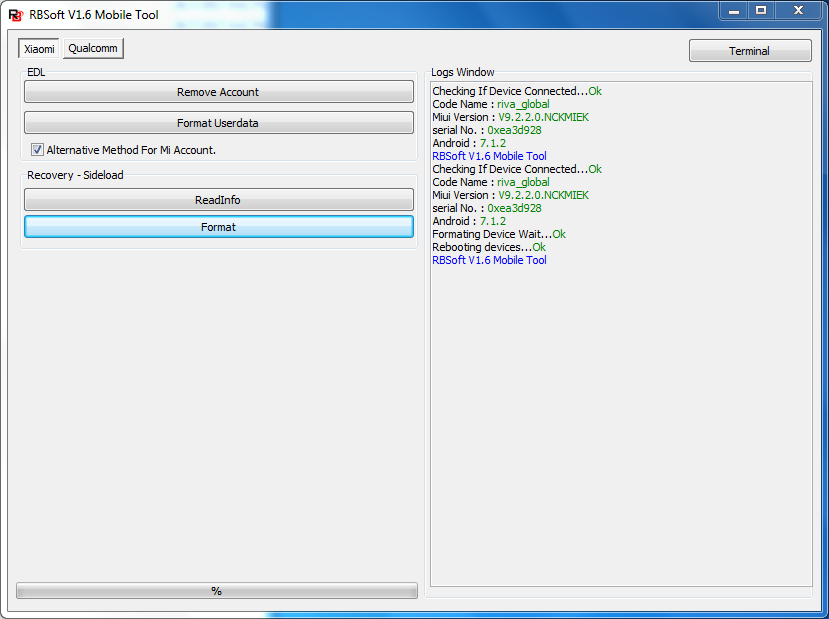
Xiaomi Redmi 5A MCI3B Android 7.1.2 Mi account unlock, how to unlock mi account of Redmi 5A without using any flashing box? Here you can unlock the Mi account of Redmi 5A using RB Soft Tool, unlock Mi account free with RB Soft Tool, to unlock Redmi 5A mi account please follow the below steps. By using this process it will unlock the mi account with doing a hard reset of the Mi phone.

Note: Hard Reset and Mi account unlock must erase your personal data on the phone.
Xiaomi Redmi 5A - How to unlock Mi Account?

Download the RB Soft v1.6 Mobile Tool working, by searching on the Internet and open it using the User ID and Password.

Download RBSoft Mobile Tool v1.6 Full 100% Working : Link

Xiaomi Redmi 5A Mi Account Unlock and Hard Reset:
  • Open RB Soft Mobile Tool.
  • Go to Xiaomi Tab and select Alternative method for Mi Account.
  • Now put the phone into recovery mode (Volume + and Power Key)
  • Connect the phone to PC and click on Format.

Wednesday, December 13, 2017

Free Mi Account Unlock Tool 2017 Download


Here you can download Free Mi Account Unlock Tool latest version and basic tutorial of how to use Mi account Unlock tool 2017 to remove or by pass Mi account on your Xiaomi Mi Android smart phones. This Mi account unlock tool is working on all models of Mi phones.


Mi Account Unlock Tool
Mi Account Unlock Tool Features:
  • You can use this for all MI models.
  • Information 
  • Bypass Mi Account
  • Disable Mi Account
Mi Account Unlock Tool 2017 Software Details:
  • Tool Name: Mi Account Unlock Tool/Mi Account Remove Tool
  • File Size: 3.5 MB
  • Zip File Name: Mi Unlock Tool Download.zip


How to Use this Tool?


  • Open the Mi account Unlock Tool
  • Put the phone into Mi assistance mode
  • Now connect the phone to PC
  • Click on Information to get the connected phone info.
  • Now click on "Bypass Mi Account"
  • You can watch the video from the below link.


Downloads:

Password for the Zip File  is freecomputertricks
Download Mi Account Unlock Tool 2017 Here

Watch Video on YouTube
Xiaomi Mi All in One Mi Account Unlock Tool 2017

Sunday, October 8, 2017

Xiaomi Mi Note 4 (2016100) Hard Reset and Mi Account Bypass Solved


How to hard reset and remove/reset FRP lock  or bypass Mi account on Xiaomi Mi Note 4 2016100? Here is the solution for reset Mi account on Mi note 4 and format user data or hard reset. The Mi Note 4 (2016100) has Qualcomm CPU and runs on Android 6.0.1 and MIUI v8.2.10 and here is the process to unlock it.

Xiaomi Mi Note 4 Phone Details:

Code Name : mido_global
MIUI Version : V8.2.10.0.MCFMIDL
Android Version : 6.0.1

Redmi Mi Note 4 2016100 Hard Reset and Mi Account Bypass OK - RB Soft Mobile Tool

Xiaomi Mi Note 4 (2016100) Hard Reset and Mi Account Unlock Success:

  • Open RB Soft Mobile Tool
  • Select "Xiaomi" Tab and then select "Alternative Method For Mi Account".
  • Now put the Mi Note 4 to "Recovery Mode" (For Recovery Mode Mi Note 4 please below)
  • Now click on "Read Info" (If Read Info success, that means you have installed Mi USB driver, if not then please install USB driver)
  • Now click on "Format" and wait until the Formatting process complete.

That's all now you have successfully remove mi account on the Xiaomi Mi Note 4 2016100 Android 6.0 smart phone.

Xiaomi Mi Note 4 (2016100) Recovery Mode:

Hold Volume Up and the press Power key, when it vibrate release the power key only and keep holding the volume key until it show a mobile picture and when you see the mobile image that means it Recovery mode and now you can follow the above steps to reset mi account using RBSoft Tool V1.6.

Xiaomi Mi Note 4 Format Log:

Checking If Device Connected...Ok
Code Name : mido_global
Miui Version : V8.2.10.0.MCFMIDL
Android : 6.0.1
RBSoft V1.6 Mobile Tool
 

Checking If Device Connected...Ok
Code Name : mido_global
Miui Version : V8.2.10.0.MCFMIDL
Android : 6.0.1
Formating Device Wait...Ok
Rebooting devices...Ok
RBSoft V1.6 Mobile Tool


Download RB Soft Tool Free Here

Download the FRP unlock tool for Mi phones and enjoy free factory reset protection frp unlock tool RB Soft mobile unlock tool from the above link. frp unlock tool, mediatek frp unlock tool, qaulcomm frp unlock tool, mi qualcomm frp unlock tool free download, mi account unlock tool free, 100% working frp unlock tool for xiaomi redmi mi Android smart phones, latest mi unlock tool free download, all in one mi account unlock and hard reset tool.
 

Xiaomi Redmi Mi 4a (2016116) Hard Reset and Mi Account Bypass Solved


How to hard reset Xiaomi Redmi Mi 4a and How to bypass Mi account on Mi 4a? Here is the solution for Mi 4a hard reset and remove mi account, follow the below process to unlock Mi 4a using simple steps. Mi 4a Android 6.0.1 MIUI version v8.2.9.0 hard reset and remove Mi account success with "RB Soft Tool", see the below details to know how to hard reset and mi account solution using RB Soft Tool?

Xiaomi Redmi Mi 4a  (2016116)Mi Account and Hard Reset OK RB Soft Tool 1.6

Redmi Mi 4a Hard Reset and Bypass Mi Account:

  • Download RB Soft Tool 1.6
  • Now put the Mi 4a to Recovery Mode (Hold Both Volume Key and Press Power)
  • Then connect USB cable to the Computer
  • Open RB Soft Tool V1.6 and go to Xiaomi Tab
  • Select Alternative method for Mi account and click on "Read Info"
  • Now Click on "Format" and wait until you see "Formatting Device Wait..OK"
  • Then phone will be automatically reboot

In this way you can remove Mi account and do hard reset on Xiaomi Redmi Mi 4a (2016116) Android 6.0.1 smart phone using RB Soft V1.06 Mobile Tool.

Xiaomi Redmi Mi 4a Recovery or Sideload Mode:

1) Hold both volume up and volume down then press power key.
2) After vibrate release power key only but continue holding both volume keys .
3) When you see a Mobile on screen with USB cable release volume keys.
4) Now connect the Mi phone to PC and Install Mi driver.
5) Then use the above process to unlock mi account and hard reset Mi smart phones.
Xiaomi Redmi Mi Recovery Mode - Redmi Mi 4a Recovery Mode Sideload Mode

Sunday, September 24, 2017

Redmi Mi 4A (2016116) Mi Bypass Account - Solved


Here is the solution and working process to bypass or unlock Redmi Mi 4A Mi account. How to bypass Redmi Mi 4a 2016116 smart phone's mi account using Mi flash tool? The below is the complete process to flash Mi 4a and unlock Mi account using fastboot ROM MIUI 8.1 and "Mi Flash Tool". To flash the phone you have to put the phone to EDL mode and then flash with Mi 4A fastboot ROM using Mi Flash Tool.

Xiaomi Redmi Mi 4A 2016116 Mi Account Solution:

1- Download Mi 4A Fastboot ROM Here.
Flash file name 
rolex_global_images_V8.5.5.0.MCCMIED_20170829.0000.00_6.0_global_d948c57cdcf3
2- Download Mi Flash Tool Here.
3- Install Mi flash tool and then extract Mi 4a firmware.
4- Now put the Mi 4a to edl mode and then connect USB to PC.
5- Now open the mi flash tool and select the mi 4a firmware image folder.
6- Now select "clean all and lock" and click on "flash" and wait until the process completed.

Redmi 4A Flashing and Remove Mi Account Success With Mi Flash Tool

After flash complete remove the USB cable and power On the phone, to switch on the phone you need to press and hold the power key until it shows MI logo, normally after flash you need to press and hold the power key up-to 1-2 minutes to switch on.

Downloads:

To download Mi 4A fastboot ROM please go to Xiaomi MIUI Official Forum and Download "Redmi 4A Latest Global Stable Version Fastboot File Download" and then download "Mi flash tool" from the above link and flash the phone.

Wednesday, September 20, 2017

Oppo Qualcomm EDL Mode Reset FRP and Format User Data


Here you will know the complete process and free frp tool on Qualcomm CPU phones. If you are searching for how to hard reset and frp lock Oppo smart phones, having Qualcomm CPU or chip-set then you are in right place, here you will download free frp and hard reset tool for Oppo smart phones and do the hard reset and frp unlock on any model of Oppo smart phone having Qualcomm processor.

Oppo Qualcomm EDL Mode Reset FRP, Hard Reset and Format User Data

As you know on some Oppo smart phones, if you forgot the Pattern lock or PIN or Password then you may not able to hard reset the phone. When you try to hard reset the phone, whether it's through hard key or settings it will ask to confirm the lock code you used on that particular device. If the Oppo phone is runs on Qualcomm CPU then do not worry, you can easily hard reset and unlock frp lock on this device by using the free frp and hard reset tool edl mode.

How To Use This Tool?

1- Download Qualcomm EDL Mode Hard Reset and FRP Tool from the below link.
2- Extract the zip file, it may ask for password (see below).
3- Now open the tool and go to Qualcomm Tab.
4- Connect the phone with EDL mode to PC.
5- Now click on "Reset FRP" or "Format User Data" It depends what you need to do, then wait until the reset process compete and you are done.

Downloads:

Qualcomm EDL Mode FRP and Hard Reset Tool Here.

If you choose Reset FRP then it will do the frp unlock on the phone and if it's "format userdata" then it will do a factory reset of the phone.

Note: This topic is only for tutorial purpose and we are not responsible for any kind of damage happens to the phone.

Password = fctfrptool

RBSoft Mobile Tool v1.6 Full 100% Working


RBSoft mobile tool is use full for flashing and unlocking Android smart phones. This tool helps to remove Mi account on any Xiaomi Redmi Mi phones and now it's support MIUI 8.1. Using this tool you can do hard reset and frp unlock and format and mi account on generic Qualcomm cpu. So if you are searching for hard reset Mi smart phones, then this tool will help you to hard reset and remove mi account with single click on Xiaomi Redmi Mi All models.

RBSoft Mobile Tool V1.6 Full Working Download Here

Added support for new CPU's for FRP and Format for Generic Qualcomm etc.
Supported Cpu For Format And Frp and mi account for all Mi phones.

MSM8909
MSM8916
MSM8936
MSM8937
MSM8974
MSM8976
MSM8996

-supported Xiaomi Redmi Mi readinfo in Recovery mode.
-supported Xiaomi Redmi Mi format in Recovery + EDL Mode.
-Support for unlock MI account for more Xiomi* models added.

Support for Generic phones like LeTv, Oppo,Vivo,Lyf, etc added for Format and FRP Unlock.

Added Support for Auto detection CPU-

Now no need to select model, just connect phone and software will auto-detect cpu and do required operation as selected by user.

In case phone still mi account locked,please tic on alternative mi option and do job again.

For other features like HTC flashing, Qcn writing,etc. please use old module for now. All will be added in next module with more support and enhancement.

This version is still beta. On too much demand of users we have released it. If you find any bug or have any recommendation post with log.

How to Use RBSoft Mobile Tool For Mi Account Unlock?

1- Open the RBSoft Mobile tool.
2- Go to Qualcomm Tab
3- Now put the Mi phone to EDL Mode and Install EDL USB Driver.
4- Now click "Reset FRP" and wait until the process completed.

That's all now you have successfully remove MI account lock on the phone, in this tool now you do not need to select the model, it will automatically detect the CPU and do the 'frp reset' for the phone.

RBSoft Mobile Tool Features:

1- Reset FRP EDL Mode.
2- Format User Data EDL Mode.
3- Remove Account EDL Mode.
4- Format Userdata EDL Mode Xiaomi.
5- Read Info Recovery Mode.
6- Format Recovery Mode.

Downloads:

You can download by searching on Google or click here.

Sunday, September 17, 2017

Xiaomi Mi (2016002) Mi Max Remove Mi Account OK


Redmi Xiaomi Mi 2016002 Mi Max remove Mi account or FRP lock success. Here in this topic you will know how to remove mi account on Mi Max smart phone. If the Mi Max Android smart phone is mi account locked then do not need to flash the phone using this process here you can easily remove mi account on this phone.

Here in this process of removing mi account on Xiaomi phones, you can use a tool called RBSoft_V1.5_Full and easily remove the mi account. To remove mi account Mi Max you need to put the phone in to EDL mode and then install Qualcomm QDloader USB driver and use this tool to remove Mi account. In this process you do not need to flash the phone just follow the below process to remove mi account without flashing the phone.

How to remove Mi Account on Xiaomi Mi Max 2016002

Xiaomi Mi Max (2016002) Remove Mi Account:

1- Download RBSoft_V1.5_Full
2- Put the phone to EDL Mode
3- Open the RB Soft tool and go to 'Xiaomi' tab and select 'Mi Max'.
4- Then choose the COM Port and click on Remove Account

Mi Max Remove Mi Account Log:

Select Model: Mi Max
Selected Operation: FRP
Opening Port COM82...Ok
Sending Loader...Ok
Removing Account Wait...Ok
Closing Port...Ok
Job Finish Successfully.
Press and hold power key for 15-20 second for restart.

Saturday, September 9, 2017

Redmi Note 4 2016100 Locked EDL Mode And Mi Account - All In One Solution


Here in this topic you will get Redmi note 4 (2016100) locked edl mode and Mi account solutions and possible ways to unlock edl mode on this smart phone. There are some methods to unlock edl mode of redmi note 4, here we will discuss about the process and you can try any one of these method and hope you will successfully put the redmi note 4 into edl or download mode. The edl mode is only available in those smart phones run on Qualcomm platform. If you know any other way to unlock or enter the redmi note 4 in to edl mode then please post through comments.

Xiaomi Redmi Mi EDL Mode - Qualcomm QDLoader - USB Driver Installed On PC
In this topic we will discuss about Xiaomi Redmi Note 4 (2016100) locked edl mode and mi account. As you know on Redmi Note 4 we can easily enter into edl mode by using EDL Cable or EDL Command but extacly on the same model (Redmi Note 4) we wil not able to boot the phone into edl mode, because the phone has been updated to latest MIUI i.e. MIUI Version 8 or 9. If you are update the Mi phone to latest MIUI then the edl mode wil be locked or disabled and you will not able to enter into edl mode by using edl USB cable or EDL command, but by using the below methods you can access the edl mode on Redmi Note 4.

Xiaomi Redmi Note 4 (2016100) EDL Mode Solutions:

There are two main process to enter in to edl mode on xiaomi mi redmi note 4, one is using fastboot tool, that means software method and the second one is hardware method, here we will discuss both of methods below.

Xiaomi Redmi Mi 4 (2016100) Edl Mode Software Process:
Xiaomi redmi note 4 edl mode using Fastboot Tool, software tool, Edl Commands.

Method 1

1. Put the phone in to Fastboot Mode (Hold Volume Down and Connect USB Cable)
2. Download the Fastboot_edl-v2.zip from Here.
3. Extract the zip in your desktop
4. Open the folder and double Click on Reboot.bat
5. Now your device will reboot to EDL mode, then install Qualcomm edl USB driver.
6. Now flash Mi fastboot ROM using Mi Flash Tool.

Method 2

1. Download this Fastboot tool Here.
2. Reboot the phone to Fastboot Mode.
3. Now Open the fastboot tool and press number 4 and press Enter.
4. Now the phone will reboot in to edl mode.

Xiaomi Redmi Mi4 (2016100) Edl Mode Hardware Process:

Redmi mi 4 edl mode, how to use edl mode on redmi phones using hardware method, please see the below picture.

Method 1

1. See the "edl mode 1" image.
2. Shot or connect this two points.
3. Remove Battery and connect the phone to PC.
4. If the phone is not detected then connect battery again.

Redmi Note 4 EDL Mode Hardware Method 1 (edl mode 1)
In this way you can put the phone to edl mode using hardware method. In this method you need to do some changed if the phone is not detected, as shown on the above image connect this tow points, then remove battery and then connect the phone to PC, but in some cases after connect the phone to PC just connect the Battery again or just remove the connected points.

Method 2

1. See the "edl Mode 2" image. (This is the new process for edl mode redmi note 4 and success if all the above methods not work)
2. Shot or connect this two points.
3. Now connect the phone PC and install Qualcomm Edl mode USB driver.

Redmi Note 4 EDL Mode Hardware Method 2 (edl Mode 2)

After enter to edl mode you can easily flash the phone using Mi flash tool and fastboot rom with 'clean_all.bat' to remove Mi account. Download the correct firmware for the Mi smart phones then flash.

Note: This topic is only for tutorial purpose and we are not responsible for any kind of damage happens to the phone.

These process will help you to put Redmi Note 4 into edl mode, any one of these method will work for you. So in this topic you can do the followings on Redmi Note 4.

Redmi Note 4X boot-loop, can't boot into download mode via adb command, Test-point force into Download mode (EDL), Redmi Note 4 dead boot, Unbrick Redmi Note 4x etc.

This topic is helpful for below problems or errors.

Redmi note 4 miui 8 edl mode
Edl mode - Redmi Note 4
How to fix Redmi Note 4 with Locked Bootloader
Redmi note 4 edl mode disabled
How to unbrick Xiaomi Redmi note 4
How to enter EDL mode Redmi Note 4X
Redmi Note 4X flashing guide and unlock edl mode
Redmi Note 4 Force edl mode 

Saturday, September 24, 2016

All About Redmi Mi Account Remove or Bypass


As you know on Redmi Mi phones, there is a security option for the user, that they can create Mi Account to Recover the phone, in case you forgot the user name and password of the account it's difficult to open the phone after doing a hard reset. Here is the tutorial or topic about Xiaomi Redmi Mi phones, that can you remove or delete or bypass Mi Account after hard reset or flash or update the phone software.

Why Redmi Mi Account Need?
If you format or wipe data of the Mi phone using hard keys or buttons and the phone has latest Mi firmware or Xiaomi MIUI 7 higher version firmware, then it will ask for Mi account login at the start up of the phone or ask to "Activate this device", see the below image.

Redmi Mi Activate This Device
Now the problem is how you can overcome the problem of Mi Account and can you delete the Mi account or bypass the Mi cloud account. See the below details to know whether its possible to disable the Mi Account. Not all the model of Redmi Mi can be unlock but some can be unlocked or bypass the Mi account. Try the following process on the phone to unlock Mi account on the phone.

Redmi FRP Unlock or Mi Account Bypass:

1) You can remove Mi account using china flashing box, Miracle box support to remove Mi account on Redmi phone using fastboot mode.

2) Another process is you can downgrade the firmware or software of the phone, i.e. if you have the latest MIUI firmware then flash with lowest version i.e. 6 or 5 if available for your phone.

You can download firmware from Xiaomi website or search Google for Redmi Mi Fastboot ROM.


๐Ÿ“š You May Also Like to Read