Showing posts with label Karbonn Hard Reset. Show all posts

Sunday, March 15, 2015

Karbonn A108 Android Smartphone Hard Reset and Pattern Unlock Solution


How to hard reset Karbonn A108 Mobile phone? see the below details to hard reset Karbonn A108 Android smartphone. Karbonn A108 which has a Android Operating System and can be hard reset through Recovery Mode.


Karbonn A108 Hard Reset
Volume Down + Power
Enter recovery and press power key
Then Wipe Data/Factory reset


Karbonn A108 Android Smartphone Hard Reset Done

Wednesday, September 17, 2014

Karbonn A51+ Android KitKat Hard Reset and Pattern Unlock


How to hard reset Karbonn A51+ which has runs on latest Android 4.4 KitKat? the below is the details to hard reset and pattern unlock solution for karbonn A51+.
Karbonn A51+ With Android KitKat Operating System
Karbonn A51+ Hard Reset


  • Volume Down + Power (Until Karbonn log with features with full screen)
Karbonn A51+ Pattern Unlock Factory Mode to Clear Flash


  • Press Volume UP to see Factory Mode
Karbonn A51+ Android Kit Kat Hard Reset and Pattern Unlock With Factory Mode and Format Flash
  • Select Clear Flash and Press Power Button To OK

Sunday, September 7, 2014

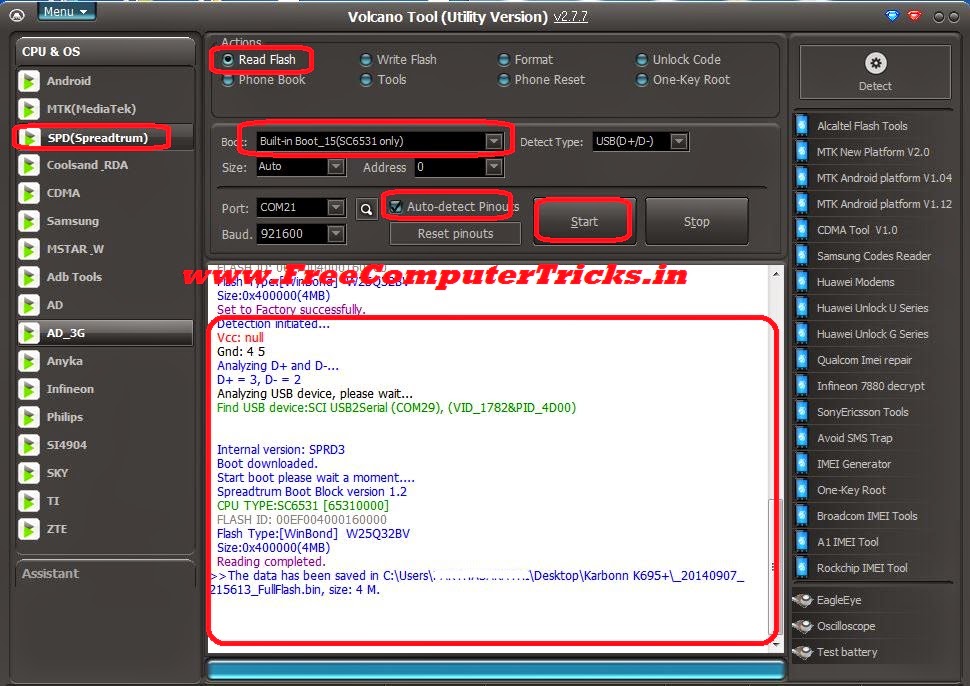
Karbonn K695+ SPD SC6531 Read Flash and Format Success With Volcano Tool V2.7.7


Karbonn K695 Plus SPD SC6531 CPU read flash and format success with volcano tool v2.7.7. The below is the step by step process to flash Karbonn K695+ 6531 CPU with Volcano Tool, in this way you can read flash and format the Karbonn K695+ with Volcano Tool.

Karbonn K695+ CPU AND Phone Details
  • CPU : SC6531
  • H/W Version - GC798A
  • S/W Version : UTL_K695+_V3-200314_171105


Karbonn K695+ Format Done With Volcano Tool
  • Open volcano tool
  • Go to SPD Tab
  • Select Boot_15 SC6531
  • Select Format
  • Tick on Auto Detect Pinouts
  • Click on Run

Karbonn K695+ SPD SC6531 CPU Format Success With Volcano Tool V2.7.7

Karbonn K695+ Read Flash Done With Volcano Tool

KARBONN K695+ SPD SC6531 Read Flash Done with Volcano Tool
Karbonn K695+ Volcano Tool Log:


Detection initiated...
  Vcc: null
  Gnd: 4 5
  Analyzing D+ and D-...
  D+ = 3, D- = 2
  Analyzing USB device, please wait...
  Find USB device:SCI USB2Serial (COM29), (VID_1782&PID_4D00)
   
  Internal version: SPRD3
  Boot downloaded.
  Start boot please wait a moment....
  Spreadtrum Boot Block version 1.2
  CPU TYPE:SC6531 [65310000]
  FLASH ID: 00EF004000160000
  Flash Type:[WinBond]  W25Q32BV
  Size:0x400000(4MB)
  Set to Factory successfully.
  Detection initiated...
  Vcc: null
  Gnd: 4 5
  Analyzing D+ and D-...
  D+ = 3, D- = 2
  Analyzing USB device, please wait...
  Find USB device:SCI USB2Serial (COM29), (VID_1782&PID_4D00)
   
   
  Internal version: SPRD3
  Boot downloaded.
  Start boot please wait a moment....
  Spreadtrum Boot Block version 1.2
  CPU TYPE:SC6531 [65310000]
  FLASH ID: 00EF004000160000
  Flash Type:[WinBond]  W25Q32BV
  Size:0x400000(4MB)
  Reading completed.

Monday, August 25, 2014

Karbonn A99 Hard Reset and Pattern Unlock Done With Keys


How to hard reset Karbonn A99 with buttons? this topic is about hard reset and pattern unlock of Karbonn A99 with keys/buttons. With hard reset of Karbonn A99 you can solve the pattern lock, hang on Karbonn Logo, erase/delete all use data and Karbonn Hang or restart problem. So see the below process to Hard Reset Karbonn A99.

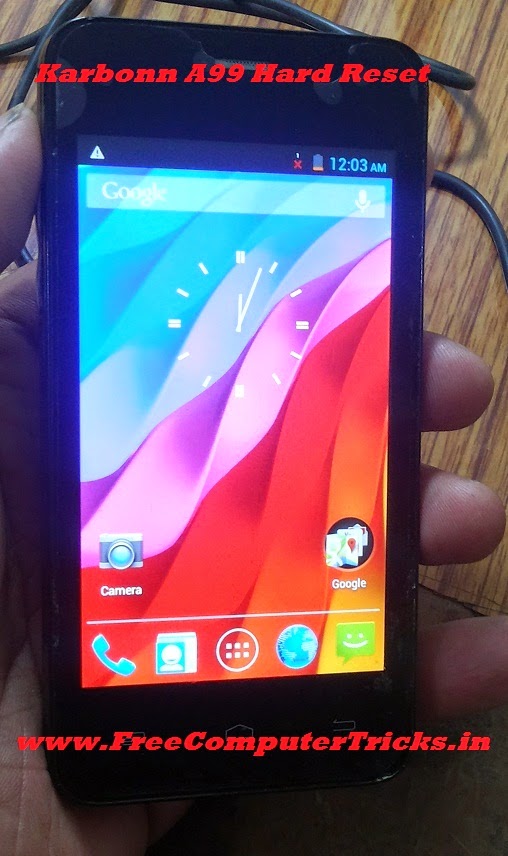
Karbonn A99 Hard Reset Done with Keys

Karbonn A99 Hard Reset


  • Switch Off the Phone
  • Press and Hold Volume Down + Power Key For Factory Mode
  • Press Volume Down and Select Clear eMMC then Press Power Button to OK
  • Wait till the process complete (It will take 2 to 5 minutes)
  • After that the device will restart automatically

Karbonn A99 Hard Reset and Pattern Unlock


Now the Karbonn A99 has been successfully hard reset and the phone is set to factory default. Remember after Clear eMMC the device will restart automatic and takes 2 to 4 minutes to complete switch ON and also the wipe data/factory reset/ formatting will take 2 to 5 minutes, so don't worry about that just keep patience and let the hard reset process to complete.


Search tags:
karbonn a99 hard reset, karbonn a99 hard reset code, Karbonn A99 hangs on logo, Karbonn A99 hang and restart problem solved, Karbonn A99 pattern unlock done with keys, Karbonn A99 Pattern Lock Unlock, karbonn a99 pattern lock.


Wednesday, August 13, 2014

Karbonn A27+ Hard Reset and Pattern Unlock Done - www.FreeComputerTricks.in


Karbonn A27+ hard reset and pattern lock remove done with keys, as you know with recovery mode of Karbonn A27+ we can't wipe data/factory reset and on Fastboot mode also. So to hard reset or do a pattern unlock you have to go to the Factory mode on Karbonn A27+ and Clear eMMC. To hard reset Karbonn A27+ follow the below steps.

Karbonn A27+ Factory Mode For Hard Reset and Pattern Unlock

Karbonn A27+ Hard Reset and Pattern Unlock


  • Press and hold Volume Down + Power Until factory mode
  • Then Press Volume down to select Clear eMMC
  • Now Press power key to OK

That's all now you can see on the karbonn screen Formatting/Data...

Then the phone will Reboot and you are done


Karbonn A27+ Recovery Mode and Fastboot Mode

Press and Hold Volume Up + Power Key

Karbonn A27+ Recovery Mode and Fastboot Mode


But both in recovery mode and fastboot mode you can not wipe data, so follow the above steps in Factory mode to wipe data/hard reset and pattern unlock.

Search Tags: Too Many Pattern attempts Solution, karbonn a27 hard reset, karbonn a27 plus Hard reset, Unlock Android phone after too many pattern attempts, Karbonn A27+ Hard Reset, Restore Karbonn A27 Pattern Lock, karbonn a27+ pattern lock solution, karbonn a27+ pattern unlock solution, karbonn a27 plus pattern lock solution

Wednesday, July 23, 2014

Karbonn A26 Hard Reset and Pattern Unlock Done


Here is the way to hard reset the Karbonn A26, in this way you can solve the pattern lock and factory reset the phone. Karbonn A26 hang on logo will solve by hard reset of the mobile, see the below process to hard reset, wipe data/factory reset with key and Android recovery options.


Karbonn A26 Pattern Unlock and Hard Reset
Karbonn A26 Hard Reset

  • Switch Off the Phone
  • Press and Hold Volume Up + Power Button Until you see Android Recovery Menu
  • Then Press Volume and select wipe data/factory reset
  • Press Power Button to Enter
  • Then Reboot the phone


Karbonn A26 Hard Reset

Now you have successfully factory reset the Karbonn A26.

Friday, April 11, 2014

Karbonn A36 SPD 6282 Hard Reset With Volcano Tool and ADB Root - www.FreeComputerTricks.in


How to hard reset/Restore to factory settings of Karbonn A36 which has SPD 6282 CPU. The below process is to hard reset Karbonn A36 with Volcano tool and with the help of ADB Root, with this ADB Root process you no need to format the Karbonn A36. So to hard reset Karbonn A36 just Root the device and Wipe All using the Volcano Tool.


How to Hard Rest Karbonn A36/ Set to Factory Settings

  • Open Volcano Tool
  • Then Open Android Tool
  • Select CPU Type to Spd6820
  • Click on ADB Root
  • Connect the Karbonn A36 with USB Data Cable
  • Click Start


After Root Success the device will restart

  • Then Click on Wipe All
  • Click on Start
Now it will clear user data and Restart the device

So now the Karbonn A36 is successfully set to factory defaults and the pattern lock has been removed.


Karbonn A36 Hard Reset Volcano Tool


After that just Unroot the device


  • Click on ADB Unroot
  • Click on Start
  • You will get a message Unroot OK 

📚 You May Also Like to Read