Showing posts with label Volcano Tool Karbonn Mobiles. Show all posts

Tuesday, June 30, 2015

Karbonn K22 Plus SPD SC6531 Format Done With Volcano Tool V3.0.0


How to flash Karbonn K22+ using Volcano Tool? the below is the process to flash Karbonn K22+ with Volcano Tool V3.0.0. The karbonn K22+ has SPD SC6531 CPU, to flash the phone first read flash or download flash file then select the flash and format or do the wright flash option.


Karbonn K22+ CPU Info:
CPU TYPE:SC6531 [65310001]
FLASH ID: 00C8006000160000
Flash Type: SF_GD25LQ32                
Size:0x400000(4MB)

Karbonn K22 Plus SC6531 Format With Volcano Tool
Open volcano tool
Go to SPD tab
Select boot 15 (SC6531)
Click on Start
Connect the phone using volcano JIG Cable


Karbonn K22+ SPD SC6531 Format Done With Volcano Tool V3.0.0
Note: As the karbonn K22+ has SC6531 CPU, before do anything first Read flash of the phone, then you can format the phone, just select the flash file and format then click on start.

Karbonn K22+ Format Log Volcano Tool:
Detection initiated...
  Vcc: null
  Gnd: 5
  Analyzing D+ and D-...
  D+ = 3, D- = 2
  Detection D+/D- with 1.08 seconds.
  Continue to detect BOOT pin...
  Found [SPD] USB device: SCI USB2Serial,(VID_1782&PID_4D00)
  BOOT(Pull Down) = 4
  Setting...
  Find USB device:SCI USB2Serial (COM34), (VID_1782&PID_4D00)
  Pinouts setting complete!
   
  Internal version: SPRD3
  Boot downloaded.
  Start boot please wait a moment....
  Spreadtrum Boot Block version 1.2
  CPU TYPE:SC6531 [65310001]
  FLASH ID: 00C8006000160000
  Flash Type: SF_GD25LQ32               
  Size:0x400000(4MB)
  Set to Factory successfully.

Wednesday, July 23, 2014

How to Flash Karbonn K9 8533BX Mstar CPU With Volcano Tool


Karbonn K9, how to flash with volcano tool, as you know karbonn k9 comes with various CPUs one of it's is Mstar 8532B/8533BX which comes with the Karbonn K9 New Model. So here is the process how to flash Karbonn K9 Mstar CPU with Volcano Tool.

Karbonn K9 Chip-set Details

  • Flash Type: GIGA_GD25LQ64
  • Flash ID:   00C8601700000000
  • Flash Size: 00800000h
  • Read Size: 00800000h(8M)
  • CPU : 8532B/8533BX


Karbonn K9 Mstar 8533BX CPU 8MB Flash Done With Volcano Tool V2.4.7

Karbonn K9 8533BX 8MB Flash Done With Volcano Tool

  • Open Volcano Tool
  • Select MSTAT_W Tab
  • Select Write Flash
  • Choose the Karbonn K9 8MB Flash File
  • Select Default Boot
  • Tick on Auto Detect Pinouts
  • Connect the Volcano Box Jig Cable and Power Connector
  • Click on Start


 Search Tags: Karbonn K9 8533BX 8MB Flash File, how to flash karbonn k9 with volcano tool, karbonn flashing tutorials, karbonn k9 mstar flash file and flash tool, karbonn k9 volcano tool flashing, karbonn k9 new flash done with volcano tool, karbonn k9 new mstar 8MB flash file download and flashing tutorials.

Tuesday, April 29, 2014

Karbonn K52+ Format Done With Volcano Tool Via USB Cable


Karbonn K52+ which has a MTK 625A Chipset Format success with Volcano Tool using Micro USB Cable. The below is the way through which you can format Karbonn K52+ with Volcano Tool Via USB Cable. Flash Karbonn K52+ via USB Cable using Popular China Mobile Flash tool Volcano Tool.


Karbonn K52+ Format With Volcano Tool Using USB Cable


How to Flash/Format Karbonn K52+ Volcano Tool?


  • Open Volcano Tool
  • Go to MTK Tab
  • Choose Built-in Boot_11
  • Tick on Format or Write Flash or Read Info or Read Flash
  • Do not tick Auto Detect Pinouts
  • Tick on USB Mode
  • Click on Run
Now Connect The Karbonn K52+ with USB cable (Switched Off Phone with Battery)


Search Tags: Karbonn K52+ USB Flash, how to flash karbonn mobiles, karbonn mobiles flash with volcano tool help, mobile flashing tutorials, karbonn mobile flash tutorial with volcano tool, Free mobile flash and software or firmware tutorial Free Computer Tricks, Volcano tool flash mobile help, volcano tool flash files karbonn, how to format karbonn mobile with volcano, volcano tool the best tool for china mobiles.


Saturday, April 26, 2014

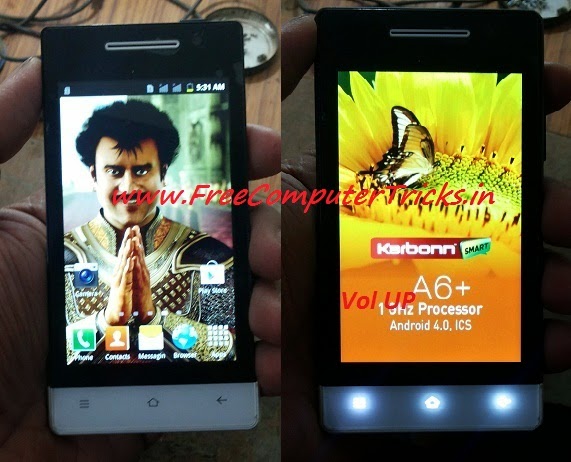
Karbonn A6+ Hard Reset and Pattern Unlock Done With Volcano Tool - www.FreeComputerTricks.in


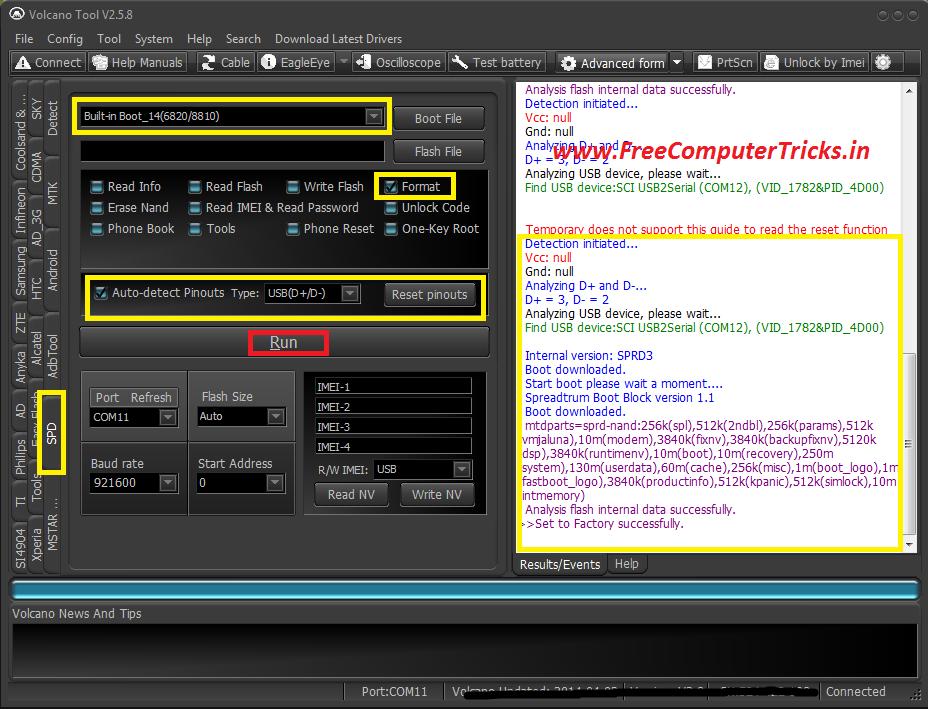
Karbonn A6+ SPD 6820/8810 CPU pattern lock remove with volcano tool. Karbonn A6+ Hard reset done with Volcano Tool by Format the Phone. See the below procedure to hard reset or remove pattern lock of Karbonn A6+ with Volcano Tool.


Karbonn A6+ Hard Reset Volcano Tool SPD CPU


How to remove Karbonn A6+ Pattern Lock Volcano Tool?


  • Open Volcano Tool
  • Go to SPD Tab
  • Select Built-in Boot_14
  • Tick on Format
  • Tick Auto Detect Pinouts
  • Click on Run


Karbonn A6+ pattern unlock with volcano tool


Connect the jig cable and box power to the Karbonn A6+ and Press Volume UP

Karbonn A6+ Volcano Tool Boot Key = Volume Up

Friday, April 25, 2014

Karbonn KT61 Read Flash, Write Flash and IMEI Repair Done With Volcano Tool


Karbonn KT61 MTK 6252 successfully flashed with Volcano Tool, Read flash and IMEI also done with Volcano Tool. The below is the procedure to operate Karbonn KT61 with Volcano Tool using USB cable.


Karbonn KT61 MTK 6252 USB Flash With Volcano Tool


  • To write, Read Flash & Read info & Format put the USB Cable to switched Off phone by pressing the home Button.

  • For IMEI put the USB Cable to Switched ON Phone and Select COM port on the Mobile.

 
Karbonn KT61 Read Flash Volcano Tool Log:

Analysis of USB port,Please insert phone USB cable.
  Connecting...
  Hardware version:CA05
  Software version:0101
  CPU TYPE:6252
  Internal version:8B00
  Boot downloading complete!
  Flash ID: 00C2002500370000
  Flash Type: SF_MX25U6435E             
  Chip Capacity: 0x800000(8MB)
  Flash reading complete!
  privacy:1122
  usercode:1122
>>The data has been saved in C:\Users\PARTHA\Desktop\KT61\KARBONN_52_6432_10A_PCB01_GPRS_MT6252_S01.KARBONN_KT61_T322_M00_S06_120217.BIN, size: 8 M


Karbonn KT61 Format Done With Volcano Tool


Karbonn KT61 Format Volcano Tool


 Karbonn KT61 Read Flash Volcano Tool


Karbonn KT61 MTK Read Flash Volcano Tool


Karbonn KT61 IMEI Volcano Tool


Karbonn KT61 IMEI Android Tool Volcano

Thursday, April 24, 2014

Karbonn K76 USB Flash Done With Volcano Tool - Karbonn K76 MTK 6260 Write Flash Volcano Tool Through USB Cable


In this tutorial I will show you, how you can flash Karbonn K76 with USB cable using Volcano Tool. The below is the process to write flash Karbonn K76 MTK 6260 CPU Mobile phone.


Steps to Write Flash on Karbonn K76 Volcano Tool


  • Open Volcano Tool
  • Go to MTK Tab
  • Select Built-in_Boot-11
  • Tick on Write Flash
  • Do not select Auto Detect Pinouts
  • Tick on USB Mode
  • Click on Run
  • Now Insert USB Cable to switched off phone by pressing volume Down


Karbonn K76 MTK 6260 USB Flash Done With Volcano Tool


Search Tags: how to flash karbonn k76, how to flash karbonn k76 with volcano tool, karbonn k76 flash tool, karbonn k76 USB flash with volcano tool, karbonn k76 MTK 6260 flash process with volcano tool, volcano tool how to flash karbonn mobiles, volcano tool MTK CPU USB Flashing, karbonn K76 hard reset volcano tool, how to flash karbonn k76 volcano tool, karbonn USB flash.

Tuesday, April 15, 2014

Karbonn K101 Star Read Password and Read Flash Done With Volcano Tool


Karbonn K101* Star Successfully read flash and read IMEI/password using Volcano Tool. Karbonn K101* SPD 6610 CPU read flash and password with Volcano Tool and you can also Write flash with this procedure.


Karbonn K101 Star Read IMEI & Read Password Volcano Tool


  • Open Volcano Tool
  • Go to SPD Tab
  • Select Built-in-Boot_2(6610/20)
  • Tick on Read IMEI & Read Password
  • Tick Auto Detect Pinout
  • Click on Run


Karbonn K101* Star Read IMEI & Password with Volcano Tool

Karbonn K101 Star Read Flash With Volcano Tool


  • Open Volcano Tool
  • Go to SPD Tab
  • Select Built-in-Boot_2(6610/20)
  • Tick on Read Flash
  • Tick Auto Detect Pinout
  • Click on Run


Karbonn K101 Star Read Flash With Volcano Tool SPD 6610


Karbonn K101 Star CPU Type SPD 6610 Volcano Tool Log:


 Internal version: Spreadtrum Boot Block version 2.0
  Boot downloaded.
  Start boot please wait a moment....
  BOOT Ver: Spreadtrum Boot Block version 1.2
  CPU TYPE:SC6610/20 [66100000]
  Please select Boot J and try again.
  Please change Boot or reduce Baudrate, try it again.
  Detection initiated...
  Vcc: 10
  Gnd: 1 4
  Analyzing D+ and D-...
  D+ = 9, D- = 8
  Analyzing USB device, please wait...
  Find USB device:SCI USB2Serial (COM37), (VID_1782&PID_4D00)
   
   
  Internal version: Spreadtrum Boot Block version 2.0
  Boot downloaded.
  Start boot please wait a moment....
  Spreadtrum Boot Block version 1.2
  CPU TYPE:SC6610/20 [66100000]
  FLASH ID: 00C8004000160000
  Flash Type:[GD]  GD25Q32
  Size:0x400000(4MB)
  IMEI :910575601400468
  [privacy lock]  1122
  [phone lock]  7929
  
  One privacy lock: 1-9 or #.
  Reading IMEI password completed.
  Ready to read/write again, please remove the power supply clip or battery and then re-loaded it.
  Detection initiated...
  Vcc: 10
  Gnd: 1 4
  Analyzing D+ and D-...
  D+ = 9, D- = 8
  Analyzing USB device, please wait...
  Find USB device:SCI USB2Serial (COM37), (VID_1782&PID_4D00)
   
   
  Internal version: Spreadtrum Boot Block version 2.0
  Boot downloaded.
  Start boot please wait a moment....
  Spreadtrum Boot Block version 1.2
  CPU TYPE:SC6610/20 [66100000]
  FLASH ID: 00C8004000160000
  Flash Type:[GD]  GD25Q32
  Size:0x400000(4MB)
  Reading completed.


Friday, April 11, 2014

Karbonn A36 SPD 6282 Hard Reset With Volcano Tool and ADB Root - www.FreeComputerTricks.in


How to hard reset/Restore to factory settings of Karbonn A36 which has SPD 6282 CPU. The below process is to hard reset Karbonn A36 with Volcano tool and with the help of ADB Root, with this ADB Root process you no need to format the Karbonn A36. So to hard reset Karbonn A36 just Root the device and Wipe All using the Volcano Tool.


How to Hard Rest Karbonn A36/ Set to Factory Settings

  • Open Volcano Tool
  • Then Open Android Tool
  • Select CPU Type to Spd6820
  • Click on ADB Root
  • Connect the Karbonn A36 with USB Data Cable
  • Click Start


After Root Success the device will restart

  • Then Click on Wipe All
  • Click on Start
Now it will clear user data and Restart the device

So now the Karbonn A36 is successfully set to factory defaults and the pattern lock has been removed.


Karbonn A36 Hard Reset Volcano Tool


After that just Unroot the device


  • Click on ADB Unroot
  • Click on Start
  • You will get a message Unroot OK 

Monday, April 7, 2014

Karbonn K451+ CPU Type MTK 625A Write Flash Done With Volcano Tool


Here is the way how to flash Karbonn k451+ MTK 625A CPU with volcano tool, the flash MTK 625A flash file size is 3MB.


Steps:

  • Open Volcano Tool
  • Go to MTK Tab
  • Select Built-in Boot-11(v5.1232)(625A/62xx)
  • Select the Karbonn K451+ MTK Flash File
  • Tick on Write Flash
  • Un-Tick Auto-detect Pinouts
  • Tick on USB Mode
  • Click on RUN
  • Now connect the phone to Computer With USB Cable with Battery
 

Karbonn K451+ write flash done with volcano tool v2.5.7 MTK 625A CPU

No need to press any boot key for Karbonn K451+ MTK CPU

Friday, April 4, 2014

Karbonn A6 Stuck On Logo Successfully Done With Volcano Tool V2.5.7


Karbonn A6 SPD 6820/8810 CPU stuck on logo problem solved by format with volcano tool, so just format the Karbonn A6 SPD cpu with volcano tool to overcome the stuck problem on Logo.


Steps:

  • Open Volcano Tool
  • Go to SPD Tab
  • Select Built-In Boot_14 (6820/8810)
  • Tick Format
  • Click on Run


If not detected the pinout press and hold Volume Up Key


karbonn a6 format success with volcano tool SPD 6820 CPU

Monday, March 31, 2014

Karbonn K9 New MTK CPU 6260 Flash Done With Volcano Tool V2.5.6


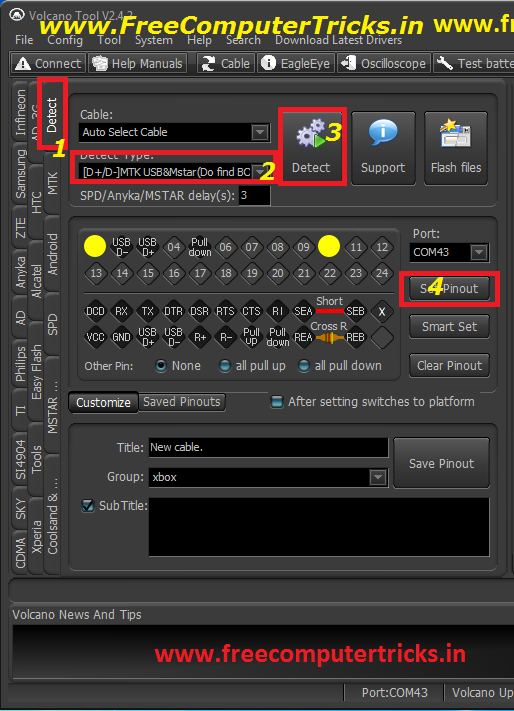
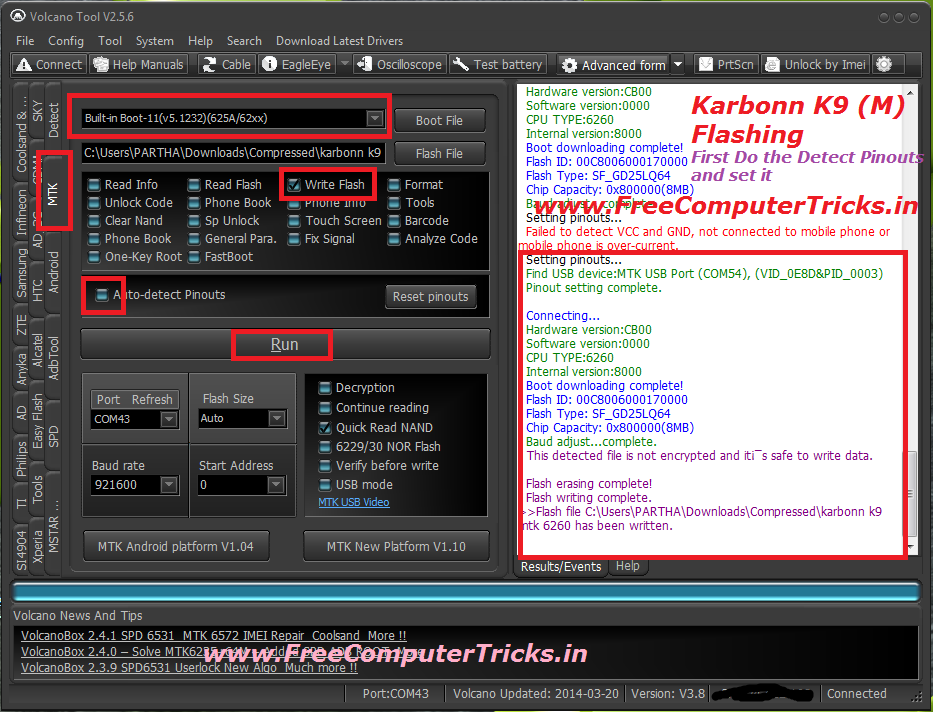
Karbonn K9 (M) MTK CPU 6260 Flash success with Volcano Tool, To flash the Karbonn K9 MTK you have to do the Pinout setting manually in Volcano Tool not only this all MTK 6260 CPU may need to set the pinout manually. So it's not so difficult to set the pinout in Volcano Tool, this tutorial is about how you can set the pinout manually in volcano tool and how the flash the Karbonn K9 mobile which has MTK 6260 CPU.

Not all Karbonn K9 Mobile has the MTK CPU some are also have Mstar CPU. So this topic is about How you can flash the Karbonn K9 (M) MTK 6260 CPU.


The Karbonn K9 is not switched on even when I try to format the phone using volcano tool it's not format also, then I download the Karbonn K9 MTK 6260 Flash file and finally flash the phone using Volcano Tool and it's done now the phone is working fine.

How to know the Phone has Software problem?

1) The phone may be dead means not switched on
2) The phone is restarting
3) The phone is hanged
4) The phone is switched off when make and receive calls
5) The phone's IMEI is missing
6) The phone is switched off when insert SIM Card
7) Some options are not working well


How to  Set Pinout Karbonn K9 MTK 6260 ?

See the below Image

Karbonn K9 MTK Set Pinout

After Pinout Setting Complete go back to MTK Tab and see the below Image to flash the phone.


How to Flash Karbonn K9 MTK 6260 CPU with Volcano Tool ?


Karbonn K9 MTK 6260 Flash done with Volcano Box

Note: Use Volcano Box Power and P-05B Jig


Search Tags: how to flash karbonn k9 phone, karbonn k9 m how to flash with volcano tool, karbonn phone flashing, karbonn flash files download, karbonn k9 new mtk cpu how to flash, volcano tool successfully flashed phones, karbonn k9 mtk 6260 flash file, karbonn k9 phone flashing, how to flash a phone, how to know the phone has software problem, mobile free flashing tutorials by Free Computer Tricks, All mobile flashing tutorials online for free, karbonn mobile flashing procedure with volcano tool, how to use volcano tool, Volcano Tool latest setup, All about Volcano tool the flashing tool for mobile phones, Karbonn K9 dead solution, how to repair karbonn k9 new mtk 6260 cpu not booting.


Thursday, March 13, 2014

Karbonn K64 Flash Done With Volcano Tool V2.5.4 - www.FreeComputerTricks.in


Karbonn K64 flash (Write Flash) Done with volcano tool v2.5.4, Karbonn K64 which has SPD CPU SC6531 and it successfully flashed with volcano box.


Karbonn K64

CPU = SPD SC 6531
JIG = P-05B
Connect Volcano Box Power To Phone


Karbonn K64 Flash Success With Volcano Box

Karbonn K64 Write Flash Done With Volcano Tool SPD 6531 CPU


Karbonn K64 Flash File For Volcano Tool Download Here

Go to that link and download from 4shared 

This file has tested on volcano tool and it's work fine on Karbonn K64 Mobile

📚 You May Also Like to Read