Showing posts with label Karbonn Volcano Tool. Show all posts

Friday, November 20, 2015

Karbonn K4 MTK CPU Read Flash and Format Done With Volcano Tool


How to flash Karbonn K4 Mobile using volcano tool? here is the way to flash the phone using volcano tool or volcano utility. The phone has MTK 6252 CPU and it's not support USB flash, so use volcano JIG cable to flash the phone. The below is the read flash and format of Karbonn K4 with volcano tool v3.0.9, always use the latest version of volcano box for better results.

Karbonn K4 CPU Details:
Hardware version:CA05
Software version:0101
CPU TYPE:6252
Internal version:8B00
Boot downloading complete!
Flash ID: 00EF006000170000
Flash Type: SF_W25Q64DW                
Chip Capacity: 0x800000(8MB)
Mobile phone software version for:ZL560B_002A_V1_0_6


Karbonn K4 MTK CPU Read flash done with volcano tool
Karbonn K4 Format Done With Volcano Tool
Boot key for Karbonn K4 is Power key

Detection initiated, connect the phone and power on it...
  Vcc: 4
  Gnd: 2
  Waiting for phone's response,please press Power on/off button. 
  Connecting...
  Hardware version:CA05
  Software version:0101
  CPU TYPE:6252
  Internal version:8B00
  Boot downloading complete!
  Flash ID: 00EF006000170000
  Flash Type: SF_W25Q64DW               
  Chip Capacity: 0x800000(8MB)
  Mobile phone software version for:ZL560B_002A_V1_0_6
  Baud adjust...complete.
  Format range: Start Address: 0x750000,Format Length :0x0B0000
  Flash erasing complete!

Wednesday, May 20, 2015

Karbonn K53 SC6531 CPU Format Done With Volcano Tool V3.0.2


How to flash the firmware of Karbonn K53? which has SPD SC6531 CPU. Now you can flash Karbonn K53 SPD SC6531 using Volcano tool. Karbonn K53 Read flash and format done with volcano tool v3.0.2. The below is the process to flash the Karbonn K53 SC6531 with Volcano Utility.


Karbonn K53 Format Done With Volcano Tool
  • Open volcano tool V3.0.2
  • Go to SPD tab and choose SC6531 boot
  • First Read flash and then Format
  • Choose Format and Select the Flash File
  • Click on Start
  • Hold the left menu key


Karbonn K53 Boot Key = Left Menu Key

Karbonn K53 SC6531 CPU Format Done With Volcano Tool V3.0.2
Karbonn K53 Volcano Tool Log:
 Detection initiated...
  Vcc: null
  Gnd: 5
  Analyzing D+ and D-...
  D+ = 3, D- = 2
  Detection D+/D- with 3.96 seconds.
  Continue to detect BOOT pin...
  Found [SPD] USB device: SCI USB2Serial,(VID_1782&PID_4D00)
  UsbVcc(VCC) = 1 10, BOOT(Pull Down) = 4
  Setting...
  Find USB device:SCI USB2Serial (COM189), (VID_1782&PID_4D00)
  Pinouts setting complete!
   
  Internal version: SPRD3
  Boot downloaded.
  Start boot please wait a moment....
  Spreadtrum Boot Block version 1.2
  CPU TYPE:SC6531 [65310001]
  FLASH ID: 00C8006000160000
  Flash Type: SF_GD25LQ32               
  Size:0x400000(4MB)
  Set to Factory successfully.

Wednesday, December 31, 2014

Karbonn K75 Read Flash Done With Volcano Tool


How to flash Karbonn K75 with volcano utility? the below is the process to flash karbonn phone using Volcano tool/Utility. See the below step by step procedure to flash Karbonn K75 with Volcano box.


Karbonn K75 Read Flash Volcano
  • Open volcano tool
  • Go to MTK tab
  • Select boot 11 v5.1232
  • Tick on USB mode and Read flash
  • Click Run and connect USB cable to phone


Karbonn K75 read flash with volcano tool

Sunday, September 7, 2014

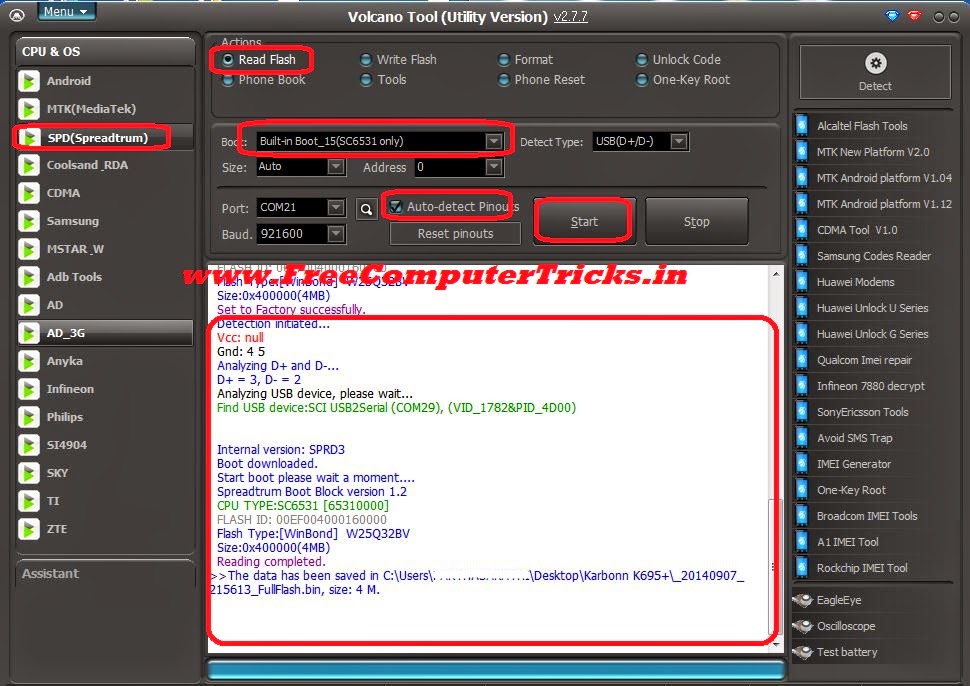
Karbonn K695+ SPD SC6531 Read Flash and Format Success With Volcano Tool V2.7.7


Karbonn K695 Plus SPD SC6531 CPU read flash and format success with volcano tool v2.7.7. The below is the step by step process to flash Karbonn K695+ 6531 CPU with Volcano Tool, in this way you can read flash and format the Karbonn K695+ with Volcano Tool.

Karbonn K695+ CPU AND Phone Details
  • CPU : SC6531
  • H/W Version - GC798A
  • S/W Version : UTL_K695+_V3-200314_171105


Karbonn K695+ Format Done With Volcano Tool
  • Open volcano tool
  • Go to SPD Tab
  • Select Boot_15 SC6531
  • Select Format
  • Tick on Auto Detect Pinouts
  • Click on Run

Karbonn K695+ SPD SC6531 CPU Format Success With Volcano Tool V2.7.7

Karbonn K695+ Read Flash Done With Volcano Tool

KARBONN K695+ SPD SC6531 Read Flash Done with Volcano Tool
Karbonn K695+ Volcano Tool Log:


Detection initiated...
  Vcc: null
  Gnd: 4 5
  Analyzing D+ and D-...
  D+ = 3, D- = 2
  Analyzing USB device, please wait...
  Find USB device:SCI USB2Serial (COM29), (VID_1782&PID_4D00)
   
  Internal version: SPRD3
  Boot downloaded.
  Start boot please wait a moment....
  Spreadtrum Boot Block version 1.2
  CPU TYPE:SC6531 [65310000]
  FLASH ID: 00EF004000160000
  Flash Type:[WinBond]  W25Q32BV
  Size:0x400000(4MB)
  Set to Factory successfully.
  Detection initiated...
  Vcc: null
  Gnd: 4 5
  Analyzing D+ and D-...
  D+ = 3, D- = 2
  Analyzing USB device, please wait...
  Find USB device:SCI USB2Serial (COM29), (VID_1782&PID_4D00)
   
   
  Internal version: SPRD3
  Boot downloaded.
  Start boot please wait a moment....
  Spreadtrum Boot Block version 1.2
  CPU TYPE:SC6531 [65310000]
  FLASH ID: 00EF004000160000
  Flash Type:[WinBond]  W25Q32BV
  Size:0x400000(4MB)
  Reading completed.

Thursday, August 14, 2014

Karbonn K102 Star Read Flash and Read Unlock Code Done With Volcano Tool


Karbonn K102* read flash and read unlock code done with Volcano Tool V.2.6.4, the below is the process how to read flash, unlock code using Volcano Tool with Rx Tx. You can also do this with Volcano box JIG cable ( P-14H or P-20B), so if the phone has no USB Jig connection or it's damaged then you can read flash and unlock code using Rx, Tx. Please see the below details to flash Karbonn K102 Star with Volcano Tool.


Note: For Rx/Tx you have to Sold wires on the board Rx, Tx and Ground and use Volcano Universal Jig for this.

Karbonn K102 Star Read Flash Done With Volcano Tool


Karbonn K102 Star Read Flash Volcano Tool Rx/Tx

  • Open Volcano Tool
  • Go to SPD Tab
  • Select Boot_02 6610/20
  • Tick on Read Flash
  • Tick on Auto Detect Pinouts 
  • In Type Choose COM(Rx/Tx) For Rx/Tx Sold on Karbonn K102* Mother Board
  • If you use JIG Cable Don't need to change this (It should Be D+ D-)
  • Click on Run and Press the Power Button


Karbonn K102 Star Unlock Code Volcano Tool


Karbonn K102 Star Read Unlock Code Volcano Tool


Karbonn K102 Star Volcano Tool Log:

Waiting for phone's response, press the Power on the phone  
  Internal version: Spreadtrum Boot Block version 2.0
  Boot downloaded.
  Start boot please wait a moment....
  Spreadtrum Boot Block version 1.2
  CPU TYPE:SC6610/20 [66100000]
  FLASH ID: 00C8004000160000
  Flash Type:[GD]  GD25Q32
  Size:0x400000(4MB)
  Reading completed.
The data has been saved in C:\Users\-------\Desktop\K102 Star\MOCOR_09A_MP.W11.16.17.11.07_Release_20140814_141424_FullFlash.bin, size: 4 M.


Friday, May 16, 2014

Karbonn K46+ Read Flash & Write Flash Done With Volcano Tool V2.6.4


Karbonn K46+ Read and Write Flash done with Volcano Tool v2.6.4 using USB Mode, below is the procedure to flash karbonn K46+ with Volcano Tool using USB Cable.


Karbonn K46+ Read Flash Volcano Tool


  • Open Volcano Tool
  • Go to MTK Tab
  • Select Boot 11
  • Tick on Read Flash
  • Uncheck Auto Detect Pinouts
  • Tick on USB Mode
  • Click on Run
Then Connect USB Cable to Karbonn K46+ in Switched Off Condition


karbonn k46+ read flash volcano tool mtk 625A cpu

Karbonn K46+ Write Flash Volcano Tool


  • Open Volcano Tool
  • Go to MTK Tab
  • Select Boot 11
  • Select Karbonn K46+ .bin Flash file
  • Tick on Write Flash
  • Uncheck Auto Detect Pinouts
  • Tick on USB Mode
  • Click on Run
Then Connect USB Cable to Karbonn K46+ in Switched Off Condition


karbonn k46+ write flash volcano tool

Tuesday, April 29, 2014

Karbonn K52+ Format Done With Volcano Tool Via USB Cable


Karbonn K52+ which has a MTK 625A Chipset Format success with Volcano Tool using Micro USB Cable. The below is the way through which you can format Karbonn K52+ with Volcano Tool Via USB Cable. Flash Karbonn K52+ via USB Cable using Popular China Mobile Flash tool Volcano Tool.


Karbonn K52+ Format With Volcano Tool Using USB Cable


How to Flash/Format Karbonn K52+ Volcano Tool?


  • Open Volcano Tool
  • Go to MTK Tab
  • Choose Built-in Boot_11
  • Tick on Format or Write Flash or Read Info or Read Flash
  • Do not tick Auto Detect Pinouts
  • Tick on USB Mode
  • Click on Run
Now Connect The Karbonn K52+ with USB cable (Switched Off Phone with Battery)


Search Tags: Karbonn K52+ USB Flash, how to flash karbonn mobiles, karbonn mobiles flash with volcano tool help, mobile flashing tutorials, karbonn mobile flash tutorial with volcano tool, Free mobile flash and software or firmware tutorial Free Computer Tricks, Volcano tool flash mobile help, volcano tool flash files karbonn, how to format karbonn mobile with volcano, volcano tool the best tool for china mobiles.


Saturday, April 26, 2014

Karbonn A6+ Hard Reset and Pattern Unlock Done With Volcano Tool - www.FreeComputerTricks.in


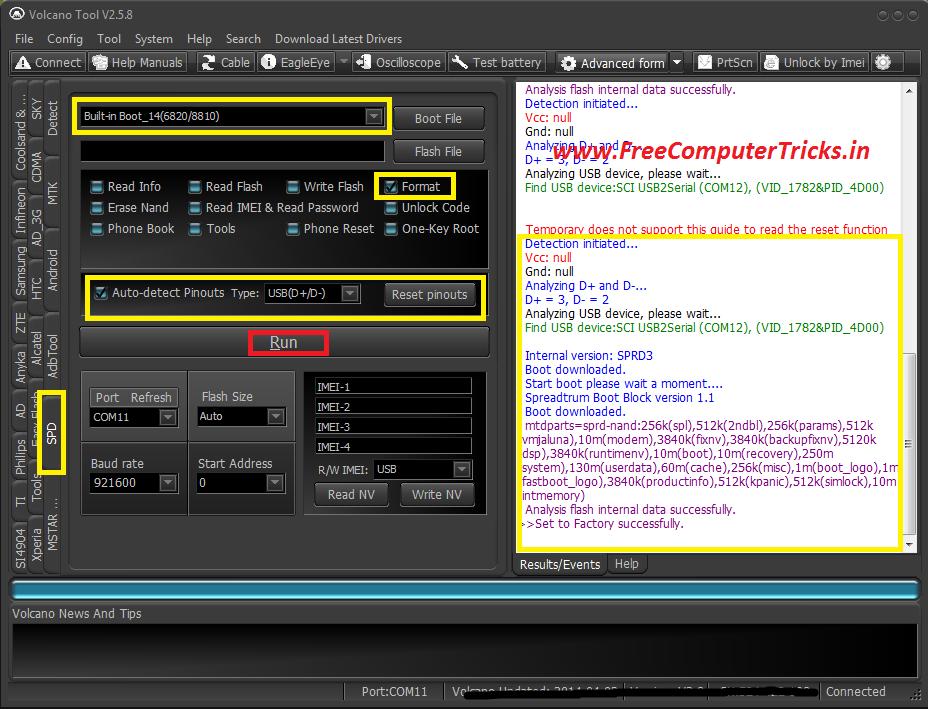
Karbonn A6+ SPD 6820/8810 CPU pattern lock remove with volcano tool. Karbonn A6+ Hard reset done with Volcano Tool by Format the Phone. See the below procedure to hard reset or remove pattern lock of Karbonn A6+ with Volcano Tool.


Karbonn A6+ Hard Reset Volcano Tool SPD CPU


How to remove Karbonn A6+ Pattern Lock Volcano Tool?


  • Open Volcano Tool
  • Go to SPD Tab
  • Select Built-in Boot_14
  • Tick on Format
  • Tick Auto Detect Pinouts
  • Click on Run


Karbonn A6+ pattern unlock with volcano tool


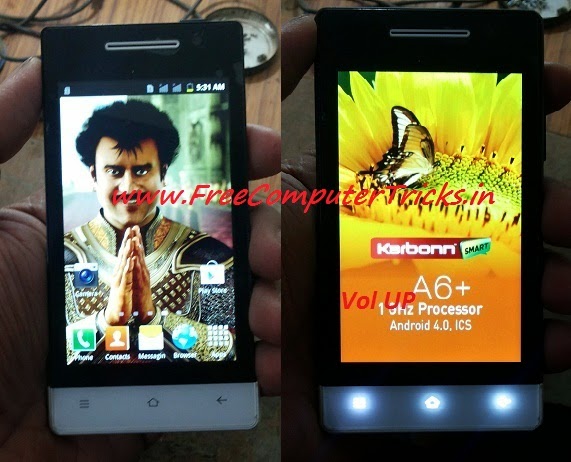
Connect the jig cable and box power to the Karbonn A6+ and Press Volume UP

Karbonn A6+ Volcano Tool Boot Key = Volume Up

Friday, April 25, 2014

Karbonn KT61 Read Flash, Write Flash and IMEI Repair Done With Volcano Tool


Karbonn KT61 MTK 6252 successfully flashed with Volcano Tool, Read flash and IMEI also done with Volcano Tool. The below is the procedure to operate Karbonn KT61 with Volcano Tool using USB cable.


Karbonn KT61 MTK 6252 USB Flash With Volcano Tool


  • To write, Read Flash & Read info & Format put the USB Cable to switched Off phone by pressing the home Button.

  • For IMEI put the USB Cable to Switched ON Phone and Select COM port on the Mobile.

 
Karbonn KT61 Read Flash Volcano Tool Log:

Analysis of USB port,Please insert phone USB cable.
  Connecting...
  Hardware version:CA05
  Software version:0101
  CPU TYPE:6252
  Internal version:8B00
  Boot downloading complete!
  Flash ID: 00C2002500370000
  Flash Type: SF_MX25U6435E             
  Chip Capacity: 0x800000(8MB)
  Flash reading complete!
  privacy:1122
  usercode:1122
>>The data has been saved in C:\Users\PARTHA\Desktop\KT61\KARBONN_52_6432_10A_PCB01_GPRS_MT6252_S01.KARBONN_KT61_T322_M00_S06_120217.BIN, size: 8 M


Karbonn KT61 Format Done With Volcano Tool


Karbonn KT61 Format Volcano Tool


 Karbonn KT61 Read Flash Volcano Tool


Karbonn KT61 MTK Read Flash Volcano Tool


Karbonn KT61 IMEI Volcano Tool


Karbonn KT61 IMEI Android Tool Volcano

Thursday, April 24, 2014

Karbonn K76 USB Flash Done With Volcano Tool - Karbonn K76 MTK 6260 Write Flash Volcano Tool Through USB Cable


In this tutorial I will show you, how you can flash Karbonn K76 with USB cable using Volcano Tool. The below is the process to write flash Karbonn K76 MTK 6260 CPU Mobile phone.


Steps to Write Flash on Karbonn K76 Volcano Tool


  • Open Volcano Tool
  • Go to MTK Tab
  • Select Built-in_Boot-11
  • Tick on Write Flash
  • Do not select Auto Detect Pinouts
  • Tick on USB Mode
  • Click on Run
  • Now Insert USB Cable to switched off phone by pressing volume Down


Karbonn K76 MTK 6260 USB Flash Done With Volcano Tool


Search Tags: how to flash karbonn k76, how to flash karbonn k76 with volcano tool, karbonn k76 flash tool, karbonn k76 USB flash with volcano tool, karbonn k76 MTK 6260 flash process with volcano tool, volcano tool how to flash karbonn mobiles, volcano tool MTK CPU USB Flashing, karbonn K76 hard reset volcano tool, how to flash karbonn k76 volcano tool, karbonn USB flash.

Tuesday, April 15, 2014

Karbonn K101 Star Read Password and Read Flash Done With Volcano Tool


Karbonn K101* Star Successfully read flash and read IMEI/password using Volcano Tool. Karbonn K101* SPD 6610 CPU read flash and password with Volcano Tool and you can also Write flash with this procedure.


Karbonn K101 Star Read IMEI & Read Password Volcano Tool


  • Open Volcano Tool
  • Go to SPD Tab
  • Select Built-in-Boot_2(6610/20)
  • Tick on Read IMEI & Read Password
  • Tick Auto Detect Pinout
  • Click on Run


Karbonn K101* Star Read IMEI & Password with Volcano Tool

Karbonn K101 Star Read Flash With Volcano Tool


  • Open Volcano Tool
  • Go to SPD Tab
  • Select Built-in-Boot_2(6610/20)
  • Tick on Read Flash
  • Tick Auto Detect Pinout
  • Click on Run


Karbonn K101 Star Read Flash With Volcano Tool SPD 6610


Karbonn K101 Star CPU Type SPD 6610 Volcano Tool Log:


 Internal version: Spreadtrum Boot Block version 2.0
  Boot downloaded.
  Start boot please wait a moment....
  BOOT Ver: Spreadtrum Boot Block version 1.2
  CPU TYPE:SC6610/20 [66100000]
  Please select Boot J and try again.
  Please change Boot or reduce Baudrate, try it again.
  Detection initiated...
  Vcc: 10
  Gnd: 1 4
  Analyzing D+ and D-...
  D+ = 9, D- = 8
  Analyzing USB device, please wait...
  Find USB device:SCI USB2Serial (COM37), (VID_1782&PID_4D00)
   
   
  Internal version: Spreadtrum Boot Block version 2.0
  Boot downloaded.
  Start boot please wait a moment....
  Spreadtrum Boot Block version 1.2
  CPU TYPE:SC6610/20 [66100000]
  FLASH ID: 00C8004000160000
  Flash Type:[GD]  GD25Q32
  Size:0x400000(4MB)
  IMEI :910575601400468
  [privacy lock]  1122
  [phone lock]  7929
  
  One privacy lock: 1-9 or #.
  Reading IMEI password completed.
  Ready to read/write again, please remove the power supply clip or battery and then re-loaded it.
  Detection initiated...
  Vcc: 10
  Gnd: 1 4
  Analyzing D+ and D-...
  D+ = 9, D- = 8
  Analyzing USB device, please wait...
  Find USB device:SCI USB2Serial (COM37), (VID_1782&PID_4D00)
   
   
  Internal version: Spreadtrum Boot Block version 2.0
  Boot downloaded.
  Start boot please wait a moment....
  Spreadtrum Boot Block version 1.2
  CPU TYPE:SC6610/20 [66100000]
  FLASH ID: 00C8004000160000
  Flash Type:[GD]  GD25Q32
  Size:0x400000(4MB)
  Reading completed.


📚 You May Also Like to Read