Showing posts with label Nokia Flashing. Show all posts

Sunday, December 2, 2018

All NOKIA Android Smartphone ADB Mode FRP Unlock Tool Free Download Here


How to unlock frp of Nokia 3.1 plus Android smartphone and file download here. Here is the complete info to use the tool and here you can also download the NOKIA FRP Bypass Tool, working on all New Nokia Android smartphones releases by HMD Global. So bypass Google account verification lock on Nokia 3.1 Plus TA-1118 using the small and useful FRP tool. In this procedure you do not need any flashing box to unlock the Nokia phone, just use the trick given in this video and use the Nokia FRP Unlock tool to reset FRP or bypass Google account lock.
 
All NOKIA Android Smartphone ADB Mode FRP Unlock Tool Free Download Here


You can also watch the video tutorial on the Free Computer Tricks YouTube Channel to know how to enable locked Nokia 3.1 Plus Android phone USB debugging and then allow USB debugging on the phone screen and follow the unlock procedure on PC. Here you can also download Nokia 3.1 Plus FRP unlock tool free and use it to reset or unlock Factory Reset Protection of Nokia 3.1 plus phone and this tool is working on all most all Nokia Android phones.
 
NOKIA Android 8.1.0 Google Account Bypass or FRP Unlock Tool - Free Download Here


Nokia 3.1 Plus Software Info:
  • Device Name: Nokia 3.1 Plus
  • Model: TA-1118
  • Android version: 8.1.0
  • Android security patch level: 5 October 2018
  • Baseband version: MOLY.LR12A.R2.MP.V37.P17
Nokia Bypass FRP Google Account Android 8.1.0 Nokia 2/3/5/6/8 and all new models releases, So just follow the tutorial here and download the ADB FRP unlock tool for Nokia New phones and unlock FRP of Nokia all New Android smartphones.
NOKIA Android 8.1.0 FRP Done - Allow USB Debugging on Locked Phone

How To Use Nokia ADB FRP Tool?
  • Download the tool and unzip it using password given below.
  • Now enable ADB or USB debugging on the FRP Locked NOKIA phone (Watch the video below)
  • Now run the BYPASS-FRP.bat in the Nokia FRP folder.
  • Allow USB debugging on phone screen.
  • Now press any key to close FRP Reset Window.
  • Then Reboot the phone and it's done.
Download Nokia Android FRP Unlock Tool:

All Nokia ADB FRP Reset Tool Free Download Here | Download Link
Password = Nokia@FCT@FRP

Search Keywords:
Nokia 1 hard reset
Nokia 3 hard reset
Nokia hard reset
Nokia 3.1 frp
Nokia ta 1083 hard reset
Nokia 3 soft reset
Nokia 1 recovery mode
Nokia 8 hard reset not working
Nokia 3.1 plus hard reset
Nokia TA-1118 hard reset and frp
Nokia HMD Global Android phone hard reset and frp Unlock.
Nokia new Android phone hard reset and google account unlock without box.

How to Hard Reset Nokia 3.1 Plus?
How to hard reset Nokia TA-1118?
Nokia TA-1118 FRP unlock file and tool free download.

Tuesday, June 19, 2018

Nokia 105 RM-908 Dead Solution 2018 - All Working Methods Here


Nokia Microsoft Mobile 105 RM-908 Dead, How to Recover the Nokia 105? Here you will get all the method to unbrick Microsoft Nokia 105 Mobile. The main cause for not switching on or dead Nokia 105 Mobile phone is, Due to Battery BSI Line connection missing, LCD tracks Missing and Software problem. If the phone is dead you can try these solutions to recover the phone, if still not success then the phone may have the motherboard issue or water damage, in that case you can wash the motherboard using IP and lightly hit the board then check.

Nokia Microsoft Mobile 105 RM-908 Complete Dead Solution and All methods to recover the phone. If the does not have any water damage or physical damage then you can try the below methods to recover dead phones and here is the complete process to recover your Microsoft Nokia 105 Mobile phone.
Microsoft Nokia 105 dead 100% Solution Here - Nokia 105 Not Switch On complete solution here

Nokia 105 Dead Problem Solved By Flashing The Phone With ATF:

If the phone is in dead condition, first try to recover the phone by flashing the phone using ATF (Advance Turbo Flasher) or you can also user UFS3 Turbo or you can user Nokia BEST Dongle or any other Nokia flashing tools. In most of the cases we solved the not switching on Nokia 105 problem and successfully recovered dead Microsoft Nokia 105 phone using this method. First try this method, if not success then try the second method to recover the dead phone.
Nokia 105 Dead Phone Recovered By Flashing The Phone With ATF


Nokia 105 Dead Solution: Method 2 (LCD Tracks):

If the software flashing method does not work, then try this method. Due LCD track missing the phone may not switching on, which called a dead phone, so check the all the 12 legs of the Nokia LCD connector, if the LCD ways are missing apply jumper according to the below image. As said before there are 12 LCD legs on the Nokia 105 PCB includes 4 ground points and 2 LCD light points and 6 color and figure points.
Nokia 105 Dead Solution: Method 2 (LCD Tracks)

Nokia 105 Dead Solution: Method 3 (Nokia 105 BSI Way):

Nokia 105 BSI Way, If you are still facing problem then try this method, check the battery connector BSI line or the battery temperature line. The center pin is the BSI line for Nokia phone, which has 3 pin battery connector. So check the Nokia 105 BSI way and apply jumper as shown in the below image.
Nokia 105 BSI Way - Nokia 105 RM-908 BSI Line


These methods are used for recovering the dead Microsoft Nokia 105 phone, as mentioned above try the first method, second method or 3rd method to recover dead phone. If you still not able to solve the issue then the phone must have Motherboard fault or the main IC on the PCB.

Saturday, October 7, 2017

Nokia Software Recovery Tool 8.0.23 Setup Download


NSRT (Nokia Software Recovery Tool) Version 8.0.23 setup released  and you can download it to update and recover Nokia Firmware. After releasing the latest version Nokia software recovery tool, the old version of this tool will not work and you may ask to update the Nokia flash tool and use it to recovery your Nokia or Microsoft feature phones and smart phones.

"There is a mandatory application update 8.0.23
This update must be installed and cannot be skipped. The application cannot be used until it is updated.
-Publisher change to B2X - new installation and program data paths, remote URLs"

Nokia Software Recovery Tool 6.3.56 Online Update Download and Install 8.0.23

How to Update Nokia Software Recovery Tool:

If you have installed Nokia Software Recovery Tool 6.3.56, after open the tool it will ask to update the tool and it's mandatory application update, just click on "Install" it will download the update from Internet and then you can install the Nokia tool setup by following the installation steps.

Nokia Software Recovery Tool 8.0.23 Online Update Download

Download:

If you need to download "Nokia Software Recovery Tool" version 8.0.23 setup, you can visit Here and you can find the download link of Nokia software recovery tool 8.0.23, which helps to recover firmware on Nokia Series 30+, Nokia Series 40, Asha, Nokia Belle and Nokia X platform phones and allow you to reinstall your phone Operating System.

Nokia Software Recovery Tool Latest Update Download Link and Install to reinstall Nokia phone Operating System

Wednesday, April 19, 2017

How to Flash Nokia 220 - A Complete Guide To Flash Nokia MTK Phones


How to flash Nokia 220 RM-969 ? So here is the complete process/guide to flash Nokia 220 using Miracle Box and Nokia Software Recovery Tool. If the Nokia 220 is restarting, hangs on logo, white display, to reset user code and to upgrade the phone, you need to flash it with 220 latest firmware, which can be download using Internet. 

220 Flashing OK Miracle Box

How to Flash Nokia 220 Using Miracle Box?

1- Open the Miracle Tool
2- Select MTK Tab and Choose 10th Boot
3- Now Select "Only Firmware"
4- Then Click on Start Button and wait until the process complete

This is the process to flash or solve restart process on Nokia 220 RM-969, after complete the flashing process switch on the phone it will be work fine. If you need to flash the phone using Nokia Software Recovery Tool then follow the below steps.

How to Flash Nokia 220 Using "Nokia Software Recovery Tool" ?

1- Download and install Nokia Software Recovery Tool Here : Mirror Link
2- Open the Nokia Recovery Tool and connect the phone to PC
3- Install Nokia USB driver
4- Now download an install firmware on Nokia 220

Saturday, April 11, 2015

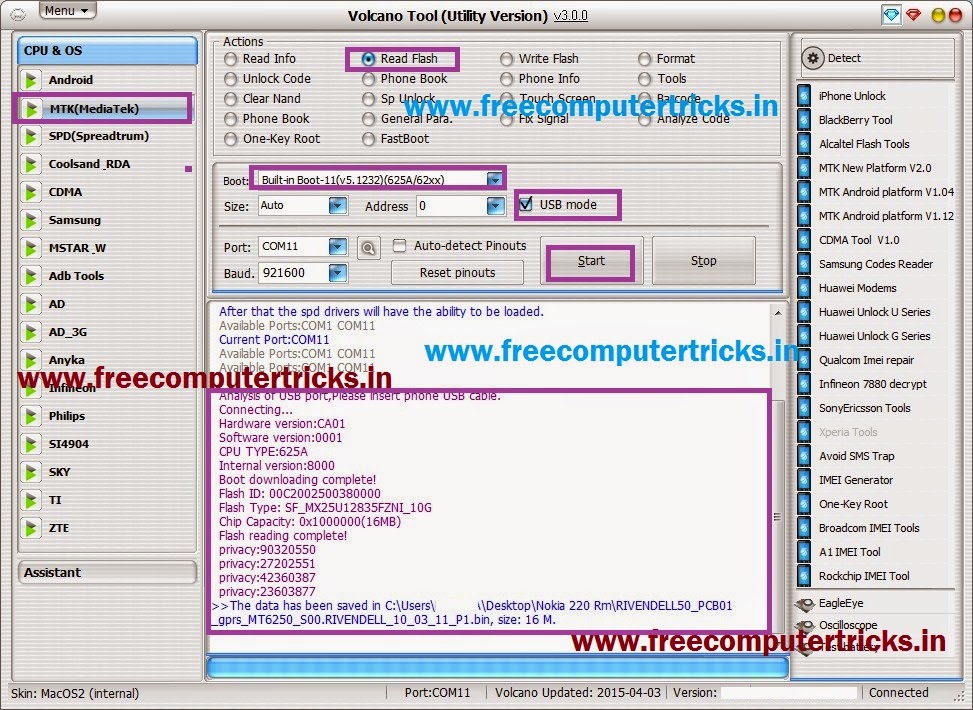
Nokia 220 Read Flash and Format Done With Volcano Tool V3.0.0


How to flash Nokia 220 with Volcano Tool? see the below details to flash Nokia 220 using volcano tool v3.0.0. The Nokia 220 has MTK CPU MT6250 and can be flash with Volcano box and using USB Mode. The below is the complete step by step process to flash the Nokia 220 with Volcano box.

Nokia 220 Format Success With Volcano Tool
  • Open volcano tool
  • Go to MTK tab
  • Select Format
  • Select Boot-11 and Tick on USB mode
  • Click on Start and Connect USB Cable To Switched off phone


Nokia 220 Format Done With Volcano Tool V3.0.0
Nokia 220 Read Flash Done With Volcano Utility V3.0.0


Nokia 220 Read Flash Done With Volcano Tool V3.0.0

Wednesday, December 17, 2014

Nokia 108 MTK CPU Format and Write Flash Done With Volcano Tool V2.5.3


How to flash Nokia 108 with Volcano Tool? As you know the phone has MTK 625A CPU so it can be flashed with any china tool, So here is the process to Flash and format the Nokia 108 using Volcano Tool. To format and write flash for the 108 Nokia follow the steps below.

Nokia 108 Format With Volcano Tool
  • Open Volcano Tool V2.5.3
  • Go to MTK Tab
  • Select Boot 11 V5.1232
  • Tick on Format
  • Do not Select Auto Detect Pinouts
  • Select USB Mode
  • Click on Run
  • Connect the phone with USB Bus Cable


Nokia 108 format done with volcano tool

Nokia 108 Write Flash With Volcano Tool

Nokia 108 Write Flash Done with Volcano Tool
Nokia 108 Volcano Log:


Analysis of USB port,Please insert phone USB cable.
  Connecting...
  Hardware version:CA01
  Software version:0001
  CPU TYPE:625A
  Internal version:8000
  Boot downloading complete!
  Flash ID: 00EF004000160000
  Flash Type: SF_W25Q32BV               
  Chip Capacity: 0x400000(4MB)
    Format addr:0x003A6000 --Format length:0x0004E000
  Flash erasing complete!
 
  Analysis of USB port,Please insert phone USB cable.
  Connecting...
  Hardware version:CA01
  Software version:0001
  CPU TYPE:625A
  Internal version:8000
  Boot downloading complete!
  Flash ID: 00EF004000160000
  Flash Type: SF_W25Q32BV               
  Chip Capacity: 0x400000(4MB)
  Start to analyze file, may take several minutes....
  Flash writing complete.

Friday, December 12, 2014

Nokia 107 Flash Done With ATF Using Nokia 101 Fbus Cable


How to flash Nokia 107 with ATF? you can flash this phone using ATF and no need to buy a 107 Fbus cable you can flash with Nokia 101 Fbus cable. The below is the detail procedure to flash the Nokia 107 with Advance Turbo Flasher. 

Nokia 107 Full Factory Reset With ATF
  • Open ATF (Advance Turbo Flasher)
  • Under Infineon choose 107: RM-961
  • Click on BUS Check
  • Connect the Nokia 101 Fbus cable
  • Now go to Tuning and Maintenance 
  • Click Reset All


Nokia 107 hard reset, factory reset or user code reset done with ATF

That's all now you have successfully reset the Nokia 107 to the factory defaults, in this way you can reset the user code for this phone.


Nokia 107 Read Flash with ATF

Nokia 107 Read Flash with ATF
ATF Nokia 107 log
Booting Phone...
VBATT Powering Down <<<<
VBATT Powering Up   >>>>
SET VCCIO Level Done
SET BSI Load Done

Booting Phone...
CPU ID Response: A200341100
CPU Type: XG110 2.1B
Phone Booted after 5 attempts...


******************************************************
              START INFINEON BUS CHECK                 
******************************************************


Sending PBL 37888 bytes...
PBL Successfully Sent...
Sending SBL 65024 bytes...
SBL Successfully Sent...

Flash Chip Manufacturer: STMicroelectronics
Flash Chip Type: M58WR064 64 Mbit (4Mb x 16) NOR
Extended Information: Multiple Bank / Burst / 1.8v

******************************************************
              INFINEON BUS CHECK DONE                 
******************************************************


FACTORY SET TO : Full Factory Set
 OK
FACTORY SET TO : User Data
 OK
FACTORY SET TO : Leave Factory
 OK
FACTORY SET TO : Service Center
 OK
FACTORY SET TO : Software Upgrade
 OK
FACTORY SET TO : Production Tune
 OK

Saturday, December 21, 2013

Nokia X2-02 Restart After Showing Nokia Logo - Solved (RM-694)


If your Nokia x2-02 restarts after white screen, it's shows only the Nokia Logo then restart, So to solve the restart problem of Nokia x2-02 just flash the mobile with latest flash file (RM-694) using UFSx or any other flash tool/box.

Nokia X2-02 Flash with UFS/HWK

Nokia X2-02 USB Flash with UFSx


Insert USB Cable to Switched OFF Phone and Power ON
IF_USB: XGOLDxxx
IF_SBL: XGOLD213, Ok
IF_EBL: Quantum_Bootloader_10.46_M1S1 10.46, Mode: CC
FL_ID : 89008289, Intel 38F50xxLOY3 512Mb
MCU FLASH BUNDLE: rm694__12.04.mcusw
Flash File: rm694__12.04.mcusw_ebl_psi.fls
Erase Area: 0x40000000 - 0x4001FFFE, Erased: 00:01
Write Area: 0x40000000 - 0x4001FFFE, Written: 00:00
Erase Area: 0x40040000 - 0x4005FFFE, Erased: 00:00
Write Area: 0x40040000 - 0x4005FFFE, Written: 00:00
Erase Area: 0x40060000 - 0x4015FFFE, Erased: 00:05
Write Area: 0x40060000 - 0x4015FFFE, Written: 00:02
Erase Area: 0x40280000 - 0x41BFFFFE, Erased: 02:19
Write Area: 0x40280000 - 0x41B7FFFE, Written: 00:50
Erase Area: 0x43E20000 - 0x43E5FFFE, Erased: 00:00
PPM FLASH BUNDLE: rm694__12.04.ppm_mh
Flash File: package_mh.ppm_ebl_psi.fls
Erase Area: 0x41C00000 - 0x422FFFFE, Erased: 00:31
Write Area: 0x41C00000 - 0x421D9642, Written: 00:11
CNT FLASH BUNDLE: rm694__12.04.image_mh_059D1Q7_059N1T6_240_01
Flash File: rm694__12.04.image_mh_059D1Q7_059N1T6_240_01.fls
Erase Area: 0x42300000 - 0x43E1FFFE, Erased: 03:41
Write Area: 0x42300000 - 0x4327FFFE, Written: 00:31
Erase Area: 0x43E60000 - 0x43F3FFFE, Erased: 00:07
Flashing Done: 08:27
ShutDown Done
All Done, Time: 08:34


How to Flash Nokia X2-02 With USB Using UFSx / HWK ( Solve the X2-02 Restart Problem)

Search Tags: How to flash Nokia X2-02 through USB Cable, X2-02 White screen and restart problem, Nokia Flashing process using UFSx, Nokia X2-02 Latest flash file RM-694 V12.4, Nokia Flash Files 2014, How to solve Nokia White screen and restart problem


📚 You May Also Like to Read