Showing posts with label Nokia Firmware. Show all posts

Saturday, December 21, 2013

Nokia X2-02 Restart After Showing Nokia Logo - Solved (RM-694)


If your Nokia x2-02 restarts after white screen, it's shows only the Nokia Logo then restart, So to solve the restart problem of Nokia x2-02 just flash the mobile with latest flash file (RM-694) using UFSx or any other flash tool/box.

Nokia X2-02 Flash with UFS/HWK

Nokia X2-02 USB Flash with UFSx


Insert USB Cable to Switched OFF Phone and Power ON
IF_USB: XGOLDxxx
IF_SBL: XGOLD213, Ok
IF_EBL: Quantum_Bootloader_10.46_M1S1 10.46, Mode: CC
FL_ID : 89008289, Intel 38F50xxLOY3 512Mb
MCU FLASH BUNDLE: rm694__12.04.mcusw
Flash File: rm694__12.04.mcusw_ebl_psi.fls
Erase Area: 0x40000000 - 0x4001FFFE, Erased: 00:01
Write Area: 0x40000000 - 0x4001FFFE, Written: 00:00
Erase Area: 0x40040000 - 0x4005FFFE, Erased: 00:00
Write Area: 0x40040000 - 0x4005FFFE, Written: 00:00
Erase Area: 0x40060000 - 0x4015FFFE, Erased: 00:05
Write Area: 0x40060000 - 0x4015FFFE, Written: 00:02
Erase Area: 0x40280000 - 0x41BFFFFE, Erased: 02:19
Write Area: 0x40280000 - 0x41B7FFFE, Written: 00:50
Erase Area: 0x43E20000 - 0x43E5FFFE, Erased: 00:00
PPM FLASH BUNDLE: rm694__12.04.ppm_mh
Flash File: package_mh.ppm_ebl_psi.fls
Erase Area: 0x41C00000 - 0x422FFFFE, Erased: 00:31
Write Area: 0x41C00000 - 0x421D9642, Written: 00:11
CNT FLASH BUNDLE: rm694__12.04.image_mh_059D1Q7_059N1T6_240_01
Flash File: rm694__12.04.image_mh_059D1Q7_059N1T6_240_01.fls
Erase Area: 0x42300000 - 0x43E1FFFE, Erased: 03:41
Write Area: 0x42300000 - 0x4327FFFE, Written: 00:31
Erase Area: 0x43E60000 - 0x43F3FFFE, Erased: 00:07
Flashing Done: 08:27
ShutDown Done
All Done, Time: 08:34


How to Flash Nokia X2-02 With USB Using UFSx / HWK ( Solve the X2-02 Restart Problem)

Search Tags: How to flash Nokia X2-02 through USB Cable, X2-02 White screen and restart problem, Nokia Flashing process using UFSx, Nokia X2-02 Latest flash file RM-694 V12.4, Nokia Flash Files 2014, How to solve Nokia White screen and restart problem

Saturday, December 7, 2013

How to Flash Nokia X6-00 Through USB Using Ufs - HWK SarasSoft


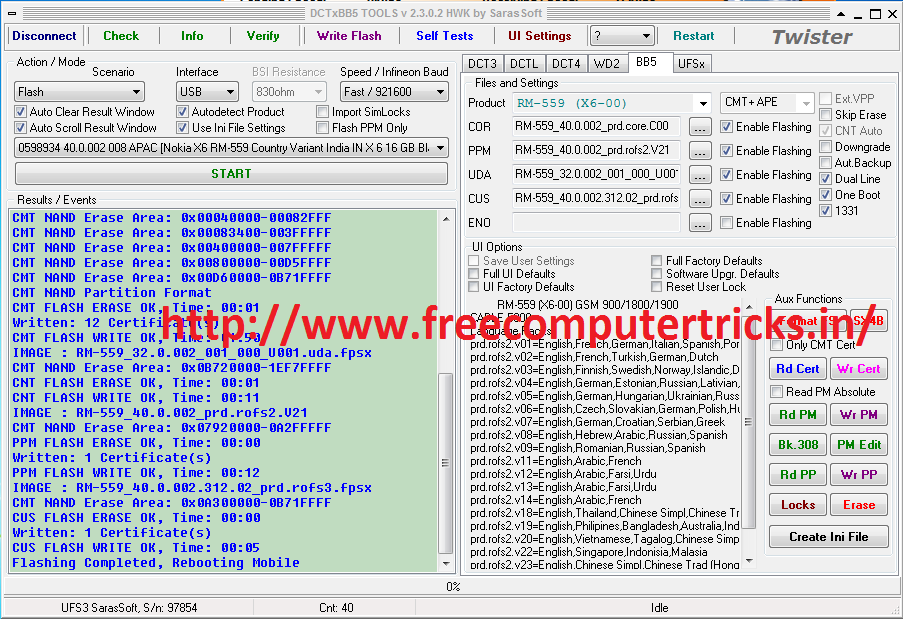
Here is the way how you can do a USB Flash of the Nokia X6-00 using the UFS or HWK SarasSoft. To do a USB Flashing of X6-00 You need UFS Box and USB Cable to Connect the Mobile to the Computer and after that follow the steps below of see the screenshot to understand the settings on the DCTxBB5 TOOLS.


NOKIA X6-00 USB FLASH DONE WITH UFS/HWK


Nokia x6-00 USB Flashing with Ufs

Set the interface as per the screenshot.

Then Click on Write Flash 

Remove Battery from the phone

Insert USB Cable


Now Insert Battery and Press the Power Button

Now the Flashing will Start wait until complete 


Nokia X6-00 USB Flashing Done with UFS/HWK


Wednesday, August 28, 2013

How to download Nokia/Samsung/Sony/Motorola Firmware files - All Mobile Firmware/Flash Files (Android, Windows Phone 7/8, Symbian, Symbian Belle,BB5,DCT4)


Download Nokia firmware files to flash/update your Nokia mobile phone, not only Nokia Flash files but here you can also have an idea where to download all other mobile flashing files, i.e. Samsung, BlackBerry, Motorola and Sony Ericsson etc.

The mobile firmware/flash file is used to update the phone or if your mobile operating system has corrupted you need the firmware to download and flash your mobile by using any mobile flasher box, which supports your model and brand of the phone.


Most of the mobile software and hardware personnel ask, how to download Nokia firmware, how to download Samsung mobile flash file, so here in this post you will find some helpful links and process to download mobile firmware files or flash files to flash your mobile phone.

The firmware/flash file is updated with a regular interval, to get the latest features on the phone, you need to update your mobile phone to latest version of mobile operating system to get the most recent features and any other updates form the mobile manufacturer.
 

How to download Nokia/Samsung/Sony/Motorola Firmware files

Here I will show you how to download Nokia/Samsung/Sony/Motorola Firmware/flashing files for all models including Nokia Symbian, Nokia Symbian Belle and the latest Windows Phone 7/8 Nokia Lumia series and all android smartphones.

There are three options to download firmware files
  • Using Nokia Care Suite
  • Using NaviFirm + 2.3
  • Visit the site freeflashfile

1) Download Nokia Care Suite PST 5.0 2013.13.4.4 and you will able to download latest Nokia firmware. You can download Nokia Firmware files.

or

2) You can download NaviFirm Plus 2.3

Now Navifirm plus 2.3 is available for donors only, but it has feature to search product code and download the firmware in the free version. You can download all Nokia Model Firmware using NaviFirm plus 2.3, see below image to know how you can search the firmware according to the product codes.


Example: Nokia Lumia 920
RM-867
Product Code- 059Q8P5


How to download Nokia/Samsung/Sony/Motorola Firmware files - All Mobile Firmware/Flash Files (Android, Windows Phone 7/8, Symbian, Symbian Belle,BB5,DCT4)

When you open the Navifirm plus it will ask for account setup, hit Cancel and search the Nokia Mobile Product code and Download the RM file/ Flash file, with the Navifirm you can only download Nokia Firmwares/flash files.


Visit Nokia Firmware Versions and Product Codes to know all Nokia Lumia Product Codes.

or 

3) You can download mobile flash file for Nokia, Samsung, Motorola and Sony Ericsson from the website freeflashfile.


This topic will helpful to Mobile Repair Personnel to get the latest firmware for the mobile phones. 

To update your mobile phone yourself, check your mobile does it have Software Update option, if it has an option to update software open it and download and install on your phone via 3G/Wi-Fi.

Nokia Lumia Firmware Versions and Product Codes


Here are some Nokia Lumia Firmware version and product codes, which helps you to find out the right firmware to download. If you know the RM version of the firmware then you can find some variations of product codes for the Nokia Lumia Windows mobile phones. These Lumia Windows phone 7/8 product codes, make easy to get the right firmware updates to update/flash the Nokia Lumia Mobile phones. You can know the Nokia Lumia product codes by using any Mobile Flashing Device i.e. UFS, JAF, MXKEY etc. or type *#0000# form the phone.


The Nokia Lumia product codes also help you to download firmware by using Navifirm Plus 2.3, download NaviFirm + 2.3 and enter the product code then search, it will show  the updates available for the Firmware.


Nokia Lumia 505 RM-923

Nokia Lumia 505 RM-923 Product codes

059R4H4: RM-923 VAR LTA MX TELCEL SL BLACK
059R4H9: RM-923 VAR LTA MX TELCEL SL MAGENTA
059R4J0: RM-923 VAR LTA MX TELCEL SL RED
059R4L4: RM-923 VAR LTA CL CLARO SL BLACK

Nokia Lumia 510 RM-889 

Download Nokia Lumia 510 RM-889 Product Codes text file below


Nokia Lumia 510 RM-898

Download Nokia Lumia 510 RM-898 Product Codes text file below


Nokia Lumia 610 RM-835

Download Nokia Lumia 610 RM-835 Product Codes text file below


Nokia Lumia 610 RM-836


Nokia Lumia 610 RM-836 Product Codes

059N197: RM-836 NDT CHINA CYAN
059N288: RM-836 NDT CHINA BLACK
059N289: RM-836 NDT CHINA WHITE
059P1S3: RM-836 NDT CHINA MAGENTA


Nokia Lumia 610 RM-849

Nokia Lumia 610 RM-849 Product Codes

059P5C8: Nokia 610 RM-849 NDT EU EURO1 MAGENTA
059P6C3: Nokia 610 RM-849 Orange France FR Black V1 GV
059P6C5: Nokia 610 RM-849 Orange Spain ES Black V1 GV
059P6C6: Nokia 610 RM-849 PTK Centertel (Orange PL) PL Black V1 GV
059P962: Nokia 610 RM-849 Orange SK SK White V1 GV
059Q036: Nokia 610 RM-849 Orange Romania RO Black V1 GV
059Q349: Nokia 610 RM-849 PTK Centertel (Orange PL) PL White V1 GV
059Q375: Nokia 610 RM-849 Orange Romania RO White V1 GV
059Q384: Nokia 610 RM-849 Orange Spain ES White V1 GV
059Q3B1: Nokia 610 RM-849 Mobistar BE black v1
059Q3V7: Nokia 610 RM-849 PTK Centertel (Orange PL) PL Black V2 non-SL GV
059Q3V8: Nokia 610 RM-849 PTK Centertel (Orange PL) PL White V2 non-SL GV


Nokia Lumia 620 RM-846 

Download Nokia Lumia 620 RM-846 Product Codes text file below


Nokia Lumia 920 RM-867

Nokia Lumia 920 RM-867 Product Codes 

059Q203: RM-867_CMCC_PRC_VAR254007_BLACK_V3_Black
059Q5M5: RM-867_CMCC_PRC_VAR254007_BLACK_V3_White
059Q820: RM-867_CMCC_PRC_VAR254007_BLACK_V3_Red
059Q8P5: RM-867_CMCC_PRC_VAR254007_BLACK_V3_Yellow


Nokia Lumia 820 RM-826

Nokia Lumia 820 RM-826 Product Codes 

059R4F3: RM-826_Nokia 820_CV_VAR251422_IN_Black_V1_Black


Nokia Lumia 710 RM-803

Download Nokia Lumia 710 RM-803 Product Codes text file below


Wednesday, February 1, 2012

New Phoenix Service Software 2011.14.004.45945


New Phoenix Service Software 2011.14.004.45945, used for flashing or update Nokia Phones. Download Nokia Firmware file as per your Model No, to check your RM Version Dial *#0000# on your Nokia phone.Then connect your Nokia phone using data cable and open the Phoenix then update your Nokia phone.

This is the latest version of Phoenix Service Software

Phoenix Service Software

NEW PRODUCTS ADDED
* RM-776, RM-775, RM-763, RM-773, RM-670, RM-765, RM-774

NEW FEATURES :

* New version of FUSE connection Manager
* New version of Flash Update Package
* New version of Auto tuning components
* New version of Product API
* New version of Connectivity Cable Driver
* Torque Information - menu implemented. Information concerning screw tightening torques can be shown if product specific data package contains pictures / information files
* Simple Multi Software Updater UI added

Phoenix Nokia Service Software Tool

NOTE :

* All Nokia Service Software Applications will use following location for product specific data: - Windows XP: C:\Documents and Settings\All Users\Application Data\Nokia\Packages - Windows 7: C:\Program Data\Nokia\Packages
* During installation, Data Packages should be installed in these directories, if they install to any other location by default. target folder for local data packages can be changed in the installation wizard manually
* This version contains the latest Tucson components. Therefore it is not necessary to use Tucson Add-On Installation Packages
* Before you start Phoenix or Care Suite installation to Windows 7 the User Account Control (UAC) should be turned off from Windows Control Panel settings.
* For more information concerning new options in "Firmware Update" - menu and their use, Please see documents SR1313 and SR1659 in KICS Information Center.
* Tucson operations combined with "flash" - option are now handled in the same way as "refurbishment", which requires Mass Memory Content File to be available.
* Do not use Flash option simultaneously with product code change for USB Only phones, flash phone separately with Firmware Update
* It is recommended to use FPS-21 flash prommer with TCPIP connection when refurbishing USB Only - phones (RM-596 etc) due to mandatory optional MMC file size.
* Connection media to FLS-5 must be configured to be "USB_FBUS", after FLS-4 support has been removed FBUS does not work anymore with FLS-5

How to use phoenix service software 2011

INSTALLATION :

* If you have Phoenix External 2007.4.6.170 or older you must uninstall it before installing this release.
* Download Phoenix_Service_Software_2011_14_3_45843.exe application file to your computer (e.g. C:\TEMP).
* Close all other programs.
* Disconnect all flash Devices and phones which may be connected to PC via USB connection (reconnect them only after Phoenix installation has been completed)
* Run Phoenix_Service_Software_2011_14_3_45843.exe and follow instructions on the screen to install Phoenix Service Software
* Connect a dongle (PK-1, PKD-1, FLS-4S, FLS-5) when message appears on the screen
* If you are prompted to update any existing driver or file versions, select “yes”.
* Depending on the operating system, the PC may require rebooting.
* Allow Windows to register the Phoenix components.
* Open Phoenix, use FUSE Connection Manager to configure connections depending on the tools you use
* If you use CU-4, please pair the connection with service adapter by selecting “pair with service adapter” - option
* Update your prommer with the latest software included in this installation package.
* Install and use the latest available product specific data packages or flash bundles


Supported operating systems and user rights

* Windows XP Service Pack 1 or higher
* you must have local admin rights.
* Windows 7 32 Bit version

You can Download Phoenix Latest Version here just search the below line on Google Search for Mediafire Link.

site:mediafire.com Phoenix Service Software 2011.14.004.45945

Saturday, January 28, 2012

Download Nokia Firmware Using NaviFirm : Nokia Flashing


Most of the Mobile Repair Personnel search for the Nokia Firmware to flash Nokia Mobiles. So Don't bother about that here is the best way to download the all Firmwares. NaviFirm+ is all in one solution for Nokia Firmware just select the Phone Model and then the Firmware version or Releases then select the Variants then click on Download, your needed file like Ppm, Mcu, Content etc. for flashing will be download to the default directory (Drive:\NaviFirm\Fw).

How to download Nokia firmware

NaviFirm+ is a modded version of the NAVIFIRM tool developed by EPICBIZNUS, which can be download form Symbian-toys.com or search Google For NaviFirm.

NAVIFIRM is the ultimate tool for downloading Nokia firmware files, you can get list of product codes, and finding the right product code for your phone. NAVIFIRM downloads all this firmware from Nokia servers.

NAVIFIRM is useful for mobile repairing personnel, if you do not know how to flash the Nokia mobile then probably you not need the NaviFirm+


http://www.symbian-toys.com/navifirm.aspx

📚 You May Also Like to Read