Showing posts with label Celkon Mobile Flash. Show all posts

Thursday, April 23, 2015

How to Flash Celkon C7060 Using Volcano Box - Read Flash Done With Volcano Tool


How to flash Celkon C7060, which has a MTK 625A CPU using Volcano Utility. The below is the complete process to flash Celkon C7060 with Volcano Tool. 

Celkon C7060 CPU Details:
Hardware Version : CA01
Software Version : 0001
CPU Type : 625A
Flash ID : 00EF006000180000
Chip Capacity : 0x1000000(16MB)


Celkon C7060 Flash With Volcano Tool
  • Open volcano tool
  • Go to MTK tab
  • Select boot 11
  • Tick on USB Mode
  • Click Start
  • Connect USB cable to switched off phone


Celkon C7060 Read Flash Done With Volcano Tool

Wednesday, August 20, 2014

Celkon C770i Write Flash and Read Info Done With Volcano Tool


Celkon C770i read info, write flash and read flash done with Volcano Tool V2.7.7. See the below steps to know how to flash Celkon C770i with volcano tool and in this process the read flash and read info can be done with the Tool. How to flash Celkon C770i with USB Cable using volcano tool.


Celkon C770i Write Flash Volcano Tool


  • Open Volcano Tool
  • Go to MSTAR_W Tab
  • Select Write Flash
  • Choose the Celkon C770i 8MB Mstar Flash File
  • Un-tick Auto Detect Pinouts
  • Press the Home/Center Button On C770i and Connect USB Cable
  • Now click on Start


celkon c770i write flash success with volcano tool

That's all wait until write flash finished, remove the USB Cable and battery then put the battery back to the phone and switch ON the phone. So in this process you can also read flash and read flash of C770i, to do that instead of write flash, select read info or read flash.


Celkon C770i Write Flash Volcano Tool Log:

Connecting to phone...
  Connection success!
  Boot downloading...
  CPU ID:00508003
  Boot downloading finished.
  Flash Type: GIGA_GD25LQ64
  Flash ID:   00C8601700000000
  Flash Size: 00800000h
  CPU : 8533d/8532_series

  Flash Erasing finished
>>Flash Writing finished.

Celkon C770i Read Flash Volcano Tool Log:

Connecting to phone...
  Connection success!
  Boot downloading...
  CPU ID:00508003
  Boot downloading finished.
  Flash Type: GIGA_GD25LQ64
  Flash ID:   00C8601700000000
  Flash Size: 00800000h
  Read Size: 00800000h(8M)
  CPU : 8533d/8532_series

  Flash Reading finished

Saturday, July 5, 2014

Celkon A60 Hard Reset and Pattern Unlock Done - www.FreeComputerTricks.in


Celkon A60 pattern unlock and hard reset done with keys. By hard reset you can solve the hang problem or A60 hangs on Logo. So to hard reset or remove pattern lock of Celkon A60 follow the process below.


Celkon A60 Hard Reset With Buttons

Celkon A60 Hangs on Logo Problem solved by hard reset the phone, this can be done with a key combination.


Celkon A60 Pattern Unlock and Hanging Problem Solved

Celkon A60 Hard Reset and Wipe Data/Factory Reset

  • Switch Off the Phone
  • Press Volume Down + Power For Recovery Mode (Hold 10 to 20 Seconds)
  • Then Android Logo Will Appear
  • Then Press Volume Up For Android Recovery Menu
  • Press Volume Down To Select Wipe Data/Factory Reset
  • Then Press Power Button Enter

Friday, June 20, 2014

Celkon C6060 Mstar CPU Flash With Volcano Tool Using USB Cable


How to flash celkon c6060 with volcano tool ? the below is the procedure to flash celkon c6060 with volcano tool.


Celkon C6060 Write Flash Volcano Tool

  • Open Volcano Tool
  • Go to MSTAR Tab
  • Select the Flash File
  • Tick on Write Flash
  • Un-tick Auto Detect Pinouts
  • Connect the Phone with Modified/Normal CA-101 USB Cable (with Battery)
  • Then Click on Run


Celkon C6060 Mstar CPU Flash done with volcano tool

How to Create Modified USB Cable


How to Create Modified USB Cable For Volcano Box 


Thursday, April 24, 2014

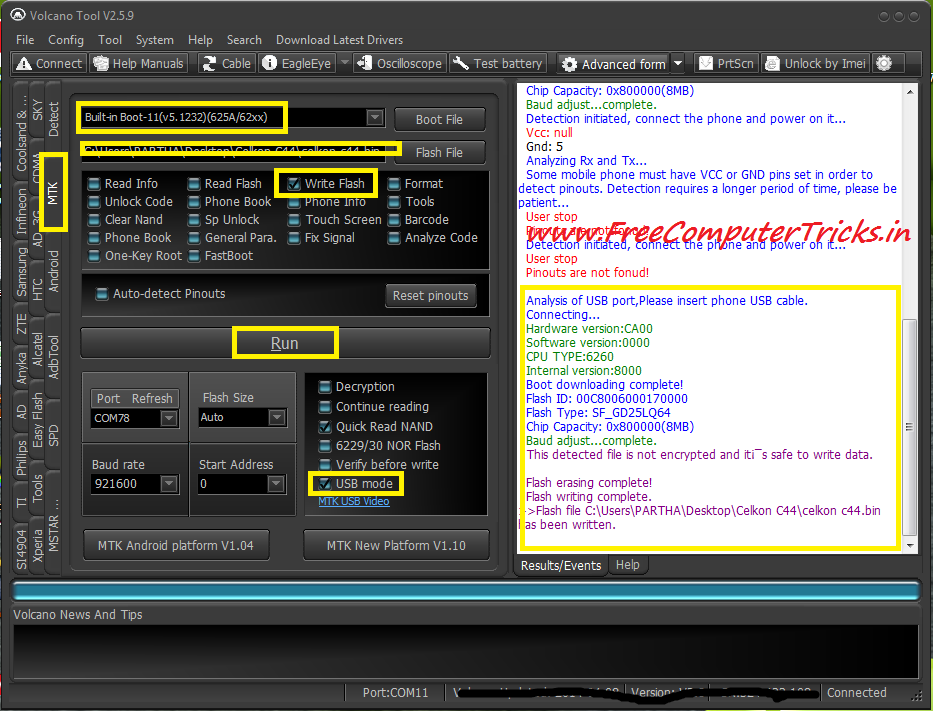
Celkon C44 Read Flash & Write Flash Done With Volcano Tool Using USB Cable


Celkon C44 MTK 6260 Read and Write flash success with Volcano tool using USB Cable, the below is the procedure how to write flash and read flash of Celkon C44 which has a MTK 6260 CPU with Volcano Box.


Celkon C44 Write Flash Volcano Tool


  • Open Volcano Tool
  • Go to MTK Tab
  • Select Built-in_Boot 11
  • Select the Flash file for Celkon C44
  • Tick on Write Flash
  • Untick Auto Detect Pinouts
  • Tick on USB Mode
  • Now Click on Run and Connect the USB cable to Switched off phone


Celkon C44 MTK 6260 CPU Flash done with volcano tool in USB Mode


Search Tags: how to flash celkon c44 with volcano tool, celkon c44 flash file download, celkon c44 mtk 6260 cpu flash file and how to flash, celkon c44 flashing tool flash tool, celkon mobile flash with volcano tool, celkon c44 usb flashing, celkon c44 read flash write flash with volcano tool, how to write flash celkon mobile, celkon mobile flash solution and procedure Free Computer Tricks, mobile flashing tutorials, celkon mobile flashing tutorial volcano tool.

๐Ÿ“š You May Also Like to Read