Showing posts with label ChatGPT. Show all posts

Sunday, August 31, 2025

What ChatGPT Can Do: Complete Guide for Beginners and Experts


What ChatGPT Can Do: Complete Guide

Artificial Intelligence (AI) is transforming the way we interact with computers, and ChatGPT is at the forefront of this revolution. Developed by OpenAI, ChatGPT is a cutting-edge language model designed to understand and generate human-like text. But what exactly can ChatGPT do? Let’s explore everything in detail.

1. Understanding ChatGPT

ChatGPT is an AI-powered chatbot that uses natural language processing (NLP) to converse with humans. Unlike traditional search engines, ChatGPT can understand context, answer questions, provide explanations, and even generate creative content.

  • Conversational AI: Chat naturally like talking to a human.
  • Context Awareness: Remembers previous messages in a conversation.
  • Multi-purpose: From coding to writing, ChatGPT can assist in many tasks.

What ChatGPT Can Do Complete Guide for Beginners and Experts

2. Writing and Content Creation

  • Write articles, blog posts, and essays
  • Generate social media captions and marketing content
  • Draft emails, reports, and letters
  • Create poems, stories, and even jokes

For bloggers, ChatGPT can save hours of writing time by generating high-quality drafts quickly.

3. Learning and Education

  • Explain complex topics in simple terms
  • Solve math problems and provide step-by-step solutions
  • Teach programming languages like Python, Java, or C++
  • Answer questions on history, science, or general knowledge

It’s like having a personal tutor available 24/7.

4. Programming Assistance

  • Generating code snippets for websites, apps, or scripts
  • Explaining algorithms and coding concepts
  • Debugging errors and suggesting fixes
  • Converting code between programming languages

Whether you’re a beginner or expert, ChatGPT can boost productivity significantly.

5. Creative Design and Ideas

  • Business and startup ideas
  • Marketing campaigns
  • Video scripts and storyboards
  • Game or app concepts

It can act as a creative partner, making the ideation process faster and easier.

6. Personal Assistant Tasks

  • Setting reminders or schedules (requires integration)
  • Drafting emails and letters
  • Creating checklists or plans
  • Recommending books, movies, or travel itineraries

This makes it a versatile AI assistant for both work and personal life.

7. Entertainment and Fun

  • Storytelling and roleplay
  • Quizzes and trivia games
  • Fun conversations or jokes
  • Writing scripts for YouTube or TikTok content

It can be a fun companion for anyone curious or bored.

8. Limitations of ChatGPT

  • Can produce incorrect or misleading information
  • Limited understanding of extremely recent events (knowledge cutoff)
  • Cannot access personal or confidential data
  • Lacks true human emotions

It’s important to verify critical information before relying on it.

9. How to Use ChatGPT

  1. Visit platforms like chat.openai.com
  2. Sign up or log in
  3. Start typing your query or instruction
  4. Refine responses by asking follow-up questions

For businesses and developers, ChatGPT can also be integrated via API for apps, websites, and automation tools.

10. Conclusion

ChatGPT is more than just a chatbot. From learning and coding to content creation and entertainment, it is a versatile AI tool that can save time, enhance creativity, and provide knowledge instantly. While it has limitations, understanding its capabilities can unlock immense potential for personal and professional growth.

Monday, August 25, 2025

Free ChatGPT Image Generator Tool – Create Stunning AI Prompts Instantly


🎨 ChatGPT Image Generator Tool – Create Stunning AI Prompts Instantly

The ChatGPT Image Generator Tool is a unique and free online tool designed to help creators, bloggers, designers, and AI enthusiasts generate powerful photo editing prompts instantly. In today’s digital world, AI-generated images are in high demand for websites, blogs, YouTube thumbnails, social media posts, and even professional projects. However, not everyone can write detailed and effective prompts. This tool solves that problem by providing ready-made prompts as well as customization options. In this guide, we will explore everything you can do with this tool, how it works, and why it can be your ultimate AI companion.


Free ChatGPT Image Generator Tool – Create Stunning AI Prompts Instantly


✨ What is ChatGPT Image Generator Tool?

The ChatGPT Image Generator Tool is an AI-powered prompt creator designed specifically for generating detailed instructions for photo editing and AI image generation platforms like DALL·E, Stable Diffusion, and MidJourney. Instead of spending hours thinking about what to write, you can simply use this tool to create professional-grade prompts instantly. Whether you want a cinematic portrait, a fantasy artwork, a realistic product photo, or a modern cartoon-style illustration, this tool covers everything.

🔍 Features of ChatGPT Image Generator Tool

  • ✅ Generate AI photo editing prompts instantly
  • ✅ Includes 20+ pre-made prompts for quick use
  • ✅ Custom input box to build your own unique prompt
  • ✅ Works for cinematic, vintage, fantasy, neon, cartoon, travel styles
  • ✅ Mobile-friendly and easy to use
  • ✅ Completely free to use online
  • ✅ Saves time and effort for bloggers, designers, and YouTubers

📌 How to Use the Tool?

  1. Visit the official page of ChatGPT Image Generator Tool.
  2. Select from the pre-made prompts or enter your own idea in the box.
  3. Click on the Copy Button to copy the generated prompt.
  4. Paste it into your favorite AI image generator (ChatGPT, DALL·E, MidJourney, Stable Diffusion).
  5. Generate professional-quality AI images in seconds.


Free ChatGPT Image Generator Tool – Create Stunning AI Prompts Instantly


🎯 What Can You Do With This Tool?

There are endless possibilities with this tool. Here are just a few popular ways users can benefit:

  • 📷 Create cinematic portraits with golden lighting
  • 🎨 Generate fantasy characters and artwork
  • 🌆 Design futuristic cityscapes
  • 🛍️ Make realistic product photography for eCommerce
  • 👕 Build AI t-shirt designs and merchandise
  • 📺 Create YouTube thumbnails & social media posters
  • 📚 Design book covers, wallpapers, and story illustrations
  • 💡 Practice creative storytelling with visuals

💡 Who Can Benefit from This Tool?

This tool is useful for a wide range of people:

  • Bloggers – Generate unique images to make blogs more engaging.
  • YouTubers – Create attention-grabbing thumbnails instantly.
  • Graphic Designers – Save time by generating new design ideas.
  • Students – Use AI images in projects and presentations.
  • Freelancers – Deliver creative work faster to clients.
  • Social Media Influencers – Build attractive Instagram, Facebook, and Twitter posts.

🚀 Why This Tool is Important for SEO and Content Creators?

Images play a huge role in search engine optimization (SEO). A post with unique and attractive images ranks better on Google compared to plain text articles. With this tool, you can generate AI-driven, original-looking images that make your blog posts stand out. For YouTubers, a professional thumbnail can increase CTR (Click-Through Rate) by more than 50%. Social media creators can also gain more likes and shares by using stunning AI-generated visuals.

📌 Conclusion

The ChatGPT Image Generator Tool is more than just a simple widget – it’s a complete AI assistant for creators. From bloggers to designers, from YouTubers to freelancers, anyone can use this tool to generate stunning prompts and produce professional-quality AI images in seconds. It is free, fast, and user-friendly. If you are looking to enhance your digital content, boost SEO, and save time, this tool is the perfect choice. Try it now and explore the limitless creativity of AI-powered photo editing prompts.


🔗 You May Also Like

Wednesday, August 20, 2025

Top 10 Free AI Tools in 2025 to Save Time and Boost Productivity


What is AI? (Artificial Intelligence Explained)

Artificial Intelligence (AI) is the branch of computer science that focuses on creating machines and systems capable of simulating human intelligence. Unlike traditional software that follows fixed rules, AI is designed to think, learn, and adapt by analyzing data, identifying patterns, and making predictions. In simple terms, AI means teaching machines to “act smart” so they can perform tasks such as problem-solving, decision-making, and even understanding natural language.


At its core, AI works through technologies like machine learning, natural language processing, and computer vision. Machine learning helps AI systems learn from data and improve over time. Natural language processing enables machines to understand and respond to human language, powering tools like chatbots and voice assistants. Computer vision allows AI to recognize and analyze images or videos, which is the foundation of self-driving cars, face recognition, and medical image analysis.

Today, AI is transforming industries and everyday life. In healthcare, it assists doctors in diagnosing diseases; in education, it supports personalized learning; in business, it automates customer service and predicts market trends. While AI brings efficiency and innovation, it also raises important ethical debates about privacy, bias, and the future of work.


Top 10 Free AI Tools in 2025 to Save Time and Boost Productivity


Top 10 Free AI Tools in 2025 to Save Time and Boost Productivity

Cut busywork, speed up research, design faster, and write better — all with zero cost.

Quick take: AI in 2025 is smarter and more accessible than ever. These free tools help you write, research, design, learn, and run meetings — so you can focus on creativity, strategy, and growth.
Free Beginner-friendly No-code Multi-platform

Table of Contents (click to hide/show)

Artificial Intelligence is now a daily co-pilot. Whether you’re a student, creator, entrepreneur, or part of a growing team, the right tools can cut hours from your week. Below are the 10 best free AI tools of 2025 with what they do and why they matter.


1. ChatGPT (OpenAI) – Your All-in-One Productivity Partner

Draft emails, summarize long reads, brainstorm content, outline videos, or debug code. ChatGPT shines as a versatile assistant across writing and problem-solving.

Best for: Writing, brainstorming, coding help
Time saver: Automates repetitive thinking and first drafts

2. Perplexity AI – AI-Powered Research Assistant

Ask a question and get concise, cited answers. Ideal for students, bloggers, and analysts who need fast facts without endless tabs.

Best for: Research and summaries
Time saver: Delivers reliable info with sources instantly

3. Google Gemini – Real-Time AI Companion

Great for up-to-date research, SEO brainstorming, and creative prompts. Benefits from Google’s ecosystem and real-time awareness.

Best for: Market research, real-time answers
Time saver: Current insights + creative support

4. Canva AI – Design Made Simple

Turn prompts into polished graphics, social posts, and slide decks. Tools like Magic Design and Magic Eraser make non-designers look pro.

Best for: Marketing visuals, presentations
Time saver: Generates ready-to-use designs quickly

5. Copy.ai – Rapid Marketing Copy Generator

Create product descriptions, ad variations, and blog intros in seconds. Perfect when you need options fast.

Best for: Ads, product copy, blog intros
Time saver: Multiple polished variants instantly

6. Notion AI – Smart Workspace Organizer

Summarize notes, draft documents, and turn meeting notes into action items — without leaving your workspace.

Best for: Notes, tasks, project management
Time saver: Centralizes work + AI in one place

7. Claude AI (Anthropic) – Your Learning Buddy

With new “Learning Modes,” Claude guides you through explanations and problem-solving — ideal for studying and deep understanding.

Best for: Studying, complex reasoning
Time saver: Faster comprehension, better retention

8. Fireflies & tl;dv – AI Meeting Assistants

Auto-transcribe and summarize calls so you can skim decisions and action items instead of rewatching hour-long meetings.

Best for: Teams, online classes
Time saver: Turns hours of calls into minutes of review

9. AFFiNE – Open-Source Productivity Suite

Notes, whiteboards, and tasks in one free, privacy-friendly app — with offline support and collaboration.

Best for: Notes & collaboration
Time saver: Replaces multiple apps with one

10. Canva Magic Studio Tools – Next-Level Creativity

Use Magic Write, Magic Eraser, and Magic Presentation to rapidly create and refine content — even on the free plan.

Best for: Content creators & students
Time saver: Quick edits and auto-generated assets

Quick Comparison Table

Tool Best For Key Productivity Benefit
ChatGPTWriting, brainstorming, codingMassive time savings across tasks
Perplexity AIResearch & summariesCited answers fast
Google GeminiReal-time researchUpdated insights; Google integration
Canva AIGraphics & slidesInstant design generation
Copy.aiMarketing copyMultiple variants in seconds
Notion AIWork organizationNotes + tasks + AI together
ClaudeLearning & reasoningGuided explanations
Fireflies / tl;dvMeetingsAuto transcripts & summaries
AFFiNENotes & collaborationOpen-source + offline
Magic StudioCreative workflowsQuick tweaks & auto-content

Best Picks by Need

  • Writing & clarity: ChatGPT, Copy.ai, Notion AI
  • Research: Perplexity AI, Google Gemini
  • Design: Canva AI, Magic Studio
  • Deep learning/study: Claude
  • Meetings: Fireflies, tl;dv
  • All-in-one notes: Notion AI, AFFiNE
Tip: Chain tools for speed — Perplexity (research) → ChatGPT (draft) → Canva (visuals) → Fireflies (meeting recap).

Final Thoughts

AI is the ultimate productivity multiplier in 2025. Start with one or two tools that match your workflow and expand as you see gains.

Pro move: Create a repeatable “AI stack” for your projects so every new task starts at 60% done.

Disclaimer: Features and free tier limits can change. Always check current plans.

FAQ

Are these tools really free? Yes — all offer free plans. Some features may require upgrades.

Which one should I start with? For general productivity, try ChatGPT + Perplexity + Canva AI.

Will these replace my current apps? Often they complement — start small and keep what works.

Wednesday, July 23, 2025

🧠 How to Use ChatGPT Plus for Free – Hidden Tricks, Offers, and Referral Links Explained! - Free Computer Tricks


✨ Introduction

OpenAI’s ChatGPT Plus has revolutionized the way we interact with AI, giving users faster access, premium models like GPT-4-turbo, and priority support. But here’s the catch — it comes at a price. As of 2025, the ChatGPT Plus subscription costs $20/month (approx ₹2,000/month in India). Not everyone can afford that — especially students, freelancers, and content creators.

So, is there any way to use ChatGPT Plus for free legally?

The answer is YES — with the right strategies.

This blog dives deep into all the possible legal ways to use ChatGPT Plus features for free or at a reduced cost — including referral programs, AI-powered browsers, student access portals, and free GPT-4 alternatives.


How to Use ChatGPT Plus for Free – Hidden Tricks, Offers, and Referral Links Explained! - Free Computer Tricks


✅ What is ChatGPT Plus?

ChatGPT Plus is the premium version of ChatGPT offered by OpenAI. It gives access to:

  • GPT-4-turbo model (faster, more accurate)

  • Priority access during peak times

  • Faster responses

  • Early access to new features

💸 Current Pricing (as of July 2025)

  • ChatGPT Free – Uses GPT-3.5 only

  • ChatGPT Plus – $20/month (~₹2,000/month)


🎁 How to Use ChatGPT Plus for Free (100% Legal Methods)

Let’s explore all realistic and legal ways you can use ChatGPT Plus or similar GPT-4 services for free:


How to Use ChatGPT Plus for Free – Hidden Tricks, Offers, and Referral Links Explained! - Free Computer Tricks


1️⃣ Use Microsoft Copilot (Free GPT-4 Access)

Microsoft integrates GPT-4 for free via:


✅ Benefits:

  • Free access to GPT-4 (same tech as ChatGPT Plus)

  • No subscription required

  • Can handle long conversations and image uploads

👉 Visit: https://www.bing.com/chat


2️⃣ Use Poe.com – GPT-4 Free Trials

Poe.com by Quora offers GPT-4 with free daily access (limited):

  • GPT-4 (free for a few messages daily)

  • Claude (another powerful AI)

  • No credit card needed

👉 Try here: https://poe.com/ChatGPT

🟢 Tip: Create multiple accounts with different emails to extend free use.


3️⃣ Student Discount or School Access

Some schools, colleges, and universities partner with OpenAI or Microsoft to provide free or discounted GPT-4 access to students.

🔍 Ask your institution:

  • Do they provide OpenAI credits?

  • Are you eligible for GPT-powered services like Copilot, Notion AI, or GitHub Copilot?


4️⃣ Referral and Affiliate Programs (Limited)

While OpenAI doesn't offer a public referral program, some browser extensions or third-party tools might offer GPT-4 access through affiliate sharing.

🧩 Example:

  • Tools like AIPRM for ChatGPT, Merlin, or UseChatGPT.AI offer browser extensions that give GPT-4-like access and sometimes rewards for inviting others.


How to Use ChatGPT Plus for Free – Hidden Tricks, Offers, and Referral Links Explained! - Free Computer Tricks


👉 Try:

  • https://chromewebstore.google.com/detail/maxai-ask-ai-anything-as/mhnlakgilnojmhinhkckjpncpbhabphi

  • https://chromewebstore.google.com/detail/merlin-ask-ai-to-research/camppjleccjaphfdbohjdohecfnoikec


5️⃣ Use Free Trials of GPT-4 Tools

Several tools that run on GPT-4 offer free trials, such as:

ToolFree GPT-4 AccessUse Case
WritesonicYes (Limited)Content writing
Jasper AIYes (5-day trial)Marketing content
Copy.aiYes (7-day trial)Blog/Ad writing
Notion AIFree GPT-4 for usersNotes, docs, AI writing


🟢 Visit:


6️⃣ Join OpenAI Research Programs / Beta Test

Sometimes OpenAI invites users for:

  • Free research access

  • Feature beta tests

  • Student research credits

👀 Keep an eye on:
https://openai.com/blog


7️⃣ Use ChatGPT Mobile App (Limited Free GPT-4)

Some users report GPT-4 responses on the ChatGPT mobile app even without Plus. While this is not consistent, it's worth trying:

📱 Download:


🧪 Experiment: Ask long prompts and verify if it’s responding with GPT-4 capability (longer memory, better reasoning).


How to Use ChatGPT Plus for Free – Hidden Tricks, Offers, and Referral Links Explained! - Free Computer Tricks


8️⃣ Use GPT-4 Through API Credits (Free Trial)

OpenAI offers $5 worth of free credits when you create a new account on their platform for developers.

📌 Steps:

  1. Visit https://platform.openai.com

  2. Sign up and go to API keys

  3. Use Postman or Python to make GPT-4 calls (tech skills required)

📖 Guide: https://platform.openai.com/docs/guides


⚠️ Important Warning: Avoid Illegal Methods or Cracks

Many websites or Telegram groups offer:

  • “Free ChatGPT Plus cracked accounts”

  • “GPT-4 login share links”

🚫 These are ILLEGAL and unsafe. They can:

  • Steal your data

  • Inject malware

  • Get you banned

✅ Always use trusted platforms like Microsoft, Poe, OpenAI, and verified apps.


How to Use ChatGPT Plus for Free – Hidden Tricks, Offers, and Referral Links Explained! - Free Computer Tricks


📊 Comparison Table: ChatGPT Free vs Plus vs Free GPT-4 Methods

FeatureChatGPT FreeChatGPT PlusBing CopilotPoe GPT-4
ModelGPT-3.5GPT-4-turboGPT-4GPT-4 (limited)
CostFree$20/monthFreeFree (daily limit)
SpeedNormalFastFastNormal
AvailabilityAll usersPaid users onlyAll usersAll users
AccessWeb/AppWeb/AppWeb/App


🌍 Referral Tools You Can Use to Simulate ChatGPT Plus

While OpenAI doesn’t have direct referrals, here are GPT-4 based tools that offer referral-style rewards:

ToolReferral SystemGPT-4 Access
Merlin ExtensionYesYes
UseChatGPT.AIYesYes
AIPRM for ChatGPTYes (limited)GPT-3.5 enhanced


🎓 Summary: Top Ways to Use ChatGPT Plus for Free

MethodFree?Requirements
Bing Copilot✅Microsoft login
Poe.com✅Daily limit
Writesonic/Copy.ai✅Trial signup
Student Access✅Edu email
OpenAI API✅Developer skills
Browser Extensions✅Chrome/Edge


How to Use ChatGPT Plus for Free – Hidden Tricks, Offers, and Referral Links Explained! - Free Computer Tricks


.

🔚 Final Thoughts

While ChatGPT Plus offers the best experience officially from OpenAI, it’s not the only way to enjoy GPT-4 power. With smart workarounds like Bing Copilot, Poe.com, and free trials, you can enjoy the same benefits without spending a single rupee.

So, instead of searching for cracked versions or risking malware, use these legal alternatives and student-friendly hacks to access ChatGPT Plus for free.


🙋‍♂️ Author: PARTHASARATHI PANDA (M.Com)

A passionate blogger, YouTuber, and digital educator from India.

📌 Websites

📺 YouTube Channels


Tuesday, July 8, 2025

📸 Old Photo Restoration and Colorization Using AI: A Journey from Damage to Digital Beauty (With AI Prompt to clean or restore the damaged phone)


In every household, there lies a box or an album filled with faded memories—old black-and-white photographs that capture moments long gone. These are not just images; they are emotional time capsules holding stories of laughter, love, and legacy. Unfortunately, time does take its toll. Mold, scratches, water damage, and fading often ruin these precious keepsakes.

But today, thanks to powerful AI photo restoration and colorization tools, bringing these memories back to life is no longer a dream—it’s reality. In this blog, we explore how one severely damaged childhood photo was beautifully restored and colorized using AI—and how you can do it too.
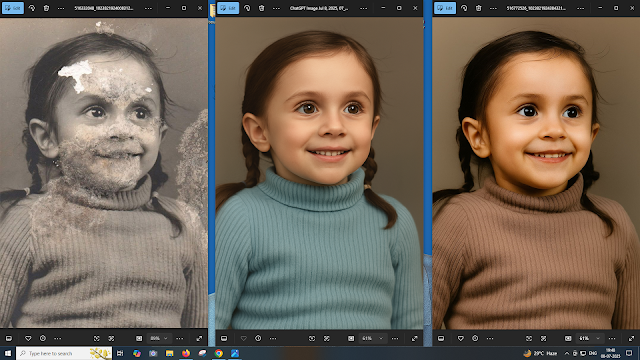
 Old Photo Restoration and Colorization Using AI: A Journey from Damage to Digital Beauty (With AI Prompt to clean or restore the damaged phone)


🧒 The Story Behind the Photo

A vintage black-and-white photo of a little girl wearing a ribbed sweater and smiling with curiosity had suffered the effects of time. The image had:

  • Mold and water damage across the face and chest

  • Faded paper texture

  • Blotches and cracks that obscured features like the mouth and nose

  • Large portions of the face and background missing

It looked almost beyond repair.

This was not just a picture—it was a memory frozen in time, and the goal was to give it a new life while keeping the emotional warmth intact.

🛠️ How Restoration Was Done Using AI

Using modern tools like DALL·E, GFPGAN, Remini, or Photoshop Generative Fill, AI can now reconstruct facial features and recolor black-and-white photos with astonishing accuracy.

Here’s the prompt used for AI-based restoration:


✅ Restoration Prompt Used:

"Restore and beautify an old, heavily damaged black-and-white photograph of a young girl. Remove all visible mold, cracks, tears, and stains from the image—especially across the face, sweater, and background. Smooth and reconstruct missing facial features like the nose, mouth, and eyes realistically, maintaining the original joyful expression. Add natural-looking skin tones, soft brown eyes, and dark brown hair in neatly parted twin braids. Recolor the ribbed sweater with a warm, earthy tone (e.g., cocoa brown), preserving the texture. Use soft lighting and a neutral beige background to maintain the vintage feel while giving a clean, high-resolution modern finish."


🎨 The Magic of Colorization

After removing the damage, the next step was colorization. Adding color to a black-and-white image not only enhances realism but also adds emotional warmth. In this case, the AI tool was instructed to use:

  • Warm skin tones

  • Dark brown hair styled in braids

  • Brown ribbed sweater to preserve vintage clothing style

  • Neutral background to avoid distraction and keep focus on the subject

The result? A lifelike, clean, vibrant version of the photo—almost like it was taken with a modern camera.

📷 Before vs After: What Changed?

AspectBefore (Original)After (AI Restored)
DamageMold, cracks, missing facial partsCompletely cleaned, face reconstructed
ColorBlack & whiteWarm skin tone, natural sweater color
SharpnessBlurry, low detailHigh resolution, sharp and vivid details
Emotional AppealDistracted by damageInnocent smile fully restored


🔧 Tools You Can Use for Photo Restoration

Here are the tools that you can use to restore your old photographs:

  1. Remini App – For smartphones; excellent for restoring portraits

  2. DALL·E + Prompting – For creative AI-based restoration and enhancement

  3. Photoshop AI (Generative Fill) – For advanced users

  4. GFPGAN (Github/Open Source) – For face restoration

  5. MyHeritage In Color™ – For quick colorization online

Each tool has its own strengths. If you’re dealing with light damage, online tools work great. For heavy restoration like the image we used, combining tools gives better results.

📌 Step-by-Step: How You Can Restore a Damaged Photo Using AI

Step 1: Scan Your Photo

Use a good-quality scanner to digitize your photo in at least 300 DPI resolution.

Step 2: Clean the Image (Optional)

Use tools like Photoshop or Snapseed to adjust brightness and remove large spots manually if needed.

Step 3: Use AI for Restoration

Upload your image to a tool like Remini, GFPGAN, or DALL·E with the prompt (like the one above).

Step 4: Apply Colorization

Once the damage is restored, use a separate tool (like MyHeritage or Photoshop Neural Filters) to add color.

Step 5: Download and Save

Save your photo in high resolution. You can print, share, or even frame it for your home.


💡 Tips for Better Results

  • Use clear, descriptive prompts for AI tools.

  • Mention emotions (e.g., “joyful expression”) to retain personality.

  • Choose natural colors—AI tends to over-saturate unless guided.

  • Always keep an untouched original version backed up.


💬 What This Restoration Meant

Restoring a photo like this isn’t just about pixels—it’s about bringing history to life. For the family, it was as if a lost memory had been returned. A child’s smile, once hidden under layers of damage, now shines bright again.

This shows how AI isn’t just about automation—it’s a tool for empathy, healing, and preservation.


🧭 Final Thoughts

AI-based photo restoration and colorization have revolutionized how we protect and relive the past. What used to take hours of manual editing can now be done within minutes—with breathtaking accuracy.

If you have an old family photo hidden in an album or drawer, don’t let it fade away forever. Digitize it, restore it, and give it the second life it deserves.

EXAMPLE AND DONE WITH CHATGPT

Old Photo Restoration and Colorization Using AI: A Journey from Damage to Digital Beauty (With AI Prompt to clean or restore the damaged phone) - OLD PHOTO

Old Photo Restoration and Colorization Using AI: A Journey from Damage to Digital Beauty (With AI Prompt to clean or restore the damaged phone) CHATGPT USED THE BELOW PROMPT

🔧 Prompt Used to Clean, Recolor, and Beautify the above Damaged Photo: AI IMAGE RESTORE PROMPT - 1

"Restore this heavily damaged vintage photograph of a young girl. Remove all visible mold, stains, and scratches on the face, sweater, and background while preserving the natural texture. Reconstruct missing or faded facial features realistically—especially eyes, nose, mouth, and cheeks—maintaining the original expression. Smooth out the damaged areas of the sweater without losing its ribbed pattern.

Recolor the image with soft, natural tones—light brown or dark brunette hair, warm skin tones, and subtle color in the sweater (like pastel blue, green, or beige). Keep the background neutral and clean. Add a touch of photo enhancement to make the image look vibrant but true to its vintage character. The final result should look like a professionally retouched and colorized portrait with minimal artifacts and high emotional clarity."


Old Photo Restoration and Colorization Using AI: A Journey from Damage to Digital Beauty (With AI Prompt to clean or restore the damaged phone) USED THE BELOW PROMPT


🎨 Restoration & Recolor Prompt (Used for the Image Above): AI IMAGE RESOTRE PROMPT -2

"Restore and beautify an old, heavily damaged black-and-white photograph of a young girl. Remove all visible mold, cracks, tears, and stains from the image—especially across the face, sweater, and background. Smooth and reconstruct missing facial features like the nose, mouth, and eyes realistically, maintaining the original joyful expression.

Add natural-looking skin tones, soft brown eyes, and dark brown hair in neatly parted twin braids. Recolor the ribbed sweater with a warm, earthy tone (e.g., cocoa brown), preserving the texture. Use soft lighting and a neutral beige background to maintain the vintage feel while giving a clean, high-resolution modern finish. Final image should appear professionally restored, lifelike, and emotionally warm."

You can use or modify this prompt in AI tools like DALL·E, Remini, GFPGAN, or Photoshop Generative Fill for similar high-quality results.


📚 You May Also Like to Read