Showing posts with label Samsung Flash UFS3. Show all posts

Thursday, October 9, 2014

Samsung S5610K Flashing and IMEI Repair With HWK Samsung Tool


How to flash Samsung S5610K with Samsung Tool HWK SarasSoft? The below is the complete procedure to flash Samsung S5610K with HWK. You can also flash this Samsung model with Flash Loader, the flash loader process also given here.

Samsung S5610K Restart and blinking problem solved by flash with HWK Samsung Tool.

Samsung S5610K Flash With HWK
  • Open Samsung Tool HWK
  • Click on Swift Tab
  • Select Model S5610K
  • Choose the flash files
  • Click on Write Flash


Samsung S5610K write flash with hwk and blinking solution
 Samsung S5610K IMEI Repair with HWK UFS3


Samsung S5610K IMEI Repair with HWK UFS3 Samsung Tool
Samsung Flash Done With Flash Loader

Samsung S5610K Flash done with Flash loader Lite


Sunday, September 21, 2014

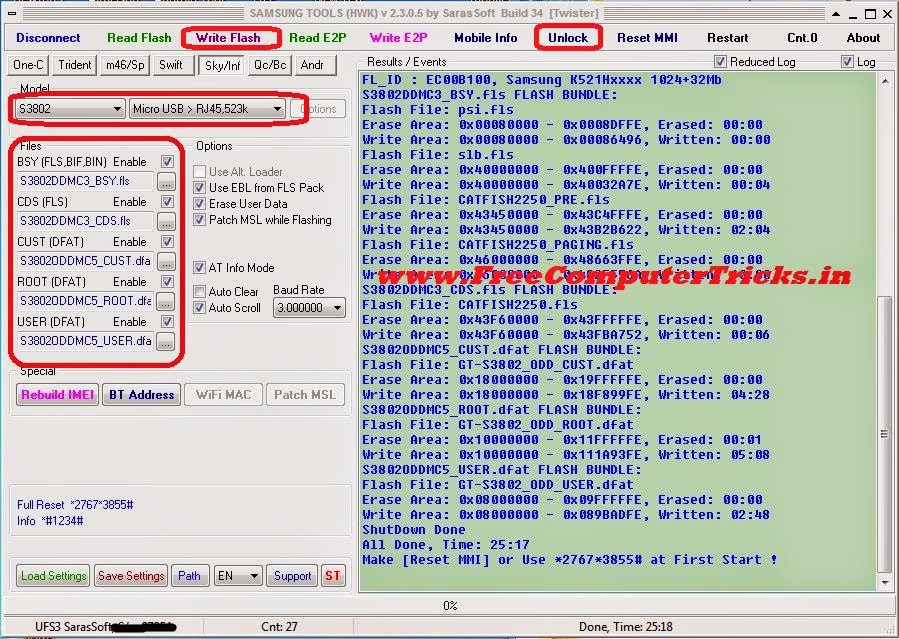
Samsung S3802 Flashing, Phone Lock and SIMlock Successfully Done With HWK


How to flash Samsung S3802 with HWK? the below is the procedure to flash Samsung S3802 with HWK Samsung Tool, in this way you can hard reset the Samsung phone and can reset the SIM lock for this model. So follow the below procedure to flash and phone lock of Samsung S3802.

Samsung S3802 Flash With HWK
  • Open Samsung Tool (SAMs)
  • Go to Sky/Inf Tab and Choose S3802 Model
  • Now Choose the S3802 firmware files
  • Click on Write Flash and Connect the phone with UART Cable
  • After flash complete Click on Unlock Tab to Factory Reset the phone


Samsung S3802 Flashing and Phone Unlock and SIMlock solution with HWK samsung tool
HWK Unlock Log S3802


IME1: --------
IME2: --------0
S/N : RZ1DA61E7K
NCK : 00000000 [#0111*00000000#]
SCK : 00000000 [#0121*00000000#]
SPCK: 00000000 [#0133*00000000#]
PCK : 00000000 [#0141*00000000#]
MCK : 12345678 [#0199*12345678#]
Lock Keys Reset Done

Use these default code after flash the phone.

Friday, August 1, 2014

How to Flash Samsung S5292 With HWK UFS3 - Samsung S5292 Flash Done


Samsung GT-S5292 successfully flashed with hwk ufs3, the below is the complete and step by step procedure to flash S5292 with ufs. If you are unable to flash Samsung S5292 with hwk ufs, then this will help you to flash the mobile. 

How to flash Samsung S5292

Download
  • S5292XXMB2_OXEMB3.zip from Internet


Flash Samsung S5292 with UFS3

  • Open Samsung Tools HWK SAMs.exe
  • Click on Sky/Inf Tab
  • Select Model S5292
  • Select S5292 Flash Files
S5292OXEMB3_CSC.dffs
S5292XXMB2_BSY.fls
S5292XXMB2_CDS.fls
  • Click on Write Flash
  • Connect C3303K cable to phone with battery

Samsung S5292 Flash success with ufs3
Samsung S5292 UFS3 Log


MSL Patched OK: 00:00
If used non Auto-Ignition cable, press Power-On button
IF_SBL: XGOLD230, Ok
IF_EBL: CATFISH2230_PCM_1.9400_M1S1 1.9400, Mode: BB
BAUD_R: 921600
FL_ID : FF000000, Unknown 1024+32Mb
S5292XXMB2_BSY.fls FLASH BUNDLE:
Flash File: CATFISH.fls
Erase Area: 0x40000000 - 0x4001FFFE, Erased: 00:00
Write Area: 0x40000000 - 0x4001FFFE, Written: 00:02
Flash File: CATFISH.fls
Erase Area: 0x40020000 - 0x42EFFFFE, Erased: 00:20
Write Area: 0x40020000 - 0x42A03212...Writing
IFXFR_ERR_BAD_CMD
WR_ERR_DATA: ,at: 41526800
ShutDown Done 


MSL Patched OK: 00:00
If used non Auto-Ignition cable, press Power-On button
IF_SBL: XGOLD230, Ok
IF_EBL: CATFISH2230_PCM_1.9400_M1S1 1.9400, Mode: BB
BAUD_R: 921600
FL_ID : FF000000, Unknown 1024+32Mb
S5292XXMB2_BSY.fls FLASH BUNDLE:
Flash File: CATFISH.fls
Erase Area: 0x40000000 - 0x4001FFFE, Erased: 00:00
Write Area: 0x40000000 - 0x4001FFFE, Written: 00:02
Flash File: CATFISH.fls
Erase Area: 0x40020000 - 0x42EFFFFE, Erased: 00:11
Write Area: 0x40020000 - 0x42A03212, Written: 15:03
S5292XXMB2_CDS.fls FLASH BUNDLE:
Flash File: CATFISH.fls
Erase Area: 0x42F00000 - 0x42FFFFFE, Erased: 00:00
Write Area: 0x42F00000 - 0x42F6B64E, Written: 00:09
S5292OXEMB3_CSC.dffs FLASH BUNDLE:
Flash File: temp_GT-S5292_OXE.dffs
Erase Area: 0x43000000 - 0x47E7FFFE, Erased: 00:20
Write Area: 0x43000000 - 0x45CFB2EA, Written: 18:04
ShutDown Done
All Done, Time: 34:38
Make [Reset MMI] or Use *2767*3855# at First Start !


Sunday, June 29, 2014

How to Flash Samsung E3213 With Z3x - www.FreeComputerTricks.in


Unable flash Samsung E3213K with z3x, I tried to flash in two ways but not success but Samsung E3213K flash done with HWK UFS3. Just see the below details.


Samsung E3213K Flash With Z3X Samsung 2G Tool


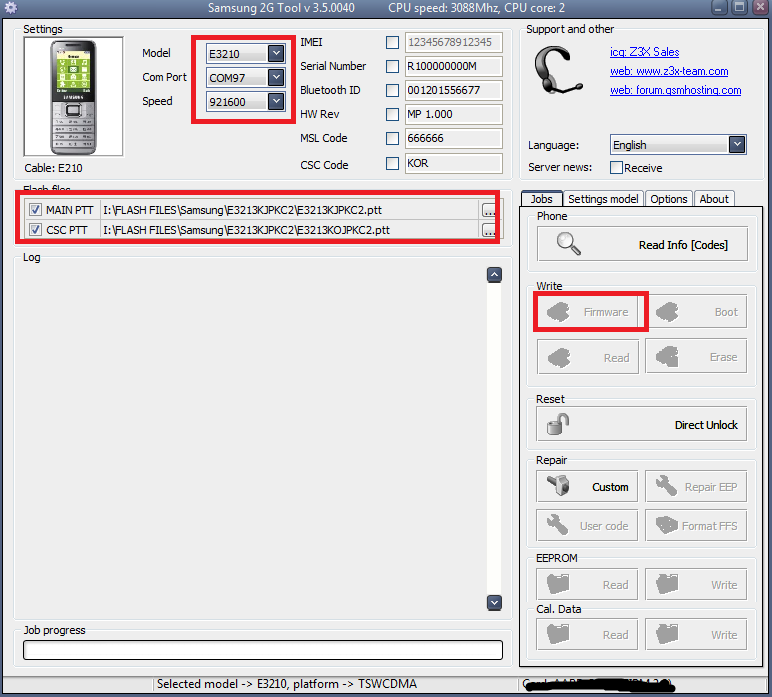
As you noticed that in Samsung 2G tool there is no such Model but you can choose E3210 only for Reset/Unlock the E3213K, the Firmware option is not enabled. See the below scree shot.


Samsung E3213 Unable to Flash with Z3x Samsung 2G tool

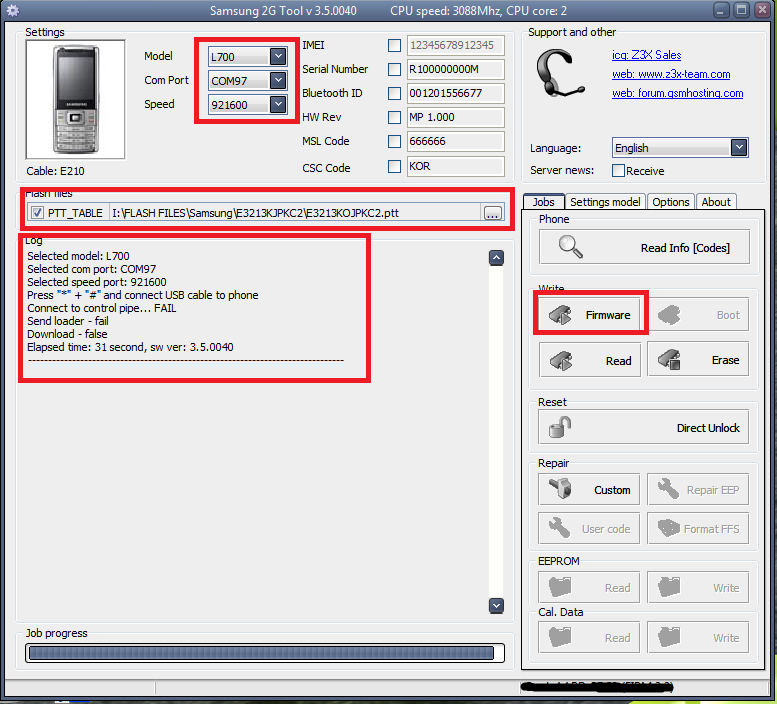
But Some one told me that you can flash Samsung E3213K with Z3x by selecting the model L700, and tried it but it's not detected the phone. Just See the below screen shot.


Samsung L700 to Flash E3213K with Samsung 2G Tool Z3x


If any body knows the complete procedure using z3x, can post through comments.


E3213K Flashed With UFS 


But good news for HWK UFS users, the Samsung E3213K successfully flashed with Ufs3 to know the step by step process to flash E3213K with HWK please vising the below link of my website, which is very useful.


Saturday, May 3, 2014

Samsung E2252 Restart Problem Solved - How to Flash Samsung E2252 With HWK UFS3


Samsung E2252 blinking problem solved by flashing with HWK UFS3, the below is the procedure how to flash samsung e2252 with hwk ufs3. The tutorial is simple step by step and easy to understand, if you are new in Mobile Technician field the this is very useful to you, follow the tutorial and enjoy 

Regards


How to flash Samsung E2252 with UFS3

  • Open Samsung Tool HWK By SarasSoft
  • Click on Connect
  • Go to Swift Tab
  • Select Model E2252
  • Select PTT File (i.e. E2252DD.ptt)
  • Click on Write Flash
  • Then Connect USB Cable to mobile by pressing 1+3 (E213 Cable)


how to flash samsung e2252 with hwk ufs3 sarasSoft


Samsung E2252 Full Reset/Hard Reset/E2P Reset Code

*2767*3855#

Samsung Info Code

*#8002*8376263#
or
*#1234#


Wednesday, April 23, 2014

Samsung E3213K Flash Done With UFS HWK - Samsung E3213 K How To Flash With UFS


How to Flash Samsung E3213K with HWK UFS-3? See the below steps to flash the Samsung E3213K with UFS-3.


  • Open Samsung Tool UFS 3
  • Go to Swift Tab
  • Select E3213K Model from The List
  • Select PTT File i.e. E3213KJPKC2.ptt
  • Click on Write Flash
  • Press 5 and 8 on Samsung E3213K and Insert UART Cable


How to Flash Samsung E3213K with HWK

📚 You May Also Like to Read