Showing posts with label Samsung Mobile Flashing. Show all posts

Friday, June 20, 2014

Samsung GT-S5292 Read Phone Lock Success With Z3X - www.FreeComputerTricks.in


How to read Samsung S5292 phone lock code or security code in Z3X, so below is the procedure to read user code for z3x users.


Steps:
  • Open Samsung Tool
  • Select Model S5222
  • Select Z3X COM Port
  • Switch ON the phone
  • Click Read (User Code) 
  • Connect UART Cable/C3300k Cable


Samsung S5292 Read User Code Done with Z3X

Sunday, May 4, 2014

How to Flash Samsung E1207T With Z3X - www.FreeComputerTricks.in


How to flash samsung e1207t with z3x? Z3X does not have this model, so to flash samsung e1207t with z3x follow the below steps.


Samsung E1207T Flashing Process With Z3X
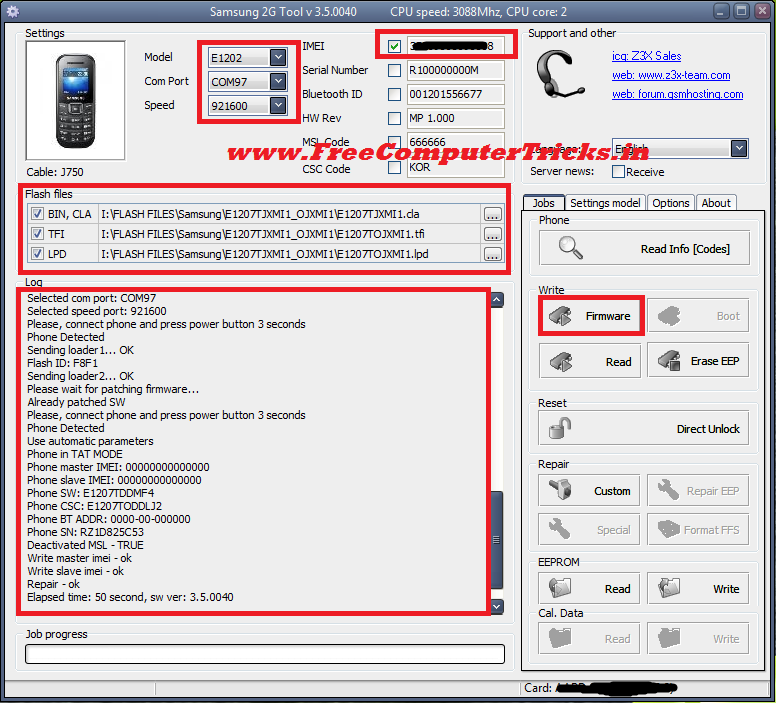
 
  • Open Samsung 2G Tool
  • Select Model E1202
  • Select Z3X COM Port
  • Select Flash Files
  • Click on Firmware


How to flash Samsung E1207T with Z3X

Samsung E1207T Flash Z3X Log:

Selected model: E1202
Selected com port: COM97
Selected speed port: 921600
Please, connect phone and press power button 3 seconds
Phone Detected
Sending loader1... OK
Flash ID: 0004
Set speed - Fail
Send loaders - fail
Patch MSL - FAIL

Elapsed time: 9 second, sw ver: 3.5.0040

If you got this error "Set speed - Fail" while flashing e1207t with z3x Press the power button 3 to 4 seconds after connect the USB Cable to the phone.

------------------------------------------------------------------
Selected model: E1202
Selected com port: COM97
Selected speed port: 921600
Please, connect phone and press power button 3 seconds
Phone Detected
Sending loader1... OK
Flash ID: F8F1
Sending loader2... OK
Please wait for patching firmware...
Already patched SW
Please, connect phone and press power button 3 seconds
Phone Detected
Use automatic parameters
Phone in TAT MODE
Phone master IMEI: 00000000000000
Phone slave IMEI: 00000000000000
Phone SW: E1207TDDMF4
Phone CSC: E1207TODDLJ2
Phone BT ADDR: 0000-00-000000
Phone SN: RZ1D825C53
Deactivated MSL - TRUE
[FREZEE]: 73246500
[NET Lock]: 00000000
[Subset Lock]: 00000000
[SP Lock]: 00000000
[CP Lock]: 00000000
[Sim Lock]: 00000000
[Phone Lock]: 84867195
Read info - ok
Elapsed time: 52 second, sw ver: 3.5.0040
------------------------------------------------------------------

Wednesday, April 23, 2014

Samsung E3213K Flash Done With UFS HWK - Samsung E3213 K How To Flash With UFS


How to Flash Samsung E3213K with HWK UFS-3? See the below steps to flash the Samsung E3213K with UFS-3.


  • Open Samsung Tool UFS 3
  • Go to Swift Tab
  • Select E3213K Model from The List
  • Select PTT File i.e. E3213KJPKC2.ptt
  • Click on Write Flash
  • Press 5 and 8 on Samsung E3213K and Insert UART Cable


How to Flash Samsung E3213K with HWK

Thursday, March 6, 2014

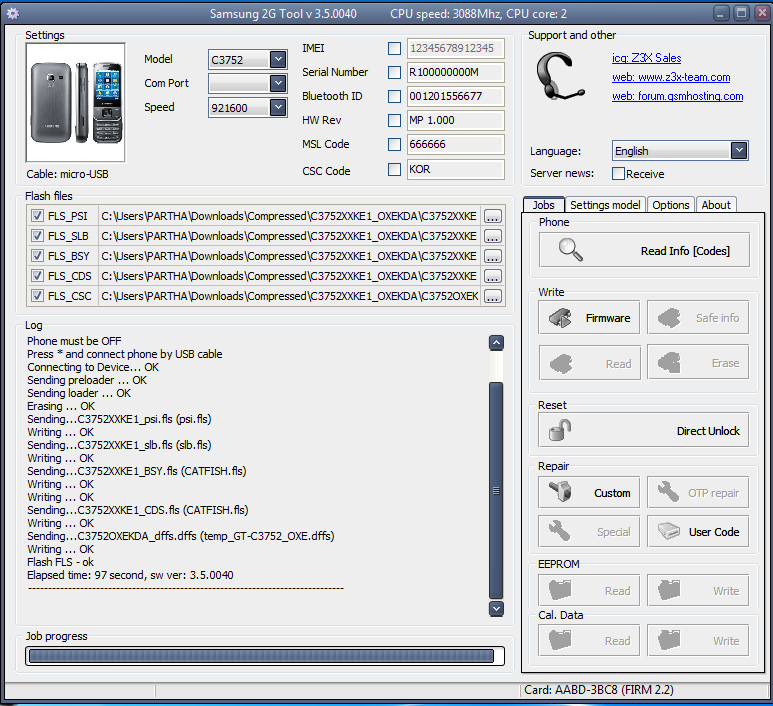
Samsung C3752 Flash Done With Z3X - How To Flash C3752 With Z3X, Samsung 2G Tool


Samsung c3752 flash done with z3x box, Samsung 2G Tool. Here is the process how to flash c3752 with z3x box.

  • Open Samsung 2G Tool
  • Select the Model C3752
  • Select the Flash Files i.e. PSI, SLB, BSY,CDS and CSC
  • Then Just connect the Micro USB Cable to Samsung C3752


Samsung C3752 Flashing with Z3X Box using Samsung 2G Tool v3.5.0040

That's wait for sometime to finish the flash process and you have successfully flash the Samsung C3752 phone with Z2X.

Monday, December 23, 2013

How to Flash Samsung C3262 - Samsung C3262 Restart When Insert SIM Solved.....


If the C3262 restarts after inserting the SIM Card then you need to flash the mobile with following procedure. In this procedure your mobile flash will be OK but you may lost the Samsung Mobile C3262 IMIE No but which can rebuild using ufs.


How to Flash Samsung C3262

  • First Download Samsung Firmware C3262DDLI8_BIN and C3262OWNLI2_CSC

  • Download Flash Loader 7.5.16_CSC_v0.1_LITE 


Steps:


  • Now open the bfloader (Flash Loader 7.5.16_CSC_v0.1_LITE )

  • Click on Main Partition and Select C3262DD.ptt which can be found in C3262DDLI8_BIN Folder ( Select ALL Partitions)

  • Click on CSC and select C3262WN.ptt From C3262OWNLI2_CSC folder ( Select All Partitions)

  • Then Click on Start

  • Press Volume Down + Power Button and Connect the Samsung C3262 with USB Cable

Samsung C3262 Flash Done With Flash Loader

  • After Complete the flash the phone will be reboot to normal mode


Now you can check the Samsung C3262 by inserting SIM Card, it won't restart but you can See the Phone IMEI No is 000000, so don't worry about that you can Rebuild the IMEI using UFS.


📚 You May Also Like to Read