Showing posts with label Samsung Restart Problem Solved. Show all posts

Thursday, January 9, 2014

Samsung S5222 Restart Problem Solved - www.FreeComputerTricks.in


Today I faced a problem on Samsung S5222 Mobile, it restarts when you trying to call that Mobile number the Samsung S5222 restart. SO if you have the same problem then you can easily solve this problem by flashing the phone with Flash Tool E2, the below is the process how you can flash the Samsung S5222 with out using any box.


Steps:

  • Download Flash Tool For Samsung S5222 { C3750_C3650_FlashTool_E2_XMM2150 }

  • Download Samsung S5222 Firmware { S5222XXLAF_OXELAE } 

  • Open the Flash Tool {FlashTool_E2}

  • Choose the Flash Files: See the Below Screen Shot
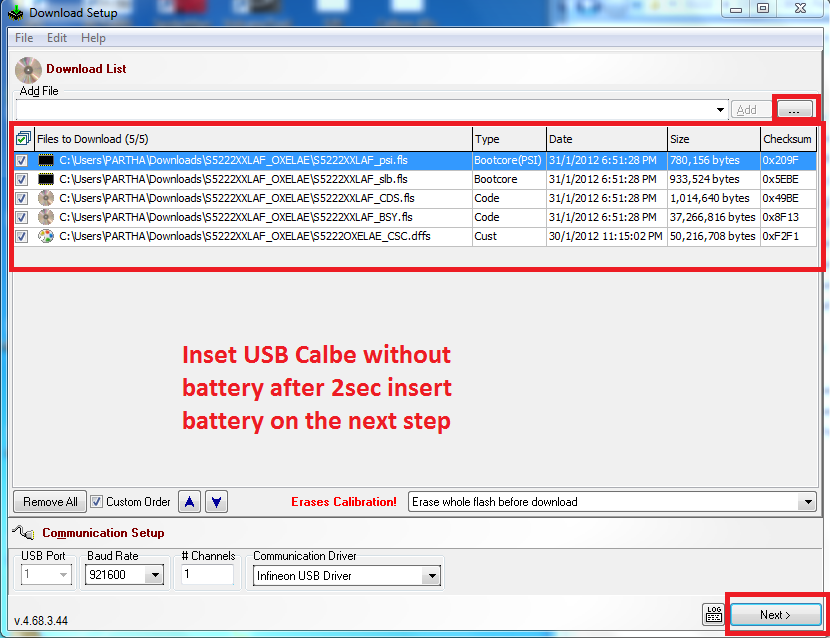

Samsung S5222 Flashing Without using Any Box

  • Click Next
 
Samsung S5222 USB Flashing
  • Click on Start USB1


  • Remove the Battery From the phone and connect it to the computer after 2-3 seconds Insert Battery to the phone.

That's all now the restart problem of Samsung S5222 solved.


Monday, December 23, 2013

How to Flash Samsung C3262 - Samsung C3262 Restart When Insert SIM Solved.....


If the C3262 restarts after inserting the SIM Card then you need to flash the mobile with following procedure. In this procedure your mobile flash will be OK but you may lost the Samsung Mobile C3262 IMIE No but which can rebuild using ufs.


How to Flash Samsung C3262

  • First Download Samsung Firmware C3262DDLI8_BIN and C3262OWNLI2_CSC

  • Download Flash Loader 7.5.16_CSC_v0.1_LITE 


Steps:


  • Now open the bfloader (Flash Loader 7.5.16_CSC_v0.1_LITE )

  • Click on Main Partition and Select C3262DD.ptt which can be found in C3262DDLI8_BIN Folder ( Select ALL Partitions)

  • Click on CSC and select C3262WN.ptt From C3262OWNLI2_CSC folder ( Select All Partitions)

  • Then Click on Start

  • Press Volume Down + Power Button and Connect the Samsung C3262 with USB Cable

Samsung C3262 Flash Done With Flash Loader

  • After Complete the flash the phone will be reboot to normal mode


Now you can check the Samsung C3262 by inserting SIM Card, it won't restart but you can See the Phone IMEI No is 000000, so don't worry about that you can Rebuild the IMEI using UFS.


📚 You May Also Like to Read