Samsung S5222 Restart Problem Solved - www.FreeComputerTricks.in
Today I faced a problem on Samsung S5222 Mobile, it restarts when you trying to call that Mobile number the Samsung S5222 restart. SO if you have the same problem then you can easily solve this problem by flashing the phone with Flash Tool E2, the below is the process how you can flash the Samsung S5222 with out using any box.
Steps:
- Download Flash Tool For Samsung S5222 { C3750_C3650_FlashTool_E2_XMM2150 }
- Download Samsung S5222 Firmware { S5222XXLAF_OXELAE }
- Open the Flash Tool {FlashTool_E2}
- Choose the Flash Files: See the Below Screen Shot
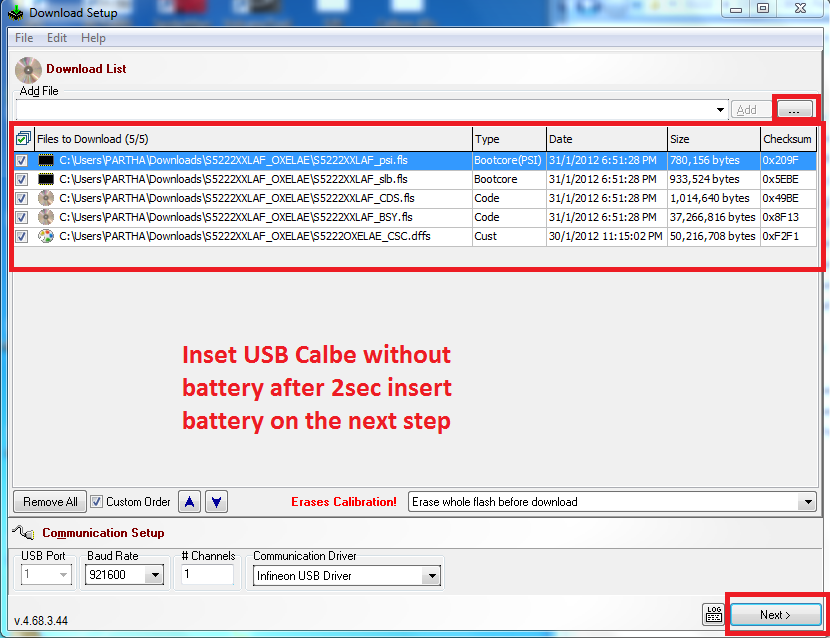 |
| Samsung S5222 Flashing Without using Any Box |
- Click Next
 |
| Samsung S5222 USB Flashing |
- Click on Start USB1
- Remove the Battery From the phone and connect it to the computer after 2-3 seconds Insert Battery to the phone.
That's all now the restart problem of Samsung S5222 solved.


