Showing posts with label Windows Tutorials. Show all posts

Sunday, October 11, 2020

Unable to Boot and Install Windows 10 From USB Pen Drive (Rufus) - Solved


Unable to Boot and Install Windows 10 From USB Pen Drive (Rufus) - Solved

Hi friends in this video I will show the complete process to create a bootable USB drive (Windows 10) using rufus tool and if you are not able to boot or install the Windows form USB Pen Drive then this video will help you to findout the solution, so please watch the video till end (in Hindi) and create a bootable Pen drive to install Windows on your PC. Thank You!
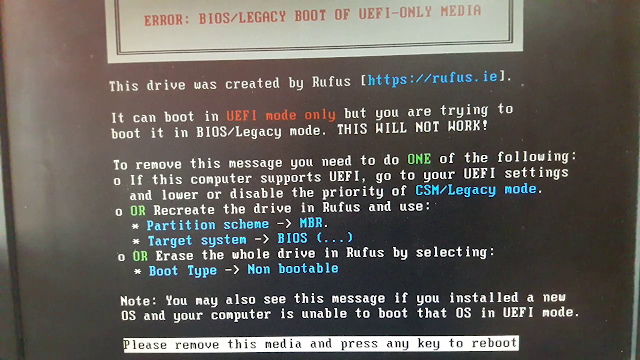
ERROR: BIOS/LEGACY BOOT OF UEFI-ONLY MEDIA


UEFI bootable USB of Windows does not boot

How to use Rufus to install Windows 10?

Bootable USB for UEFI and Legacy BIOS

How to create bootable Pen Drive Windows 10

Unable to install Windows from USB Drive - Solved

My PC does not show any Bootable PEN Drive - Solution

Can not boot from USB flash drive 100% Solution Here

How to use RUFUS to create a UEFI Bootable WIndows 10?

How to create bootable Windows USB Flash Drive?


ERROR: BIOS/LEGACY BOOT OF UEFI-ONLY MEDIA

This drive was created by Rufus [https://rufus.ie]

It can boot in UEFI mode Only but you are trying to 

boot it in BIOS/Legacy Mode. THIS WILL NOT WORK!

To remove this message you need to do ONE of the following:

If this computer supports UEFI, go to your UEFI settings and lower

or disable the priority of CSM/Legacy Mode.

OR Recreate the drive in Rufus and use:

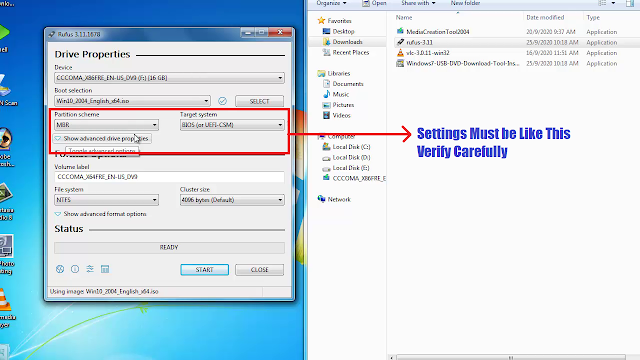
*Partition scheme -> MBR.

*Target system -> BIOS (...)

OR Erase the whole drive in Rufus by selecting

* Boot Type -> Non bootable

Note: You may also see this message if you installed a new OS and your computer

is unable to boot that OS in UEFI Mode.

Please remove this media and press any key to reboot


Download RUFUS 

https://rufus.ie/


Windows 10 ISO Download Link

https://www.microsoft.com/en-in/software-download/windows10

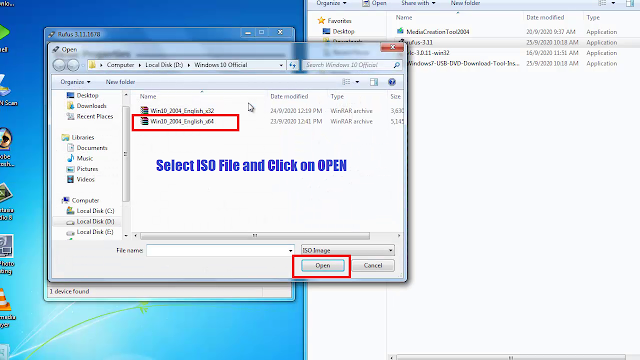
Open rufus tool and Select the Windows 10 ISO file


Choose Windows 10 ISO


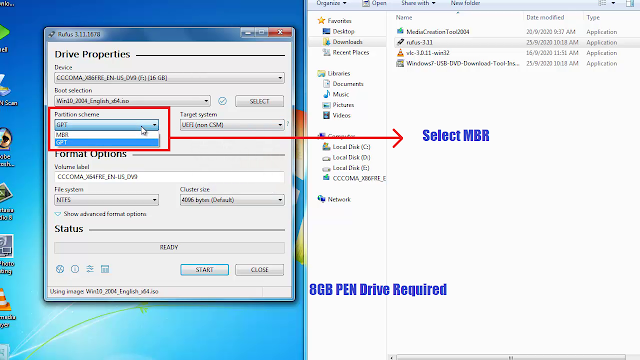
Choose MBR Here

rufus settings must like this, please verify carefully

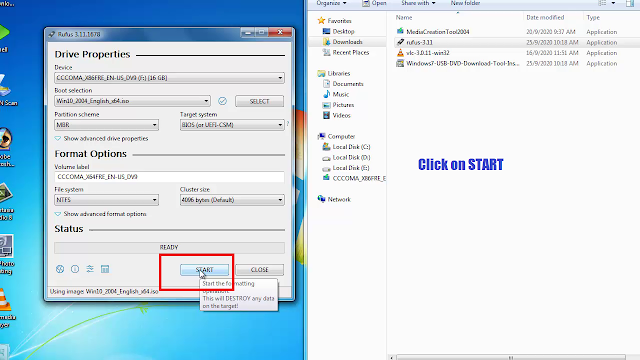
Click on Start - Minimum 8GB Pen Drive required 


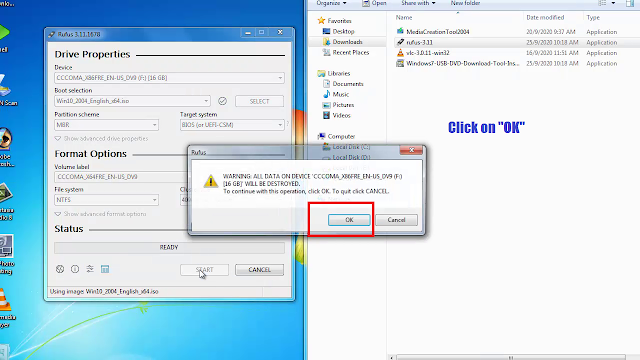
Click on OK


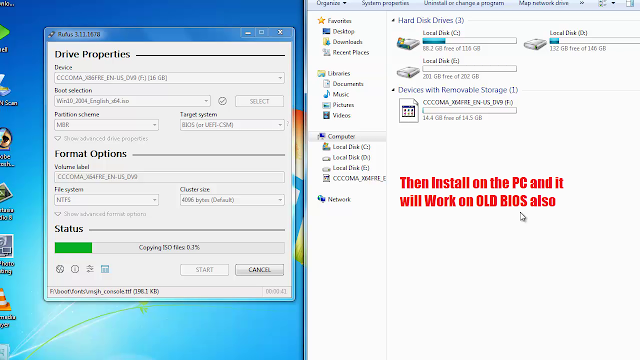
After complete it will work on old BIOS also


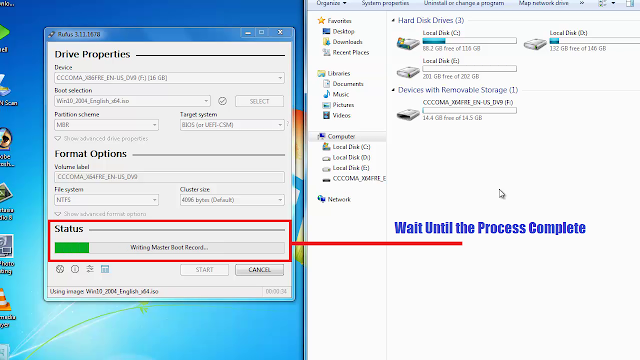
Please wait until the process complete


Monday, April 1, 2013

Basic Networking Questions and Answers Part 3 (WINDOWS OPERATING SYSTEM DIFFERENCES) - Interview questions for system administrator or Desktop Support


Basic Networking Questions and Answers For WINDOWS OPERATING SYSTEM DIFFERENCES - Interview questions for system administrator or Desktop Support. Here are some basic differences between various operating system.


1. Difference between Windows 95  Windows 98

WINDOWS 95                                          WINDOWS 98

  • NO USB support                                   USB Support
  • FAT16 and FAT32 for R2                         FAT16 and FAT32
  • Single monitor                                      Multiple monitor
  • No Direct X                                          Direct X
  • Internet Explorer 3                               Internet Explorer 4
  • No Advance Power management         APM (Advance Power management)


2. Difference between Windows xp and Windows 98

WINDIWS XP                                           WINDOWS 98

  • Remote desktop                                 No Remote desktop
  • GPO (Group Policy)                             No GPO
  • 2 processor                                       1 PROCESSOR
  • NTLM & Kerberos                                NTLM authentication
  • Encryption                                         No Encryption
  • Disk quota                                         No Disk quota
  • FAT, FAT32 and NTFS                          FAT and FAT32
  • IE 5                                                  IE 4


3. Difference between Windows xp home and Windows xp professional


WINDOWS XP HOME                                    WINDOWS XP PROFESSIONAL

  • No remote desktop                             Remote desktop
  • No offline folders                               Offline folders
  • 1 processor                                        2 processor
  • Workgroup                                         Workgroup and domain
  • No Encryption                                     Encryption
  • No GPO                                             GPO
  • No Roaming profile                            Roaming profile
  • No ASR                                            ASR


WINDOWS OPERATING SYSTEM DIFFERENCES


4. Difference between Window 2000 professional and Windows xp professional

WINDOWS 2000 PROFESSIONAL                  WINDOWS XP PROFESSIONAL

  • ERD                                                     ASR
  • Terminal service                                    Remote desktop and assistance
  • IE-5                                                     IE-6
  • No firewall                                            Basic firewall
  • No Alternate IP configuration                   Alternate IP configuration
  • No System restore                                  System restore
  • No Driver rollback feature                         Driver rollback feature


5. Difference between Windows 2000 server and 2003 server      

WINDOWS 2000                                         WINDOWS 2000


  • No shadow copy                                        Shadow copy feature
  • No RPC over HTTP                                     RPC over HTTP
  • 32 BIT                                                     32 bit and 64 bit
  • No domain rename features                        Domain rename features
  • Terminal service                                   Remote desktop and assistance
  • ERD                                                          ASR
  • Less command line tool                               More command line tools
  • No stub dns                                               Stub dns
  • IIS 5 (Internet Information Services 5)           IIS 6


6. Difference between Windows NT and 2003

WINDOWS NT                                           WINDOWS 2003

  • Directory service                               Active directory service
  • FAT16 and NTFS 4.0                        FAT16, FAT32 and NTFS 5.0
  • Compression                            Compression, Encryption and disk quota 
  • System policy                                   Group policy
  • Local and Global group                       Local, Global and Universal Group
  • No ip sec                                          ipsec built in
  • 40000 user limit                                100000 user limit
  • NTLM authentication                   NTLM and Kerberos authentication
  • Basic disk                                         Basic and dynamic disk
  • No shadow copy                                 Shadow copy
  • ERD                                                  ASR


7. Difference between Windows NT and 2000

WINDOWS NT                                            WINDOWS 2000
  • Directory service                            Active directory service
  • FAT16 and NTFS 4.0             FAT16, FAT32 AND NTFS 5.0                       
  • Compression                          Compression, Encryption and Disk quota
  • System policy                                     Group policy
  • Local and Global group                 Local, Global and Universal Group
  • No ip sec                                           ipsec built in
  • 40000 user limit                                  100000 user limit
  • NTLM authentication                 NTLM and Kerberos authentication
  • Basic disk                                           Basic and dynamic disk


📚 You May Also Like to Read