Showing posts with label Face Lock Remove YXTEL. Show all posts

Friday, January 10, 2014

YXTEL C910 China Mobile Read Flash Success With Volcano Tool - www.FreeComputerTricks.in


This process will help you to read user locks and all other security codes of the mobile YXTEL C910. So to do that please follow the steps below to Read Flash for the mobile YXTEL C910 and save it for future use. The YXTEL C910 flash file can be used to flash the same model of YXTEL.


Steps:


  • Open Volcano Tool 

  • Go to Detect Tab

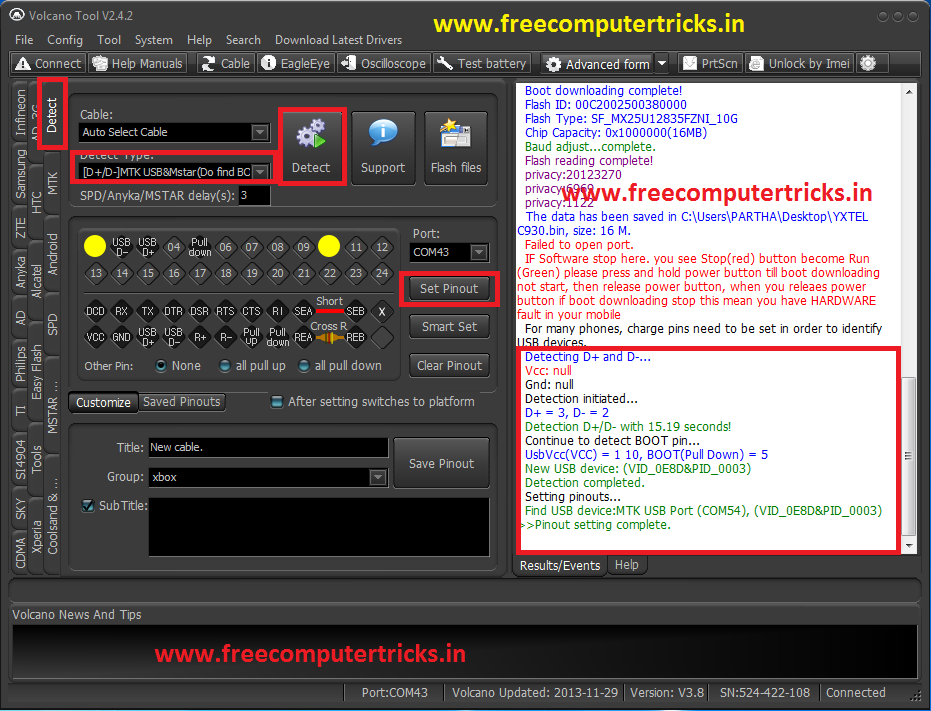
  • Set the Detect Type to [D+/D-]MTK&Mstar(Do Find BOOT)

  • Click on Detect

  • Then Click on Set Pinout


Set Pinout YXTEL C910 on Volcano Tool

  • Now Go Back to MTK Tab

  • Select Boot Built-in Boot-11(v5.1232)(625A/62xx)


  • Click on Read Flash

  • Un-Tick  Auto-detect Pinouts

YXTEL C910 Read Flash with Volcano Tool V2.4.2

  • Click on RUN


That's all Now you can get the user set codes for the mobile phone and also you can save the back up flash file of YXTEL C910 to your computer, which can be use on another YXTEL C910 mobile to flash.

Wednesday, January 1, 2014

YXTEL C930 Face Lock Solution (Volcano Tool) - www.FreeComputerTricks.in - Solved 100%


Here I am going to show you how you can remove YXTEL C930 Face lock easily using Volcano Tool v2.4.2, also this tutorial helps you to remove face lock on the yxtel mobile without losing your phone data. Just Read Flash with volcano tool where you can find the password of the phone.


Steps:

Read Flash with Volcano Tool v2.4.2

YXTEL C930 Mobile CPU Type-6260


yxtel c930 face lock removed with volcano tool


  • After Wrong face detection you will be asked to enter password to unlock the phone

  • Read Flash with volcano (Follow the above link or Click Here)

  • See the results of volcano tool and you will get a privacy code :6969 and this code is to unlock the phone


  • Then go to settings and and do a Factory Reset ( Use the same code) after that your phone will not ask any face lock and then off the face lock.


  • Before you did all this thing you can simply try the default security code for YXTEL C930 (6969)


If you are facing any problem feel free to post comment


Regards:


YXTEL C930 Successfully Unlocked With Volcano Tool v2.4.2 (Read/Write Flash and Format) YXTEL C930 CPU Type-6260


Here is the tutorial about YXTEL C930 Mobile with CPU-6260, how to Read/Write Flash and Format using Volcano Tool V2.4.2. This tutorial is easy to understand and very help full to the mobile service personnel, So to do this follow the below steps, also I put some screenshots for better understanding and enjoy.


Steps:


  • Open Volcano Tool V2.4.2

  • Go to Detect Tab and Select [D+/D-]MTK USB&Mstar(Do find BOOT)

  • Now Connect the Phone YXTEL C930 (Use the Box Power Cable and Insert Jig Cable)

  • Click on Detect (No Need To Press Any Buttons)

  • Then Click on Set Pinout

  • Now Come Back to MTK Tab

  • Select Built-in Boot-11(v5.1232)625A/62xx)

  • Select Operation Like Read Flash, Write Flash and Format etc.

  • Uncheck Auto-detect Pinouts

  • And finally Click on Run (No Need to Press Power Button)


Please See the below screenshots


PINOUT Setting For Yxtel C930 Using Volcano Box

YXTEL C930 PINOUT Setting Volcano


YXTEL C930 READ FLASH WITH VOLCANO
YXTEL C930 CPU-6260 Read Flash Done With Volcano Box (Volcano Tool v2.4.2)

In this way you can also Write flash and write IMEI to the YXTEL c930.


HAPPY NEW YEAR
           TO
ALL VISITORS


📚 You May Also Like to Read