October 28, 2011 PARTHASARATHI PANDA
Normally we use Nokia Mobiles as USB modem to access internet on Computers. Just Download OVI Suite from the Nokia website, install it on your PC, Connect the Nokia Phone with a Data Cable and get connected to the internet.
But do you know that, if you have a Nokia Mobile with Wi-Fi option then you can connect your Wi-Fi devices such as Laptops, ipod, ipad or other Wi-Fi mobiles to access internet of the mobile by turning it on as a Wi-Fi Router.
So how can we do that, here is the example for Nokia 5800 Mobile Handset and the procedure is almost same for all Nokia Wi-Fi enabled Handset, just follow these steps bellow.
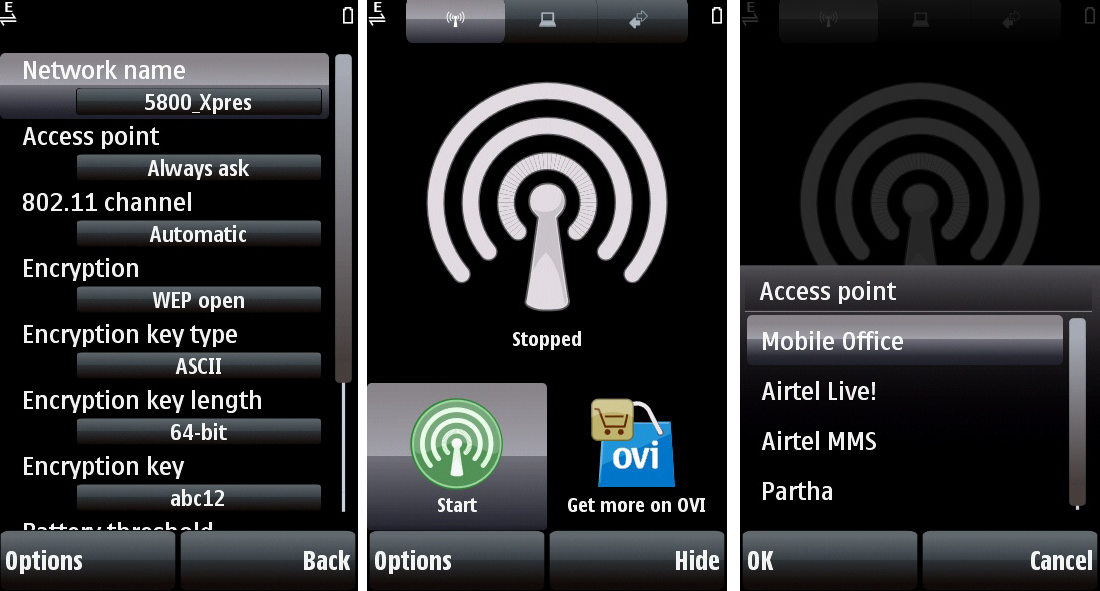 |
| How to Use Nokia 5800 As a Wi-Fi Hotspot |
You need to install an Application Called Joikuspot on the Nokia 5800 to make it a WiFi HotSpot.It's simple to download just go to store.ovi.com and register for an account, then come back to your mobile, open Ovi store Sign in using the user name and password that You have created, then make a search for Joikuspot you will get JOIKUSPOT LIGHT WiFi HotSpot Which is Free and JOIKUSPOT PREMIUM WiFi HotSpot for which you have to pay, let's go for the LIGHT download and install it.
Steps:
- Install Joikuspot app on the phone.
- Now open the Application and click allow sharing internet connection.
- Set a Password on it.
- Now you can use the phone as Wi-Fi hotspot, access the hotspot with password.
Then open the JoikuSpot it will ask to "Allow sharing your internet connection with external devices" select No, then go to Option-> Settings-> Encryption Select WEP Open select OK, then Encryption key length 64-bit which requires 5 characters or 128-bit which requires 13 characters just go for 64-bit it can be changed later if want, then Joikuspot automatically generate a Encryption key you can change it just select and give a key i.e abc12, then go back and select Start then select Yes it will ask for Access point select Mobile Office if you are using Airtel SIM or as per your service provider, now go to the Laptop search for Wifi Click Connect and give the Encryption key you have created. That's all now you can access internet on your Laptop through the WiFi.
~~~::: Nokia Launched Nokia 6.1 with Android One :::~~~
Nokia 6.1 Key Specifications:
- Network Speed: LTE Cat. 4, 150 Mbps DL/50 Mbps UL
- WiFi: 802.11 a/b/g/n
- Bluetooth: 5.0
- GPS/AGPS+GLONASS+BDS+FM/RDS, NFC
- Operating System: Android Oreo
- RAM: 4 GB (LPDDR 4)
CPU: Qualcomm Snapdragon 630, octa-core, 2.2 GHz
- Storage: Internal memory 64 GB2 eMMC 5.1
- MicroSD card slot Support for up to 128 GB3
- Display: Size and type 5.5” (13.97 cm) IPS LCD, full-HD
You can get more details on Nokia Official Website.


