Showing posts with label China Mobile Hard Reset. Show all posts

Wednesday, September 10, 2014

Rokea S3 SPD 6530 Read Password Done With Volcano Tool


Rokea S3 which has a SPD 65310 CPU, Read Password and Unlock done with volcano tool V2.3.9. The below is the process to read password of Rokea S3 SPD 6530.

Rokea S3 Volcano Tool Log:
Detection initiated...
  Vcc: 12 13
  Gnd: 14
  Analyzing D+ and D-...
  D+ = 8, D- = 7
  Analyzing USB device, please wait...
  Find USB device:SCI USB2Serial (COM12), (VID_1782&PID_4D00)


  Internal version: SPRD3
  Boot downloaded.
  Start boot please wait a moment....
  Spreadtrum Boot Block version 1.2
  CPU TYPE:SC6530 [65300000]
  FLASH ID: 00C8006000180000
  Flash Type:[GD]  25LQ128YIG
  Size:0x1000000(16MB)
  [phone lock]  1234
  [phone lock]  32888
  
  One privacy lock: 1-9 or #.
  Reading IMEI password completed

Rokea S3 read password and unlock with volcano tool

Rokea S3 Read Password Volcano Tool


  • Open volcano tool
  • Go to SPD Tab
  • Select Read IMEI & Read Password
  • Select Boot 13-6530
  • Tick on Auto Detect Pinouts
  • Click on Run

Tuesday, August 19, 2014

Sking S9300 UDisk Error Solved and Read Flash Done With Volcano Tool


Sking S9300 U Disk error done with flash the phone using volcano tool. Error while saving to U disk Reinitializing Please wait.... and read flash done with Volcano Tool v.2.7.7. see the below details to know how to read flash with volcano tool Sking S9300.


sking s9300 read flash volcano tool spd sc6530


Sking S9300 Read Flash With Volcano Tool


  • Open Volcano Tool
  • Go to SPD Tab
  • Select Read Flash
  • Select Built-in-Boot_13
  • Select Size 32MB
  • Click on Start


For U Disk error on Sking S9300 download flash file and write flash with Volcano Tool. 


Monday, May 12, 2014

China Clone Samsung i9500 Hard Reset and Pattern Unlock Done - www.FreeComputerTricks.in


China high copy samsung mobile i9500 hard reset and pattern unlock process. how to pattern unlock china samsung i9500 with key and with the help of Android Multi Tool. Android Multi Tool how to enter into Recovery Mode. The below is the procedure to hard reset and pattern unlock of samsung high copy china i9500 with Android Multi Tool to wipe data/factory reset.


Android Multi Tool Enter to Recovery Mode China Samsung copy i9005


Hard Reset and Pattern Unlock China Samsung i9500


  • Switch On the Phone
  • Connect the phone to PC using micro USB Cable
  • Let the Driver to be Installed
  • Now Open Android Multi Tool
  • Then Type Number 3 on keyboard and hit Enter
  • Now the mobile will reboot in Recovery Mode

China Samsung i9500 hard reset and pattern unlock


  • Press power button to see recovery options
  • Now select wipe data/factory reset
  • Then Press Left Soft Key to Enter

China Samsung i9500 Samsung High Copy pattern Lock Removed


Note : For this trick the phone should have enabled USB Debug, in the Samsung copy china i9500 has already enabled the USB Debug so not to worry this trick will work on this model to hard reset/pattern unlock with entering the Android recovery mode. In this method all the data will be erased on the phone.


You can check whether the phone has enabled USB Debug or Not

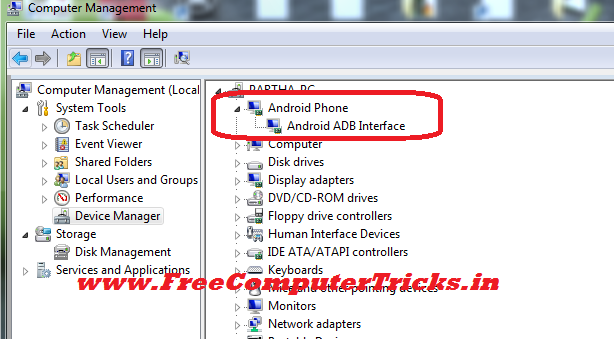
Go to Device Manager of the Computer if you See Android Phone and Android ADB Interface, (See the below screenshot) that means the phone has enabled USB Debug Option, then you can easily use the above trick to unlock pattern or hard reset the phone.


Android ADB Interface on Device Manager


📚 You May Also Like to Read