Showing posts with label Intex Mobile Flashing. Show all posts

Thursday, October 5, 2017

Intex Aqua 3G+ SPD Flash Tool Failed Uart Send Error - Solved


If you are facing the error message "Failed: Uart Send Error", while flashing Intex Aqua 3G+ using SPD flash tool, then this topic will show you how to solve this problem on Aqua 3G plus SPD Android smart phone. In this topic you will know how to flash Intex Aqua 3G plus with SPD flash tool and how to solve SPD flash tool Error Failed Uart Sent Error.

While flashing Aqua 3G+ SPD SC77xx_16 : Intex_Aqua_3G+_V12_Indian_SER with SPD Upgrade Tool, get this SPD tool error message called "Failed: Uart Send Error" to solve this error please see the below details.

Model Details:

Model: Intex Aqua 3G Plus
CPU: Spreadtrum (SPD)
H/W Ver: v2.06
S/W Ver: V12

Intex Aqua 3G Plus Flash Success With SPD Flash Tool

Failed: Uart Send Error Solution For Intex Aqua 3G Plus:

1) Download Intex Aqua 3G+ Firmware (Latest Firmware version is Intex_Aqua_3G_Plus_V12_Indian_SER) You can download Intex Firmware.
2) Now Download Spreadtrum (SPD) Research Download Tool V4.0.0001.
3) Then Open the Research Download Tool and Open Intex_Aqua_3G+_V12_Indian_SER.pac file.
4) Now click on Start Button and Connect the phone to PC (Hold Volume Down Key and Connect USB)

Intex Aqua 3G+ Boot Key = Hold Volume Down Key and Connect USB

Downloads:

Intex Aqua 3G Plus Firmware Download From the below links.

Intex Aqua 3G Plus Firmware Download Link 1.

Intex Aqua 3G Plus Firmware Download Link 2.

SPD Research Download Tool Version 4.0.0001 Download Here.

Monday, November 21, 2016

How to Flash Intex Aqua T5 V0.5 With Smart Phone Flash Tool


Here is the process, how you can flash Intex aqua T5 Android smartphone using flash tool. If you normally flash the phone using smartphone flash tool, the flashing process will not complete or hang the preloader or stuck on 5% in the flashing process, so how you overcome this process is as below.

Intex Aqua T5 Flashing OK SP Flash Tool
Today I try to flash this Intex Aqua T5 smartphone using sp flash tool with the normal process as we do to flash MTK base smartphones using smartphone flash tool. i.e. Select the scatter file and click on download or sometimes we uncheck the preloader and then try to flash, but here in this phone I try both the process to flash the phone, but it stuck in 5% with some error message. Finally I got a solution for this problem and share it here.

Downloads:
Intex Aqua T5 V0.5 Firmware Here
 
How to flash Intex Aqua T5?
  • Download the above firmware for Aqua T5
  • Now Open flash tool and select scatter file
  • Select Download Only
  • Now select one by one image file and click Download

For Example first select USRDATA (only select this) then click on download and connect the switched off phone to the PC, then select ANDROID click on download. Download one by one using this process and leave the PRELOADER and try to switch on the phone if the phone not switching on then again flash PRELOADER only.

That's all now you are successfully flash the Intex Aqua T5 using smartphone flash tool.

Monday, October 26, 2015

How to Flash Intex Mega 528 SC6531 CPU With Volcano tool


How to flash Intex Mega 528with volcano tool and Intex Mega 528 flash file download. The below is the complete process to flash the phone using volcano tool, download the Intex Mega 528 flash file and write flash or format with volcano tool. Intex Mega 528 has SPD SC6531 CPU so before do format back up the full flash with read flash option with volcano tool. 


Intex Mega 528 CPU Details:
Spreadtrum Boot Block version 1.2
CPU TYPE:SC6531 [65310001]
FLASH ID: 00C8006000160000
Flash Type: SF_GD25LQ32                
Size:0x400000(4MB)

Intex Mega 528 Flash With Volcano tool
Intex Mega 528 Format Log Volcano Tool:
Detection initiated...
  Vcc: null
  Gnd: 5
  Analyzing D+ and D-...
  D+ = 3, D- = 2
  Detection D+/D- with 1.19 seconds.
  Continue to detect BOOT pin...
  Found [SPD] USB device: SCI USB2Serial,(VID_1782&PID_4D00)
  BOOT(Pull Down) = 4
  Setting...
  Find USB device:SCI USB2Serial (COM59), (VID_1782&PID_4D00)
  Pinouts setting complete!
    

  Internal version: SPRD3
  Boot downloaded.
  Start boot please wait a moment....
  Spreadtrum Boot Block version 1.2
  CPU TYPE:SC6531 [65310001]
  FLASH ID: 00C8006000160000
  Flash Type: SF_GD25LQ32               
  Size:0x400000(4MB)
  Set to Factory successfully.

Friday, September 4, 2015

Intex Turbo S5 SPD SC6531 Read Flash and Format Done With Volcano Tool


How to flash Intex Turbo S5 Mobile phone? The phone has Spreadtrum SC6531 CPU and this can be format using Volcano tool. First read flash and then select the flash file and format the phone. The below is the complete process to flash Intex Turbo S5 SPD SC6531 CPU phone.

Intex Turbo S5 CPU Details:
  • Spreadtrum Boot Block version 1.2
  • CPU TYPE:SC6531 [65310001]
  • FLASH ID: 00C8006000160000
  • Flash Type: SF_GD25LQ32                
  • Size:0x400000(4MB)

Intex Turbo S5 SPD SC6531 Format With Volcano Tool


Intex Turbo S5 SPD SC6531 Read Flash With Volcano Tool

Intex Turbo S5 SPD SC6531 Volcano Tool Format Log:
Detection initiated...
  Vcc: null
  Gnd: null
  Analyzing D+ and D-...
  D+ = 3, D- = 2
  Detection D+/D- with 1.16 seconds.
  Continue to detect BOOT pin...
  Found [SPD] USB device: SCI USB2Serial,(VID_1782&PID_4D00)
  UsbVcc(VCC) = 1 10, BOOT(Pull Down) = 4
  Setting...
  Find USB device:SCI USB2Serial (COM34), (VID_1782&PID_4D00)
  Pinouts setting complete!
    

  Internal version: SPRD3
  Boot downloaded.
  Start boot please wait a moment....
  Spreadtrum Boot Block version 1.2
  CPU TYPE:SC6531 [65310001]
  FLASH ID: 00C8006000160000
  Flash Type: SF_GD25LQ32               
  Size:0x400000(4MB)
  Set to Factory successfully.


Saturday, July 11, 2015

How to Flash Intex Aqua Power With Smartphone Flash Tool


Here you will get to know, how to flash Intex Aqua power using SP flash tool or SmartPhone Flash tool. To flash the Intex Aqua power you need to download the Aqua power firmware and SP flash tool using the internet. See the below process to flash the Intex Aqua Power with SP flash tool.

Downloads:
Intex Aqua Power Firmware
SP Flash Tool v3.1344.214


Intex Aqua Power Flash With SP Flash Tool:
  • Open flash tool
  • Load scatter MT6592_Android_scatter.txt
  • Click on Download

Aqua Power flash done with sp flash tool
Search Tags:
Intex mobile flashing
Intex Aqua firmware
Intex Aqua Power hard reset
Intex Aqua power pattern unlock
Intex Aqua privacy protection password solution
Intex firmware download
Intex flash tool
Intex flash firmware with sp flash tool
Download firmwares intex mobile
Smartphone flash tool
How to format Intex Aqua power
Android phone hard reset and flashing 

Wednesday, May 6, 2015

How to Flash Intex Aqua N15 With SmartPhone Flash Tool


Here is the process to flash Intex Aqua N15 using SP flash tool, to flash the phone you need to download Intex Aqua N15 Firmware and SP flash tool latest version. 

Intex Aqua N15 Flashing Will help you to solve the hang problem of the Intex Aqua N15, it will also the restart problem of the phone, see the below point how the Intex Aqua N15 flashing helps.


Intex Aqua N15 Software/Firmware Faults and Solution
Hangs on Logo
Restarting Problem
Blinking Problem
Gallery not opening
Menu options not work properly 
Suck on Intex Logo etc.

All the above problems may be due to Firmware issue or software issue or flashing issue, so download the firmware and flash the phone using SP flash tool, the phone problems will solve.

Downloads:
Intex Aqua N15 Firmware
Smartphone Flash Tool 


Intex Aqua N15 Flash with SP flash tool V5

How to flash Intex Aqua N15
  • Open sp flash tool 
  • Load MT6582_Android_scatter.txt
  • Click on Download
  • Now connect the switched off phone PC using USB Cable


Tuesday, May 5, 2015

Intex Platinum Pearl SPD SC6531 Read Flash, Write Flash and Format Done With Volcano Tool


Intex Platinum Pearl SPD SC6531 read, write flash and format successfully done with Volcano Tool V3.0.2. The below is the complete process to flash the phone using Volcano Tool. As you know the Intex Platinum Pearl phone has a SPD SC6531 CPU and now can be flash using Volcano utility latest version 2015 V3.0.2. See the below details to flash the phone and to download flash file of Intex Platinum Pearl SC6531.

Download Intex Platinum Pearl Volcano Tool Flash file and flash the phone using volcano box.


Intex Platinum Pearl Read Flash done with Volcano tool
  • open volcano tool
  • Go to SPD tab
  • First Read Flash (Important)
  • Select read flash and select boot SC6531
  • Select the Read flash file
  • Connect the phone using Volcano Jig Cable
  • Click Start


Intex Platinum Pearl SC6531 Read Flash Done With Volcano Tool

Intex Platinum Pearl Boot Key is 3+6

Intex Platinum Pearl Write Flash done with Volcano tool

Intex Platinum Pearl SC6531 Write Flash Done With Volcano Tool

Intex Platinum Pearl SC6531 Format Done With Volcano Tool


Intex Platinum Pearl SC6531 Format Done With Volcano Tool

Friday, May 1, 2015

How To Flash Intex Cloud X12 With Upgrade Tool


How to flash Intex Cloud X12 with Upgrade Tool? The below is the procedure to flash Intex cloud X12 using upgrade download tool. The phone has SPD SC7710G CPU and can be flash with .pac file using upgrade tool. The step by step procedure to flash the phone is given below.

Downloads:
intex_cloud_x12_v22_indian.pac
Upgrade Download Tool


Intex Cloud X12 Flashing
  • Open Upgrade tool
  • Load the flash file (.pac)
  • Click on Start button
  • Now Hold Volume Up Button connect the phone to PC 


Intex Cloud X12 flash done with Upgrade Tool

Sunday, April 19, 2015

How to Flash Intex Cloud Fx Mobile Phone Firefox Operating System


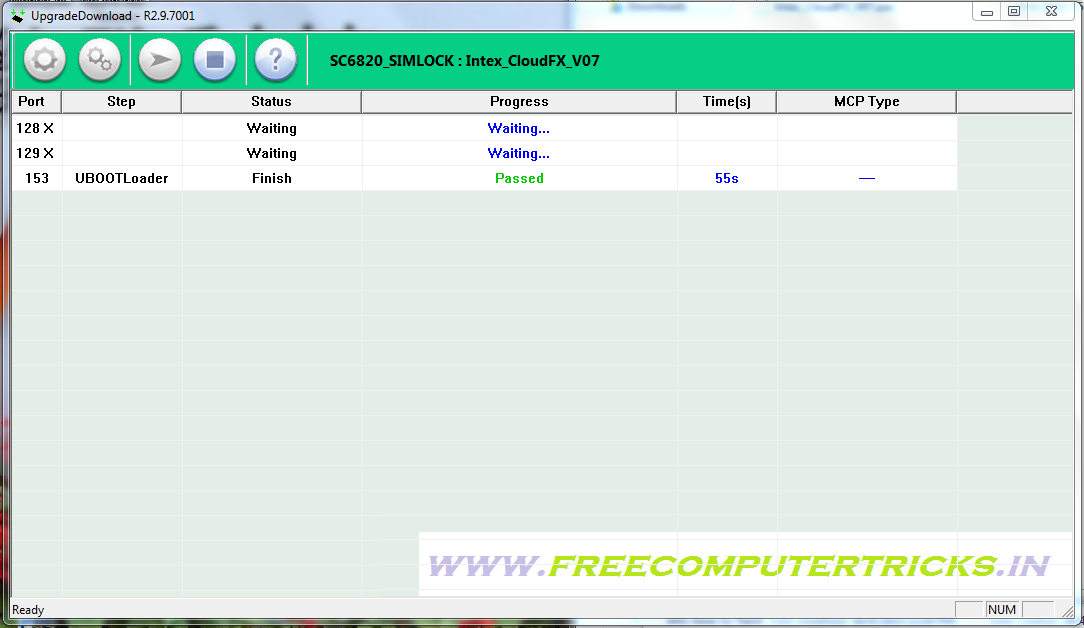
Intex Cloud Fx Firefox OS flash done with Upgrade Download Tool, the below is the details about how to flash the phone using flash tool and where to download the firmware for Intex Cloud Fx Mobile phone. The Intex cloud FX has Firefox Operating System and can be flash using the following steps or procedure.

Intex Cloud Fx Firefox OS Flash Success With Flash Tool

Downloads
Spreadtrum Upgrade Tool
Intex Cloud Fx Firmware
Intex_CloudFX_V07.pac or Intex_CloudFX_V08_SER.pac as per your mobile S/W version.


How to Flash Intex Cloud Fx Firefox OS
Open UpgradeDownload Tool
Load Packet and Select the Intex CloudFx V07.pac
Click on Start
Now Connect the USB cable to the phone by holding Volume Down


Intex Cloud Fx Flash Done With Flash Tool

Saturday, January 24, 2015

How to Format Intex Aqua 3G Mini With Volcano Tool


Intex Aqua 3G Mini with MTK MT6572 CPU format success with volcano tool, the below is the way to format Intex mobile with volcano tool using USB Cable. The phone has MTK CPU and can be hard reset and flash with Volcano Utility.

Intex Aqua 3G Mini Format With Volcano Utility/Tool
  • Open volcano tool/utility
  • Go to MTK Tab
  • Choose Boot 14 and Tick on USB Mode
  • Click Start
  • Now connect the switched off phone using USB Cable


Intex Aqua 3G Mini Format Success With Volcano Tool using USB Cable

Intex Aqua 3G Mini Volcano Tool Format Log:
Current Port:COM11
  Available Ports:COM1 COM11
  Analysis of USB port,Please insert phone USB cable.
  Connecting...
  CPU TYPE:MT6572
  Hardware version:CA01
  Software version:0000
  Boot downloading complete!
  FlashID:009800BC00900066
  Flash Type: NAND_TYBC0A111236KC10     
  FlashLen:20000000


  Analysis of system files...
  PRELOADER:  addr:0x000000 --length:0x100000
  PRO_INFO:  addr:0x100000 --length:0x100000
  NVRAM:  addr:0x200000 --length:0x300000
  PROTECT_F:  addr:0x500000 --length:0x300000
  PROTECT_S:  addr:0x800000 --length:0x300000
  SECCFG:  addr:0xB00000 --length:0x040000
  UBOOT:  addr:0xB40000 --length:0x080000
  BOOTIMG:  addr:0xBC0000 --length:0x600000
  RECOVERY:  addr:0x11C0000 --length:0x600000
  SEC_RO:  addr:0x17C0000 --length:0x040000
  MISC:  addr:0x1800000 --length:0x0C0000
  LOGO:  addr:0x18C0000 --length:0x100000
  EXPDB:  addr:0x19C0000 --length:0x200000
  FAT:  addr:0x1BC0000 --length:0x1400000
  ANDROID:  addr:0x2FC0000 --length:0x10900000
  CACHE:  addr:0x138C0000 --length:0x700000
  USRDATA:  addr:0x13FC0000 --length:0xB5C0000
  BMTPOOL:  addr:0xFFFF0028 --length:0x000000
  
    Format addr:0x13FC0000 --Format length:0xB5C0000
  Read phone information success.
  Format range: Start Address: 0x13FC0000,Format Length :0xB5C0000
  Flash erasing complete!


📚 You May Also Like to Read