Showing posts with label Micromax Download Tool. Show all posts

Tuesday, April 29, 2014

How To Flash Micromax A089 With SP Flash Tool - www.FreeComputerTricks.in


In this topic I will show you how to flash Micromax A089 with sp flash tool and download link of Micromax A089 firmware and SP flash tool. Micromax A089 MT6572 CPU Flashing procedure and download flash file here.


SP_Flash_Tool_v3.1320.0.174.rar
Micromax_A089_EI_V0.13_user(20140124).rar


How to flash Micromax A089 with Smart Phone Flash Tool


  • Open SP Flash Tool ( Flash_tool.exe)
  • Click on Scatter Loading and Select MT6572_Android_scatter.txt
  • Click on Download
  • Now connect USB cable to Micromax A089 
When you see Download OK that means you have successfully flashed the phone


Micromax A089 MTK CPU Flash Done With SP Flash Tool


Micromax A089 Hard Reset


  • Volume Up + Power Button
  • Then Press Power Button
  • Volume Down to Select and Volume Up to Enter
 

Saturday, April 12, 2014

How to Flash Micromax Bolt A27 With Download Tool


In this topic I will show you hot to flash Micromax Bolt/Ninja A27 with Download Tool. The below is the step by step process to flash Micromax A27 with UPGRADE DOWNLOAD_R2.9.7003.


Micromax A27 Firmware and Flash Tool - Download from support site
Install SCI Android USB Driver For Micromax A27


Micromax A27 Bolt Firmware V3_22.02.2013
UPGRADE DOWNLOAD_R2.9.7003
SCI-android-usb-driver-jungo-v4.rar Extract it and Double click on DPInst to Install the Driver


Steps to Flash Micromax A27 with Flash Tool

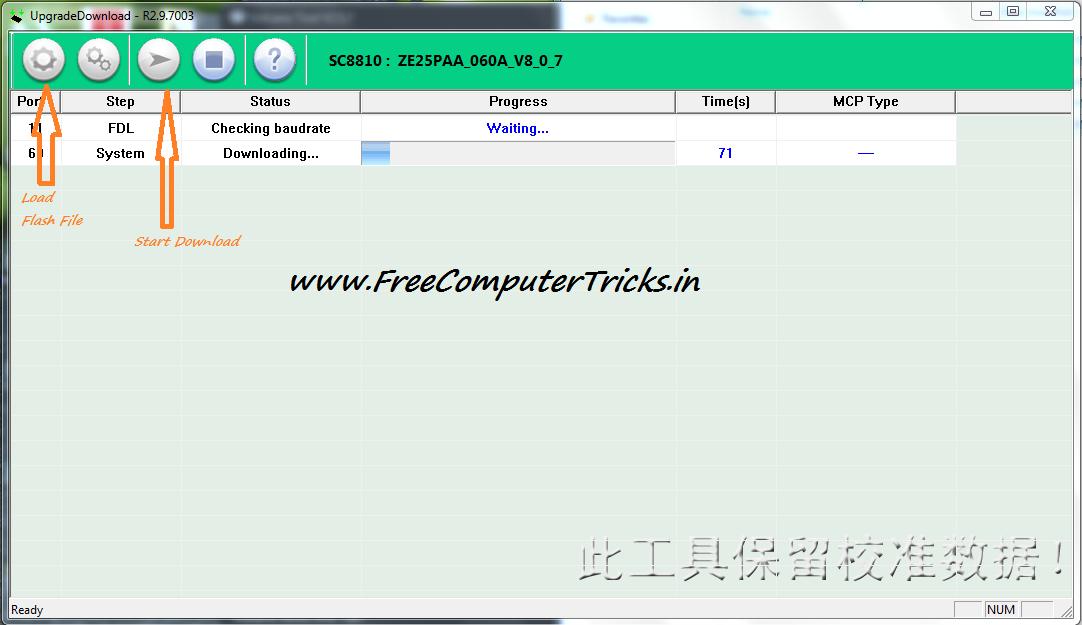
  • Open UpgradeDownload.exe
  • Click on Load Packet and Select Micromax A27 Firmware .pac File i.e. ze25paa_060.pac
  • Now Click on Start Downloading
  • Press Volume Down and Connect micro USB Cable to Phone
  • The Download Process will start automatically


Micromax A27 Upgrade Download Tool How To Flash

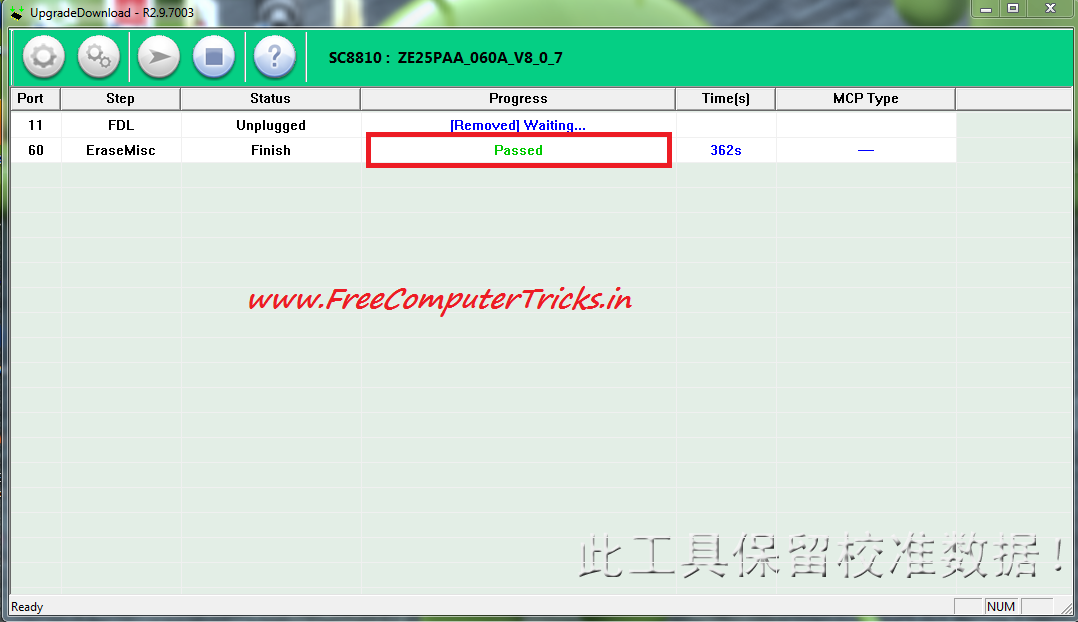
After complete the download process you will get a success message Passed like the below Image.

Micromax A27 Successfully Flashed with Flash Tool

Note: If you have professional in Mobile Repairing the do this other wise don't try this you may damage the phone, do it at your own risk.

When download Micromax A27 firmware/flash file check the SW version and HW version (Remove Battery and See) and Download the correct file version for the mobile other wise the mobile won't be start or it may dead the mobile phone.

📚 You May Also Like to Read