Showing posts with label Photoshop Tutorials. Show all posts

Sunday, October 31, 2021

COVID CERTIFICATE ID Card Size Photoshop PSD Template A4 Size


How to print COVID Certificate in Identity Card size using photoshop, If you need to print the COVID Certificate in ID card size and laminate using 85x110MM lamination pouch, then here is the all in one solution for you, Here you can download covid certificate id card size photoshop PSD template to print the certificate in ID card size and also you will get the video tutorial on our YouTube channel.


COVID CERTIFICATE ID Card Size Photoshop PSD Template A4 Size 


Please download the COVID CERTIFICATE ID Card Size Photoshop PSD Template A4 Size below and follow the instruction in the video on our YouTube channel.

COVID CERTIFICATE ID Card Size Photoshop PSD Template A4 Size - Sample


How to print covid certificate in id card size?

Photoshop covid certificate id card size template?

Photoshop templates.

Covid vaccine certificate pdf to id card.

How to open PDF file on Photoshop?


SIZE OF THE ID CARD

3X4" (INCH) OR 7.2CMX10.2CM

LAMINATION POUCH SIZE: 85X110 MM

DOWNLOADS

COVID CERTIFICATE ID Card Size Photoshop PSD Template A4 Size 


Download the Photoshop template 

Open the template in photoshop

Then open the COVID certificate pdf file in photoshop

Resize the image and drag on to the template

Again resize the image as required.

For more details please Follow the instruction in Hindi and Odia on our YouTube channel.

Friday, May 3, 2019

Flex Banner Design Photos and PSD File - Telecom Shop Banner 10x3 Feet - PSD Banner Template Free Download


Hi friends here you can download ready made designs of banners in this website and her is the one of the flex banner design psd file and photos and the banner belongs to telecom shops or mobile shops or computer shops or mobile and computer repairing shops etc. If you are looking to print the banner flex for your shop, then here is the one of the best and simple design for you, please download the .psd file and change the name as required, then print it.

Photoshop PSD Banner Template download.
How to create big banners using photoshop?
Create your own banner design - Flex Print.
Free Computer Tricks - Banner Designs.
PSD Banners free download.
10x3 feet banner psd design free download.
120x36 inch psd banner free download.

How to Use the .psd File?

The file here uploaded is in .psd format, as you all know the format belongs to Photoshop, so you need Photoshop software to edit or print this psd file. This is a shop banner design and you can edit it using Photoshop and print using flex printer. So finally if you need shop banner design can be download here and also you can post comments if you need any other design etc. thank you.

Download Banner PSD File Below :

The Below is the sample design preview and if you like the design then download it from the below PSD download link.
Banner PSD template design free download - sample image
Download Link : 120x36 PSD Banner Template Download Here

Friday, August 23, 2013

Stamp Size Photo Dimension - What is the size of a Stamp size photo


In the previous topic I have discussed about the size of a passport photo and how to create in Photoshop, from that topic we came to know that, the normal passport photo size is 3.5 cm x 4.5 cm with 300dpi. Here I will tell you about the size of a stamp size photo and a sample stamp size photo is given below with the size of 3.5cm x 3.5cm.

Here you will get the various Stamp size photograph used on various official applications or forms or for any other purpose. Usually stamp size photo is used on ID cards or on some specific official documents, and here we are giving some frequently used size of Stamp size photo to crop the photo using Photoshop or you can also use any other photo editing software on your Computer.
Stamp Size photo size - crop with adobe Photoshop

To Know About the Size of a Passport Size Photo Click here

Some Stamp Size Photo Dimensions:
  • Stamp Size : (2cm x 2.5 cm)
  • SSLC Size : (2.5cm x 2.5 cm)
  • Normal Stamp size : (2.5cm x 3 cm)
  • Pan Card Size : (2.5cm x 3.5 cm)
  • Passport Form Size : (3.5cm x 3.5 cm)
  • Normal Passport Size : (3.5 cm x 4.5 cm)
  • USA Size : (5cm x 5 cm)
  • Normal Size: (3.5cm x 4.5 cm)

Friday, August 2, 2013

Create Your Own Passport Size Photos Within 30 Seconds - How To Create Passport Photos With Photoshop


Yes it's absolutely right you can create passport size photos within 30 seconds with a single click or by pressing the Ctrl+F2 Key on your keyboard using Photoshop. If you want to know how to create your own passport size photos, then this topic will help you regarding that.

Here I am going to show, how can you create passport photo using adobe Photoshop. To make it simple you can use Photoshop action file and can be download from the link below. To use the Photoshop action for making passport size photo you have to download the action file which has been attached below and save the file then open the file, the action file will automatically load the Photoshop. The action file set to the shortcut key Ctrl+F2, that means just open the photo which you want to make the passport size photos and press Ctrl+F2 the remaining things will automatically done and finally you will get your passport size photos on a 4x6 page.

To create passport size photos just follow the step by step procedure below and a video tutorial also given in this topic. So let's start the steps for passport size photos using Photoshop. For this you do not need to be an expert in Photoshop, as I told you have to download the action file, save it and open it, then open the photo you want to make passport size and press Ctrl+F2 key on the key board, that's all the rest will be automatically done for you.
Steps To Create Passport Size Photos Using Photoshop

Requirements:
  • You should have adobe Photoshop installed on your computer (Any version ) (Recommended Adobe Photoshop CS5)
  • you need an Internet connection to download the Photoshop action file or you can download it from any Internet cafe and take the file in pen drive.
Steps:

1) Download the Photoshop Action File Here

2) Save the file and open it (It will open with Photoshop)

3) Now open the photo you want to make passport size photos

4) Press "Ctrl+F2" key on your keyboard
Passport Photo Crop in Photoshop
5) Now a crop area will be selected, you can drag and adjust the area you want to crop.

6) After selecting the crop area just press "Enter" Key
Create Passport Photos in Photoshop
7) That's all now your passport size photos ready, 8 passport size photos on a 4x6 page, just take a print out of this or you can save it and take the print out later.


Download the Passport Action File For Photoshop below


Watch the video How to create passport size photos with Photoshop within 30 seconds.

Wednesday, July 31, 2013

Actual Size of A Passport Photo and How to Crop the Passport Size Photo in Photoshop (3.5x4.5cm)


Most of us having the confusion about the size of a passport photo and how to crop or create a passport from a camera photo. so here I am going to tell you something about the passport photo size and also show you how you can create a passport photo from an image using adobe Photoshop. If you are new to Photoshop this topic will help you well for creating passport photo. This topic also helpful to Digital Studio owners, Multimedia Students or a home user who has the Photoshop on the PC and want to learn Photoshop to create passport size photos. Normally a passport photo size is 3.5cm x 4.5cm (Width x Height), In some cases the passport photo size will be 2inch x 2inch.

Some passport photo size in cm. inches and pixels:

Size (cm)                    Size (inches)                   Size (pixels)
                                                                                            (300 dpi)
5.08x5.08 cm         2x2 inches                 600x600 pixels
3.5x4.5 cm           1.38x1.77 inches         413x531 pixels
3.81x3.81 cm        1.5x1.5 inches            450x450 pixels
3.5x3.5 cm           1.38x1.38 inches         413x413 pixels
3x4 cm                1.18x1.57 inches         354x472 pixels
5x7 cm                1.97x2.76 inches         591x827 pixels
3.3x4.8 cm           1.30x1.89 inches         390x567 pixels 

The most common passport photo sizes are: (2x2") and (3.5x4.5cm), which are frequently used in India, among these two the (3.5x4.5cm) passport photo size is mostly used.

How to create a passport photo in Photoshop ?
  • Open Photoshop and open the photo, which you want to make a passport photo
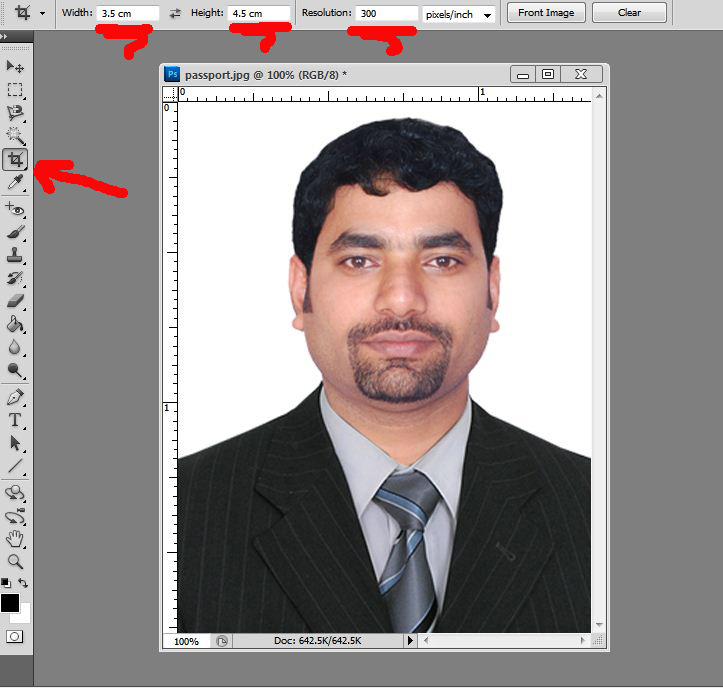
  • Select the Crop Tool or press 'C' then give the 'Width' 'Height' and 'Resolution' (3.5 cm x 4.5 cm and 300dpi) or you can also give the size in inches like (1.38 in x 1.77 in and Resolution 300dpi).
Passport Photo Crop in Photoshop
  • Then crop the photo
  • So now here is your single passport size photo.
Passport Photo Dimensions or Size
You can create a new 4x6 page and drag the passport photo on to it and make copies of the passport photo to take print out.
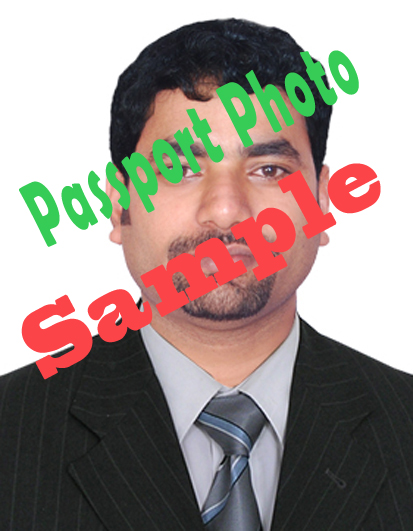
Passport Photo Size Sample (3.5 cm x 4.5 cm, 1.38x1.77 inches, 413x531 pixels and 300dpi)
The above image is a sample of passport photo size, which is cropped with 3.5x4.5cm with 300dpi. You can download the Passport size photo sample and crop the image to this size and you can easily make your passport size photo.

📚 You May Also Like to Read