Showing posts with label Volcano Tool LAVA Flash. Show all posts

Friday, January 6, 2017

How to Flash Lava Iris Selfie 50 Using Broadcom Multiloader


Here is the tutorial for "How to flash Lava iris selfie 50" using Broadcom Multiloader? see the below details to flash the phone, as you know the Lava iris selfie 50 has broadcom CPU and you can use Broadcom Multiloader to flash the phone. The step by step process to flash Lava iris selfie 50 is given below.

Downloads:

Broadcom_MultiDownloader_v2.3.0

Broadcom USB Driver

Download the above Broadcom USB driver and Broadcom flash tool and use these files to flash the phone. Lava iris selfie firmware can be download from Internet using Google search.


Lava Iris Selfie 50 Flash OK Using Broadcom Multiloader

How to flash Lava iris selfie 50?

1) First Install the Broadcom USB Driver
2) Then download and extract the Lava firmware
3) Now Open Broadcom Multiloader (MultiDownloader.exe)
4) Click on Settings -> Configuration and Select Flashing Image folder (Select the fbflash Folder) For example O:\LAVA\Iris Selfie 50\Lava_Iris_Selfie_50_X5033LV_Java_1G_V13\Firmware\fbflash
5) Click on Apply
6) Now connect the USB cable to switched off phone.

That's all now wait until the flashing process is complete, then remove the phone and switch on it.


Saturday, June 27, 2015

How to Flash Lava C81 With Volcano Tool V3.0.0


Lava C81 hangs on logo, restart problem, forgot user code and hardware OK but not switched ON, for all this type of problem you need to flash the phone using any china flash tool. Here is the example of Lava C81 how to flash this phone using Volcano tool V3.0.0.


Lava C81 CPU Details:
Flash Type: GIGA_GD25LQ128
Flash ID:   00C8601800000000
Flash Size: 01000000h
Read Size: 01000000h(16M)
CPU : 8532B/8533BX

Lava C81 How to Flash

Open Volcano tool
Go to MSTAR tab
Select Read flash
Click on Start
Connect the phone with Volcano JIG cable

Lava C81 MSTAR CPU Read Flash Done With Volcano Tool
To write flash select write flash, in this way you can flash the lava Mstar CPU phone using Volcano Tool. With read flash you can know the user codes of the phone.


Saturday, April 4, 2015

Lava KKT27+ Read Flash and Format Done With Volcano Tool V2.9.9


How to flash Lava KKT27 Plus ? You can flash the phone using Volcano Tool, the phone has MTK 6261 CPU and the flashing procedure of Lava KKT27+ is given below.


Lava KKT27+ Format With Volcano Tool
  • Open volcano tool
  • Go to MTK tab
  • Select Format
  • Select Boot 11 (625A/62xx)
  • Tick USB Mode
  • Click Start
  • Now connect the phone to PC using USB Cable


Lava KKT27+ Format Done With Volcano Tool

Monday, December 8, 2014

Lava Iris 430 Flash Done With SP Flash Tool


How to flash Lava iris 430 with Smart Phone Flash tool or SP Flash Tool? the below is the way to flash the Lava Android smartphone using SP flash tool. See the below steps to flash the phone  and with flashing the phone you will solve the hang, restart and dead problem of the Lava Iris 430.

Downloads
SP_Flash_Tool_v3.1332.0.187.rar
LAVA_IRIS430_S103_20130108_DCC.rar 


Lava iris 430 Flash success with SP Flash Tool
  • Open Flash tool
  • Click on scatter loading and choose MT6577_Android_scatter_emmc.txt
  • Then click on Download and connect the phone with USB Cable 
  • When you see the Download OK, that means the download process has been completed successfully.


Lava iris 430 flash success with sp flash tool, a complete flash procedure of Lava mobiles
Now disconnect the Lava iris 430 from computer and switch on.

Thursday, October 9, 2014

Lava KKT18 MTK 6252 Read Flash Done With Volcano Tool V2.8.1


Lava KKT18 which has MTK 6252 CPU successfully read flash with Volcano Tool v2.8.1. Which the Read Flash you can know the Privacy Code, User Code, SM Lock and SIM Lock etc. The below is the procedure of how to read flash Lava KKT18 with Volcano box.

Lava KKT18 Read Flash Volcano Utility

  • Open volcano tool
  • Go to MTK Tab
  • Select Read Flash
  • Choose boot 09 v5.1205
  • Tick Auto Detect Pinouts
  • Click on Start


Lava kkt18 read flash done with volcano tool
Lava KKT18 IMEI Repair With Volcano Utility


Lava kkt18 IMEI Repair success with volcano tool


Monday, September 1, 2014

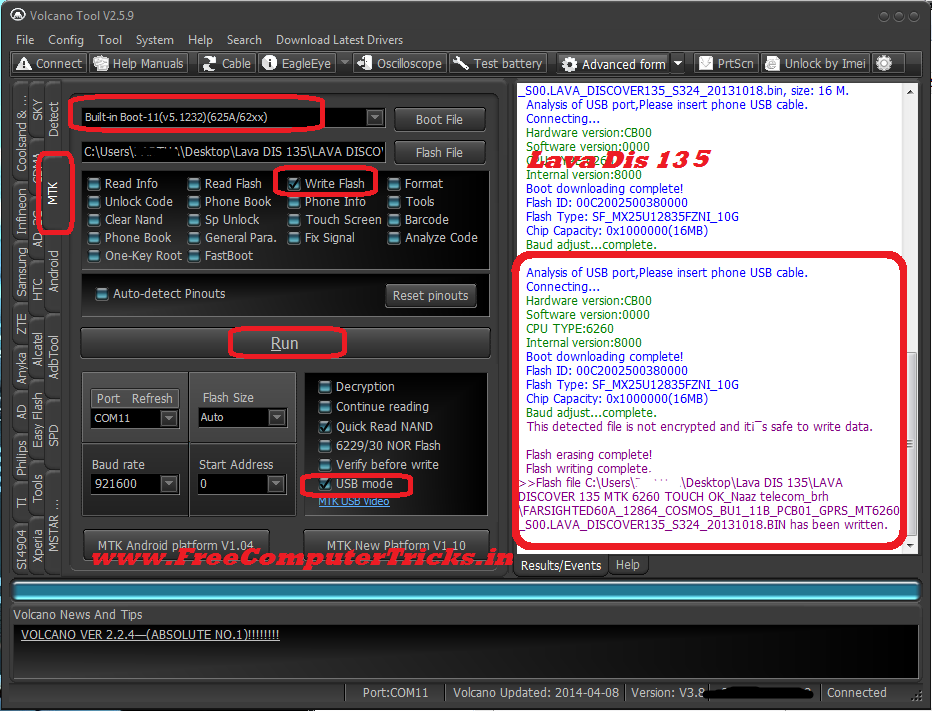
Lava Discover 135 Write Flash Done With Volcano Tool


Lava Discover 135 flash success with Volcano Tool, the below is the procedure to write flash with volcano tool. Lava Discover 135 which has a MTK 6260 CPU and flash file size is 16MB. Lava DIS 135 flash done with USB Cable using Volcano Box.

Lava Dis 135 CPU Details
  • Hardware version:CB00
  • Software version:0000
  • CPU TYPE:6260
  • Internal version:8000
  • Boot downloading complete!
  • Flash ID: 00C2002500380000
  • Flash Type: SF_MX25U12835FZNI_10G      
  • Chip Capacity: 0x1000000(16MB)


How to flash Lava Dis 135 with Volcano Tool
Lava Dis 135 Write Flash With Volcano Tool USB Mode


  • Open volcano tool
  • Go to MTK Tab
  • Tick on Write Flash
  • Select the Flash File for Lava Dis 135
  • Select Boot -11 v5
  • Un-tick Auto Detect Pinouts
  • Tick on USB Mode
  • Click on Run
  • Now connect Lava Dis 135 to PC using Micro USB Cable

No need to press any key, just connect the phone to PC using USB Cable, Lava Dis 135 no need to press any boot key.

Wednesday, July 9, 2014

LAVA ARC12 MTK 625A Flash Done With Volcano Tool V2.7.3


How to flash Lava Arc12 MTK 625A 3MB flash file size with volcano tool? Lava Arc12 MTK read flash and write flash and format success with volcano tool v2.7.3 using USB Cable. The below is the process to flash the Lava Arc12 W1513 with volcano tool by usb cable.


Lava Arc 12 W1513 Read Flash Volcano Tool

  • Open Volcano Tool
  • Go to MTK Tab
  • Select Read Flash/Write Flash/Format
  • Select Built-in Boot-11
  • Tick on USB Mode
  • Click on Start
  • Then Connect the USB Cable to Switched Off Phone


Lava Arc 12 Read Flash Volcano Tool


Lava Arc12 Write Flash Volcano Tool


Lava Arc12 W1513 MTK 625A CPU Write Flash Done Volcano Tool


Lava ARC 12 Write Flash Volcano Box Log:

Analysis of USB port,Please insert phone USB cable.
  Connecting...
  Hardware version:CA01
  Software version:0001
  CPU TYPE:625A
  Internal version:8000
  Boot downloading complete!
  Flash ID: 00EF004000160000
  Flash Type: SF_W25Q32BV               
  Chip Capacity: 0x300000(3MB)
  Baud adjust...complete.
  This detected file is not encrypted and it is safe to write data.
  
  Flash erasing complete!
  Flash writing complete.


Lava Arc12 Format Volcano Log:

Analysis of USB port,Please insert phone USB cable.
  Connecting...
  Hardware version:CA01
  Software version:0001
  CPU TYPE:625A
  Internal version:8000
  Boot downloading complete!
  Flash ID: 00EF004000160000
  Flash Type: SF_W25Q32BV               
  Chip Capacity: 0x300000(3MB)
  Baud adjust...complete.
  Format range: Start Address: 0x2CB000,Format Length :0x033000
  Flash erasing complete!


Monday, July 7, 2014

LAVA KKT14+ MTK 6260 Read Flash Done With Volcano Tool V2.5.0


How to flash Lava kkt14+ MTK 6260, Lava kkt14 rad flash and read phone code done with Volcano Tool V2.5.0. Lava KKT14 which has MTK 6260 CPU successfully read flash done with USB Cable.


Lava KKT14+ Read Flash Volcano Tool

  • Open Volcano Tool
  • Go to MTK Tab
  • Select Built-in Boot-11
  • Tick on Read Flash
  • Tick on USB Mode
  • Un-tick on Auto-detect Pinouts
  • Click on Run
  • Connect Lava KKT14+ with V3 USB Cable


Lava KKT14+ Volcano Tool Read Flash


LAVA kkt14+ Read Flash Volcano Log:

Analysis of USB port,Please insert phone USB cable.
  Connecting...
  Hardware version:CA00
  Software version:0000
  CPU TYPE:6260
  Internal version:8000
  Boot downloading complete!
  Flash ID: 00C2002500360000
  Flash Type: SF_MX25U3235E             
  Chip Capacity: 0x300000(3MB)
  Baud adjust...complete.
  Flash reading complete!
  privacy:9936
>>The data has been saved in C:\Users\XXXXX\Desktop\KKT14+\lava kkt14.bin, size: 3 M.


To Download Lava kkt14+ Flash File Go Here

Thursday, July 3, 2014

LAVA KKT40s Read Flash and Read Phone Lock Done With Volcano Tool V2.7.3


Lava KKT40s which has a MTK 625A CPU Read flash and read privacy code done with USB Mode using Volcano Tool V2.7.3. The below is the process to Read flash with Volcano Tool, as it's MTK CPU with read flash you will able to know the Phone Lock or Privacy Code.


LAVA KKT40s MTK 625A CPU Read Flash Done With Volcano Tool V2.7.3


How to Read Flash KKT40s Volcano Tool

  • Open Volcano Tool 
  • Click on MTK (MediaTek) Tab
  • Click on Read Flash Radio Button
  • Select Built-in Boot 11
  • Tick on USB Mode
  • Then Click on START and connect the switched off phone with USB Cable (With Battery)
 

After flash reading complete you will ask to save the flash file, just save it and you can find the privacy code in the Volcano Tool Log.

LAVA KKT40s Volcano Tool Log:

Analysis of USB port,Please insert phone USB cable.
  Connecting...
  Hardware version:CA01
  Software version:0001
  CPU TYPE:625A
  Internal version:8000
  Boot downloading complete!
  Flash ID: 00C2002500360000
  Flash Type: SF_MX25U3235E             
  Chip Capacity: 0x400000(4MB)
  Baud adjust...complete.
  Flash reading complete!
  privacy:1234
>>The data has been saved in C:\Users\XXXX\Desktop\KKT40S\FARSIGHTED50D_3232_11B_PCB01_gprs_MT6250_S00.LAVA_KKT40S_S109.bin, size: 4 M.

Saturday, March 29, 2014

LAVA KKT34i Read Flash With Volcano Tool V2.5.6


LAVA KKT34i Read Flash done with Volcano Tool V2.5.6, CPU Type  MTK 6260.


Steps:
  • Open Volcano Tool
  • Go to MTK Tab
  • Select Built-in Boot-11(v5.1232)(625A/62xx)
  • Click on Read Flash 
  • Now Click on RUN and Press the Power button on Phone


LAVA kkt34i read flash success with volcano tool mtk 6260 cpu


LAVA KKT34i Read Flash Volcano Tool Log:


Volcano Updated: 2014-03-20
  Connecting...
  Connection successful,connected state!
  Version: V3.8
  SN:524-422-108
  Port:COM11
  After format or Flash you have to press & hold power button for at least 1.30 mins.
  Note for win7 users :
  Start your Win 7 64bit with F8 key and choose 'Disable Driver Signature Enforcement'.
  After that the spd drivers will have the ability to be loaded.
  Available Ports:COM1 COM11
  Detection initiated, connect the phone and power on it...
  Vcc: 4
  Gnd: 2
  RX: 9, TX: 7


  Connecting...
  Hardware version:CA00
  Software version:0000
  CPU TYPE:6260
  Internal version:8000
  Boot downloading complete!
  Flash ID: 00C2002500360000
  Flash Type: SF_MX25U3235E             
  Chip Capacity: 0x400000(4MB)
  Baud adjust...complete.
  Flash reading complete!
  privacy:4321
>>privacy:1234

📚 You May Also Like to Read